

Les tests sont une partie intégrante du processus de développement. Parfois, les développeurs ont besoin d'exécuter des tests localement, avant de valider les modifications.
Si l'application utilise Amazon Web Services, python d'une bibliothèque moto , cela convient parfaitement.

Vous pouvez consulter la liste complète des ressources prises en charge .
Il y a un dépôt sur Github Hugo Picado — . C'est une image prête à l'emploi, lancez-la et utilisez-la. L'unique nuance est qu'après le lancement, aucune AWS ressource n'a encore été créée.
Eh bien, c'est assez facile à corriger.
Étant donné qu'il est nécessaire d'indiquer le type de service à son lancement (env variable MOTO_SERVICE), il nous reste à décrire la création de la ressource.
Modifions légèrement start.sh:
Au lieu de
moto_server $MOTO_SERVICE -H $MOTO_HOST -p $MOTO_PORT
Insérons:
if [ -f /opt/init/bootstrap.py ]; then
  moto_server $MOTO_SERVICE -H $MOTO_HOST -p $MOTO_PORT & (sleep 5 && echo "Exécution du script de démarrage." && python /opt/init/bootstrap.py)
else
  moto_server $MOTO_SERVICE -H $MOTO_HOST -p $MOTO_PORT
fi
wait
Le fichier final est:
start.sh
#!/bin/sh

# validate required input
if [ -z "$MOTO_SERVICE" ]; then
  echo "Please define AWS service to run with Moto Server (e.g. s3, ec2, etc)"
  exit 1
fi

# setting defaults for optional input
if [ -z "$MOTO_HOST" ]; then
  MOTO_HOST="0.0.0.0"
fi

if [ -z "$MOTO_PORT" ]; then
  MOTO_PORT="5000"
fi

echo "Starting service $MOTO_SERVICE at $MOTO_HOST:$MOTO_PORT"

if [ -f /opt/init/bootstrap.py ]; then
  moto_server $MOTO_SERVICE -H $MOTO_HOST -p $MOTO_PORT & (sleep 5 && echo "Executing bootstrap script." && python /opt/init/bootstrap.py)
else
  moto_server $MOTO_SERVICE -H $MOTO_HOST -p $MOTO_PORT
fi
# Prevent container from exiting when bootstrap.py finishing
wait
Nous bâtissons une nouvelle image et la poussons dans notre registre.
Ensuite, écrivons un script d'initialisation de la ressource, par exemple domaine SWF, en utilisant la bibliothèque pour travailler avec AWS — boto3:
bootstrap_swf.py
import boto3
from botocore.exceptions import ClientError
import os

os.environ["AWS_ACCESS_KEY_ID"] = "fake"
os.environ["AWS_SECRET_ACCESS_KEY"] = "fake"

client = boto3.client('swf', region_name='us-west-2', endpoint_url='http://localhost:5000')

try:
    client.register_domain(
        name='test-swf-mock-domain',
        description="Domaine SWF de test",
        workflowExecutionRetentionPeriodInDays="10"
    )
except ClientError as e:
    print "Le domaine existe déjà: ", e.response.get("Error", {}).get("Code")

response = client.list_domains(
    registrationStatus='REGISTERED',
    maximumPageSize=123,
    reverseOrder=True|False
)

print 'Prêt'
La logique est la suivante:
- Nous montons notre script au démarrage /opt/init/bootstrap.py.
- Si le fichier est monté, il sera exécuté.
- Si le fichier n'existe pas, alors seul le moto-server sera lancé.
Et, on peut simuler une ressource entière avec le lancement d'un seul conteneur:
docker run --name swf -d
    -e MOTO_SERVICE=swf
    -e MOTO_HOST=0.0.0.0
    -e MOTO_PORT=5000
    -p 5001:5000
    -v /tmp/bootstrap_swf.py:/opt/init/bootstrap.py
    -i awesome-repo.com/moto-server:latest
Essayons en mode interactif:
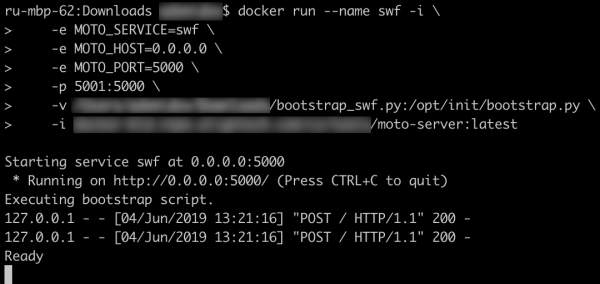
Ça marche!
Ainsi, nous pouvons créer un docker-compose.yml qui aidera à gagner du temps lors des tests de modifications:
docker-compose.yml
version: '3'
services:
  s3:
    image: picadoh/motocker
    environment:
      - MOTO_SERVICE=s3
      - MOTO_HOST=10.0.1.2
    ports:
      - "5002:5000"
    networks:
      motonet:
        ipv4_address: 10.0.1.2
    volumes:
      - /tmp/bootstrap_s3.py:/opt/init/bootstrap.py
  swf:
    image: picadoh/motocker
    environment:
      - MOTO_SERVICE=swf
      - MOTO_HOST=10.0.1.3
    ports:
      - "5001:5000"
    networks:
      motonet:
        ipv4_address: 10.0.1.3
    volumes:
      - /tmp/bootstrap_swf.py:/opt/init/bootstrap.py
  ec2:
    image: picadoh/motocker
    environment:
      - MOTO_SERVICE=ec2
      - MOTO_HOST=10.0.1.4
    ports:
      - "5003:5000"
    networks:
      motonet:
        ipv4_address: 10.0.1.4
    volumes:
      - /tmp/bootstrap_ec2.py:/opt/init/bootstrap.py
networks:
  motonet:
    driver: bridge
    ipam:
      config:
        - subnet: 10.0.0.0/16
Ce n'est pas seulement sur le portable du développeur que cette approche peut être utilisée. Les tests préliminaires avec des mocks après la construction aideront à éviter d'éventuels problèmes lors du démarrage dans des environnements dev*.
Liens :
Dépôt Motocker —
Dépôt Moto —
Docs Boto3 —
Source : habr.com
