

Note de traduction.: l'auteur de l'article — Erkan Erol, ingénieur chez SAP — partage son exploration des mécanismes de fonctionnement de l'équipe kubectl exec, familière à tous ceux qui travaillent avec Kubernetes. Il accompagne l'ensemble de l'algorithme de listings de code source Kubernetes (et de projets associés), ce qui permet de comprendre le sujet en profondeur selon les besoins.
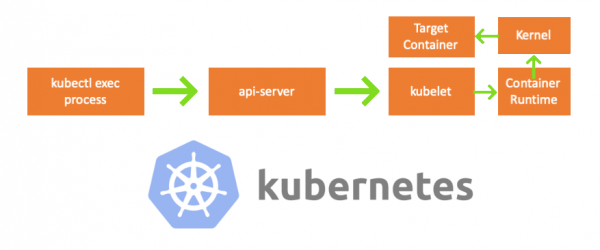
Un vendredi, un collègue est venu me voir et m'a demandé comment exécuter une commande dans un pod à l'aide de . Je n'ai pas pu lui répondre et j'ai soudainement réalisé que je ne savais rien du mécanisme de fonctionnement kubectl exec. Oui, j'avais certaines idées sur son fonctionnement, mais je n'étais pas 100% certain de leur exactitude, alors j'ai décidé de me pencher sur la question. Après avoir exploré des blogs, de la documentation et le code source, j'ai beaucoup appris et dans cet article, je souhaite partager mes découvertes et ma compréhension. Si quelque chose ne va pas, n'hésitez pas à me contacter à .
Préparation
Pour créer un cluster sur mon MacBook, j'ai cloné . Ensuite, j'ai modifié les adresses IP des nœuds dans la configuration du kubelet, car les paramètres par défaut ne permettaient pas de procéder kubectl exec. Vous pouvez lire plus sur la raison principale .
- Toute machine = mon MacBook
- IP du nœud maître = 192.168.205.10
- IP du nœud de travail = 192.168.205.11
- port de l'API server = 6443
Composants
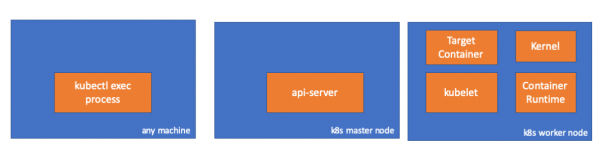
- kubectl exec process: lorsque nous exécutons «kubectl exec …», un processus est lancé. Cela peut être fait sur n'importe quelle machine ayant accès à l'API server K8s. Note du traducteur : Dans les listings de la console suivants, l'auteur utilise le commentaire «any machine», impliquant que les commandes suivantes peuvent être exécutées sur n'importe quelle machine ayant accès à Kubernetes.
- : composant sur le nœud maître, fournissant un accès à l'API Kubernetes. C'est l'interface frontale du plan de contrôle dans Kubernetes.
- : agent qui fonctionne sur chaque nœud du cluster. Il assure le fonctionnement des conteneurs dans le pod.
- (environnement d'exécution des conteneurs) : logiciel chargé de faire fonctionner les conteneurs. Exemples : Docker, CRI-O, containerd…
- kernel: noyau du système d'exploitation sur le nœud de travail ; il est responsable de la gestion des processus.
- cible (cible) container: conteneur qui fait partie du pod et fonctionne sur l'un des nœuds de travail.
Ce que j'ai découvert
1. Activité côté client
Créons un pod dans l'espace de noms default:
// any machine
$ kubectl run exec-test-nginx --image=nginx
Ensuite, exécutons la commande exec et attendons 5000 secondes pour de futures observations :
// any machine
$ kubectl exec -it exec-test-nginx-6558988d5-fgxgg -- sh
# sleep 5000
Le processus kubectl apparaît (avec pid=8507 dans notre cas) :
// any machine
$ ps -ef |grep kubectl
501  8507  8409   0  7:19PM ttys000    0:00.13 kubectl exec -it exec-test-nginx-6558988d5-fgxgg -- sh
Si nous vérifions l'activité réseau du processus, nous constaterons qu'il a des connexions au serveur api (192.168.205.10.6443) :
// any machine
$ netstat -atnv |grep 8507
tcp4       0      0  192.168.205.1.51673    192.168.205.10.6443    ESTABLISHED 131072 131768   8507      0 0x0102 0x00000020
tcp4       0      0  192.168.205.1.51672    192.168.205.10.6443    ESTABLISHED 131072 131768   8507      0 0x0102 0x00000028
Regardons le code. Kubectl crée une requête POST avec le sous-ressource exec et envoie une requête REST :
              req := restClient.Post().
                        Resource("pods").
                        Name(pod.Name).
                        Namespace(pod.Namespace).
                        SubResource("exec")
                req.VersionedParams(&corev1.PodExecOptions{
                        Container: containerName,
                        Command:   p.Command,
                        Stdin:     p.Stdin,
                        Stdout:    p.Out != nil,
                        Stderr:    p.ErrOut != nil,
                        TTY:       t.Raw,
                }, scheme.ParameterCodec)

return p.Executor.Execute("POST", req.URL(), p.Config, p.In, p.Out, p.ErrOut, t.Raw, sizeQueue)()
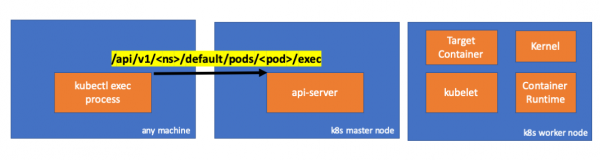
2. Activité du côté du nœud maître
Nous pouvons également observer la requête du côté du serveur api :
handler.go:143] kube-apiserver: POST "/api/v1/namespaces/default/pods/exec-test-nginx-6558988d5-fgxgg/exec" satisfait par gorestful avec webservice "/api/v1"
upgradeaware.go:261] Connexion au proxy backend (intercepting redirects) https://192.168.205.11:10250/exec/default/exec-test-nginx-6558988d5-fgxgg/exec-test-nginx?command=sh&input=1&output=1&tty=1
Headers: map[Connection:[Upgrade] Content-Length:[0] Upgrade:[SPDY/3.1] User-Agent:[kubectl/v1.12.10 (darwin/amd64) kubernetes/e3c1340] X-Forwarded-For:[192.168.205.1] X-Stream-Protocol-Version:[v4.channel.k8s.io v3.channel.k8s.io v2.channel.k8s.io channel.k8s.io]]
Notez que la requête HTTP inclut une demande de modification de protocole. permet de multiplexage des "flux" séparés stdin/stdout/stderr/spdy-error à travers une seule connexion TCP.
Le serveur API reçoit la requête et la transforme en PodExecOptions:
// PodExecOptions is the query options to a Pod's remote exec call
type PodExecOptions struct {
        metav1.TypeMeta

        // Stdin if true indicates that stdin is to be redirected for the exec call
        Stdin bool

        // Stdout if true indicates that stdout is to be redirected for the exec call
        Stdout bool

        // Stderr if true indicates that stderr is to be redirected for the exec call
        Stderr bool

        // TTY if true indicates that a tty will be allocated for the exec call
        TTY bool

        // Container in which to execute the command.
        Container string

        // Command is the remote command to execute; argv array; not executed within a shell.
        Command []string
}()
Pour exécuter les actions requises, le serveur API doit savoir avec quel pod il doit se connecter :
// ExecLocation returns the exec URL for a pod container. If opts.Container is blank
// and only one container is present in the pod, that container is used.
func ExecLocation(
        getter ResourceGetter,
        connInfo client.ConnectionInfoGetter,
        ctx context.Context,
        name string,
        opts *api.PodExecOptions,
) (*url.URL, http.RoundTripper, error) {
        return streamLocation(getter, connInfo, ctx, name, opts, opts.Container, "exec")
}()
Bien sûr, les données sur l'endpoint sont issues des informations sur le nœud :
        nodeName := types.NodeName(pod.Spec.NodeName)
        if len(nodeName) == 0 {
                // Si le pod n'a pas été assigné à un hôte, retourner un emplacement vide
                return nil, nil, errors.NewBadRequest(fmt.Sprintf("le pod %s n'a pas d'hôte assigné", name))
        }
nodeInfo, err := connInfo.GetConnectionInfo(ctx, nodeName)()
Hourra ! Kubelet a maintenant un port (node.Status.DaemonEndpoints.KubeletEndpoint.Port), auquel le serveur API peut se connecter :
// GetConnectionInfo retrieves connection info from the status of a Node API object.
func (k *NodeConnectionInfoGetter) GetConnectionInfo(ctx context.Context, nodeName types.NodeName) (*ConnectionInfo, error) {
        node, err := k.nodes.Get(ctx, string(nodeName), metav1.GetOptions{})
        if err != nil {
                return nil, err
        }

        // Find a kubelet-reported address, using preferred address type
        host, err := nodeutil.GetPreferredNodeAddress(node, k.preferredAddressTypes)
        if err != nil {
                return nil, err
        }

        // Use the kubelet-reported port, if present
        port := int(node.Status.DaemonEndpoints.KubeletEndpoint.Port)
        if port <= 0 {
                port = k.defaultPort
        }

        return &ConnectionInfo{
                Scheme:    k.scheme,
                Hostname:  host,
                Port:      strconv.Itoa(port),
                Transport: k.transport,
        }, nil
}()
D'après la documentation :
Ces connexions sont établies sur l'endpoint HTTPS de kubelet. Par défaut, le serveur API ne vérifie pas le certificat de kubelet, ce qui rend la connexion vulnérable aux attaques de type "homme du milieu" (MITM) et l'utilisation dangereuse pour fonctionner sur des réseaux non fiables et/ou publics.
Maintenant, le serveur API connaît l'endpoint et établit la connexion :
// Connect returns a handler for the pod exec proxy
func (r *ExecREST) Connect(ctx context.Context, name string, opts runtime.Object, responder rest.Responder) (http.Handler, error) {
        execOpts, ok := opts.(*api.PodExecOptions)
        if !ok {
                return nil, fmt.Errorf("invalid options object: %#v", opts)
        }
        location, transport, err := pod.ExecLocation(r.Store, r.KubeletConn, ctx, name, execOpts)
        if err != nil {
                return nil, err
        }
        return newThrottledUpgradeAwareProxyHandler(location, transport, false, true, true, responder), nil
}()
Voyons ce qui se passe sur le nœud maître.
Tout d'abord, découvrons l'adresse IP du nœud de travail. Dans notre cas, c'est 192.168.205.11 :
// any machine
$ kubectl get nodes k8s-node-1 -o wide
NAME         STATUS   ROLES    AGE   VERSION   INTERNAL-IP      EXTERNAL-IP   OS-IMAGE             KERNEL-VERSION      CONTAINER-RUNTIME
k8s-node-1   Ready    <none>   9h    v1.15.3   192.168.205.11   <none>        Ubuntu 16.04.6 LTS   4.4.0-159-generic   docker://17.3.3
Ensuite, configurons le port du kubelet (10250 dans notre cas) :
// any machine
$ kubectl get nodes k8s-node-1 -o jsonpath='{.status.daemonEndpoints.kubeletEndpoint}'
map[Port:10250]
Maintenant, il est temps de vérifier le réseau. Y a-t-il une connexion au nœud de travail (192.168.205.11) ? Oui, elle existe ! Si je "tue" le processus exec, il disparaît, donc je sais que la connexion a été établie par l'api-server à la suite de la commande exec exécutée.
// master node
$ netstat -atn |grep 192.168.205.11
tcp        0      0 192.168.205.10:37870    192.168.205.11:10250    ESTABLISHED
… 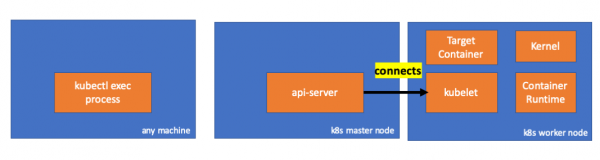
La connexion entre kubectl et l'api-server est toujours ouverte. De plus, il y a une autre connexion reliant l'api-server et le kubelet.
3. Activité sur le nœud de travail
Connectons-nous maintenant au nœud de travail et voyons ce qui s'y passe.
Tout d'abord, nous voyons que la connexion avec lui est également établie (deuxième ligne) ; 192.168.205.10 est l'adresse IP du nœud maître :
 // worker node
  $ netstat -atn |grep 10250
  tcp6       0      0 :::10250                :::*                    LISTEN
  tcp6       0      0 192.168.205.11:10250    192.168.205.10:37870    ESTABLISHED
Et qu'en est-il de notre commande sleep? Ура, она тоже присутствует!
 // worker node
  $ ps -afx
  ...
  31463 ?        Sl     0:00      _ docker-containerd-shim 7d974065bbb3107074ce31c51f5ef40aea8dcd535ae11a7b8f2dd180b8ed583a /var/run/docker/libcontainerd/7d974065bbb3107074ce31c51
  31478 pts/0    Ss     0:00          _ sh
  31485 pts/0    S+     0:00              _ sleep 5000
  …
Mais attendez : comment le kubelet a-t-il fait cela ? Le kubelet possède un démon qui ouvre l'accès à l'API via un port pour les requêtes de l'api-server :
// Server is the library interface to serve the stream requests.
type Server interface {
        http.Handler

        // Get the serving URL for the requests.
        // Requests must not be nil. Responses may be nil iff an error is returned.
        GetExec(*runtimeapi.ExecRequest) (*runtimeapi.ExecResponse, error)
        GetAttach(req *runtimeapi.AttachRequest) (*runtimeapi.AttachResponse, error)
        GetPortForward(*runtimeapi.PortForwardRequest) (*runtimeapi.PortForwardResponse, error)

        // Start the server.
        // addr is the address to serve on (address:port) stayUp indicates whether the server should
        // listen until Stop() is called, or automatically stop after all expected connections are
        // closed. Calling Get{Exec,Attach,PortForward} increments the expected connection count.
        // Function does not return until the server is stopped.
        Start(stayUp bool) error
        // Stop the server, and terminate any open connections.
        Stop() error
}()
Le kubelet calcule le point de terminaison pour les requêtes exec :
func (s *server) GetExec(req *runtimeapi.ExecRequest) (*runtimeapi.ExecResponse, error) {
        if err := validateExecRequest(req); err != nil {
                return nil, err
        }
        token, err := s.cache.Insert(req)
        if err != nil {
                return nil, err
        }
        return &runtimeapi.ExecResponse{
                Url: s.buildURL("exec", token),
        }, nil
}()
Ne vous méprenez pas. Il ne renvoie pas le résultat de la commande, mais le point de terminaison pour la communication :
type ExecResponse struct {
        \\ URL entièrement qualifié du serveur de streaming exec.
        Url                  string   `protobuf:"bytes,1,opt,name=url,proto3" json:"url,omitempty"`
        XXX_NoUnkeyedLiteral struct{} `json:"-"`
        XXX_sizecache        int32    `json:"-"`
}()
Le kubelet implémente l'interface RuntimeServiceClient, qui fait partie de l'Interface de Runtime des Conteneurs (nous en avons parlé en détail, par exemple, — n.d.t.):
Une longue liste de cri-api dans kubernetes/kubernetes
// For semantics around ctx use and closing/ending streaming RPCs, please refer to https://godoc.org/google.golang.org/grpc#ClientConn.NewStream.
type RuntimeServiceClient interface {
        // Version returns the runtime name, runtime version, and runtime API version.
        Version(ctx context.Context, in *VersionRequest, opts ...grpc.CallOption) (*VersionResponse, error)
        // RunPodSandbox creates and starts a pod-level sandbox. Runtimes must ensure
        // the sandbox is in the ready state on success.
        RunPodSandbox(ctx context.Context, in *RunPodSandboxRequest, opts ...grpc.CallOption) (*RunPodSandboxResponse, error)
        // StopPodSandbox stops any running process that is part of the sandbox and
        // reclaims network resources (e.g., IP addresses) allocated to the sandbox.
        // If there are any running containers in the sandbox, they must be forcibly
        // terminated.
        // This call is idempotent, and must not return an error if all relevant
        // resources have already been reclaimed. kubelet will call StopPodSandbox
        // at least once before calling RemovePodSandbox. It will also attempt to
        // reclaim resources eagerly, as soon as a sandbox is not needed. Hence,
        // multiple StopPodSandbox calls are expected.
        StopPodSandbox(ctx context.Context, in *StopPodSandboxRequest, opts ...grpc.CallOption) (*StopPodSandboxResponse, error)
        // RemovePodSandbox removes the sandbox. If there are any running containers
        // in the sandbox, they must be forcibly terminated and removed.
        // This call is idempotent, and must not return an error if the sandbox has
        // already been removed.
        RemovePodSandbox(ctx context.Context, in *RemovePodSandboxRequest, opts ...grpc.CallOption) (*RemovePodSandboxResponse, error)
        // PodSandboxStatus returns the status of the PodSandbox. If the PodSandbox is not
        // present, returns an error.
        PodSandboxStatus(ctx context.Context, in *PodSandboxStatusRequest, opts ...grpc.CallOption) (*PodSandboxStatusResponse, error)
        // ListPodSandbox returns a list of PodSandboxes.
        ListPodSandbox(ctx context.Context, in *ListPodSandboxRequest, opts ...grpc.CallOption) (*ListPodSandboxResponse, error)
        // CreateContainer creates a new container in specified PodSandbox
        CreateContainer(ctx context.Context, in *CreateContainerRequest, opts ...grpc.CallOption) (*CreateContainerResponse, error)
        // StartContainer starts the container.
        StartContainer(ctx context.Context, in *StartContainerRequest, opts ...grpc.CallOption) (*StartContainerResponse, error)
        // StopContainer stops a running container with a grace period (i.e., timeout).
        // This call is idempotent, and must not return an error if the container has
        // already been stopped.
        // TODO: what must the runtime do after the grace period is reached?
        StopContainer(ctx context.Context, in *StopContainerRequest, opts ...grpc.CallOption) (*StopContainerResponse, error)
        // RemoveContainer removes the container. If the container is running, the
        // container must be forcibly removed.
        // This call is idempotent, and must not return an error if the container has
        // already been removed.
        RemoveContainer(ctx context.Context, in *RemoveContainerRequest, opts ...grpc.CallOption) (*RemoveContainerResponse, error)
        // ListContainers lists all containers by filters.
        ListContainers(ctx context.Context, in *ListContainersRequest, opts ...grpc.CallOption) (*ListContainersResponse, error)
        // ContainerStatus returns status of the container. If the container is not
        // present, returns an error.
        ContainerStatus(ctx context.Context, in *ContainerStatusRequest, opts ...grpc.CallOption) (*ContainerStatusResponse, error)
        // UpdateContainerResources updates ContainerConfig of the container.
        UpdateContainerResources(ctx context.Context, in *UpdateContainerResourcesRequest, opts ...grpc.CallOption) (*UpdateContainerResourcesResponse, error)
        // ReopenContainerLog asks runtime to reopen the stdout/stderr log file
        // for the container. This is often called after the log file has been
        // rotated. If the container is not running, container runtime can choose
        // to either create a new log file and return nil, or return an error.
        // Once it returns error, new container log file MUST NOT be created.
        ReopenContainerLog(ctx context.Context, in *ReopenContainerLogRequest, opts ...grpc.CallOption) (*ReopenContainerLogResponse, error)
        // ExecSync runs a command in a container synchronously.
        ExecSync(ctx context.Context, in *ExecSyncRequest, opts ...grpc.CallOption) (*ExecSyncResponse, error)
        // Exec prepares a streaming endpoint to execute a command in the container.
        Exec(ctx context.Context, in *ExecRequest, opts ...grpc.CallOption) (*ExecResponse, error)
        // Attach prepares a streaming endpoint to attach to a running container.
        Attach(ctx context.Context, in *AttachRequest, opts ...grpc.CallOption) (*AttachResponse, error)
        // PortForward prepares a streaming endpoint to forward ports from a PodSandbox.
        PortForward(ctx context.Context, in *PortForwardRequest, opts ...grpc.CallOption) (*PortForwardResponse, error)
        // ContainerStats returns stats of the container. If the container does not
        // exist, the call returns an error.
        ContainerStats(ctx context.Context, in *ContainerStatsRequest, opts ...grpc.CallOption) (*ContainerStatsResponse, error)
        // ListContainerStats returns stats of all running containers.
        ListContainerStats(ctx context.Context, in *ListContainerStatsRequest, opts ...grpc.CallOption) (*ListContainerStatsResponse, error)
        // UpdateRuntimeConfig updates the runtime configuration based on the given request.
        UpdateRuntimeConfig(ctx context.Context, in *UpdateRuntimeConfigRequest, opts ...grpc.CallOption) (*UpdateRuntimeConfigResponse, error)
        // Status returns the status of the runtime.
        Status(ctx context.Context, in *StatusRequest, opts ...grpc.CallOption) (*StatusResponse, error)
} ()
Il utilise simplement gRPC pour appeler la méthode via l'Interface de Runtime des Conteneurs :
type runtimeServiceClient struct {
        cc *grpc.ClientConn
}()
func (c *runtimeServiceClient) Exec(ctx context.Context, in *ExecRequest, opts ...grpc.CallOption) (*ExecResponse, error) {
        out := new(ExecResponse)
        err := c.cc.Invoke(ctx, "\/runtime.v1alpha2.RuntimeService\/Exec", in, out, opts...)
        if err != nil {
                return nil, err
        }
        return out, nil
}()
Le Runtime des Conteneurs est responsable de l'implémentation de RuntimeServiceServer:
Une longue liste de cri-api dans kubernetes/kubernetes
// RuntimeServiceServer is the server API for RuntimeService service.
type RuntimeServiceServer interface {
        // Version returns the runtime name, runtime version, and runtime API version.
        Version(context.Context, *VersionRequest) (*VersionResponse, error)
        // RunPodSandbox creates and starts a pod-level sandbox. Runtimes must ensure
        // the sandbox is in the ready state on success.
        RunPodSandbox(context.Context, *RunPodSandboxRequest) (*RunPodSandboxResponse, error)
        // StopPodSandbox stops any running process that is part of the sandbox and
        // reclaims network resources (e.g., IP addresses) allocated to the sandbox.
        // If there are any running containers in the sandbox, they must be forcibly
        // terminated.
        // This call is idempotent, and must not return an error if all relevant
        // resources have already been reclaimed. kubelet will call StopPodSandbox
        // at least once before calling RemovePodSandbox. It will also attempt to
        // reclaim resources eagerly, as soon as a sandbox is not needed. Hence,
        // multiple StopPodSandbox calls are expected.
        StopPodSandbox(context.Context, *StopPodSandboxRequest) (*StopPodSandboxResponse, error)
        // RemovePodSandbox removes the sandbox. If there are any running containers
        // in the sandbox, they must be forcibly terminated and removed.
        // This call is idempotent, and must not return an error if the sandbox has
        // already been removed.
        RemovePodSandbox(context.Context, *RemovePodSandboxRequest) (*RemovePodSandboxResponse, error)
        // PodSandboxStatus returns the status of the PodSandbox. If the PodSandbox is not
        // present, returns an error.
        PodSandboxStatus(context.Context, *PodSandboxStatusRequest) (*PodSandboxStatusResponse, error)
        // ListPodSandbox returns a list of PodSandboxes.
        ListPodSandbox(context.Context, *ListPodSandboxRequest) (*ListPodSandboxResponse, error)
        // CreateContainer creates a new container in specified PodSandbox
        CreateContainer(context.Context, *CreateContainerRequest) (*CreateContainerResponse, error)
        // StartContainer starts the container.
        StartContainer(context.Context, *StartContainerRequest) (*StartContainerResponse, error)
        // StopContainer stops a running container with a grace period (i.e., timeout).
        // This call is idempotent, and must not return an error if the container has
        // already been stopped.
        // TODO: what must the runtime do after the grace period is reached?
        StopContainer(context.Context, *StopContainerRequest) (*StopContainerResponse, error)
        // RemoveContainer removes the container. If the container is running, the
        // container must be forcibly removed.
        // This call is idempotent, and must not return an error if the container has
        // already been removed.
        RemoveContainer(context.Context, *RemoveContainerRequest) (*RemoveContainerResponse, error)
        // ListContainers lists all containers by filters.
        ListContainers(context.Context, *ListContainersRequest) (*ListContainersResponse, error)
        // ContainerStatus returns status of the container. If the container is not
        // present, returns an error.
        ContainerStatus(context.Context, *ContainerStatusRequest) (*ContainerStatusResponse, error)
        // UpdateContainerResources updates ContainerConfig of the container.
        UpdateContainerResources(context.Context, *UpdateContainerResourcesRequest) (*UpdateContainerResourcesResponse, error)
        // ReopenContainerLog asks runtime to reopen the stdout/stderr log file
        // for the container. This is often called after the log file has been
        // rotated. If the container is not running, container runtime can choose
        // to either create a new log file and return nil, or return an error.
        // Once it returns error, new container log file MUST NOT be created.
        ReopenContainerLog(context.Context, *ReopenContainerLogRequest) (*ReopenContainerLogResponse, error)
        // ExecSync runs a command in a container synchronously.
        ExecSync(context.Context, *ExecSyncRequest) (*ExecSyncResponse, error)
        // Exec prepares a streaming endpoint to execute a command in the container.
        Exec(context.Context, *ExecRequest) (*ExecResponse, error)
        // Attach prepares a streaming endpoint to attach to a running container.
        Attach(context.Context, *AttachRequest) (*AttachResponse, error)
        // PortForward prepares a streaming endpoint to forward ports from a PodSandbox.
        PortForward(context.Context, *PortForwardRequest) (*PortForwardResponse, error)
        // ContainerStats returns stats of the container. If the container does not
        // exist, the call returns an error.
        ContainerStats(context.Context, *ContainerStatsRequest) (*ContainerStatsResponse, error)
        // ListContainerStats returns stats of all running containers.
        ListContainerStats(context.Context, *ListContainerStatsRequest) (*ListContainerStatsResponse, error)
        // UpdateRuntimeConfig updates the runtime configuration based on the given request.
        UpdateRuntimeConfig(context.Context, *UpdateRuntimeConfigRequest) (*UpdateRuntimeConfigResponse, error)
        // Status returns the status of the runtime.
        Status(context.Context, *StatusRequest) (*StatusResponse, error)
} ()
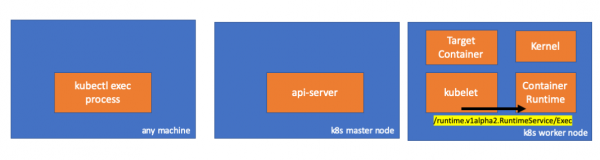
Si c'est le cas, nous devrions voir une connexion entre le kubelet et l'environnement d'exécution du conteneur, non ? Vérifions.
Exécutez cette commande avant et après la commande exec et regardez les différences. Dans mon cas, la différence est la suivante :
// worker node
$ ss -a -p |grep kubelet
...
u_str  ESTAB      0      0       * 157937                * 157387                users:(("kubelet",pid=5714,fd=33))
...
Hmm... Nouvelle connexion via des sockets unix entre le kubelet (pid=5714) et quelque chose d'inconnu. Qu'est-ce que cela pourrait bien être ? Oui, c'est Docker (pid=1186)!
// worker node
$ ss -a -p |grep 157387
...
u_str  ESTAB      0      0       * 157937                * 157387                users:(("kubelet",pid=5714,fd=33))
u_str  ESTAB      0      0      /var/run/docker.sock 157387                * 157937                users:(("dockerd",pid=1186,fd=14))
...
Comme vous vous en souvenez, c'est le processus du démon Docker (pid=1186) qui exécute notre commande :
// worker node
$ ps -afx
...
 1186 ?        Ssl    0:55 /usr/bin/dockerd -H fd://
17784 ?        Sl     0:00      _ docker-containerd-shim 53a0a08547b2f95986402d7f3b3e78702516244df049ba6c5aa012e81264aa3c /var/run/docker/libcontainerd/53a0a08547b2f95986402d7f3
17801 pts/2    Ss     0:00          _ sh
17827 pts/2    S+     0:00              _ sleep 5000
...
4. Activité dans l'environnement d'exécution du conteneur
Examinons le code source de CRI-O pour comprendre ce qui se passe. Dans Docker, la logique est similaire.
Il existe un serveur responsable de l'implémentation RuntimeServiceServer:
// Server implements the RuntimeService and ImageService
type Server struct {
        config          libconfig.Config
        seccompProfile  *seccomp.Seccomp
        stream          StreamService
        netPlugin       ocicni.CNIPlugin
        hostportManager hostport.HostPortManager

        appArmorProfile string
        hostIP          string
        bindAddress     string

        *lib.ContainerServer
        monitorsChan      chan struct{}
        defaultIDMappings *idtools.IDMappings
        systemContext     *types.SystemContext // Never nil

        updateLock sync.RWMutex

        seccompEnabled  bool
        appArmorEnabled bool
}()
// Exec prepares a streaming endpoint to execute a command in the container.
func (s *Server) Exec(ctx context.Context, req *pb.ExecRequest) (resp *pb.ExecResponse, err error) {
        const operation = "exec"
        defer func() {
                recordOperation(operation, time.Now())
                recordError(operation, err)
        }()

        resp, err = s.getExec(req)
        if err != nil {
                return nil, fmt.Errorf("unable to prepare exec endpoint: %v", err)
        }

        return resp, nil
}()
À la fin de la chaîne, l'environnement d'exécution du conteneur exécute la commande sur le nœud de travail :
// ExecContainer prepares a streaming endpoint to execute a command in the container.
func (r *runtimeOCI) ExecContainer(c *Container, cmd []string, stdin io.Reader, stdout, stderr io.WriteCloser, tty bool, resize <-chan remotecommand.TerminalSize) error {
        processFile, err := prepareProcessExec(c, cmd, tty)
        if err != nil {
                return err
        }
        defer os.RemoveAll(processFile.Name())

        args := []string{rootFlag, r.root, "exec"}
        args = append(args, "--process", processFile.Name(), c.ID())
        execCmd := exec.Command(r.path, args...)
        if v, found := os.LookupEnv("XDG_RUNTIME_DIR"); found {
                execCmd.Env = append(execCmd.Env, fmt.Sprintf("XDG_RUNTIME_DIR=%s", v))
        }
        var cmdErr, copyError error
        if tty {
                cmdErr = ttyCmd(execCmd, stdin, stdout, resize)
        } else {
                if stdin != nil {
                        // Use an os.Pipe here as it returns true *os.File objects.
                        // This way, if you run 'kubectl exec <pod> -i bash' (no tty) and type 'exit',
                        // the call below to execCmd.Run() can unblock because its Stdin is the read half
                        // of the pipe.
                        r, w, err := os.Pipe()
                        if err != nil {
                                return err
                        }
                        go func() { _, copyError = pools.Copy(w, stdin) }()

                        execCmd.Stdin = r
                }
                if stdout != nil {
                        execCmd.Stdout = stdout
                }
                if stderr != nil {
                        execCmd.Stderr = stderr
                }

                cmdErr = execCmd.Run()
        }

        if copyError != nil {
                return copyError
        }
        if exitErr, ok := cmdErr.(*exec.ExitError); ok {
                return &utilexec.ExitErrorWrapper{ExitError: exitErr}
        }
        return cmdErr
}()
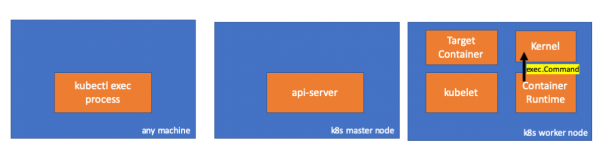
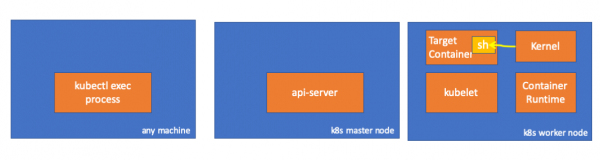
Enfin, le noyau exécute les commandes :
Rappels
- Le serveur API peut également initialiser une connexion avec le kubelet.
- Les connexions suivantes sont maintenues jusqu'à la fin de la session exec interactive :
- entre kubectl et le serveur api ;
- entre le serveur api et kubectl ;
- entre le kubelet et l'environnement d'exécution du conteneur.
- Kubectl ou le serveur api ne peuvent rien exécuter sur les nœuds de travail. Le kubelet peut exécuter, mais pour ces actions, il interagit également avec l'environnement d'exécution du conteneur.
Ressources
- Discussion «» dans kubernetes-dev ;
- Article «»;
- Discussion «» sur Server Fault.
P.S. de l'auteur
Lisez aussi dans notre blog :
- «Que se passe-t-il dans Kubernetes lorsque vous exécutez kubectl run ?» et ;
- «»;
- «»;
- «».
Source : habr.com
