

Predstavljam vam tutorial za generiranje pristupa Kubernetes klasteru pomoću Dex, dex-k8s-authenticator i GitHub.
Lokalni meme iz ruskojezičnog chata Kubernetes u
Uvod
Koristimo Kubernetes za stvaranje dinamičkih okruženja za timove programera i QA. Tako želimo omogućiti pristup klasteru kako za dashboard tako i za kubectl. Za razliku od OpenShift-a, klasični Kubernetes nema nativnu autentifikaciju, pa koristimo vanjske alate za to.
U ovoj konfiguraciji koristimo:
- — web aplikaciju za generiranje kubectl konfiguracije
- — OpenID Connect provajder
- GitHub — jednostavno zato što koristimo GitHub u našoj firmi
Pokušali smo koristiti Google OIDC, ali nažalost nismo povezati ih s grupama, pa nas je integracija s GitHub-om sasvim zadovoljila. Bez mapiranja grupa, ne možemo stvoriti RBAC politike bazirane na grupama.
Dakle, kako izgleda naš proces autorizacije u Kubernetesu u vizualnom prikazu:
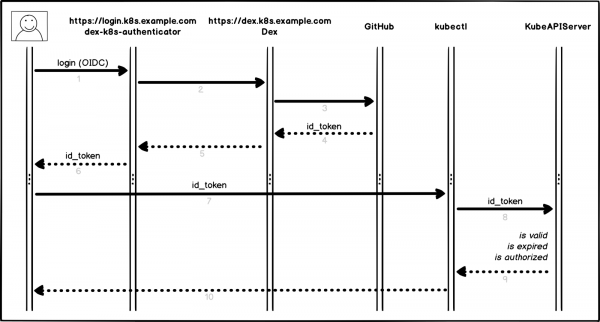
Proces autorizacije
Malo detaljnije i po tačkama:
- Korisnik se prijavljuje u dex-k8s-authenticator (
login.k8s.example.com) - dex-k8s-authenticator preusmjerava zahtjev u Dex (
dex.k8s.example.com) - Dex preusmjerava na stranicu za autorizaciju u GitHub
- GitHub generira potrebne informacije o autorizaciji i vraća ih u Dex
- Dex prosljeđuje primljene informacije u dex-k8s-authenticator
- Korisnik dobiva OIDC token od GitHub-a
- dex-k8s-authenticator dodaje token u kubeconfig
- kubectl prosljeđuje token u KubeAPIServer
- KubeAPIServer na osnovu proslijeđenog tokena vraća pristupe u kubectl
- Korisnik dobiva pristupe od kubectl
Pripremne radnje
Naravno, već imamo instaliran Kubernetes klaster (k8s.example.com), kao i prethodno instaliran HELM. Također imamo organizaciju na GitHubu (super-org).
Ako nemate HELM, instalira se .
Prvo moramo postaviti GitHub.
Idemo na stranicu s postavkama organizacije, (https://github.com/organizations/super-org/settings/applications) i kreiramo novu aplikaciju (Authorized OAuth App):
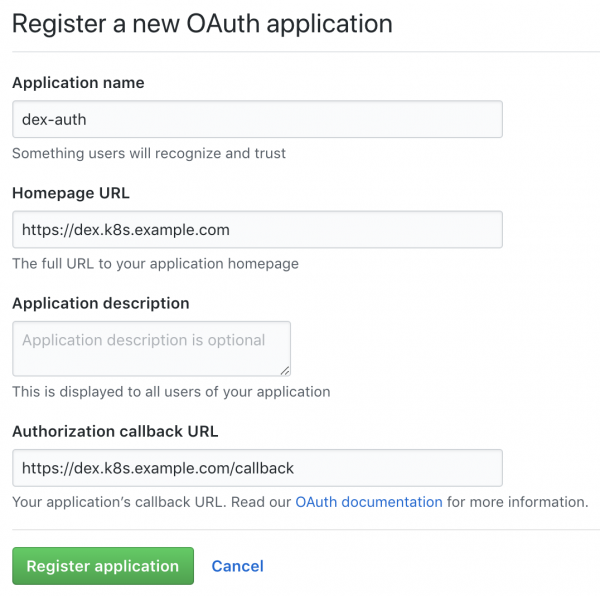
Kreiranje nove aplikacije u GitHubu
Ispunite polja potrebnim URL-ovima, na primjer:
- Homepage URL:
https://dex.k8s.example.com - Authorization callback URL:
https://dex.k8s.example.com/callback
Pazite na linkove, važno je ne izgubiti kose crte.
Kao odgovor na ispunjeni obrazac, GitHub će generirati Client ID i Client secret, spremite ih na sigurno mjesto, potrebni su nam (mi na primjer koristimo za pohranu tajni):
Client ID: 1ab2c3d4e5f6g7h8
Client secret: 98z76y54x32w1
Pripremite DNS zapise za poddomene login.k8s.example.com i dex.k8s.example.com, kao i SSL certifikate za ingress.
Stvorit ćemo SSL certifikate:
cat <<EOF | kubectl create -f -
apiVersion: certmanager.k8s.io/v1alpha1
kind: Certificate
metadata:
  name: cert-auth-dex
  namespace: kube-system
spec:
  secretName: cert-auth-dex
  dnsNames:
    - dex.k8s.example.com
  acme:
    config:
    - http01:
        ingressClass: nginx
      domains:
      - dex.k8s.example.com
  issuerRef:
    name: le-clusterissuer
    kind: ClusterIssuer
---
apiVersion: certmanager.k8s.io/v1alpha1
kind: Certificate
metadata:
  name: cert-auth-login
  namespace: kube-system
spec:
  secretName: cert-auth-login
  dnsNames:
    - login.k8s.example.com
  acme:
    config:
    - http01:
        ingressClass: nginx
      domains:
      - login.k8s.example.com
  issuerRef:
    name: le-clusterissuer
    kind: ClusterIssuer
EOF
kubectl describe certificates cert-auth-dex -n kube-system
kubectl describe certificates cert-auth-login -n kube-system
ClusterIssuer s imenom le-clusterissuer već mora postojati, a ako ne — stvorit ćemo ga pomoću HELM-a:
helm install --namespace kube-system -n cert-manager stable/cert-manager
cat << EOF | kubectl create -f -
apiVersion: certmanager.k8s.io/v1alpha1
kind: ClusterIssuer
metadata:
  name: le-clusterissuer
  namespace: kube-system
spec:
  acme:
    server: https://acme-v02.api.letsencrypt.org/directory
    email: k8s-admin@example.com
    privateKeySecretRef:
      name: le-clusterissuer
    http01: {}
EOF
Konfiguracija KubeAPIServer
Za rad kubeAPIServer potrebno je konfigurirati OIDC i ažurirati klaster:
kops edit cluster
...
  kubeAPIServer:
    anonymousAuth: false
    authorizationMode: RBAC
    oidcClientID: dex-k8s-authenticator
    oidcGroupsClaim: groups
    oidcIssuerURL: https://dex.k8s.example.com/
    oidcUsernameClaim: email
kops update cluster --yes
kops rolling-update cluster --yes
Koristimo za implementaciju klastera, no ovo također radi i za .
Konfiguracija Dex i dex-k8s-authenticator
Za rad Dex-a potrebno je imati certifikat i ključ s Kubernetes master-a, izvući ćemo ga odande:
sudo cat /srv/kubernetes/ca.{crt,key}
-----BEGIN CERTIFICATE-----
AAAAAAAAAAABBBBBBBBBBCCCCCC
-----END CERTIFICATE-----
-----BEGIN RSA PRIVATE KEY-----
DDDDDDDDDDDEEEEEEEEEEFFFFFF
-----END RSA PRIVATE KEY-----
Kloniramo repozitorij dex-k8s-authenticator:
git clone git@github.com:mintel/dex-k8s-authenticator.git
cd dex-k8s-authenticator/
Pomoću values datoteka možemo fleksibilno konfigurirati varijable za naše .
Opišimo konfiguraciju za Dex:
cat < values-dex.yml
global:
  deployEnv: prod
tls:
  certificate: |-
    -----BEGIN CERTIFICATE-----
    AAAAAAAAAAABBBBBBBBBBCCCCCC
    -----END CERTIFICATE-----
  key: |-
    -----BEGIN RSA PRIVATE KEY-----
    DDDDDDDDDDDEEEEEEEEEEFFFFFF
    -----END RSA PRIVATE KEY-----
ingress:
  enabled: true
  annotations:
    kubernetes.io/ingress.class: nginx
    kubernetes.io/tls-acme: "true"
  path: /
  hosts:
    - dex.k8s.example.com
  tls:
    - secretName: cert-auth-dex
      hosts:
        - dex.k8s.example.com
serviceAccount:
  create: true
  name: dex-auth-sa
config: |
  issuer: https://dex.k8s.example.com/
  storage: # https://github.com/dexidp/dex/issues/798
    type: sqlite3
    config:
      file: /var/dex.db
  web:
    http: 0.0.0.0:5556
  frontend:
    theme: "coreos"
    issuer: "Example Co"
    issuerUrl: "https://example.com"
    logoUrl: https://example.com/images/logo-250x25.png
  expiry:
    signingKeys: "6h"
    idTokens: "24h"
  logger:
    level: debug
    format: json
  oauth2:
    responseTypes: ["code", "token", "id_token"]
    skipApprovalScreen: true
  connectors:
  - type: github
    id: github
    name: GitHub
    config:
      clientID: $GITHUB_CLIENT_ID
      clientSecret: $GITHUB_CLIENT_SECRET
      redirectURI: https://dex.k8s.example.com/callback
      orgs:
      - name: super-org
        teams:
        - team-red
  staticClients:
  - id: dex-k8s-authenticator
    name: dex-k8s-authenticator
    secret: generatedLongRandomPhrase
    redirectURIs:
      - https://login.k8s.example.com/callback/
envSecrets:
  GITHUB_CLIENT_ID: "1ab2c3d4e5f6g7h8"
  GITHUB_CLIENT_SECRET: "98z76y54x32w1"
EOF
I za dex-k8s-authenticator:
cat < values-auth.yml
global:
  deployEnv: prod
dexK8sAuthenticator:
  clusters:
  - name: k8s.example.com
    short_description: "k8s cluster"
    description: "Kubernetes cluster"
    issuer: https://dex.k8s.example.com/
    k8s_master_uri: https://api.k8s.example.com
    client_id: dex-k8s-authenticator
    client_secret: generatedLongRandomPhrase
    redirect_uri: https://login.k8s.example.com/callback/
    k8s_ca_pem: |
      -----BEGIN CERTIFICATE-----
      AAAAAAAAAAABBBBBBBBBBCCCCCC
      -----END CERTIFICATE-----
ingress:
  enabled: true
  annotations:
    kubernetes.io/ingress.class: nginx
    kubernetes.io/tls-acme: "true"
  path: /
  hosts:
    - login.k8s.example.com
  tls:
    - secretName: cert-auth-login
      hosts:
        - login.k8s.example.com
EOF
Instalirajmo Dex i dex-k8s-authenticator:
helm install -n dex --namespace kube-system --values values-dex.yml charts/dex
helm install -n dex-auth --namespace kube-system --values values-auth.yml charts/dex-k8s-authenticator
Provjerimo funkcionalnost servisa (Dex bi trebao vratiti kod 400, a dex-k8s-authenticator — kod 200):
curl -sI https://dex.k8s.example.com/callback | head -1
HTTP/2 400
curl -sI https://login.k8s.example.com/ | head -1
HTTP/2 200
RBAC konfiguracija
Kreiramo ClusterRole za grupu, u našem slučaju s read-only pristupima:
cat << EOF | kubectl create -f -
apiVersion: rbac.authorization.k8s.io/v1
kind: ClusterRole
metadata:
  name: cluster-read-all
rules:
  -
    apiGroups:
      - ""
      - apps
      - autoscaling
      - batch
      - extensions
      - policy
      - rbac.authorization.k8s.io
      - storage.k8s.io
    resources:
      - componentstatuses
      - configmaps
      - cronjobs
      - daemonsets
      - deployments
      - events
      - endpoints
      - horizontalpodautoscalers
      - ingress
      - ingresses
      - jobs
      - limitranges
      - namespaces
      - nodes
      - pods
      - pods/log
      - pods/exec
      - persistentvolumes
      - persistentvolumeclaims
      - resourcequotas
      - replicasets
      - replicationcontrollers
      - serviceaccounts
      - services
      - statefulsets
      - storageclasses
      - clusterroles
      - roles
    verbs:
      - get
      - watch
      - list
  - nonResourceURLs: ["*"]
    verbs:
      - get
      - watch
      - list
  - apiGroups: [""]
    resources: ["pods/exec"]
    verbs: ["create"]
EOF
Kreiramo konfiguraciju za ClusterRoleBinding:
cat <<EOF | kubectl create -f -
apiVersion: rbac.authorization.k8s.io/v1beta1
kind: ClusterRoleBinding
metadata:
  name: dex-cluster-auth
  namespace: kube-system
roleRef:
  apiGroup: rbac.authorization.k8s.io
  kind: ClusterRole
  name: cluster-read-all
subjects:
  kind: Group
  name: "super-org:team-red"
EOF
Sada smo spremni za testiranje.
Testovi
Prelazimo na stranicu za prijavu (https://login.k8s.example.com) i prijavljujemo se putem GitHub računa:
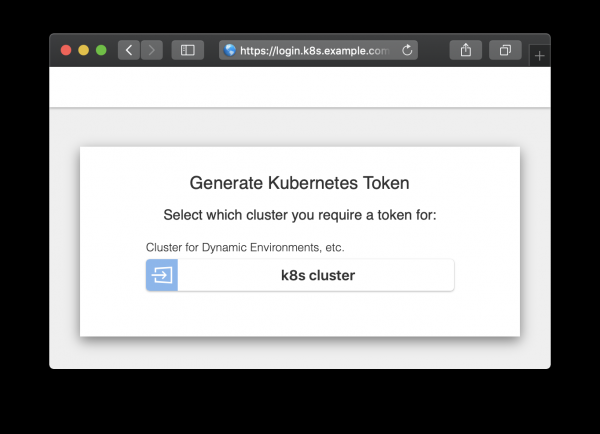
Stranica za autorizaciju
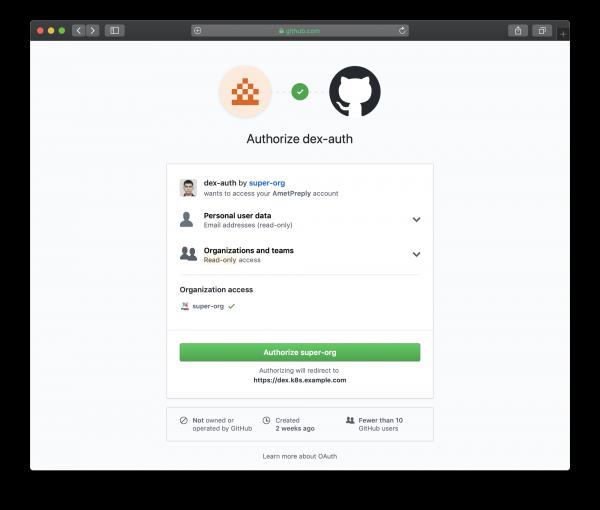
Stranica za autorizaciju preusmjerena na GitHub
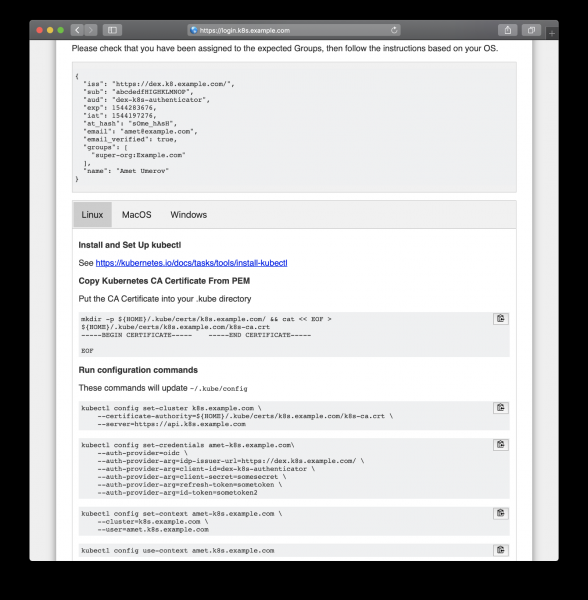
Slijedimo generirane upute za dobivanje pristupa
Nakon kopiranja s web stranice možemo koristiti kubectl za upravljanje resursima našeg klastera:
kubectl get po
NAME                READY   STATUS    RESTARTS   AGE
mypod               1/1     Running   0          3d

kubectl delete po mypod
Error from server (Forbidden): pods "mypod" is forbidden: User "amet@example.com" cannot delete pods in the namespace "default"
I to radi, svi GitHub korisnici u našoj organizaciji mogu vidjeti resurse i ulaziti u podove, no nemaju prava za njihovu promjenu.
Izvor: habr.com
