

Kezdjük azzal, hogy vannak esetek, amikor szükséges egy adatbázishoz csatlakozó alkalmazást készíteni. Ezt annak érdekében tesszük, hogy ne kelljen mélyen belemerülni a backend fejlesztésbe, és a frontendre összpontosítsunk, mivel hiányoznak a kéz és a készségek. Nem merem állítani, hogy a megoldásom biztonságos lesz, de működik.
Mivel nem szeretek fizetni a hosztolást, a munkahelyemen lévő hálózatot használtam, ahol van egy nyilvános IP. Íme a felépítése:
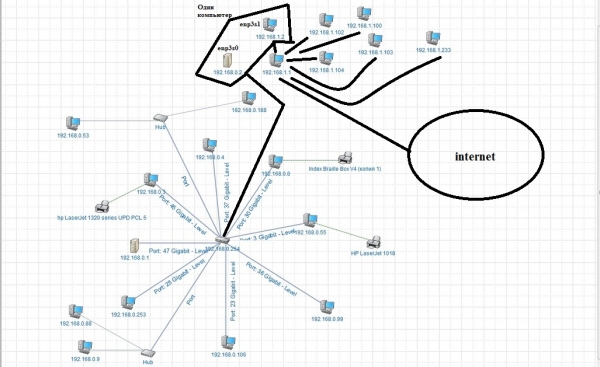
Hozzáférésem van néhány számítógéphez, pontosabban a 192.168.1.2-höz (ami a 192.168.0.2) Linux operációs rendszerrel és a 192.168.0.3-hoz Windows alatt. Összefoglalva, az alkalmazásomhoz a mysql-t választottam, és megnéztem, mi van Linuxon. Ott már telepítve volt, de senki sem tudta a jelszót, aki tudta, az elfelejtette (akik előttem dolgoztak). Miután megtudtam, hogy senkinek sincs szüksége rá, töröltem, és megpróbáltam újratelepíteni. Nem volt elég memória, és mivel ahhoz, hogy megoldjam ezt a hibát, monitort és billentyűzetet kellett volna csatlakoztatnom, úgy döntöttem, hogy feladom. Ráadásul a Windows gép sokkal erősebb, és nekem is van egy a saját otthoni laptopomon. Az installációt nem fogom részletezni, rengeteg útmutató és videó van róla. Miután telepítettem a mysql-t a Windows gépemre, úgy döntöttem, hogy biztonsági másolatot készítek a laptopról az állomásra.
Ezt így csinálom (az én esetemben):
mysqldump -uroot -p your_base > dump_file.sql
Ezután az új adatbázisban létrehozunk egy adatbázist, és helyreállítjuk a biztonsági másolatot az "új" gépen.
mysql -h localhost -u root -p
create database your_base;
use your_base;
mysql -uroot -p your_base < dump_file.sql
show tables;
A biztonsági másolat fájlját az új gépre kell helyezni, és lehet, hogy ha nem az eszközkönyvtárban, akkor a teljes útvonalat is meg kell adni. (Én egyszerűen feltöltöttem a biztonsági másolatot a GitHub-ra, majd klónoztam az új gépre). Hozzáadnék, hogy hogyan lehet létrehozni a táblákat, de nem mentettem el a képernyőképeket, és úgy gondolom, hogy ez még egy másodéves-harmadéves diáknak sem bonyolult.
Miután helyreállítottam az összes táblát, elérkezett az idő, hogy lehetővé tegyem az adatbázishoz való távoli hozzáférést. Általában ezek a parancsok nem vezettek sikerre (csak olvasási jogokat adtak a select-re),
create user 'client'@'%' IDENTIFIED by 'client';
grant select on your_base . * to 'client'@'%';
flush privileges;
Pontosabban, a bázishoz csak ezzel a parancssal tudtam csatlakozni,
mysql -h localhost -u client -pclient
de azzal már nem tudtam,
mysql -h 192.168.0.3 -u client -pclient
ez számomra nem volt megfelelő, és a root-on keresztül sem tudtam csatlakozni ezen a címen.
A mysql workbench program helped to change localhost to % in the settings, and it works, although client did not help. Now you can connect to the database from the console or code from any address.
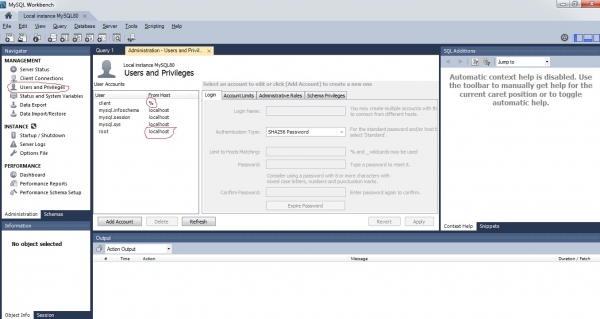
You also need to set the network to home or enterprise and turn off the Windows firewall, otherwise you won't even be able to ping this machine (let alone connect to the database).
Half of the work is done; now I need to connect to the database from home.
As seen from the network diagram, you need to go from 192.168.0.3 to 192.168.1.1 (the router) to get to the internet, so let's go the other way. We'll set up a route from 192.168.1.1 to 192.168.1.2 like this:

In general, the picture does not show — I will write it manually:
route add 192.168.0.0 mask 255.255.255.0 gateway 192.168.1.2
This can only be done within the same subnet; in other words, you can't just forward to the address 192.168.0.2 or 192.168.0.3.
This is needed for the router to know where the subnet 192.168.0.0/24 is located (learn the basics of networking; it's useful).
Now we add port forwarding for 3306 (the default mysql port, unless you changed it during installation) to the address 192.168.1.2.
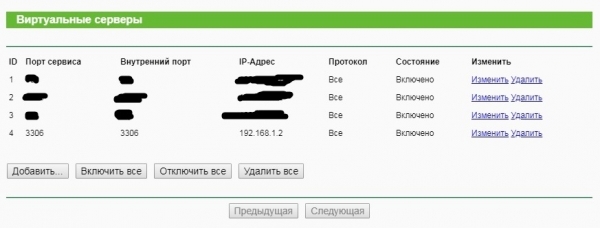
What remains is the hardest part: setting up forwarding on the Linux machine (it has two network cards: 192.168.1.2 (interface enp3s1) and 192.168.0.2 (interface enp3s0)) to let the network interfaces know to forward from 192.168.1.2 to 192.168.0.2, and then to our Windows machine with MySQL.
sudo iptables -A FORWARD -i enp3s1 -o enp3s0 -p tcp --syn --dport 3306 -m conntrack --ctstate NEW -j ACCEPT
sudo iptables -A FORWARD -i enp3s1 -o enp3s0 -m conntrack --ctstate ESTABLISHED,RELATED -j ACCEPT
sudo iptables -A FORWARD -i enp3s0 -o enp3s1 -m conntrack --ctstate ESTABLISHED,RELATED -j ACCEPT
sudo iptables -t nat -A PREROUTING -i enp3s1 -p tcp --dport 3306 -j DNAT --to-destination 192.168.0.3
sudo iptables -t nat -A POSTROUTING -o enp3s0 -p tcp --dport 3306 -d 192.168.0.3 -j SNAT --to-source 192.168.1.2
and the last line saves the entered commands so that they are not lost after the OS restarts
sudo service iptables-persistent save
That is, the first line means we accept the first connection, the second and third allow packets to be sent both ways, and the fourth and fifth mean the replacement of destination and source addresses. And voilà, you can connect from home via mysql. And finally, my code in C++ that does this:
//DataBaseConnection.cpp
#include "DataBaseConnection.h"

DataBaseConnection::DataBaseConnection()
{
}
void DataBaseConnection::Connect()
{
	// Получаем дескриптор соединения
	conn = mysql_init(NULL);
	if (conn == NULL)
	{
		// Если дескриптор не получен – выводим сообщение об ошибке
		fprintf(stderr, "Error: can'tcreate MySQL-descriptorn");
		//exit(1); //Если используется оконное приложение
	}
	// Подключаемся к szerverhez
	if (!mysql_real_connect(conn, "192.168.0.3", "root", "password", "your_base", NULL, NULL, 0))
	{
		// Ha nem lehet létrehozni a kapcsolatot a szerverrel
		// базы данных выводим сообщение об ошибке
		fprintf(stderr, "Error: can't connect to database: %sn", mysql_error(conn));
	}
	else
	{
		// Если соединение успешно установлено выводим фразу - "Success!"
		fprintf(stdout, "Success!n");
	}
}
std::vector<std::string> DataBaseConnection::Query()
{
	vectordrum.clear();
	std::string query = "SELECT * FROM drum where id=0";
	const char * q = query.c_str();
	qstate = mysql_query(conn, q);
	if (!qstate)
	{
		res = mysql_store_result(conn);
		while (row = mysql_fetch_row(res))
		{
			//printf("ID: %s,Position: %s, Image: %sn", row[0], row[1], row[2]);
			vectordrum.push_back(row[2]);
		}
	}
	else
	{
		std::cout << "Query failed:" << mysql_error(conn) << std::endl;
	}
	return vectordrum;
}
void DataBaseConnection::Close()
{
	// Закрываем соединение с сервером базы данных
	mysql_close(conn);
}
DataBaseConnection::~DataBaseConnection()
{
	vectordrum.clear();
}
//DataBaseConnection.h
#pragma once
#include <iostream>
#include <mysql.h>
#include <vector>
#pragma comment(lib,"mysqlcppconn.lib")
#pragma comment(lib,"libmysql.lib")
class DataBaseConnection
{
public:
	DataBaseConnection();
	void Connect();
	std::vector<std::string> Query();
	void Close();
	~DataBaseConnection();
	MYSQL *conn;
	MYSQL_ROW row;
	MYSQL_RES *res;
	int qstate;
	std::vector<std::string> vectordrum;
};
Now you can confidently share this program with anyone, and there's no need to rewrite it to make it work locally.
Forrás: habr.com
