

Cél
A git commit mentions any task from Jira by name in the comment, after which two things happen:
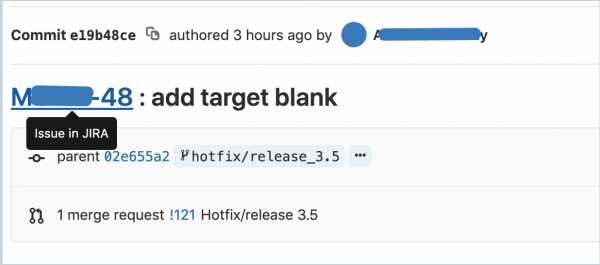
- in GitLab, the task title turns into an active link to it in Jira
- in Jira, a comment is added to the task with links to the commit and the user who made it, as well as the text of the mention itself
Beállítás
- We need a Jira user with write-level permissions. You can use an existing one, but keep in mind that all comments in Jira when mentioning tasks from git will be attributed to this user, so it’s better to create a new one, call it, say, GitLab, and add it to Jira with write permissions to all your projects.
- We need a GitLab user with admin rights in each project we will connect. The integration is set up separately for each project.
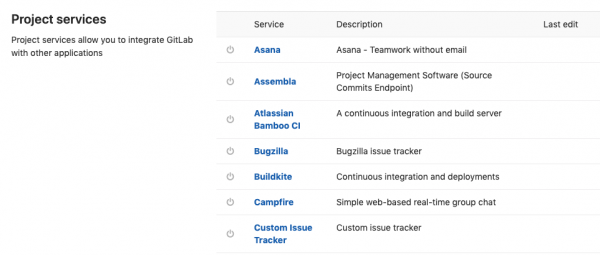
- In GitLab, open the project, go to Beállítások -> Integrations. Scroll down, and you will see Project services with a long list of services that can be connected.

- Find Jira in this list, a form will appear

- Check the box Aktív, to activate the link.
- As seen from the form, you can configure the desired behavior for commits and merge requests separately.
- Enter your company's Web URL in Jira, for example, 'https://companyname.atlassian.net'
- Jira API url — filled in if you have another instance of Jira; by default, the value will be used Web URL.
- Mezők Username/Email és Password/Token are filled in according to whether you are using Jira Server or Jira Cloud. In the case of Jira Server, you enter the username and password of the user under whose name comments will be added. In the case of Jira Cloud, you enter the email and token, which can be obtained .
- Mező Transition ID(s). If you want, say, to have the task automatically closed when mentioned, then in this field you need to specify the transition ID to the closed status. This ID can be obtained via the API:
https://companyname.atlassian.net/rest/api/2/issue/ISSUENAME-123/transitionswhere ISSUENAME-123 is the name of some task in the required state. You will receive JSON with an array of transitions, from which you can take the necessary id.
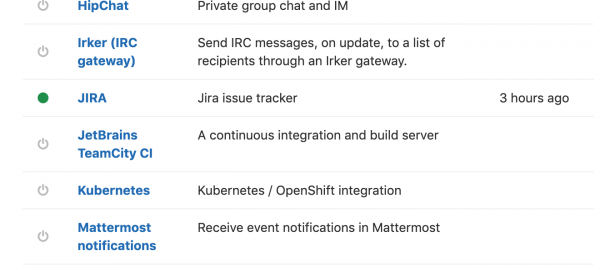
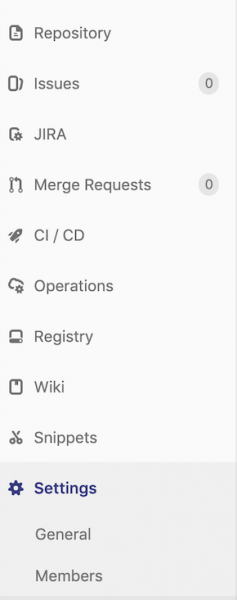
As a result, in GitLab, Jira now has a green indicator: Beállítások -> Integrations and a menu item will appear in the project that leads to the corresponding project in Jira:

When writing a comment to a commit (regardless of which tool we use for working with git), we can add the task titles in text form (without quotes or any special characters like @) Jirabugfix XPROJECT-123, XPROJECT-124

Usage:
Amikor megjegyzést írunk egy commit-hoz (nem számít, hogy milyen eszközt használunk a git kezelésére), felvehetjük a feladatok nevét szöveges formában (idézőjelek vagy bármilyen speciális karakter, például @ nélkül).
hibajavítás XPROJECT-123, XPROJECT-124a megfelelő feladathoz egy megjegyzés kerül hozzáadásra:

és a GitLabban aktív hivatkozás jelenik meg:
Forrás: habr.com
