

I test sono una parte essenziale del processo di sviluppo. E a volte gli sviluppatori devono eseguire test localmente, prima di effettuare il commit delle modifiche.
Se l'applicazione utilizza Amazon Web Services, python libreria moto è perfetto per questo.

Puoi vedere l'elenco completo delle risorse coperte .
Su Github c'è un repository Hugo Picado — . È un'immagine pronta, avviala e usala. L'unico aspetto negativo è che dopo l'avvio, nessuna AWS risorsa è ancora stata creata.
Beh, è abbastanza facile da sistemare.
Poiché è necessario specificare il tipo di servizio all'avvio (env la variabile MOTO_SERVICE), dobbiamo descrivere la creazione della risorsa.
Modifichiamo leggermente start.sh:
Invece di
moto_server $MOTO_SERVICE -H $MOTO_HOST -p $MOTO_PORT
Incolliamo:
if [ -f /opt/init/bootstrap.py ]; then
  moto_server $MOTO_SERVICE -H $MOTO_HOST -p $MOTO_PORT & (sleep 5 && echo "Esecuzione dello script di bootstrap." && python /opt/init/bootstrap.py)
else
  moto_server $MOTO_SERVICE -H $MOTO_HOST -p $MOTO_PORT
fi
wait
Il file finale risulta essere:
start.sh
#!/bin/sh

# validate required input
if [ -z "$MOTO_SERVICE" ]; then
  echo "Please define AWS service to run with Moto Server (e.g. s3, ec2, etc)"
  exit 1
fi

# setting defaults for optional input
if [ -z "$MOTO_HOST" ]; then
  MOTO_HOST="0.0.0.0"
fi

if [ -z "$MOTO_PORT" ]; then
  MOTO_PORT="5000"
fi

echo "Starting service $MOTO_SERVICE at $MOTO_HOST:$MOTO_PORT"

if [ -f /opt/init/bootstrap.py ]; then
  moto_server $MOTO_SERVICE -H $MOTO_HOST -p $MOTO_PORT & (sleep 5 && echo "Executing bootstrap script." && python /opt/init/bootstrap.py)
else
  moto_server $MOTO_SERVICE -H $MOTO_HOST -p $MOTO_PORT
fi
# Prevent container from exiting when bootstrap.py finishing
wait
Creiamo una nuova immagine e la pubblichiamo nel nostro registry.
Successivamente, scriveremo uno script per l'inizializzazione della risorsa, ad esempio dominio SWF, utilizzando la libreria per interagire con AWS — boto3:
bootstrap_swf.py
import boto3
from botocore.exceptions import ClientError
import os

os.environ["AWS_ACCESS_KEY_ID"] = "fake"
os.environ["AWS_SECRET_ACCESS_KEY"] = "fake"

client = boto3.client('swf', region_name='us-west-2', endpoint_url='http://localhost:5000')

try:
    client.register_domain(
        name='test-swf-mock-domain',
        description="Test SWF domain",
        workflowExecutionRetentionPeriodInDays="10"
    )
except ClientError as e:
    print "Il dominio esiste già: ", e.response.get("Error", {}).get("Code")

response = client.list_domains(
    registrationStatus='REGISTERED',
    maximumPageSize=123,
    reverseOrder=True|False
)

print 'Pronto'
La logica è la seguente:
- All'avvio, montiamo il nostro script in /opt/init/bootstrap.py.
- Se il file è montato, verrà eseguito.
- Se il file non esiste, verrà avviato solo il moto-server.
E possiamo simulare un'intera risorsa avviando un unico container:
docker run --name swf -d
    -e MOTO_SERVICE=swf
    -e MOTO_HOST=0.0.0.0
    -e MOTO_PORT=5000
    -p 5001:5000
    -v /tmp/bootstrap_swf.py:/opt/init/bootstrap.py
    -i awesome-repo.com/moto-server:latest
Proviamo in modalità interattiva:
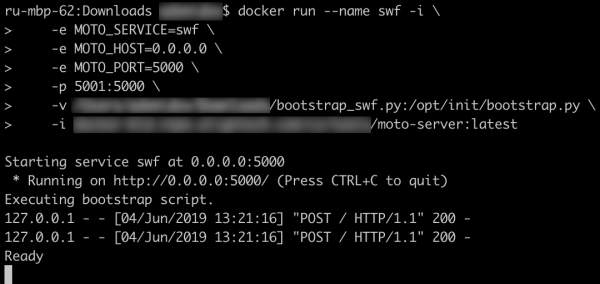
Funziona!
In questo modo, possiamo creare un docker-compose.yml che aiuterà a risparmiare tempo sui test delle modifiche:
docker-compose.yml
version: '3'
services:
  s3:
    image: picadoh/motocker
    environment:
      - MOTO_SERVICE=s3
      - MOTO_HOST=10.0.1.2
    ports:
      - "5002:5000"
    networks:
      motonet:
        ipv4_address: 10.0.1.2
    volumes:
      - /tmp/bootstrap_s3.py:/opt/init/bootstrap.py
  swf:
    image: picadoh/motocker
    environment:
      - MOTO_SERVICE=swf
      - MOTO_HOST=10.0.1.3
    ports:
      - "5001:5000"
    networks:
      motonet:
        ipv4_address: 10.0.1.3
    volumes:
      - /tmp/bootstrap_swf.py:/opt/init/bootstrap.py
  ec2:
    image: picadoh/motocker
    environment:
      - MOTO_SERVICE=ec2
      - MOTO_HOST=10.0.1.4
    ports:
      - "5003:5000"
    networks:
      motonet:
        ipv4_address: 10.0.1.4
    volumes:
      - /tmp/bootstrap_ec2.py:/opt/init/bootstrap.py
networks:
  motonet:
    driver: bridge
    ipam:
      config:
        - subnet: 10.0.0.0/16
In effetti, questo approccio può essere utilizzato non solo sul laptop dello sviluppatore. Test preliminari con i mock dopo la build possono aiutare a evitare possibili problemi durante l'avvio negli ambienti dev*.
Link:
Repository Motocker —
Repository Moto —
Documentazione Boto3 —
Fonte: habr.com
