

この記事の目的は、Microsoftを使用してVXLAN BGP EVPNおよびDFAファブリックのDHCPサービスの構成を簡素化することです。 Windows Server 2016 / 2019。
公式ドキュメントでは、DHCPサービスはMicrosoftに基づいていると記載されています。 Windows Server 工場向けの 2012 は SuperScope として構成されており、ループバック プール (このプールでは、すべての IP アドレスがプールから除外されます (除外された IP アドレス = プール)) と、実際のネットワークに IP アドレスを発行するためのプールが含まれています (ここでの重要な点は、DHCP リレー回路 ID がフィルタリングされるポリシーが構成されていることです。この DHCP リレー回路 ID にはネットワークの VNI が含まれています。つまり、別のプールでは、この DHCP リレー回路 ID は若干異なります)。
To configure DHCP on Windows server.

1. Create a super scope. Within the super scope, create scope B, S1, S2, S3, …, Sn for the subnet B and the subnets for each segment.
2. In scope B,  specify the 'Exclusion Range' to be the entire address range (so that the offered address range must not be from this scope).
3. For every segment scope Si, specify a policy that matches on Agent Circuit ID with value of '0108000600XXXXXX', where '0108000600' is a fixed value for all segments, the 6 numbers "XXXXXX" is the segment ID value in hexadecimal. Also ensure to check the Append wildcard(*) check box.
4. Set the policy address range to the entire range of the scope.
この記事には、次の質問に対する回答が含まれています。
ページ内容
- ( & )
導入
このセクションでは、ネットワーク機器の設定手順、eVPN工場で使用されるDHCPパケット内のRFC、MicrosoftにおけるDHCPサーバー設定の進化に関するリファレンスガイドなど、すべてのソースデータを簡単に一覧表示します。 Windows Server Ciscoのドキュメントでは2012年にこの件について触れています。また、Microsoftサーバー上のDHCPサービスにおけるSuperscopeとPolicyに関する簡単な情報も記載されています。 Windows Server.
VXLAN BGP EVPN、DFA ファブリックで DHCP リレーを構成する方法
VXLAN BGP EVPN ファブリックでの DHCP リレーの構成は非常に単純であるため、この記事の主なトピックではありません。 ドキュメントへのリンクと、ネットワーク機器の設定に関するスポイラーを提供します。
Nexus 9000V v9.2(3) での DHCP リレーの設定例
service dhcp
ip dhcp relay
ip dhcp relay information option
ip dhcp relay information option vpn
interface loopback10
  vrf member VRF1
  ip address 10.120.0.1/32 tag 1234567
interface Vlan12
  no shutdown
  vrf member VRF1
  no ip redirects
  ip address 10.120.251.1/24 tag 1234567
  no ipv6 redirects
  fabric forwarding mode anycast-gateway
  ip dhcp relay address 10.0.0.5
  ip dhcp relay source-interface loopback10
VXLAN BGP EVPN ファブリックでの DHCP リレー サービスの運用に実装される RFC
RFC#6607: サブオプション 151(0x97) - 仮想サブネットの選択
•	Sub-option 151(0x97) - Virtual Subnet Selection (Defined in RFC#6607)
Used to convey VRF related information to the DHCP server in an MPLS-VPN and VXLAN EVPN multi-tenant environment.
クライアントが存在する VRF の「名前」が送信されます。
RFC#5107: サブオプション 11(0xb) - サーバー ID オーバーライド
•	Sub-option 11(0xb) - Server ID Override (Defined in RFC#5107.)
The server identifier (server ID) override sub-option allows the DHCP relay agent to specify a new value for the server ID option, which is inserted by the DHCP server in the reply packet. This sub-option allows the DHCP relay agent to act as the actual DHCP server such that the renew requests will come to the relay agent rather than the DHCP server directly. The server ID override sub-option contains the incoming interface IP address, which is the IP address on the relay agent that is accessible from the client. Using this information, the DHCP client sends all renew and release request packets to the relay agent. The relay agent adds all of the appropriate sub-options and then forwards the renew and release request packets to the original DHCP server. For this function, Cisco’s proprietary implementation is sub-option 152(0x98). You can use the ip dhcp relay sub-option type cisco command to manage the function.
このオプションは、クライアントがこのオプションで使用される IP アドレスにアドレス リースを更新する要求を送信するようにするために使用されます。 (Cisco VXLAN BGP では、EVPN はクライアントのデフォルト ゲートウェイのエニーキャスト アドレスです。)
RFC#3527: サブオプション 5(0x5) - リンク選択
Sub-option 5(0x5) - Link Selection (Defined in RFC#3527.)

The link selection sub-option provides a mechanism to separate the subnet/link on which the DHCP client resides from the gateway address (giaddr), which can be used to communicate with the relay agent by the DHCP server. The relay agent will set the sub-option to the correct subscriber subnet and the DHCP server will use that value to assign an IP address rather than the giaddr value. The relay agent will set the giaddr to its own IP address so that DHCP messages are able to be forwarded over the network. For this function, Cisco’s proprietary implementation is sub-option 150(0x96). You can use the ip dhcp relay sub-option type ciscocommand to manage the function.
クライアントが IP アドレスを必要とするネットワークのアドレス。
MicrosoftにおけるDHCP構成に関するCiscoドキュメントの進化 Windows Server 2012
このセクションを含めたのは、ベンダー側に前向きな傾向があるためです。
このドキュメントでは、ネットワーク機器上で DHCP リレーを構成する方法のみが説明されています。
DHCP を設定するには Windows Server 2012年には別の記事が使われた。
この記事では、各ネットワーク/VNI には独自の SuperScope バンドルと独自のループバック アドレスのセットが必要であることを示しています。
If multiple DHCP Scopes are required for multiple subnets, you need to create one LoopbackX per subnet/vlan on all LEAFS and create a superscope with a loopbackX range scope and actual client IP subnet scope per vlan.
設定を追加しました Windows ネットワーク機器構成ドキュメントの2012 Serverに関する記述。使用されるすべてのアドレスプールは、データセンターごとに1つのSuperScopeを必要とし、このSuperScopeがデータセンターの境界となります。
Create Superscope for all scopes you want to use for Option 82-based policies.
Note
The Superscope should combine all scopes and act as the administrative boundary.
すべてが非常に簡潔に説明されています。
Let us assume the switch is using the address from subnet B (it can be the backbone subnet, management subnet, or any customer designated subnet for this purpose) to communicate with the Windows DHCP server. In DFA we have subnets S1, S2, S3, …, Sn for segment s1, s2, s3, …, sn.

To configure DHCP on Windows server.

1. Create a super scope. Within the super scope, create scope B, S1, S2, S3, …, Sn for the subnet B and the subnets for each segment.
2. In scope B,  specify the 'Exclusion Range' to be the entire address range (so that the offered address range must not be from this scope).
3. For every segment scope Si, specify a policy that matches on Agent Circuit ID with value of '0108000600XXXXXX', where '0108000600' is a fixed value for all segments, the 6 numbers "XXXXXX" is the segment ID value in hexadecimal. Also ensure to check the Append wildcard(*) check box.
4. Set the policy address range to the entire range of the scope.
MicrosoftにおけるDHCP Windows Server (スーパースコープとポリシー)
Superscope is an administrative feature of a DHCP server that can be used to group multiple scopes as a single administrative entity. Superscope allows a DHCP server to provide leases from more than one scope to clients on a single physical network. Scopes added to a superscope are called member scopes. SuperScope とは - IP アドレスの複数のプールを XNUMX つの管理単位に結合できる機能です。 同じ物理ネットワーク (同じ VLAN 内) 上のユーザーに、複数のプールからの IP アドレスをアドバタイズするには。 リクエストが SuperScope の一部としてアドレスのプールに送信された場合、クライアントには、この SuperScope に含まれる別のスコープからアドレスが与えられます。
The DHCP Server role in Windows Server 2012 introduces a new feature that allows you to create IPv4 policies that specify custom IP address and option assignments for DHCP clients based on a set of conditions.

The policy based assignment (PBA) feature allows you to group DHCP clients by specific attributes based on fields contained in the DHCP client request packet. PBA enables targeted administration and greater control of the configuration parameters delivered to network devices with DHCP.
ポリシー – ユーザーの種類やパラメータに基づいてユーザーに IP アドレスを割り当てることができます。シスコのエンジニアは、ポリシーを Windows Server 2012年版、VNI(仮想ネットワーク識別子)によるフィルタリングに対応。
メイン
このセクションには、調査結果、サポートされない理由、仕組み (ロジック)、新機能、およびこの新機能がどのように役立つかが含まれています。
なぜマイクロソフトはこれをサポートしていないのですか? Windows Server 2000/2003/2008?
Microsoft Windows Server 2008年以前のバージョンでは、オプション82は処理されず、オプション82を含まない返信パケットが送信されます。
- クライアントからのリクエストはブロードキャスト(DHCP Discover)に送信されます。
- 機器(Nexus)はパケットを DHCP サーバーに送信します(DHCP Discover + オプション 82)。
- DHCP サーバーはパケットを受信し、処理して送り返しますが、オプション 82 は使用しません。(DHCP オファー – オプション 82 なし)
- 機器(Nexus)はDHCPサーバーからパケットを受信します。 (DHCP オファー) ただし、このパケットはエンド ユーザーには送信されません。
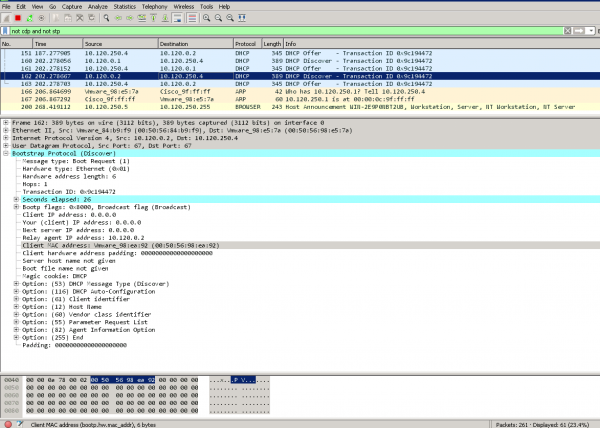
スニファデータ - オン Windows Server 2008年以降、DHCPクライアント上でWindows Server 2008はネットワーク機器から要求を受信します。(オプション82がリストに含まれています)
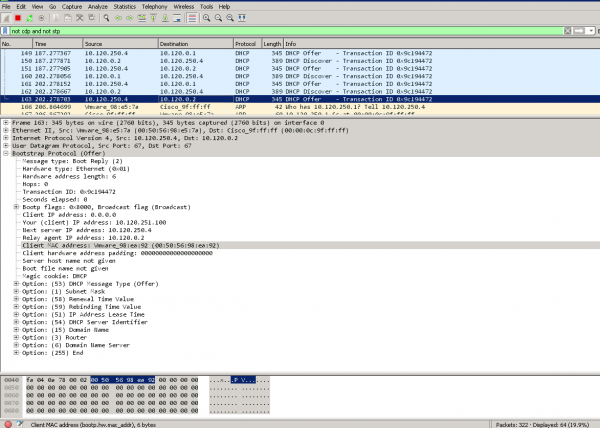
Windows Server 2008はネットワーク機器に応答を送信します。(オプション82はパケット内のオプションリストに含まれていません。)
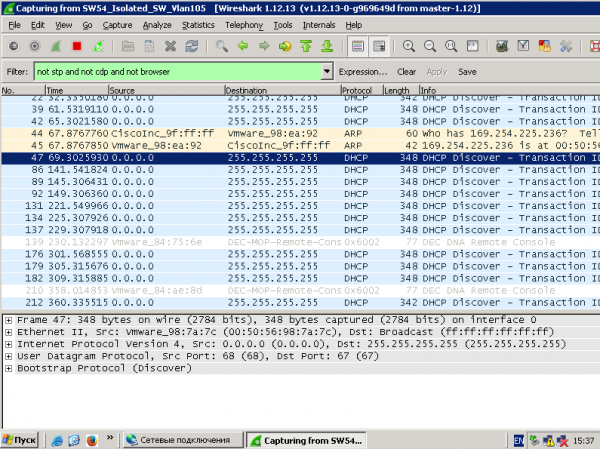
クライアントからのリクエスト - DHCP Discover は存在しますが、DHCP Offer がありません
ネットワーク機器に関する統計:
NEXUS-9000V-SW-1# show ip dhcp relay statistics
----------------------------------------------------------------------
Message Type             Rx              Tx           Drops
----------------------------------------------------------------------
Discover                  8               8               0
Offer                     8               8               0
Request(*)                0               0               0
Ack                       0               0               0
Release(*)                0               0               0
Decline                   0               0               0
Inform(*)                 0               0               0
Nack                      0               0               0
----------------------------------------------------------------------
Total                    16              16               0
----------------------------------------------------------------------

DHCP L3 FWD:
Total Packets Received                           :         0
Total Packets Forwarded                          :         0
Total Packets Dropped                            :         0
Non DHCP:
Total Packets Received                           :         0
Total Packets Forwarded                          :         0
Total Packets Dropped                            :         0
DROP:
DHCP Relay not enabled                           :         0
Invalid DHCP message type                        :         0
Interface error                                  :         0
Tx failure towards server                        :         0
Tx failure towards client                        :         0
Unknown output interface                         :         0
Unknown vrf or interface for server              :         0
Max hops exceeded                                :         0
Option 82 validation failed                      :         0
Packet Malformed                                 :         0
Relay Trusted port not configured                :         0
DHCP Request dropped on MCT                      :         0
*  -  These counters will show correct value when switch
receives DHCP request packet with destination ip as broadcast
address. If request is unicast it will be HW switched
NEXUS-9000V-SW-1#
なぜマイクロソフトなのか? Windows Server 2012年の設定ってそんなに難しいの?
マイクロソフト Windows Server 2012 はまだ RFC#3527 (オプション 82 サブオプション 5(0x5) - リンク選択) でサポートされていません。
ただし、ポリシー機能はすでに実装されています。
どのように動作します:
- Microsoft Windows Server 2012年には、ループバックアドレスと実際のネットワーク用のプールを含むスーパープール(SuperScope)が存在する。
- DHCP リレーからの応答には SuperScope に含まれるループバック ソース アドレスが含まれるため、IP アドレスを発行するためのプールの選択は SuperScope に属します。
- ポリシーを使用して、リクエストは、VNI がオプション 82 サブオプション 1 エージェント回線 ID に含まれるメンバー スコープをスーパースコープから選択します。 (「0108000600」+ 24 ビット VNI + 24 ビットの値は私には不明ですが、スニファーはこのフィールドの値 0 を示します。)
マイクロソフトがセットアップを簡素化する方法 Windows Server 2016 / 2019?
マイクロソフト Windows Server 2016年のRFC#3527の機能が実装されました。 Windows Server 2016 は、属性オプション 82 サブオプション 5(0x5) — リンク選択から正しいネットワークを認識できます
すぐに 3 つの疑問が生じます。
- スーパースコープなしでも大丈夫でしょうか?
- ポリシーなしで VNI を 16 進形式に変換できますか?
- ループバック DHCP 送信元アドレスのスコープなしでも大丈夫ですか?
Q. スーパースコープなしでも大丈夫でしょうか?
A. はい、IPv4 アドレスの領域にスコープをすぐに作成できます。
Q. ポリシーなしで VNI を 16 進形式に変換できますか?
A. はい、ネットワークの選択はオプション 82 サブオプション 0x5 に基づいています。
Q. ループバック DHCP 送信元アドレスのスコープなしでも大丈夫ですか?
A. いいえ、できません。なぜならマイクロソフトでは Windows Server 2016年/2019年現在、悪意のあるDHCPリクエストに対する保護機能が有効になっています。つまり、DHCPサーバーのアドレスプールに登録されていないアドレスからのすべてのリクエストは悪意のあるものとみなされます。
 Note
All relay agent IP addresses (GIADDR) must be part of an active DHCP scope IP address range. Any GIADDR outside of the DHCP scope IP address ranges is considered a rogue relay and Windows DHCP Server will not acknowledge DHCP client requests from those relay agents.

A special scope can be created to "authorize" relay agents. Create a scope with the GIADDR (or multiple if the GIADDR's are sequential IP addresses), exclude the GIADDR address(es) from distribution, and then activate the scope. This will authorize the relay agents while preventing the GIADDR addresses from being assigned.
それらは、Microsoft 上で構成します。 Windows Server 2016/2019 VXLAN BGP EVPNファブリック用のDHCPプールには、以下のもののみが必要です。
- ソースリレーアドレスのプールを作成します。
- クライアントネットワーク用のプールを作成する
不要なもの (ただし、設定すれば動作し、作業に支障をきたすことはありません):
- ポリシーの作成
- スーパースコープの作成
例DHCP サーバーのセットアップ例 (実際の DHCP クライアントは 2 つあり、クライアントは VXLAN ファブリックに接続されています)
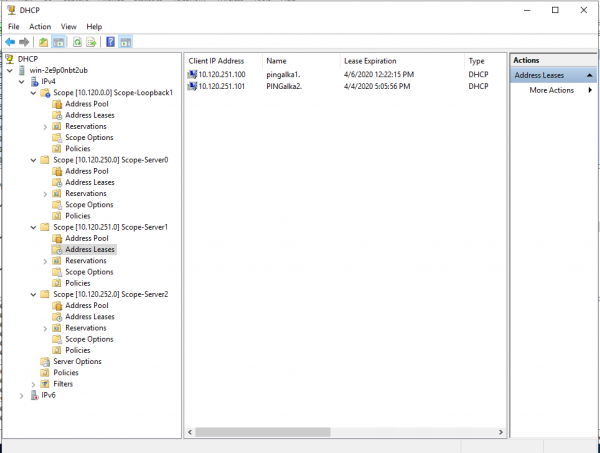
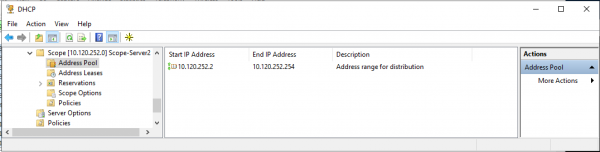
ユーザープールの設定例:
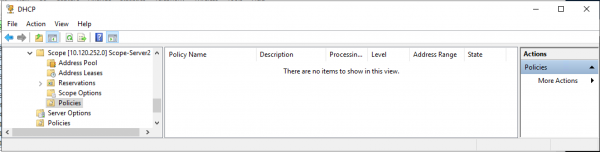
ユーザープールの設定例 (ポリシーが選択されています - ポリシーがプールの正しい操作に使用されていないことを証明します):
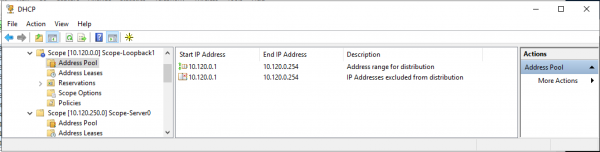
ソース DHCP リレー アドレスのプールを構成する例 (発行するアドレスの範囲は、アドレス プールからの除外に完全に対応します):
Microsoft 上で DHCP サービスを設定する Windows Server 2019
DHCP リレーのループバック アドレス (ソース) のプールを構成します。
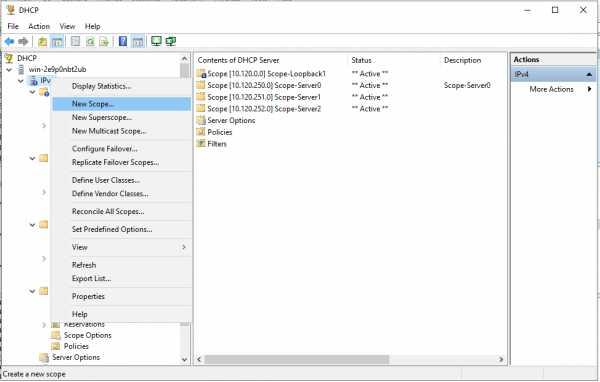
IPv4 空間に新しいプール (スコープ) を作成します。
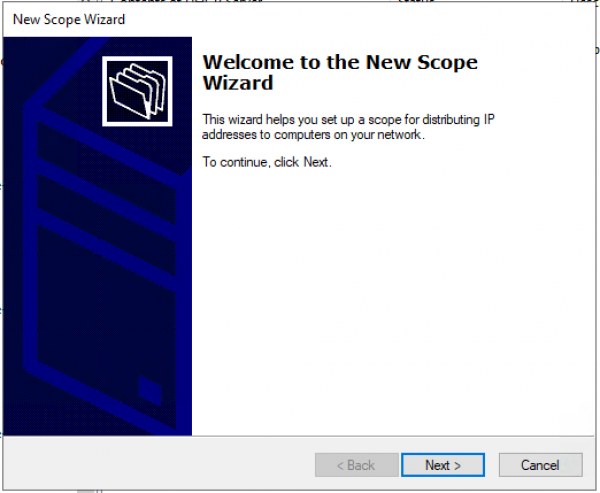
プール作成ウィザード。 「次へ>」
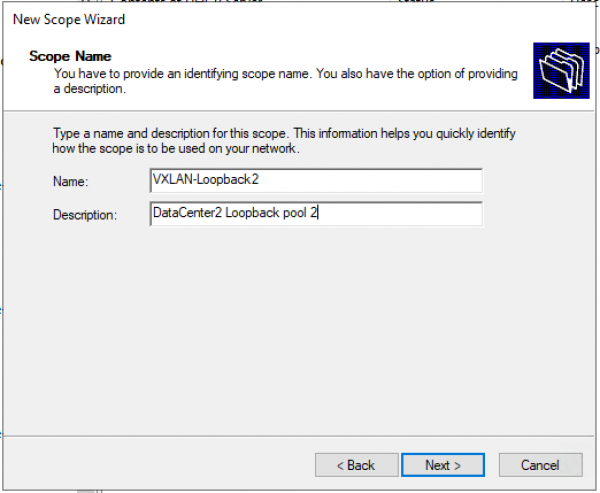
プール名とプールの説明を構成します。
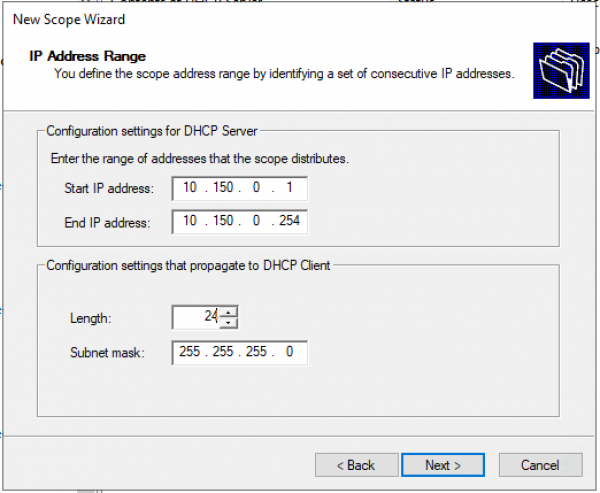
ループバックの IP アドレスの範囲とプールのマスクを設定します。
例外の追加。 除外範囲はプール範囲と正確に一致する必要があります。
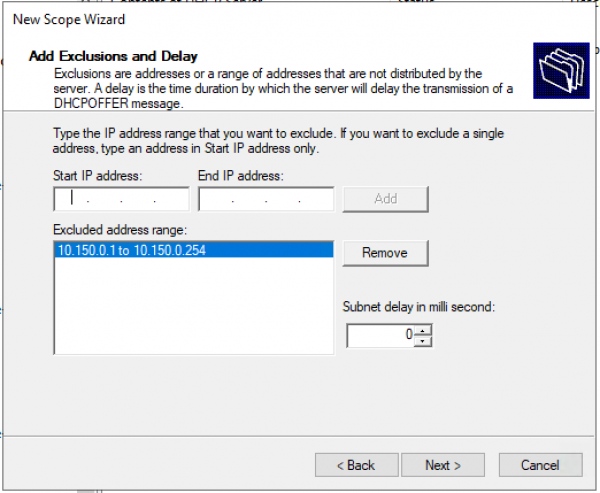
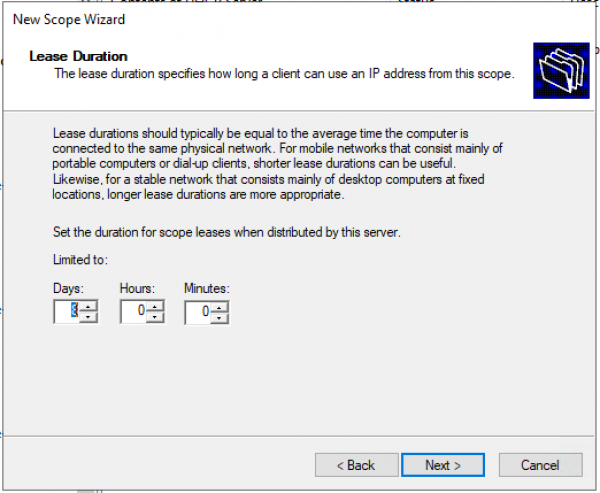
レンタル時間。 「次へ >」
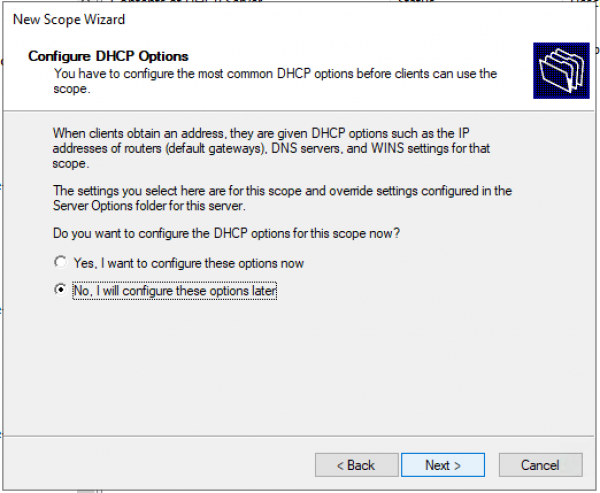
クエリ: DHCP オプション (DNS、WINS、ゲートウェイ、ドメイン) を今すぐ構成しますか、それとも後で行いますか。 「いいえ」と答えて、プールを手動でアクティブ化する方が早いでしょう。 または、何も情報を入力せずに最後まで進み、ウィザードの最後でプールをアクティブ化します。
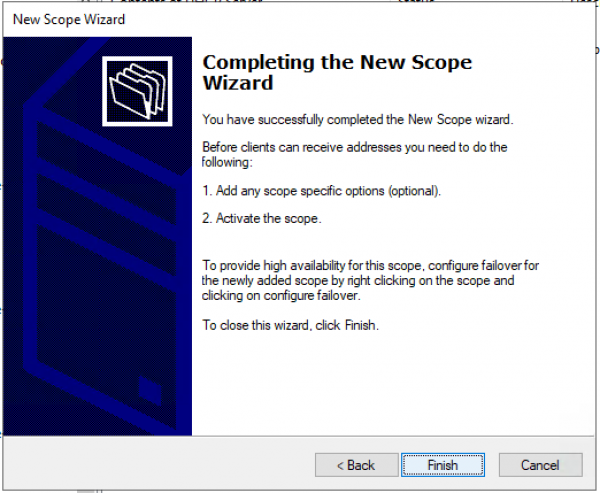
オプションが構成されておらず、プールがアクティブ化されていないことを確認します。 "仕上げる"
プールを手動でアクティブ化します。 — [スコープ] を選択し、コンテキスト メニューで [アクティブ化] を選択します。
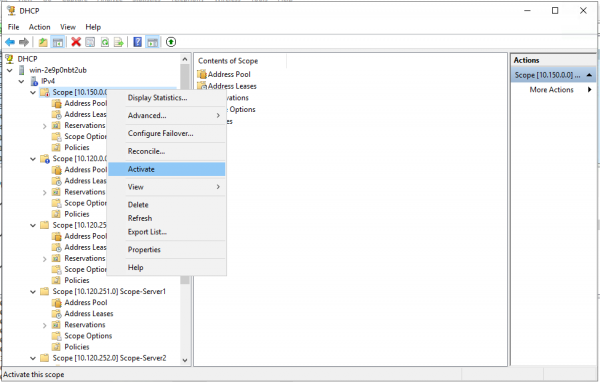
ユーザー/サーバー用のプールを作成します。
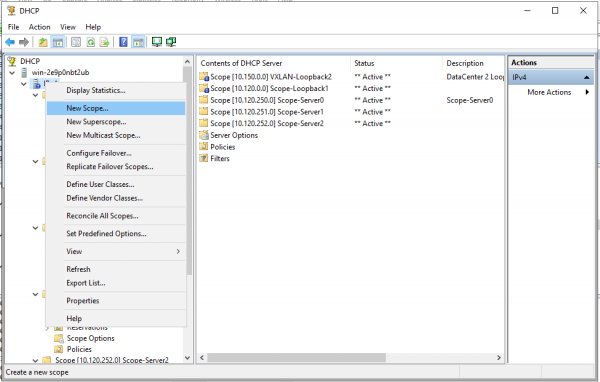
新しいプールを作成します。
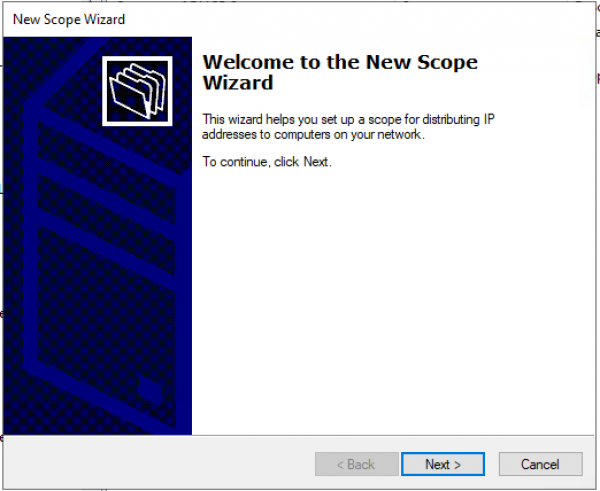
プール作成ウィザード。 「次へ>」
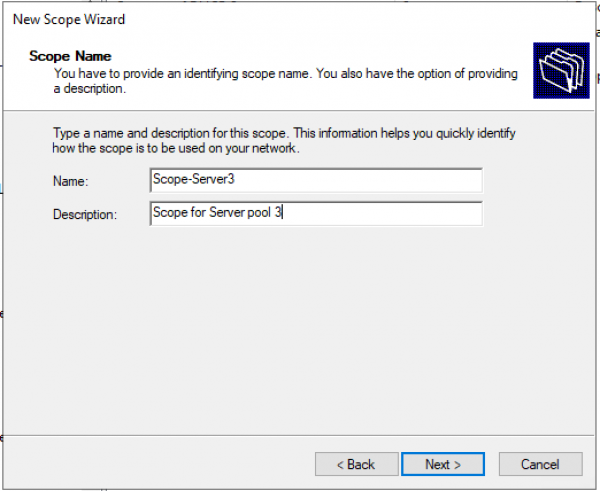
プール名とプールの説明を構成します。
ループバックの IP アドレスの範囲とプールのマスクを設定します。
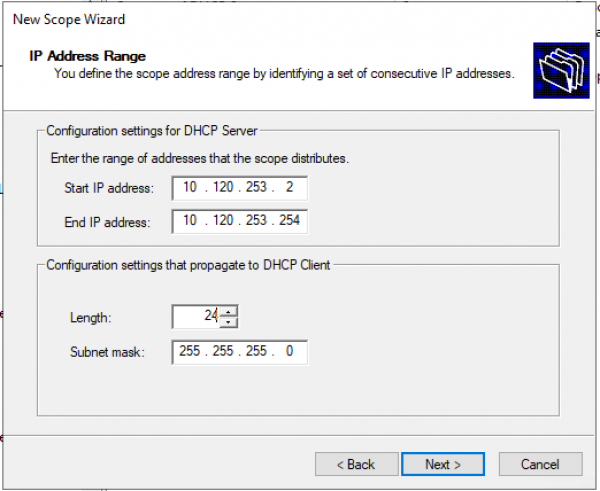
例外の追加。 (デフォルトでは例外は必要ありません) 「次へ >」
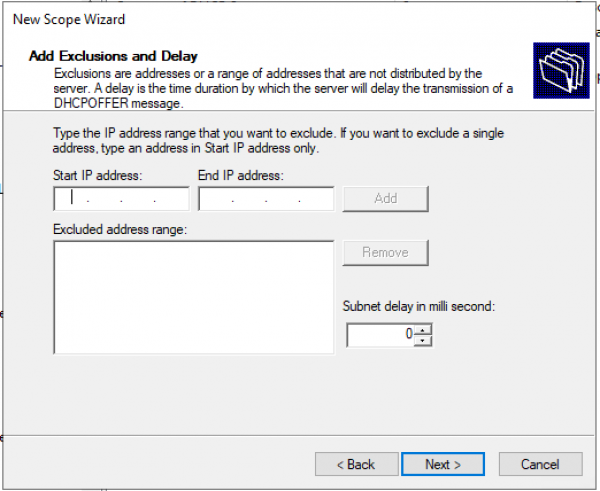
レンタル時間。 「次へ >」
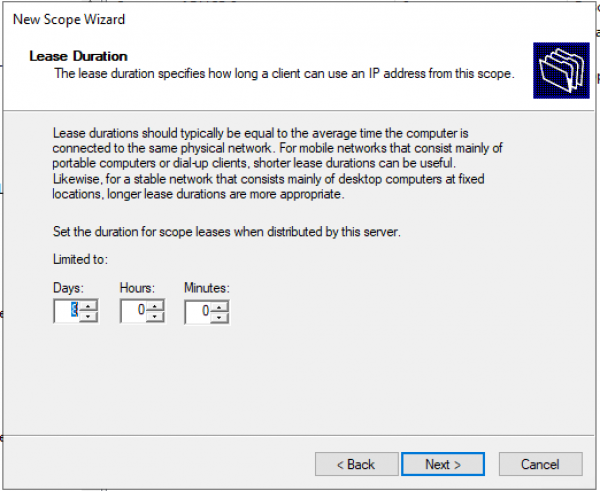
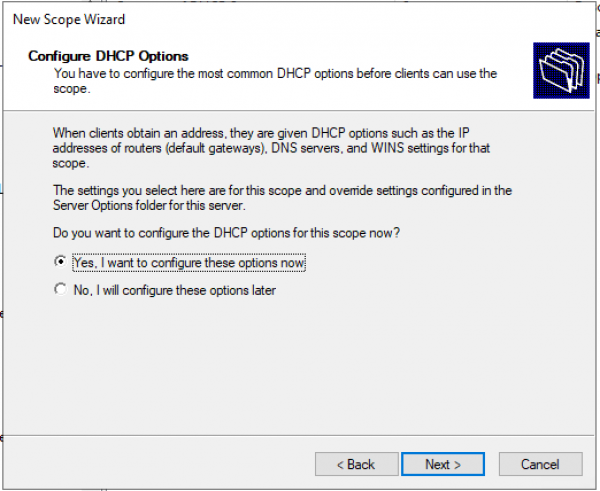
クエリ: DHCP オプション (DNS、WINS、ゲートウェイ、ドメイン) を今すぐ構成しますか、それとも後で行いますか。 今すぐ設定してみましょう。
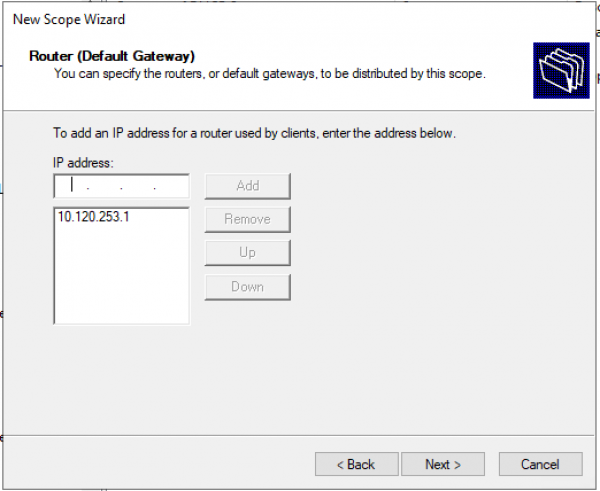
デフォルトゲートウェイアドレスを設定します。
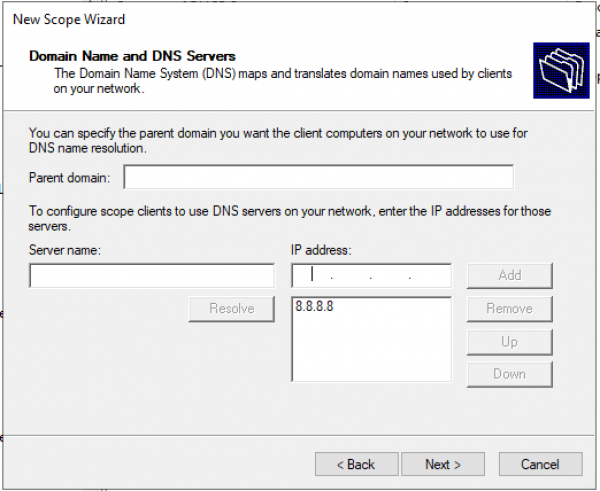
ドメインとDNSサーバーのアドレスを設定します。
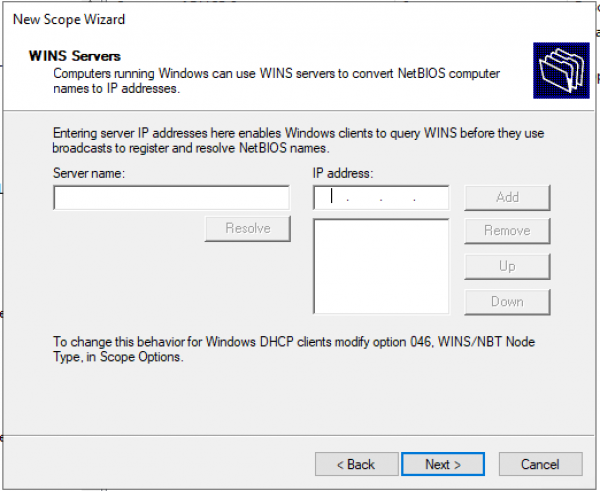
WINS サーバーの IP アドレスを構成します。
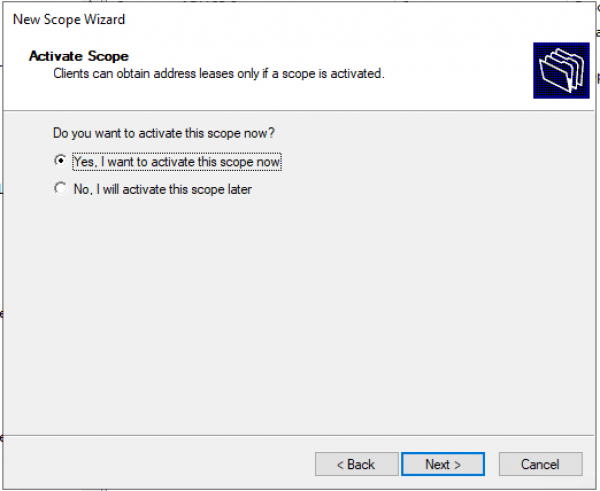
スコープのアクティブ化。
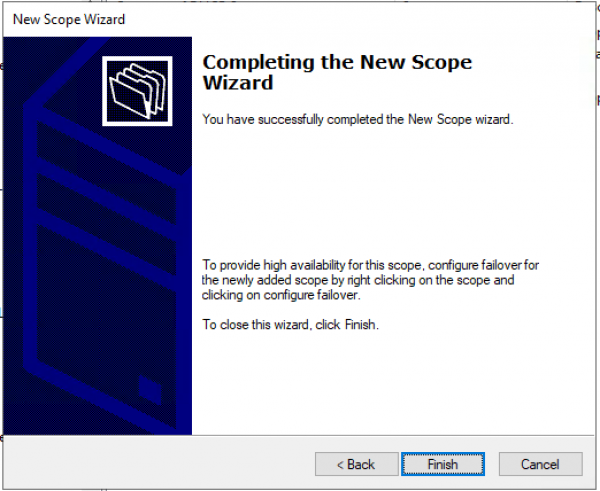
プールが構成されています。 "仕上げる"
まとめ
使用 Windows Server 2016/2019バージョンでは、VXLANファブリック(またはその他のファブリック)用のDHCPサーバーの設定が簡素化されています。(フィルタを設定するために、特別なネットワーク/エージェント回線IDをIT担当者と共有する必要はありません。)
設定は機能しますか? Windows Server 2012年版を2016年/2019年版の新しいサーバーにインストールする場合でも、問題なく動作します。
このドキュメントには、2.X と 7 の 9.3 つのバージョンへの参照が含まれています。 これは、バージョン 7.0(3)I7(7) がシスコ推奨リリースであり、バージョン 9.3 が最も革新的であるという事実によるものです(VXLAN マルチサイト経由のマルチキャストもサポートしています)。
ソースのリスト
出所: habr.com
