

I am pleased to present a tutorial for generating access to the Kubernetes cluster using Dex, dex-k8s-authenticator, and GitHub.
Local meme from the Russian-speaking Kubernetes chat in
Ievads
We use Kubernetes to create dynamic environments for the development and QA teams. Thus, we want to provide them access to the cluster for both the dashboard and kubectl. Unlike OpenShift, vanilla Kubernetes does not have native authentication, so we use third-party tools for this.
In this configuration, we use:
- — a web application for generating the kubectl config
- — an OpenID Connect provider
- GitHub — simply because we use GitHub in our company
We tried to use Google OIDC, but unfortunately we set them up with groups, so the integration with GitHub suited us just fine. Without group mapping, it won't be possible to create RBAC policies based on groups.
So, how does our authorization process in Kubernetes work in a visual representation:
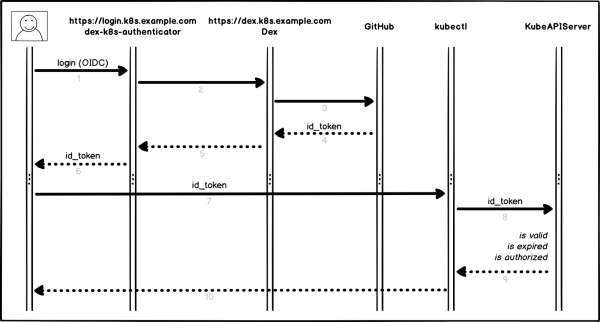
Authorization Process
A bit more detail and by points:
- The user logs into dex-k8s-authenticator (
login.k8s.example.com) - dex-k8s-authenticator redirects the request to Dex (
dex.k8s.example.com) - Dex redirects to the authorization page on GitHub
- GitHub generates the required authorization information and returns it to Dex
- Dex passes the received information to dex-k8s-authenticator
- The user receives an OIDC token from GitHub
- dex-k8s-authenticator adds the token to kubeconfig
- kubectl sends the token to KubeAPIServer
- KubeAPIServer returns access to kubectl based on the provided token
- The user receives access from kubectl
Preparatory Actions
Of course, we already have a Kubernetes cluster set up (k8s.example.com), as well as pre-installed HELM. We also have an organization on GitHub (super-org).
If you do not have HELM, it installs .
First, we need to configure GitHub.
Go to the organization settings page, (https://github.com/organizations/super-org/settings/applications) and create a new application (Authorized OAuth App):
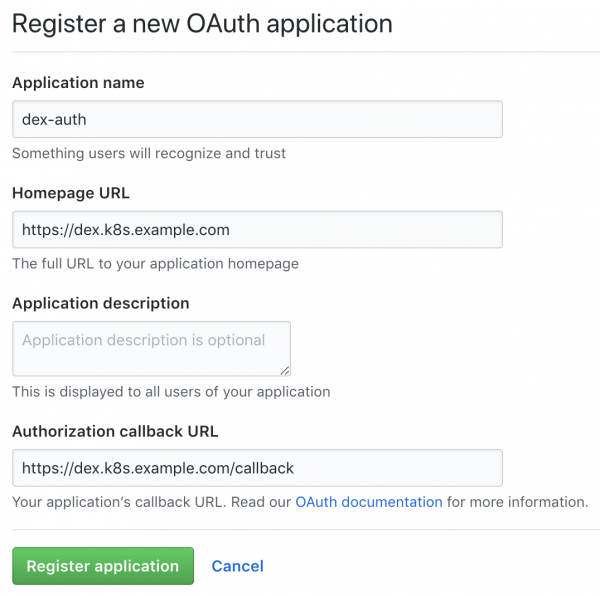
Creating a new application on GitHub
Fill in the fields with the necessary URLs, for example:
- Homepage URL:
https://dex.k8s.example.com - Authorization callback URL:
https://dex.k8s.example.com/callback
Be careful with the links, it is important not to lose the slashes.
In response to the completed form, GitHub will generate Klienta ID un Client secret, save it in a secure place, as we will need it (for example, we use to store secrets):
Client ID: 1ab2c3d4e5f6g7h8
Client secret: 98z76y54x32w1
Prepare DNS records for subdomains login.k8s.example.com un dex.k8s.example.com, kā arī SSL sertifikātiem iebraukšanai.
Izveidosim SSL sertifikātus:
cat <<EOF | kubectl create -f -
apiVersion: certmanager.k8s.io/v1alpha1
kind: Certificate
metadata:
  name: cert-auth-dex
  namespace: kube-system
spec:
  secretName: cert-auth-dex
  dnsNames:
    - dex.k8s.example.com
  acme:
    config:
    - http01:
        ingressClass: nginx
      domains:
      - dex.k8s.example.com
  issuerRef:
    name: le-clusterissuer
    kind: ClusterIssuer
---
apiVersion: certmanager.k8s.io/v1alpha1
kind: Certificate
metadata:
  name: cert-auth-login
  namespace: kube-system
spec:
  secretName: cert-auth-login
  dnsNames:
    - login.k8s.example.com
  acme:
    config:
    - http01:
        ingressClass: nginx
      domains:
      - login.k8s.example.com
  issuerRef:
    name: le-clusterissuer
    kind: ClusterIssuer
EOF
kubectl describe certificates cert-auth-dex -n kube-system
kubectl describe certificates cert-auth-login -n kube-system
ClusterIssuer ar nosaukumu le-clusterissuer jau ir jābūt eksistējošam, ja tāda nav — izveidosim to ar HELM:
helm install --namespace kube-system -n cert-manager stable/cert-manager
cat << EOF | kubectl create -f -
apiVersion: certmanager.k8s.io/v1alpha1
kind: ClusterIssuer
metadata:
  name: le-clusterissuer
  namespace: kube-system
spec:
  acme:
    server: https://acme-v02.api.letsencrypt.org/directory
    email: k8s-admin@example.com
    privateKeySecretRef:
      name: le-clusterissuer
    http01: {}
EOF
KubeAPIServer konfigurācija
Lai strādātu kubeAPIServer, ir nepieciešams konfigurēt OIDC un atjaunot klasteri:
kops edit cluster
...
  kubeAPIServer:
    anonymousAuth: false
    authorizationMode: RBAC
    oidcClientID: dex-k8s-authenticator
    oidcGroupsClaim: groups
    oidcIssuerURL: https://dex.k8s.example.com/
    oidcUsernameClaim: email
kops update cluster --yes
kops rolling-update cluster --yes
Mēs izmantojam klasteru izvēršanai, taču tas strādā līdzīgi arī citos klasteru pārvaldniekos .
Dex un dex-k8s-authenticator konfigurācija
Lai Dex darbotos, ir nepieciešams sertifikāts un atslēga no Kubernetes meistara, izņemsim to no turienes:
sudo cat /srv/kubernetes/ca.{crt,key}
-----BEGIN CERTIFICATE-----
AAAAAAAAAAABBBBBBBBBBCCCCCC
-----END CERTIFICATE-----
-----BEGIN RSA PRIVATE KEY-----
DDDDDDDDDDDEEEEEEEEEEFFFFFF
-----END RSA PRIVATE KEY-----
Noslēgsim dex-k8s-authenticator repozitoriju:
git clone git@github.com:mintel/dex-k8s-authenticator.git
cd dex-k8s-authenticator/
Izmantojot values failus, mēs varam elastīgi konfigurēt mainīgus mūsu .
Aprakstīsim Dex konfigurāciju:
cat < values-dex.yml
global:
  deployEnv: prod
tls:
  certificate: |-
    -----BEGIN CERTIFICATE-----
    AAAAAAAAAAABBBBBBBBBBCCCCCC
    -----END CERTIFICATE-----
  key: |-
    -----BEGIN RSA PRIVATE KEY-----
    DDDDDDDDDDDEEEEEEEEEEFFFFFF
    -----END RSA PRIVATE KEY-----
ingress:
  enabled: true
  annotations:
    kubernetes.io/ingress.class: nginx
    kubernetes.io/tls-acme: "true"
  path: /
  hosts:
    - dex.k8s.example.com
  tls:
    - secretName: cert-auth-dex
      hosts:
        - dex.k8s.example.com
serviceAccount:
  create: true
  name: dex-auth-sa
config: |
  issuer: https://dex.k8s.example.com/
  storage: # https://github.com/dexidp/dex/issues/798
    type: sqlite3
    config:
      file: /var/dex.db
  web:
    http: 0.0.0.0:5556
  frontend:
    theme: "coreos"
    issuer: "Example Co"
    issuerUrl: "https://example.com"
    logoUrl: https://example.com/images/logo-250x25.png
  expiry:
    signingKeys: "6h"
    idTokens: "24h"
  logger:
    level: debug
    format: json
  oauth2:
    responseTypes: ["code", "token", "id_token"]
    skipApprovalScreen: true
  connectors:
  - type: github
    id: github
    name: GitHub
    config:
      clientID: $GITHUB_CLIENT_ID
      clientSecret: $GITHUB_CLIENT_SECRET
      redirectURI: https://dex.k8s.example.com/callback
      orgs:
      - name: super-org
        teams:
        - team-red
  staticClients:
  - id: dex-k8s-authenticator
    name: dex-k8s-authenticator
    secret: generatedLongRandomPhrase
    redirectURIs:
      - https://login.k8s.example.com/callback/
envSecrets:
  GITHUB_CLIENT_ID: "1ab2c3d4e5f6g7h8"
  GITHUB_CLIENT_SECRET: "98z76y54x32w1"
EOF
Un arī dex-k8s-authenticator:
cat < values-auth.yml
global:
  deployEnv: prod
dexK8sAuthenticator:
  clusters:
  - name: k8s.example.com
    short_description: "k8s klasteris"
    description: "Kubernetes klasteris"
    issuer: https://dex.k8s.example.com/
    k8s_master_uri: https://api.k8s.example.com
    client_id: dex-k8s-authenticator
    client_secret: generatedLongRandomPhrase
    redirect_uri: https://login.k8s.example.com/callback/
    k8s_ca_pem: |
      -----BEGIN CERTIFICATE-----
      AAAAAAAAAAABBBBBBBBBBCCCCCC
      -----END CERTIFICATE-----
ingress:
  enabled: true
  annotations:
    kubernetes.io/ingress.class: nginx
    kubernetes.io/tls-acme: "true"
  path: /
  hosts:
    - login.k8s.example.com
  tls:
    - secretName: cert-auth-login
      hosts:
        - login.k8s.example.com
EOF
Uzstādīsim Dex un dex-k8s-authenticator:
helm install -n dex --namespace kube-system --values values-dex.yml charts/dex
helm install -n dex-auth --namespace kube-system --values values-auth.yml charts/dex-k8s-authenticator
Pārbaudīsim pakalpojumu darba spēju (Dex jāatgriež kods 400, bet dex-k8s-authenticator — kods 200):
curl -sI https://dex.k8s.example.com/callback | head -1
HTTP/2 400
curl -sI https://login.k8s.example.com/ | head -1
HTTP/2 200
RBAC konfigurācija
Izveidojam ClusterRole grupai, mūsu gadījumā ar read-only piekļuves tiesībām:
cat << EOF | kubectl create -f -
apiVersion: rbac.authorization.k8s.io/v1
kind: ClusterRole
metadata:
  name: cluster-read-all
rules:
  -
    apiGroups:
      - ""
      - apps
      - autoscaling
      - batch
      - extensions
      - policy
      - rbac.authorization.k8s.io
      - storage.k8s.io
    resources:
      - componentstatuses
      - configmaps
      - cronjobs
      - daemonsets
      - deployments
      - events
      - endpoints
      - horizontalpodautoscalers
      - ingress
      - ingresses
      - jobs
      - limitranges
      - namespaces
      - nodes
      - pods
      - pods/log
      - pods/exec
      - persistentvolumes
      - persistentvolumeclaims
      - resourcequotas
      - replicasets
      - replicationcontrollers
      - serviceaccounts
      - services
      - statefulsets
      - storageclasses
      - clusterroles
      - roles
    verbs:
      - get
      - watch
      - list
  - nonResourceURLs: ["*"]
    verbs:
      - get
      - watch
      - list
  - apiGroups: [""]
    resources: ["pods/exec"]
    verbs: ["create"]
EOF
Izveidosim konfigurāciju ClusterRoleBinding:
cat <<EOF | kubectl create -f -
apiVersion: rbac.authorization.k8s.io/v1beta1
kind: ClusterRoleBinding
metadata:
  name: dex-cluster-auth
  namespace: kube-system
roleRef:
  apiGroup: rbac.authorization.k8s.io
  kind: ClusterRole
  name: cluster-read-all
subjects:
  kind: Group
  name: "super-org:team-red"
EOF
Tagad mēs esam gatavi testēšanai.
Testi
Pārejiet uz pieteikšanās lapu (https://login.k8s.example.com) un autorizējieties, izmantojot GitHub kontu:
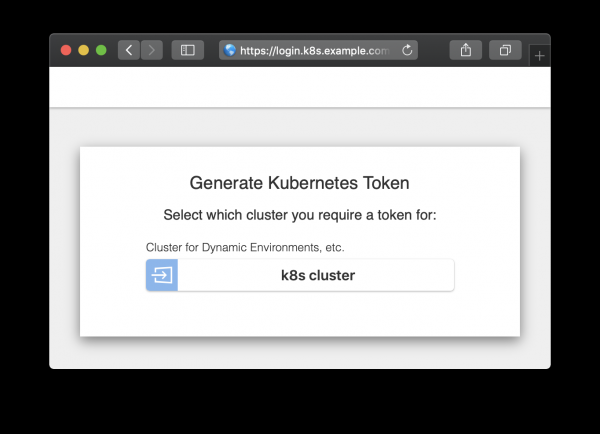
Autorizācijas lapa
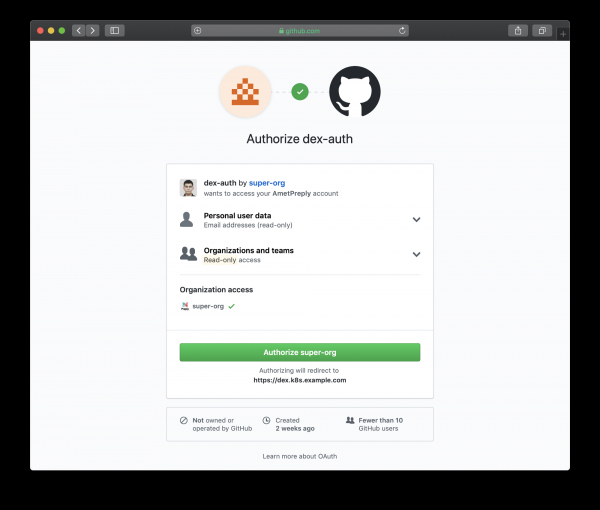
Autorizācijas lapa, kas novirzīta uz GitHub
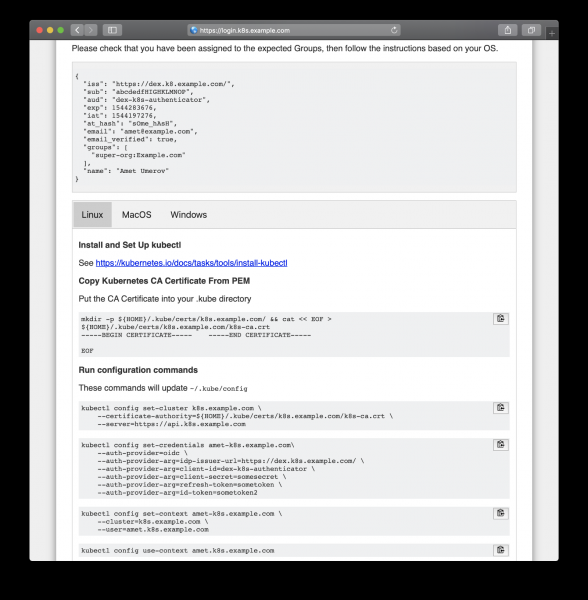
Sekojiet ģenerētajām instrukcijām, lai iegūtu piekļuves tiesības
Pēc kopēšanas no tīmekļa lapas mēs varam izmantot kubectl, lai pārvaldītu mūsu klastera resursus:
kubectl get po
NAME                READY   STATUS    RESTARTS   AGE
mypod               1/1     Running   0          3d

kubectl delete po mypod
Error from server (Forbidden): pods "mypod" is forbidden: User "amet@example.com" cannot delete pods in the namespace "default"
Un tas darbojas, visi GitHub lietotāji mūsu organizācijā var apskatīt resursus un piekļūt podiem, taču viņiem nav tiesību tos mainīt.
Avots: habr.com

 Russian
 Italian
 German
 Polish
 Estonian
 Albanian
 Bulgarian
 Croatian
 Czech
 Danish
 Dutch
 English
 French
 Hungarian
 Latvian
 Norwegian
 Portuguese
 Romanian
 Slovak
 Slovenian
 Spanish
 Swedish