


Mūsu birojā IP telefonijai tiek izmantoti Fanvil telefoni. Cik pamatots ir izvēle par labu lētākai ķīniešu produkcijai, rādīs laiks, bet es pastāstīšu, kā realizēju auto provisioning mehānismu Fanvil BW210P modeļiem.
Piemēram, tiem, kas nav pazīstami ar šo terminu, bet kaut kādā veidā ir izlasījuši līdz šai vietai, paskaidrošu, ka auto provisioning ir mehānisms, kas ļauj centralizēti pārvaldīt IP telefonu iestatījumus.
Kā tas izskatās.
Telefons savienojas ar FTP serveri, atrod savu konfigurācijas failu, salīdzina konfigurācijas faila versiju ar serveri savu. Ja numurs atšķiras, tad konfigurācijas fails tiek piemērots.
Procesā tiek izmantoti četri faili:
dsc.exe — dsCrypt utilīta. Tiek izmantota, lai šifrētu gatavos konfigurācijas failus.(Utilīta ir Windows videi. Diemžēl ne aescrypt, ne aespipe, ne citas Linux utilītas nespēja izveidot šifrējumu, kas būtu saprotams telefonam. Ja kāds zina šādas un var pastāstīt par tām, būšu ļoti pateicīgs.)
genconf.sh — skripts, kas ģenerē gatavu konfigurāciju.
key.txt — šifrēšanas atslēgas fails. Atslēga sastāv no 64 HEX simboliem.
users — to var saukt par telefonu bāzi. Satur iekārtu mac adresi, sip numuru un paroli.
Pure-FTPd serveris ir uzstādīts uz Ubuntu 10.04.
Jo tiek izmantota Windows utilīta, nācās instalēt wine.
genconf.sh saturs
#!/bin/bash
uspath=/opt/pathtousersfile/
usfile=(`cat $uspath/users`)
macdir=/home/pathtoconfigfiles/
a=0
b=1
c=2

while [ ${usfile[$a]} ]
do
dfile=$macdir${usfile[$a]}.txt

cat <<EOF >>$dfile
<<VOIP CONFIG FILE>>Version:2.0007

<GLOBAL CONFIG MODULE>
Static IP          :192.168.1.179
Static NetMask     :255.255.255.0
Static GateWay     :192.168.1.1
Default Protocol   :2
Primary DNS        :202.96.134.133
Alter DNS          :202.96.128.68
DHCP Mode          :1
DHCP Dns           :1
Domain Name        :
Host Name          :VOIP
Pppoe Mode         :0
HTL Start Port     :10000
HTL Port Number    :200
SNTP Server        :209.81.9.7
Enable SNTP        :1
Time Zone          :44
Enable Daylight    :0
SNTP Time Out      :60
DayLight Shift Min :60
DayLight Start Mon :3
DayLight Start Week:5
DayLight Start Wday:0
DayLight Start Hour:2
DayLight Start Min :0
DayLight End Mon   :10
DayLight End Week  :5
DayLight End Wday  :0
DayLight End Hour  :2
DayLight End Min   :0
MMI Set            :-1
MTU Length         :1500
Register WD Time   :0

<LAN CONFIG MODULE>
Lan Ip             :192.168.10.1
Lan NetMask        :255.255.255.0
Bridge Mode        :1

<TELE CONFIG MODULE>
Dial End With #    :1
Dial Fixed Length  :0
Fixed Length       :11
Dial With Timeout  :1
Dial Timeout value :5
Dialpeer With Line :0
Poll Sequence      :0
Accept Any Call    :1
Phone Prefix       :
Local Area Code    :
IP call network    :.
--Port Config--    :
P1 No Disturb      :0
P1 Mute            :0
P1 No Dial Out     :0
P1 No Empty Calling:0
P1 Enable CallerId :1
P1 Forward Service :0
P1 SIP TransNum    :
P1 SIP TransAddr   :
P1 SIP TransPort   :5060
P1 CallWaiting     :1
P1 CallTransfer    :1
P1 Call3Way        :1
P1 AutoAnswer      :0
P1 No Answer Time  :20
P1 Warm Line Time  :0
P1 Extention No.   :
P1 Auto HandDown   :0
P1 Auto Handdown Ti:3
P1 Hotline Num     :
P1 Record Server   :
P1 Enable Record   :0
P1 Busy N/A Line   :0

<DSP CONFIG MODULE>
Signal Standard    :1
Handdown Time      :200
G729 Payload Length:1
G723 Bit Rate      :1
G722 Timestamps    :0
VAD                :1
Ring Type          :1
Dtmf Payload Type  :101
Disable Handfree   :0
RTP PROBE          :0
--Port Config--    :
P1 Output Vol      :5
P1 Input Vol       :3
P1 HandFree Vol    :5
P1 RingTone Vol    :5
P1 Codec           :-1
P1 Voice Record    :0
P1 Record Playing  :1
P1 UserDef Voice   :0
P1 First Codec     :0
P1 Second Codec    :1
P1 Third Codec     :17
P1 Forth Codec     :15
P1 Fifth Codec     :23
P1 Sixth Codec     :9

<SIP CONFIG MODULE>
SIP  Port          :5060
Stun Address       :
Stun Port          :3478
Stun Effect Time   :50
SIP  Differv       :0
Extern Address     :
Url Convert        :1
Reg Retry Time     :32
Strict BranchPrefix:1
--SIP Line List--  :
EOF
">>$dfile1 Phone Number  :${usfile[$b]}
">>$dfile1 Display Name  :${usfile[$b]}
">>$dfile1 Sip Name      :
">>$dfile1 Register Addr :voip.server.net
">>$dfile1 Register Port :5060
">>$dfile1 Register User :${usfile[$b]}
">>$dfile1 Register Pwd  :${usfile[$c]}
">>$dfile1 Register TTL  :32
">>$dfile1 Enable Reg    :1
">>$dfile1 Proxy Addr    :voip.neoflex.ru
">>$dfile1 Proxy Port    :5060
">>$dfile1 Proxy User    :${usfile[$b]}
">>$dfile1 Proxy Pwd     :${usfile[$c]}
cat <<EOF >>$dfile
SIP1 Signal Enc    :0
SIP1 Signal Key    :
SIP1 Media Enc     :0
SIP1 Media Key     :
SIP1 Local Domain  :
SIP1 Fwd Service   :0
SIP1 Ring Type     :0
SIP1 Fwd Number    :
SIP1 Hotline Number:
SIP1 Enable Detect :0
SIP1 Detect TTL    :60
SIP1 Server Type   :0
SIP1 User Agent    :Voip Phone 1.0
SIP1 PRACK         :0
SIP1 KEEP AUTH     :0
SIP1 Session Timer :0
SIP1 Gruu          :0
SIP1 DTMF Mode     :1
SIP1 DTMF SIP-INFO :0
SIP1 Use Stun      :0
SIP1 Via Port      :1
SIP1 Subscribe     :0
SIP1 Sub Expire    :300
SIP1 Single Codec  :0
SIP1 CLIR          :0
SIP1 Strict Proxy  :0
SIP1 Direct Contact:0
SIP1 History Info  :0
SIP1 DNS SRV       :0
SIP1 Transfer Expir:0
SIP1 Ban Anonymous :0
SIP1 Dial Without R:0
SIP1 DisplayName Qu:0
SIP1 Presence Mode :0
SIP1 RFC Ver       :1
SIP1 Signal Port   :0
SIP1 Transport     :0
SIP1 Use Mixer     :0
SIP1 Mixer Uri     :
SIP1 Long Contact  :0
SIP1 Auto TCP      :0
SIP1 Click to Talk :0
SIP1 Mwi No.       :
SIP1 Park No.      :
SIP1 Help No.      :
SIP2 Phone Number  :
SIP2 Display Name  :
SIP2 Sip Name      :
SIP2 Register Addr :
SIP2 Register Port :5060
SIP2 Register User :
SIP2 Register Pwd  :
SIP2 Register TTL  :60
SIP2 Enable Reg    :0
SIP2 Proxy Addr    :
SIP2 Proxy Port    :5060
SIP2 Proxy User    :
SIP2 Proxy Pwd     :
SIP2 Signal Enc    :0
SIP2 Signal Key    :
SIP2 Media Enc     :0
SIP2 Media Key     :
SIP2 Local Domain  :
SIP2 Fwd Service   :0
SIP2 Ring Type     :0
SIP2 Fwd Number    :
SIP2 Hotline Number:
SIP2 Enable Detect :0
SIP2 Detect TTL    :60
SIP2 Server Type   :0
SIP2 User Agent    :Voip Phone 1.0
SIP2 PRACK         :0
SIP2 KEEP AUTH     :0
SIP2 Session Timer :0
SIP2 Gruu          :0
SIP2 DTMF Mode     :1
SIP2 DTMF SIP-INFO :0
SIP2 Use Stun      :0
SIP2 Via Port      :1
SIP2 Subscribe     :0
SIP2 Sub Expire    :300
SIP2 Single Codec  :0
SIP2 CLIR          :0
SIP2 Strict Proxy  :0
SIP2 Direct Contact:0
SIP2 History Info  :0
SIP2 DNS SRV       :0
SIP2 Transfer Expir:0
SIP2 Ban Anonymous :0
SIP2 Dial Without R:0
SIP2 DisplayName Qu:0
SIP2 Presence Mode :0
SIP2 RFC Ver       :1
SIP2 Signal Port   :0
SIP2 Transport     :0
SIP2 Use Mixer     :0
SIP2 Mixer Uri     :
SIP2 Long Contact  :0
SIP2 Auto TCP      :0
SIP2 Click to Talk :0
SIP2 Mwi No.       :
SIP2 Park No.      :
SIP2 Help No.      :

<IAX2 CONFIG MODULE>
Server   Address   :
Server   Port      :4569
User     Name      :
User     Password  :
User     Number    :
Voice    Number    :0
Voice    Text      :mail
EchoTest Number    :1
EchoTest Text      :echo
Local    Port      :4569
Enable   Register  :0
Refresh  Time      :60
Enable   G.729     :0

<PPPoE CONFIG MODULE>
Pppoe User         :user123
Pppoe Password     :XXXXXXX
Pppoe Service      :ANY
Pppoe Ip Address   :

<MMI CONFIG MODULE>
Telnet Port        :23
Web Port           :80
Remote Control     :1
Enable MMI Filter  :0
Telnet Prompt      :
--MMI Account--    :
Account1 Name      :admin
Account1 Pass      :XXXXXXXXX
Account1 Level     :10
Account2 Name      :guest
Account2 Pass      :XXXXXXXX
Account2 Level     :5

<QOS CONFIG MODULE>
Enable VLAN        :0
Enable diffServ    :0
DiffServ Value     :0
VLAN ID            :0
802.1P Value       :0
VLAN Recv Check    :0
Data VLAN ID       :0
Data 802.1P Value  :0
Diff Data Voice    :0
Enable PVID        :0
PVID Value         :0

<DEBUG CONFIG MODULE>
MGR Trace Level    :0
SIP Trace Level    :0
IAX Trace Level    :0
Trace File Info    :0

<AAA CONFIG MODULE>
Enable Syslog      :0
Syslog address     :0.0.0.0
Syslog port        :514

<ACCESS CONFIG MODULE>
Enable In Access   :0
Enable Out Access  :0

<DHCP CONFIG MODULE>
Enable DHCP Server :0
DHCP Relay Target  :
Enable DNS Relay   :1
DHCP Update Flag   :0
TFTP  Server       :0.0.0.0
--DHCP List--      :
Item1 name         :lan
Item1 Start Ip     :192.168.10.1
Item1 End Ip       :192.168.10.30
Item1 Param        :snmk=255.255.255.0:maxl=1440:rout=192.168.10.1:dnsv=192.168.10.1

<NAT CONFIG MODULE>
Enable Nat         :1
Enable Ftp ALG     :1
Enable H323 ALG    :0
Enable PPTP ALG    :1
Enable IPSec ALG   :1

<PHONE CONFIG MODULE>
Keypad Password    :XXXX
LCD Logo           :t
Time 12hours       :0
MWI Number         :*97
Display PhoneNum   :0
Memory Key 1       :
Memory Key 2       :
Memory Key 3       :
Memory Key 4       :
Memory Key 5       :
Memory Key 6       :
Memory Key 7       :
Memory Key 8       :
Memory Key 9       :
Memory Key 10      :
Missed Call Led    :1
Voice Message Led  :1

<AUTOUPDATE CONFIG MODULE>
Download Username  :admin
Download password  :XXXXXXXXXX
Download Server IP :voip-set.server.net
Config File Name   :
Config File Key    :fffffffffffffffffffffffffffffffffffffffffffffffffffffffffffffffffffffffffffffffffffffffffffff
Download Protocol  :1
Download Mode      :2
Download Interval  :1
DHCP Option 66     :0

<VPN CONFIG MODULE>
VPN mode           :-1
L2TP LNS IP        :
L2TP User Name     :
L2TP Password      :
Enable VPN Tunnel  :0
VPN Server IP      :0.0.0.0
VPN Server Port    :80
Server Group ID    :VPN
Server Area Code   :12345
<<END OF FILE>>
EOF

./dsc.exe key.txt e $dfile $macdir${usfile[$a]}
rm $dfile

a=`expr $a + 3`
b=`expr $b + 3`
c=`expr $c + 3`

done
Lai pielāgotu failu saviem iestatījumiem, ir nepieciešams mainīt sekojošo lauki:
uspath=\/opt\/pathtousersfile\/ \nmacdir=\/home\/pathtoconfigfiles\/
Sadaļā --SIP līniju saraksts--, lauki
">>$dfile1 Reģistrācijas adrese #VOIP servera adrese\n">>$dfile1 Reģistrācijas ports #VOIP servera ports\n">>$dfile1 Proxy adrese\n">>$dfile1 Proxy ports
Sadaļa --MMI konts--, lauki
Konts1 vārds #telefonu iestatījumu administrators\nKonts1 parole #administratora parole\nKonts2 vārds \nKonts2 parole
Sadaļa
, lauks


Taustiņu parole		#piekļuves parole iestatījumiem tieši caur telefonu
MWI numurs          #piekļuves numurs balss pastam
Sadaļa
, lauki


Lejupielādēt lietotājvārdu	#FTP servera lietotājs
Lejupielādēt paroli	#Parole FTP serverim
Lejupielādēt servera IP	#FTP servera adrese
Konfigurācijas faila atslēga		#Šifrēšanas atslēga
Bet es ieteiktu vispirms konfigurēt telefonu caur tīmekļa interfeisu pēc saviem ieskatiem, pēc tam saglabāt iestatīto konfigurāciju sadaļā MAINTENANCE — CONFIG — Backup Config. Un jau savu failu ievietot genconf.sh. Neaizmirstot protams par bloku
--SIP līniju saraksts-- : \nEOF \n">>$dfile1 Telefona numurs :${usfile[1]} \n">>$dfile1 Rādīšanas nosaukums :${usfile[1]} \n">>$dfile1 Sip nosaukums : \n">>$dfile1 Reģistrācijas adrese :voip.server.net\n">>$dfile1 Reģistrācijas ports :5060 \n">>$dfile1 Reģistrācijas lietotājs :${usfile[1]} \n">>$dfile1 Reģistrācijas parole :${usfile[2]} \n">>$dfile1 Reģistrācijas TTL :32 \n">>$dfile1 Iespējot Reģistrāciju :1 \n">>$dfile1 Proxy adrese :voip.server.net \n">>$dfile1 Proxy ports :5060 \n">>$dfile1 Proxy lietotājs :${usfile[1]} \n">>$dfile1 Proxy parole :${usfile[2]}
users faila formāts ir vienkāršs un saprotams. Mac adrese, numurs un parole, kas atdalīti ar atstarpēm.
xxxxxxxxxxxx 101 parole
xxxxxxxxxxxx 102 parole
xxxxxxxxxxxx 103 parole
Šeit servera konfigurācija ir pabeigta. Pārliecinieties, ka, palaižot genconf, tiek izveidoti nepieciešamie faili pareizajā vietā, un pāriesim pie tālruņa.
Tālruņa iestatījumos sadaļā MAINTENANCE, sadaļā AUTO PROVISION ir jāiestata konfigurācijas šādā veidā.
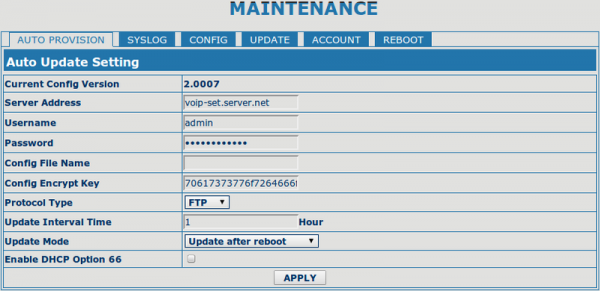
Lauku Config File Name labāk atstāt tukšu. Proti, pēc noklusējuma tālrunis meklē
failus savā MAC adresē. Tie tiek izveidoti pēc genconf.sh palaišanas.
Manā gadījumā, pēc jauno iestatījumu piemērošanas, lauka Update Mode vērtība iegūst formu Update at time interval (Atjaunināt regulāri). Tas ļaus gadījumā, ja tiks mainīti iestatījumi, neizskraidīt pa visiem aparātiem, bet gaidīt apmēram stundu, kad tālrunis pats atjaunosies.
Pēc iestatījumu pielāgošanas attiecīgajā veidā jānospiež Apply un jāpārstartē tālrunis.
Pievērsiet uzmanību laukam Current Config Version. Tieši pēc šī parametra tālrunis nosaka, vai piemērot jauno programmatūru vai nē. Lai izmaiņas stātos spēkā, ir jāpalielina vērtība <>Version: failā genconf.sh
Sapratīsiet, vai vispār notiek kaut kas, serveri, palaidiet nākamo komandu - iftop -f "dst port 21" -n. Par to, ka iestatījumi ir veiksmīgi piemēroti, var saprast pēc Current Config Version lauka, kas atšķirsies no noklusējuma 2.0002.
P.S. Liels paldies Andrei Volovikam no uzņēmuma Vimcom par viņa nenovērtējamajām norādēm un ieteikumiem.
Avots: habr.com

 Russian
 Italian
 German
 Polish
 Estonian
 Albanian
 Bulgarian
 Croatian
 Czech
 Danish
 Dutch
 English
 French
 Hungarian
 Latvian
 Norwegian
 Portuguese
 Romanian
 Slovak
 Slovenian
 Spanish
 Swedish