

Canary deployment is a very effective way to test new code on a subset of users. It significantly reduces the traffic load that could cause issues during deployment, as it occurs only within a specific subgroup. This note is dedicated to how to organize such a deployment using Kubernetes and deployment automation. It is assumed that you know something about Helm and Kubernetes resources..
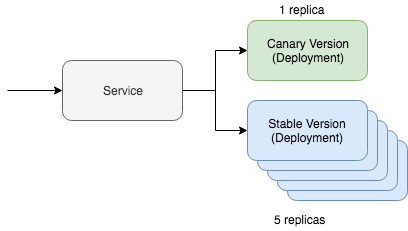
A simple canary deployment in Kubernetes includes two key resources: the service itself and the deployment tool. The canary deployment works through one service, which interacts with two different resources serving the update traffic. One of these resources will work with the "canary" version, while the other will handle the stable version. In this situation, we can regulate the number of canary versions to reduce the amount of traffic that needs servicing. If, for example, you prefer to use YAML, it will look like this in Kubernetes:
kind: Deployment
metadata:
  name: app-canary
  labels:
    app: app
spec:
  replicas: 1
  ...
    image: myapp:canary
---
kind: Deployment
metadata:
  name: app
  labels:
    app: app
spec:
  replicas: 5
  ...
    image: myapp:stable
---
kind: Service
selector:
  app: app # Selector will route traffic to both deployments.
This option can even be better visualized using kubectl, while in there is even a complete tutorial on this scenario. But the main question of this post is how we plan to automate this process using Helm.
Automating Canary Deployment
First of all, we need a Helm chart map that already contains the resources we discussed above. It should look something like this:
~\/charts\/app
├── Chart.yaml
├── README.md
├── templates
│   ├── NOTES.txt
│   ├── _helpers.tpl
│   ├── deployment.yaml
│   └── service.yaml
└── values.yaml
The foundation of the Helm concept is multi-version release management. The stable version is our main stable branch of the project code. But with Helm, we can deploy a canary release with our experimental code. The key is to maintain traffic exchange between the stable version and the canary release. We will manage all this using a special selector:
selector:
  app.kubernetes.io\/name: myapp
Onze zowel "canary" als stable deployment resources geven deze tag aan de modules. Als alles goed is ingesteld, zien we tijdens de uitrol van de canary-versie van onze Helm chart, dat het verkeer naar de pas uitgerolde modules wordt geleid. De stabiele versie van dit commando ziet er zo uit:
helm upgrade
  --install myapp
  --namespace default
  --set app.name=myapp       # Gaat naar app.kubernetes.io/name
  --set app.version=v1       # Gaat naar app.kubernetes.io/version
  --set image.tag=stable
  --set replicaCount=5
Laten we nu onze canary release controleren. Om de canary versie uit te rollen, moeten we aan twee dingen denken. De naam van de release moet anders zijn, zodat we geen updates op de huidige stable versie toepassen. De versie en tag moeten ook verschillen, zodat we andere code kunnen uitrollen en de verschillen in de resource labels kunnen vaststellen.
helm upgrade
  --install myapp-canary
  --namespace default
  --set app.name=myapp       # Gaat naar app.kubernetes.io/name
  --set app.version=v2       # Gaat naar app.kubernetes.io/version
  --set image.tag=canary
  --set replicaCount=1
Dat is alles! Als je de service pingt, kun je zien dat de canary update het verkeer slechts een deel van de tijd omleidt.
Als je op zoek bent naar deployment automation tools die de beschreven logica bevatten, kijk dan eens naar en op . De Helm charts die worden gebruikt voor het implementeren van de hierboven beschreven methode bevinden zich op Github, . Dit was in feite een theoretisch overzicht van hoe je canary deployment automatisering in de praktijk kunt implementeren, met specifieke concepten en voorbeelden.
Bron: habr.com
