

SonarQube is een open platform voor continue kwaliteitscontrole van broncode, dat veel programmeertalen ondersteunt en rapporten genereert over metrics zoals code duplicatie, naleving van codestandaarden, testdekking, codecomplexiteit, potentiële fouten, enzovoorts. SonarQube visualiseert de analyse-resultaten op een gebruiksvriendelijke manier en maakt het mogelijk om de ontwikkeling van het project in de tijd te volgen.
Taak: De status van de kwaliteitscontrole van de broncode in SonarQube aan ontwikkelaars tonen.
Er zijn twee manieren om dit te doen:
- Een script uitvoeren dat de status van de kwaliteitscontrole van de broncode in SonarQube controleert. Als de kwaliteitscontrole in SonarQube niet slaagt, dan de build laten falen.
- De status van de kwaliteitscontrole van de broncode op de startpagina van het project tonen.
Installatie van SonarQube
Voor de installatie van SonarQube uit rpm-pakketten maken we gebruik van de repository. .
We zullen het pakket met de repository voor CentOS 7 installeren.
yum install -y https://harbottle.gitlab.io/harbottle-main/7/x86_64/harbottle-main-release.rpmWe installeren SonarQube zelf.
yum install -y sonarqubeBij de installatie worden de meeste plugins geïnstalleerd, maar we moeten findbugs en pmd nog installeren.
yum install -y sonarqube-findbugs sonarqube-pmdWe starten de service en voegen deze toe aan de opstartservice.
systemctl start sonarqube
systemctl enable sonarqube
Als het lang duurt om op te starten, voeg dan aan het eind van de opties sonar.web.javaOpts een random number generator toe: /dev/.urandom
sonar.web.javaOpts=andere opties -Djava.security.egd=file:/dev/urandomDraai het script om de status van de kwaliteitscontrole van de broncode in SonarQube te controleren.
Helaas is de sonar-break-maven-plugin al lange tijd niet bijgewerkt. Daarom zullen we ons eigen script schrijven.
Voor de test gebruiken we de repository. .
We importeren in Gitlab. Voeg het bestand .gitlab-ci.yml toe:
variabelen:
  MAVEN_OPTS: "-Dhttps.protocols=TLSv1.2 -Dmaven.repo.local=~/.m2/repository -Dorg.slf4j.simpleLogger.log.org.apache.maven.cli.transfer.Slf4jMavenTransferListener=WARN -Dorg.slf4j.simpleLogger.showDateTime=true -Djava.awt.headless=true"
  MAVEN_CLI_OPTS: "--batch-mode --errors --fail-at-end --show-version -DinstallAtEnd=true -DdeployAtEnd=true"
  SONAR_HOST_URL: "http://172.26.9.226:9000"
  LOGIN: "admin" # login sonarqube
  PASSWORD: "admin" # wachtwoord sonarqube

cache:
  paden:
    - .m2/repository

build:
  afbeelding: maven:3.3.9-jdk-8
  fase: build
  script:
    - apt install -y jq || true
    - mvn $MAVEN_CLI_OPTS -Dmaven.test.failure.ignore=true org.jacoco:jacoco-maven-plugin:0.8.5:prepare-agent clean verify org.jacoco:jacoco-maven-plugin:0.8.5:report
    - mvn $MAVEN_CLI_OPTS -Dmaven.test.skip=true verify sonar:sonar -Dsonar.host.url=$SONAR_HOST_URL -Dsonar.login=$LOGIN -Dsonar.password=$PASSWORD -Dsonar.gitlab.project_id=$CI_PROJECT_PATH -Dsonar.gitlab.commit_sha=$CI_COMMIT_SHA -Dsonar.gitlab.ref_name=$CI_COMMIT_REF_NAME
    - export URL=$(cat target/sonar/report-task.txt | grep ceTaskUrl | cut -c11- ) #URL waar het rapport wordt opgeslagen
    - echo $URL
    - |
      while : ;do
          curl -k -u "$LOGIN":"$PASSWORD" "$URL" -o analysis.txt
          export status=$(cat analysis.txt | jq -r '.task.status') #Status als SUCCESS, CANCELED, IN_PROGRESS of FAILED
          echo $status
          if [ ${status} == "SUCCESS" ];then
            echo "SONAR ANALYSE SUCCESVOL";
            break
          fi
          sleep 5
      done
    - curl -k -u "$LOGIN":"$PASSWORD" "$URL" -o analysis.txt
    - export status=$(cat analysis.txt | jq -r '.task.status') #Status als SUCCESS, CANCELED of FAILED
    - export analysisId=$(cat analysis.txt | jq -r '.task.analysisId') #Krijg de analyse-ID
    - |
      if [ "$status" == "SUCCESS" ]; then
        echo -e "SONAR ANALYSE SUCCESVOL...RESULTATEN ANALYSEREN";
        curl -k -u "$LOGIN":"$PASSWORD" "$SONAR_HOST_URL/api/qualitygates/project_status?analysisId=$analysisId" -o result.txt; #Analyse resultaat zoals kritieke, belangrijke en kleine problemen
        export result=$(cat result.txt | jq -r '.projectStatus.status');

        if [ "$result" == "ERROR" ];then
          echo -e "91mSONAR RESULTATEN MISLUKT";
          echo "$(cat result.txt | jq -r '.projectStatus.conditions')"; #Print de kritieke, belangrijke en kleine overtredingen
          exit 1 #breekt de build voor overtredingen
        else
          echo -e "SONAR RESULTATEN SUCCESVOL";
          echo "$(cat result.txt | jq -r '.projectStatus.conditions')";
          exit 0
        fi
      else
          echo -e "e[91mSONAR ANALYSE MISTEDE[0m";
          exit 1 #breekt de build voor mislukking in Stap2
      fi
  tags:
    - docker
Het bestand .gitlab-ci.yml is niet perfect. Het is getest of de verificatietaken in SonarQube eindigden met de status: "SUCCESS". Tot nu toe zijn er geen andere statussen geweest. Zodra er andere statussen zijn, pas ik .gitlab-ci.yml in deze post aan.
Weergave op de startpagina van het project voor de status van de code kwaliteitscontrole
Plugins voor SonarQube installeren
yum install -y sonarqube-qualinsight-badgesWe gaan naar SonarQube op het adres
Een gewone gebruiker aanmaken, bijvoorbeeld "badges".
Inloggen met deze gebruiker in SonarQube.
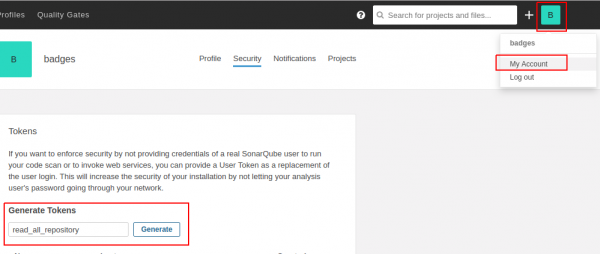
Ga naar "Mijn account", maak een nieuwe token aan, bijvoorbeeld met de naam "read_all_repository" en druk op "Genereer".
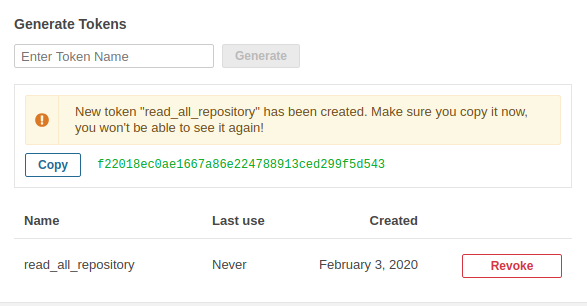
We zien dat de token is verschenen. Hij verschijnt slechts 1 keer.
Inloggen als administrator.
Ga naar Configuratie -> SVG Badges
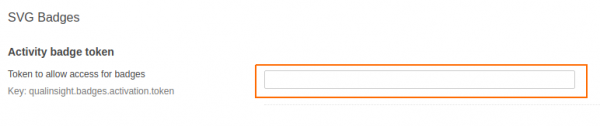
We copy this token into the "Activity badge token" field and click the save button.
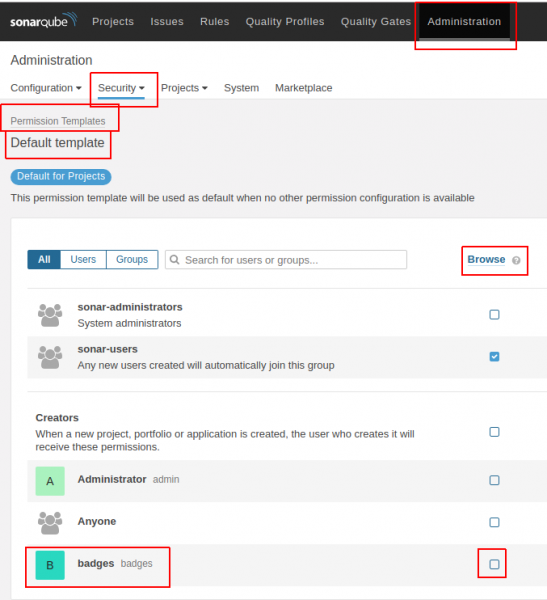
Go to Administration -> Security -> Permission Templates -> Default template (and other templates you may have).
The user badges need to check the "Browse" box.
Testing.
For example, let's take a project. .
We import this project.
We add the .gitlab-ci.yml file to the root of the project with the following content.
variables:
  MAVEN_OPTS: "-Dhttps.protocols=TLSv1.2 -Dmaven.repo.local=~/.m2/repository -Dorg.slf4j.simpleLogger.log.org.apache.maven.cli.transfer.Slf4jMavenTransferListener=WARN -Dorg.slf4j.simpleLogger.showDateTime=true -Djava.awt.headless=true"
  MAVEN_CLI_OPTS: "--batch-mode --errors --fail-at-end --show-version -DinstallAtEnd=true -DdeployAtEnd=true"
  SONAR_HOST_URL: "http://172.26.9.115:9000"
  LOGIN: "admin" # SonarQube login
  PASSWORD: "admin" # SonarQube password

cache:
  paths:
    - .m2/repository

build:
  image: maven:3.3.9-jdk-8
  stage: build
  script:
    - mvn $MAVEN_CLI_OPTS -Dmaven.test.failure.ignore=true org.jacoco:jacoco-maven-plugin:0.8.5:prepare-agent clean verify org.jacoco:jacoco-maven-plugin:0.8.5:report
    - mvn $MAVEN_CLI_OPTS -Dmaven.test.skip=true verify sonar:sonar -Dsonar.host.url=$SONAR_HOST_URL -Dsonar.login=$LOGIN -Dsonar.password=$PASSWORD -Dsonar.gitlab.project_id=$CI_PROJECT_PATH -Dsonar.gitlab.commit_sha=$CI_COMMIT_SHA -Dsonar.gitlab.ref_name=$CI_COMMIT_REF_NAME
  tags:
    - docker
In SonarQube, the project will look like this:
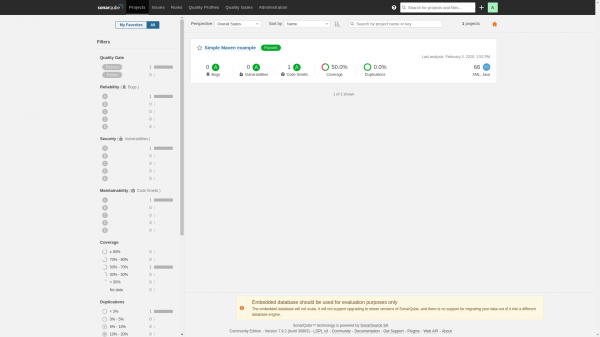
We add badges in README.md and they will look like this:
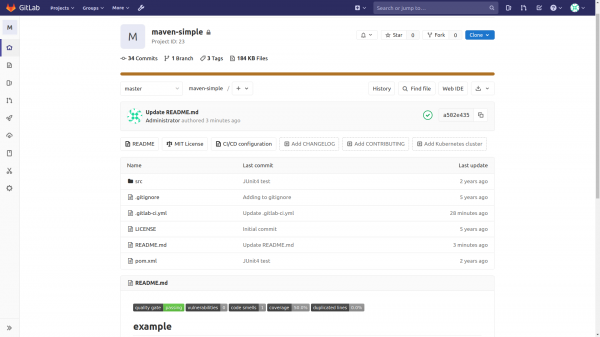
The code for displaying badges looks like this:

Parsing the display string of badges:
[](http://172.26.9.115:9000/dashboard?id=com.github.jitpackmaven-simple)
[](http://172.26.9.115:9000/dashboard?id=id-project)
[](http://172.26.9.115:9000/dashboard?id=com.github.jitpackmaven-simple)
[](http://172.26.9.115:9000/dashboard?id=id-project)Where to find/check Project Key and project id.
Project Key is located at the bottom right. The project id is in the URL.
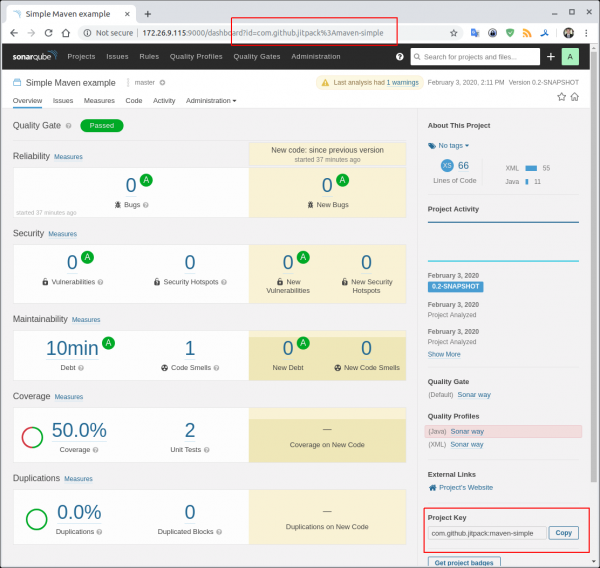
Options for obtaining metrics can be .
Please send all pull requests for improvements and bug fixes .
Telegram chat about SonarQube
Telegram chat about DevSecOps — secure DevOps
Bron: habr.com
