

David Heinemeier Hansson, racer and author of the web framework Ruby on Rails, has released the Omarchy 3.3 distribution, reflecting his vision of the ideal Linux environment. The distribution evolves according to the principle of "Omakase Computing," suggesting that most users at the beginning of their journey do not know exactly what they want, and it is better for them not to agonize over choices, but to use a set of tools prepared by someone whose competence and taste they trust. Project developments are distributed under the MIT license. The size of the ISO image is 7.2 GB.
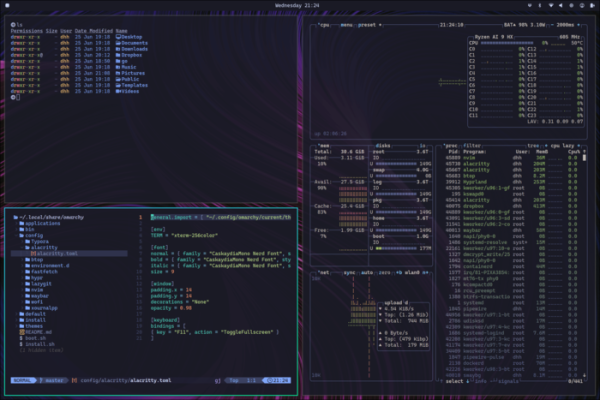
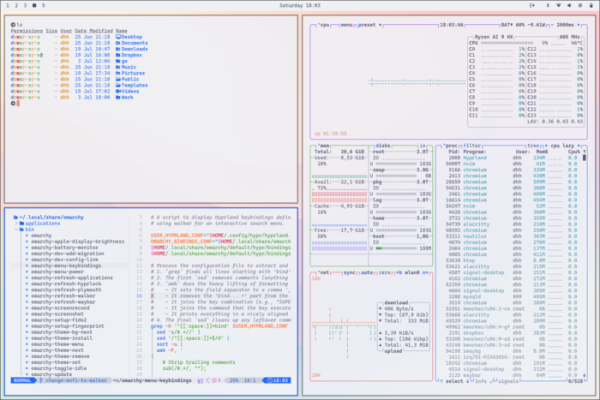
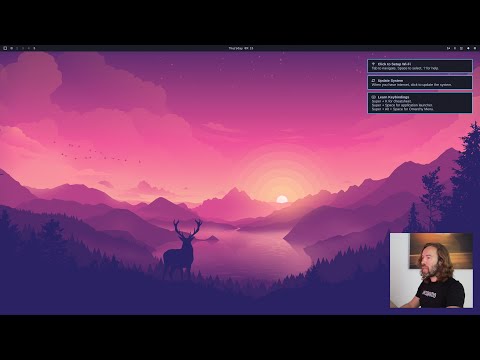
The distribution is based on the Arch Linux package base and offers a user environment based on the Hyprland compositing manager with a mosaic window layout. It is noted that the project not only offers a set of pre-installed packages but tries to provide an environment of harmonious applications selected with consideration for aesthetics and task-solving efficiency.
According to David, for høge ytelse work, motivation is important, and part of that motivation is a beautiful and aesthetic environment. Omarchy includes nothing superfluous and only offers applications that David uses daily — from Neovim, Chromium, and LibreOffice to Spotify, Typora, Ghostty, and Zoom.
Omarchy does not try to resemble Windows or macOS, to please the majority, or appear familiar to users, but only strives to be better. The proposed environment, working with code in Neovim, actively using the terminal, and the mosaic window layout may seem unusual to many, but those who dare to step out of their comfort zone and master something new will be able to increase their work efficiency.
Some features:
- Console installer and orientation towards installing on a separate disk using full disk encryption
- The ability to control all actions in the graphical environment using the keyboard, which noticeably speeds up the execution of typical actions compared to using a mouse. For example, to call the list of applications, you can use the "Super + Space" combination, to show the menu "Super + Alt + Space," to launch the terminal — "Super + Return," and to launch the browser — "Super + Shift + B."

- Det tilbys 14 forskjellige designmaler som kan endres gjennom seksjonen «Style > Theme» i hovedmenyen.
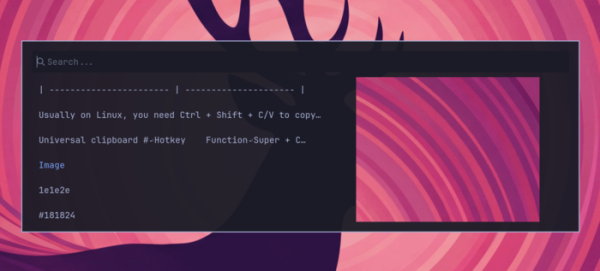
- Bruk av tastekombinasjonene Super + C, Super + X og Super + V for å kopiere og lime inn fra utklippstavlen. Det finnes et grensesnitt (Super + Ctrl + V) for å se og søke i historikken for data som er plassert i utklippstavlen.

- Automatisk oppretting av systemsnapshots etter oppdateringer med mulighet for å rulle tilbake endringer dersom det oppstår problemer. Manuell oppretting av snapshots med kommandoen «omarchy-snapshot create».
- Standard aktivering av brannmur som blokkerer alle innkommende forbindelser til porter, unntatt 22 (ssh) og 53317 (LocalSend).
- Som standard brukes Arch Linux-repositoriene core, extra, multilib, samt det egne repositoriet Omarchy Package Repository. Alternativt kan man aktivere installasjon fra AUR.
- Tilgjengelighet av AI-verktøy: OpenCode (agent for tilgang til AI-tjenester og store språkmodeller), Voxtype (stemmesystem), LM Studio og Ollama (for lokal kjøring av AI-modeller). Tilgjengelige leverandører for Claude Code, Gemini CLI, OpenAI Codex og GitHub Copilot.
- Standardbruken av tekstredigereren NeoVim med mulighet for å erstatte den med VSCode, Cursor, Zed, Sublime Text og Helix.
- Tilgjengelighet av Docker, GitHub CLI og verktøy for å sette opp forhåndskonfigurerte utviklingsmiljøer, for eksempel for bruk med Ruby on Rails, Node.js, Bun, Deno, Laravel, Symfony, .NET, OCaml, Zig og Elixir. For å installere flere forskjellige versjoner av ett programmeringsspråk eller rammeverk benyttes Mise.
- Levering av et konsollgrensesnitt, lazygit, for arbeid med Git, samt Lazydocker for arbeid med Docker.
- Bruk av konsollgrensesnittet Impala for å konfigurere Wi-Fi og BlueTUI for tilkobling av Bluetooth-enheter.
- Tilgjengelighet av grafiske applikasjoner: Obsidian notatsystem, bildebehandleren Pinta, LocalSend for filutveksling med andre enheter, kontorpakken LibreOffice, meldingsappen Signal, mediespilleren mpv, strømmesystemet OBS Studio og videoredigereren Kdenlive.
- Mulighet for enkel installasjon av proprietære applikasjoner: passordhåndtereren 1Password, markdown-redigereren Typora, filsynkroniseringstjenesten Dropbox. VPN Tailscale, musikkstjenesten Spotify.
- Installerte webapplikasjoner: e-postklient og kalenderplanlegger HEY (alternativ til Gmail, Outlook og Apple Mail), prosjektstyringssystemet Basecamp, Google Maps, ChatGPT, WhatsApp, X/Twitter, YouTube, Zoom.
- For gaming enthusiasts, Steam, RetroArch, Minecraft, and Xbox Controllers are available.
- The menu includes the option 'Install > Windows' for quick installation of Windows 11 Pro (without activation) in a Docker virtual machine.
- Availability of advanced utilities for command line use, such as fzf (enhanced file searching), Zoxide (replacement for the cd command with operation history), ripgrep (an improved grep for content searching), eza (replacement for ls that shows more information), fd (replacement for find), try (creating directories for experimentation).
- Provision of shell functions for common tasks such as compress/decompress, iso2sd, format-drive, img2jpg, img2jpg-small, and img2png.
Kilde: opennet.ru

 Russian
 Italian
 German
 Polish
 Estonian
 Albanian
 Bulgarian
 Croatian
 Czech
 Danish
 Dutch
 English
 Finnish
 French
 Hungarian
 Latvian
 Lithuanian
 Norwegian
 Portuguese
 Romanian
 Slovak
 Slovenian
 Spanish
 Swedish