

For some time, I crafted a system to evaluate the viability of office UPS devices. The assessment is based on long-term monitoring. After using the results, I refined the system and learned a lot of interesting things, which I will share—welcome under the cut.
Overall, the concept proved to be correct. From a one-time query to the UPS, you can only find out that life is pain. Some parameters are only relevant when 220 V is not connected, some turn out to be outright nonsense after analysis, and some need to be recalculated manually, cross-referencing with reality.
To anticipate, I tried to add these nuances to the system. After all, we are automators, aren’t we?
For example, the parameter "battery charge in percentage" as a standalone value conveys nothing and is usually equal to 100. What is truly important is how quickly the battery discharges, how quickly it charges, and how many times it has been discharged to critical values. Surprisingly, part of this work is done by the UPS itself, albeit using very strange formulas; more on this below.
The parameter "load on the UPS" is quite good and useful. But if you look at it dynamically, you’ll find that sometimes it’s nonsense, and at other times—interesting information about the connected equipment.
«Battery voltage". Practically a Grail, if not for one caveat: the vast majority of the time, the battery is on charge, and the parameter displays the charge voltage rather than the battery voltage. Wait, isn’t this supposed to be handled by the self-test procedure?..
«Self-test". It is, but its results are not communicated anywhere. In the case of a failed self-test, the UPS will disconnect and scream like a cut pig, and that’s the only available result. Furthermore, not all UPSs report the occurrence of the self-test.
And "nice try vendor"—the most interesting of the available parameters, "battery runtime". It is designed to predict how long the battery will last under the current load. Additionally, it ties into the internal logic of the UPS’s behavior. In reality, it shows rosy dreams, especially when fully charged.
There were also some nuances of an organizational nature.
For example, all the UPS systems I encountered have battery date information (two fields, in fact). However, I could only record this data (after replacing the battery, of course) for the products from APC, and it took quite an effort. In Powercom, though, this information cannot be input in any way, at least not under Windows.
The same Powercom stood out with identical values in the field 'serial number'. It cannot record data either.
The calculation 'battery runtime', apparently, includes values from periods when the UPS is connected to 220V, and consequently, the battery data is clearly incorrect. In reality, the battery runtime can safely be divided by 2, or even by 3. And it will still remain a purely synthetic value. Moreover, it is based on 'battery load', which also shows oddities: on some units, it doesn’t reset for a long time after high load, while on others, it tends to zero.
Despite such a zoo, it can be seen that all parameters are still subject to some algorithmization. This means that you can not only look at the data (and certainly not manually review all existing records), but can immediately input the entire array into an analyzer and build recommendations based on them. This has been implemented in the new version of the software.
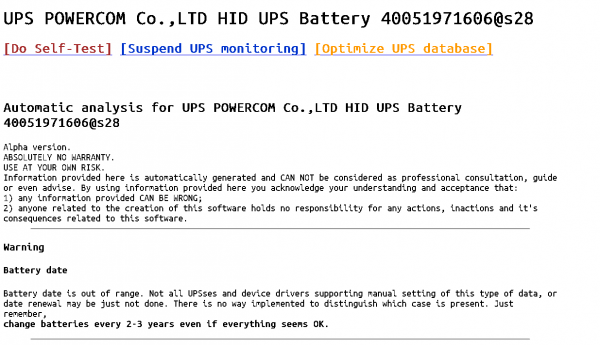
The UPS information page will provide warnings and recommendations:
- at least one self-test failure has been registered (if the UPS offers such functionality)
- the need to replace the battery
- unusual load values on the UPS
- absence of battery data
- unusual input voltage values
- recommendations for data usage and UPS maintenance
(all possible options can be found in ups_additional.php)
A necessary condition for correct analytics, of course, is the maximum possible data collection.
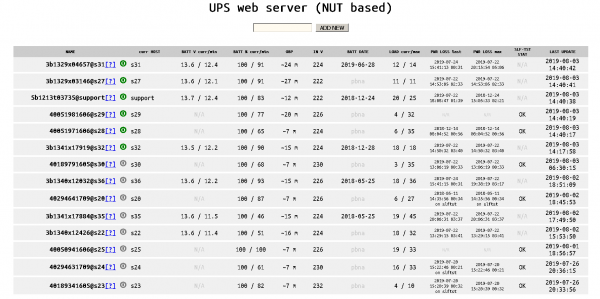
On the main page, the maximum and critical values and the adjusted prediction of runtime can be seen immediately.
And also:
- now the maximum power outage time is calculated correctly
- current information from the UPS is marked in green, outdated information in gray, critical in red and orange
- a database optimization procedure has been added (launched manually, with automatic backup creation)
- useless information has been removed from the main screen and useful content has been added 🙂
Ansvarsfraskrivelse:
Selvfølgelig er dette langt fra enterprise-nivå. Nesten hele installasjonen gjøres manuelt. Testene var for få, og det dukker opp feil her og der. Likevel bruker jeg det nyttig og ønsker dere det samme.
Takk for oppmerksomheten!
Kun registrerte brukere kan delta i undersøkelsen. , vær så snill.
Trenger vi å legge til noe annet i programvaren?
finpuss det til enterprise-nivå!
Det ville vært bra med et oppsett for å unngå manuell installasjon.
Nei, slik er det greit.
Brenn bensinen.
Mange ting er nødvendig, jeg skriver det i kommentarene.
34 brukere stemte, 13 brukere avholdt seg.
Kilde: habr.com

 Russian
 Italian
 German
 Polish
 Estonian
 Albanian
 Bulgarian
 Croatian
 Czech
 Danish
 Dutch
 English
 French
 Hungarian
 Latvian
 Norwegian
 Portuguese
 Romanian
 Slovak
 Slovenian
 Spanish
 Swedish