

Olá, Habr! Apresento a vocês a tradução do artigo do autor Christopher Kuech.
As paradigmas de programação orientada a objetos e funcional podem parecer em desacordo, mas ambos são igualmente suportados no Powershell. Praticamente todas as linguagens de programação, funcionais ou não, têm mecanismos para vinculação avançada de nomes e valores; Classes, semelhantes a structs e records, são apenas uma abordagem. Se limitarmos o uso de Classes à vinculação de nomes e valores e evitarmos conceitos de programação orientada a objetos "pesados", como herança, polimorfismo ou mutabilidade, poderemos aproveitar suas vantagens sem complicar nosso código. Além disso, ao adicionar métodos de conversão imutáveis, podemos enriquecer nosso código funcional com Classes.
A Magia do Casting
O casting é uma das funcionalidades mais poderosas do Powershell. Quando você aplica um valor a um cast, confia na capacidade de inicialização e validação implícitas que o ambiente adiciona ao seu aplicativo. Por exemplo, um simples cast de string para [xml] passará pelo código do parser e gerará uma árvore xml completa. Podemos usar Classes em nosso código com o mesmo fim.
Casting de Hashtables
Se você não tem um construtor, pode continuar sem ele, usando casting de hashtables para o tipo da sua classe. Não se esqueça de usar atributos de validação para aproveitar ao máximo esse padrão. Ao mesmo tempo, podemos usar propriedades tipadas da classe para acionar uma lógica de inicialização e validação ainda mais profunda.
class Cluster {
    [ValidatePattern("^[A-z]+$")]
    [string] $Service
    [ValidateSet("TEST", "STAGE", "CANARY", "PROD")]
    [string] $FlightingRing
    [ValidateSet("EastUS", "WestUS", "NorthEurope")]
    [string] $Region
    [ValidateRange(0, 255)]
    [int] $Index
}

[Cluster]@{
    Service       = "MyService"
    FlightingRing = "PROD"
    Region        = "EastUS"
    Index         = 2
}
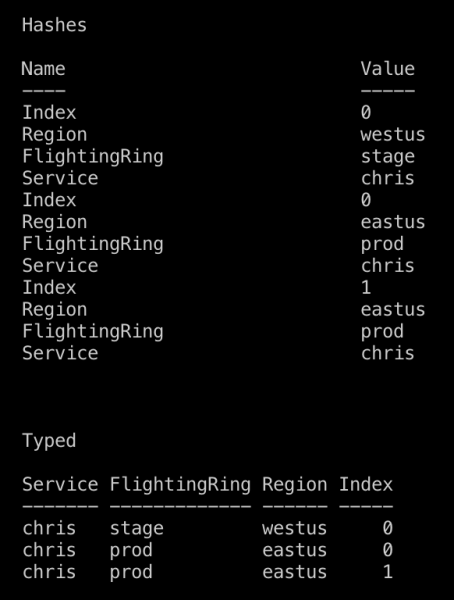
Além disso, o casting ajuda a obter uma saída limpa. Compare a saída de um array de hashtables Cluster passado para o Format-Table com o que ocorre se antes você fizer o cast dessas hashtables para uma classe. As propriedades da classe sempre são listadas na ordem em que estão definidas. Não se esqueça de adicionar a palavra-chave hidden antes de todas as propriedades que não devem ser visíveis na saída.
Casting de Valores
Se você tem um construtor com um único argumento, fazer o cast do valor para o seu tipo de classe passará o valor para esse construtor, onde você pode inicializar a instância da sua classe.
class Cluster {
    [ValidatePattern("^[A-z]+$")]
    [string] $Service
    [ValidateSet("TEST", "STAGE", "CANARY", "PROD")]
    [string] $FlightingRing
    [ValidateSet("EastUS", "WestUS", "NorthEurope")]
    [string] $Region
    [ValidateRange(0, 255)]
    [int] $Index

    Cluster([string] $id) {
        $this.Service, $this.FlightingRing, $this.Region, $this.Index = $id -split "-"
    }
}

[Cluster]"MyService-PROD-EastUS-2"
Cast para string
Você também pode sobrescrever o método class [string] ToString(), para definir a lógica de representação em string do objeto, como por exemplo, usar interpolação de strings.
class Cluster {
    [ValidatePattern("^[A-z]+$")]
    [string] $Service
    [ValidateSet("TEST", "STAGE", "CANARY", "PROD")]
    [string] $FlightingRing
    [ValidateSet("EastUS", "WestUS", "NorthEurope")]
    [string] $Region
    [ValidateRange(0, 255)]
    [int] $Index

    [string] ToString() {
        return $this.Service, $this.FlightingRing, $this.Region, $this.Index -join "-"
    }
}

$cluster = [Cluster]@{
    Service       = "MyService"
    FlightingRing = "PROD"
    Region        = "EastUS"
    Index         = 2
}

Write-Host "Criamos um modelo para '$cluster'"
Cast de instâncias serializadas
O cast permite a deserialização segura. Exemplos abaixo resultarão em erro se os dados não atenderem à nossa especificação em Cluster.
# Валидация сериализованных данных

[Cluster]$cluster = Get-Content "./my-cluster.json" | ConvertFrom-Json
[Cluster[]]$clusters = Import-Csv "./my-clusters.csv"
Casts no seu código funcional
Programas funcionais primeiro definem estruturas de dados e, em seguida, implementam o programa como uma sequência de transformações sobre estruturas de dados imutáveis. Apesar da impressão contraditória, classes realmente ajudam na escrita de código funcional, devido aos métodos de conversão de tipos.
Estou escrevendo um PowerShell funcional?
Muitas pessoas que vieram do C# ou têm um histórico semelhante escrevem PowerShell que se assemelha ao C#. Ao fazer isso, você renuncia ao uso de conceitos de programação funcional e provavelmente se beneficiará ao se aprofundar na programação orientada a objetos em PowerShell ou estudar melhor programação funcional.
Se você se baseia fortemente na transformação de dados imutáveis, usando pipes (|), Where-Object, ForEach-Object, Select-Object, Group-Object, Sort-Object, etc. — você tem um estilo mais funcional, e o uso de classes PowerShell em estilo funcional pode te ajudar.
Uso funcional de classes
As castes use an alternative syntax, they are merely a mapping between two domains. In the pipeline, you can map an array of values using ForEach-Object.
In the example below, the Node constructor runs every time there is a cast to Datum, allowing us not to write a considerable amount of code. As a result, our pipeline focuses on the declarative data query and aggregation, while our classes handle data parsing and validation.
# Пример комбинирования классов с конвейерами для separation of concerns в конвейерах

class Node {
    [ValidateLength(3, 7)]
    [string] $Name
    [ValidateSet("INT", "PPE", "PROD")]
    [string] $FlightingRing
    [ValidateSet("EastUS", "WestUS", "NorthEurope", "WestEurope")]
    [string] $Region
    Node([string] $Name) {
        $Name -match "([a-z]+)(INT|PPE|PROD)([a-z]+)"
        $_, $this.Service, $this.FlightingRing, $this.Region = $Matches
        $this.Name = $Name
    }
}

class Datum {
    [string] $Name
    [int] $Value
    [Node] $Computer
    [int] Severity() {
        $this.Name -match "[0-9]+$"
        return $Matches[0]
    }
}

Write-Host "Urgent Security Audit Issues:"
Import-Csv "./audit-results.csv" `
    | ForEach-Object {[Datum]$_} `
    | Where-Object Value -gt 0 `
    | Group-Object {$_.Severity()} `
    | Where-Object Name -lt 2 `
    | ForEach-Object Group `
    | ForEach-Object Computer `
    | Where-Object FlightingRing -eq "PROD" `
    | Sort-Object Name, Region -Unique
Class packaging for reuse
Nothing is as good as it seems
Unfortunately, classes cannot be exported by modules in the same way as functions or variables; however, there are some tricks. Suppose your classes are defined in the file ./my-classes.ps1.
You can perform a dot-sourcing of the classes file: . ./my-classes.ps1. This will execute my-classes.ps1 in your current scope and define all the classes from the file there.
You can create a PowerShell module that exports all your custom APIs (cmdlets) and set the ScriptsToProcess variable = "./my-classes.ps1" in your module manifest, with the same result: ./my-classes.ps1 will run in your environment.
Whichever option you choose, remember that the PowerShell type system cannot resolve types with the same name loaded from different places.
Even if you load two identical classes with the same properties from different sources, you risk running into issues.
The way forward
The best way to avoid type resolution problems is to never expose your classes to users. Instead of expecting the user to import a specific class type, export a function from your module that eliminates the need to interact directly with the class. Regarding Cluster, we can export the New-Cluster function, which will support user-friendly parameter sets and return a Cluster.
class Cluster {
    [ValidatePattern("^[A-z]+$")]
    [string] $Service
    [ValidateSet("TEST", "STAGE", "CANARY", "PROD")]
    [string] $FlightingRing
    [ValidateSet("EastUS", "WestUS", "NorthEurope")]
    [string] $Region
    [ValidateRange(0, 255)]
    [int] $Index
}

function New-Cluster {
    [OutputType([Cluster])]
    Param(
        [Parameter(Mandatory, ParameterSetName = "Id", Position = 0)]
        [ValidateNotNullOrEmpty()]
        [string] $Id,
        [Parameter(Mandatory, ParameterSetName = "Components")]
        [string] $Service,
        [Parameter(Mandatory, ParameterSetName = "Components")]
        [string] $FlightingRing,
        [Parameter(Mandatory, ParameterSetName = "Components")]
        [string] $Region,
        [Parameter(Mandatory, ParameterSetName = "Components")]
        [int] $Index
    )

    if ($Id) {
        $Service, $FlightingRing, $Region, $Index = $Id -split "-"
    }

    [Cluster]@{
        Service       = $Service
        FlightingRing = $FlightingRing
        Region        = $Region
        Index         = $Index
    }
}

Export-ModuleMember New-Cluster
O que mais ler
Fonte: habr.com
