

Simon Peter, creator of the self-sufficient AppImage package format, has released version 0.7 of helloSystem, based on FreeBSD 13 and targeted as a system for everyday users who may want to switch from macOS due to dissatisfaction with Apple's policies. The system is free from the complexities typical of modern Linux distributions, fully under user control, and designed to provide comfort for former macOS users. A bootable image of the distribution has been created, sized at 791 MB (torrent).
The interface resembles macOS and includes two panels — a top one with a global menu and a bottom one with an application panel. The global menu and status bar are powered by the panda-statusbar package, developed by the CyberOS distribution (formerly PandaOS). The Dock application panel is based on work from the cyber-dock project, also from the CyberOS developers. For file management and placing shortcuts on the desktop, the Filer file manager is used, based on pcmanfm-qt from the LXQt project. Falkon is offered as the default browser, with Firefox and Chromium available optionally. Applications are delivered in self-contained packages. The launch utility is used to run applications, which finds the program and analyzes errors during execution.
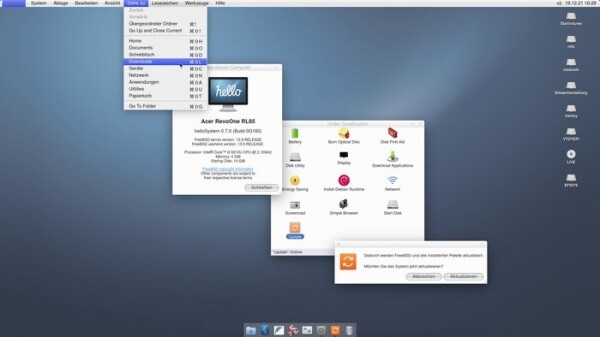
The project is developing a series of their own applications, such as a configurator, installer, mountarchive utility for mounting archives in the FS tree, a data recovery tool for ZFS, a disk partitioning interface, a network configuration indicator, a screenshot utility, a browser for Zeroconf servers, a volume configuration indicator, and a utility for configuring the boot environment. Development is done using Python and the Qt library. Among the supported components for application development, listed in order of preference, are PyQt, QML, Qt, KDE Frameworks, and GTK. ZFS is used as the primary filesystem, with support for mounting UFS, exFAT, NTFS, EXT4, HFS+, XFS, and MTP.
Main innovations in helloSystem 0.7:
- Transition to FreeBSD 13.0 codebase (the previous release was based on FreeBSD 12.2).
- A new architecture for Live mode has been implemented, functioning without a RAM disk, without changing the root partition, and without copying the system image into RAM. Instead of the ZFS file system, the UFS file system compressed with uzip is used in the live image. The start of the graphical environment has been moved to an earlier stage of booting. As a result, the size of the live image has been reduced from 1.4 GB to 791 MB, and the boot time has been cut by three times.
- Compatibility with the Ventoy toolbox has been ensured, allowing multiple different ISO images to be booted from a single medium.
- Support for the exFAT file system has been added.
- Files for application developers have been allocated in a separately bootable set, including compilers, header files, and documentation.
- Compatibility with older NVIDIA graphics cards has been improved (several different versions of NVIDIA drivers have been added).
- The boot process interface has been changed. By default, text console availability has been discontinued.
- Translations for many applications, configuration dialogs, and utilities have been added.
- In addition to the default browser Falkon, quick installation options for Chromium, Firefox, and Thunderbird with global menu support and native window decorations have been provided.
- The menu now displays hotkeys that lead to the corresponding menu items. Visual highlighting of selected menu items has been ensured. By default, the display of icons in context menus has been discontinued.
- The ability to adjust volume and screen brightness through the corresponding multimedia buttons on laptop keyboards has been implemented.
- În emulatorul de terminal, funcțiile de comandă Command-C și Command-V sunt aliniate cu procesarea datelor din alte aplicații (pentru a executa Ctrl-C, trebuie să apăsați Command-Shift-C sau Ctrl-Command-C).
- A fost adăugată suport pentru sunetele sistemului în managerul de fișiere și alertele sonore în dialogul de ieșire a mesajelor.
- În cazul în care sesiunea grafică nu poate fi lansată în termen de timp stabilit, se va afișa un mesaj de eroare cu informații utile despre hardware.
- În managerul de fișiere, a fost asigurată suportul pentru redenumirea partițiilor de disc (prin executarea comenzii diskutil rename), afișarea etichetelor text pentru acestea și asocierea pictogramelor cu partiția. A fost adăugată posibilitatea de a deschide imaginea unui disc prin dublu clic.
- A fost adăugată utilitarul makeimg pentru crearea imaginilor de disc.
- Un element a fost adăugat în meniul contextual pentru a apela interfața de formatare a discurilor.
- Programul pentru notițe lipicioase a fost eliminat din autostart.
- Pentru dispozitivele audio a fost oferită posibilitatea de a apela egalizatorul.
- Funcționalitățile experimentale complet incomplete sunt adunate în secțiunea „Under Construction”. Sunt disponibile pentru testare utilitarele pentru instalarea actualizărilor pachetelor și aplicarea patch-urilor de la FreeBSD, scrierea pe discuri optice, descărcarea seturilor cu aplicații suplimentare și instalarea Debian Runtime cu mediu pentru rularea aplicațiilor Linux.
Sursa: opennet.ro
