

Bună tuturor. În mai, OTUS lansează , atât pentru infrastructură, cât și pentru aplicații, folosind Zabbix, Prometheus, Grafana și ELK. În acest context, tradițional, împărtășim materiale utile pe această temă.
pentru Prometheus permite realizarea monitorizării serviciilor externe prin HTTP, HTTPS, DNS, TCP, ICMP. În acest articol, vă voi arăta cum să configurați monitorizarea HTTP/HTTPS folosind exporterul Blackbox. Vom rula exporterul Blackbox în Kubernetes.
Mediu
Vom avea nevoie de următoarele:
- Kubernetes
- Operatorul Prometheus
Configurarea exporterului blackbox
Configurăm Blackbox prin ConfigMap pentru a configura http modulul de monitorizare a serviciilor web.
apiVersion: v1
kind: ConfigMap
metadata:
  name: prometheus-blackbox-exporter
  labels:
    app: prometheus-blackbox-exporter
data:
  blackbox.yaml: |
    modules:
      http_2xx:
        http:
          no_follow_redirects: false
          preferred_ip_protocol: ip4
          valid_http_versions:
          - HTTP/1.1
          - HTTP/2
          valid_status_codes: []
        prober: http
        timeout: 5s
Modulul http_2xx este utilizat pentru a verifica că un serviciu web returnează un cod de stare HTTP 2xx. Detalii despre configurarea exporterului blackbox sunt descrise în .
Dislocarea exporterului blackbox în clusterul Kubernetes
Descrieți Deployment și Serviciu pentru a fi desfășurat în Kubernetes.
---
kind: Service
apiVersion: v1
metadata:
  name: prometheus-blackbox-exporter
  labels:
    app: prometheus-blackbox-exporter
spec:
  type: ClusterIP
  ports:
    - name: http
      port: 9115
      protocol: TCP
  selector:
    app: prometheus-blackbox-exporter

---
apiVersion: apps/v1
kind: Deployment
metadata:
  name: prometheus-blackbox-exporter
  labels:
    app: prometheus-blackbox-exporter
spec:
  replicas: 1
  selector:
    matchLabels:
      app: prometheus-blackbox-exporter
  template:
    metadata:
      labels:
        app: prometheus-blackbox-exporter
    spec:
      restartPolicy: Always
      containers:
        - name: blackbox-exporter
          image: "prom/blackbox-exporter:v0.15.1"
          imagePullPolicy: IfNotPresent
          securityContext:
            readOnlyRootFilesystem: true
            runAsNonRoot: true
            runAsUser: 1000
          args:
            - "--config.file=/config/blackbox.yaml"
          resources:
            {}
          ports:
            - containerPort: 9115
              name: http
          livenessProbe:
            httpGet:
              path: /health
              port: http
          readinessProbe:
            httpGet:
              path: /health
              port: http
          volumeMounts:
            - mountPath: /config
              name: config
        - name: configmap-reload
          image: "jimmidyson/configmap-reload:v0.2.2"
          imagePullPolicy: "IfNotPresent"
          securityContext:
            runAsNonRoot: true
            runAsUser: 65534
          args:
            - --volume-dir=/etc/config
            - --webhook-url=http://localhost:9115/-/reload
          resources:
            {}
          volumeMounts:
            - mountPath: /etc/config
              name: config
              readOnly: true
      volumes:
        - name: config
          configMap:
            name: prometheus-blackbox-exporter
Exporterul Blackbox poate fi desfășurat folosind comanda următoare. Spațiul de nume monitoring se referă la Operatorul Prometheus.
kubectl --namespace=monitoring apply -f blackbox-exporter.yamlAsigurați-vă că toate serviciile sunt pornite folosind următoarea comandă:
kubectl --namespace=monitoring get all --selector=app=prometheus-blackbox-exporterVerificare Blackbox
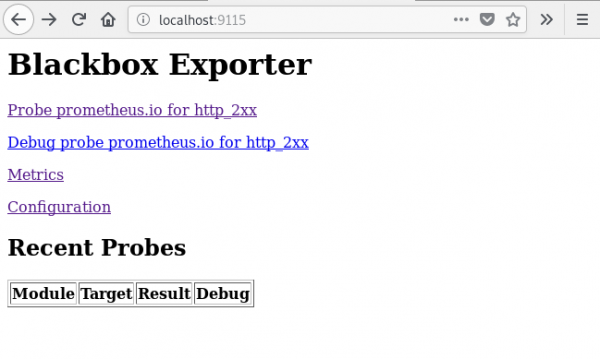
Puteți accesa interfața web a exportatorului Blackbox folosind port-forward:
kubectl --namespace=monitoring port-forward svc/prometheus-blackbox-exporter 9115:9115Conectați-vă la interfața web a exportatorului Blackbox prin intermediul browser-ului la adresa :9115.
Dacă accesați adresa , veți vedea rezultatul verificării URL-ului specificat ().
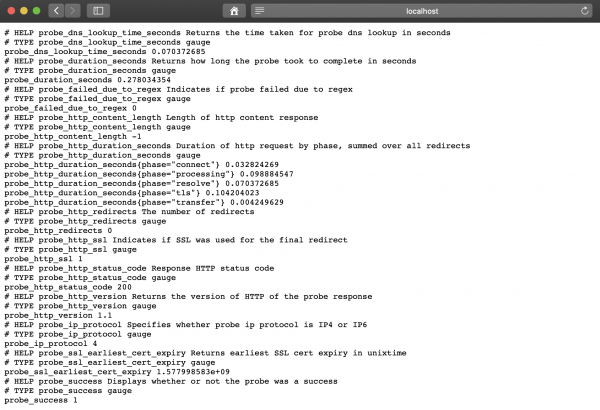
Valoarea metricii probe_success egală cu 1 înseamnă verificare reușită. O valoare de 0 indică o eroare.
Configurația Prometheus
După desfășurarea exportatorului BlackBox, configurăm Prometheus în prometheus-additional.yaml.
- job_name: 'kube-api-blackbox'
  scrape_interval: 1w
  metrics_path: /probe
  params:
    module: [http_2xx]
  static_configs:
   - targets:
      - https://www.google.com
      - http://www.example.com
      - https://prometheus.io
  relabel_configs:
   - source_labels: [__address__]
     target_label: __param_target
   - source_labels: [__param_target]
     target_label: instance
   - target_label: __address__
     replacement: prometheus-blackbox-exporter:9115 # Exportatorul blackbox.
Generăm Secret, folosind următoarea comandă.
PROMETHEUS_ADD_CONFIG=$(cat prometheus-additional.yaml | base64)
cat << EOF | kubectl --namespace=monitoring apply -f -
apiVersion: v1
kind: Secret
metadata:
  name: additional-scrape-configs
type: Opaque
data:
  prometheus-additional.yaml: $PROMETHEUS_ADD_CONFIG
EOF
Specificați additional-scrape-configs pentru Prometheus Operator, folosind additionalScrapeConfigs.
kubectl --namespace=monitoring edit prometheuses k8s
...
spec:
  additionalScrapeConfigs:
    key: prometheus-additional.yaml
    name: additional-scrape-configs
Accesăm interfața web Prometheus, verificăm metricile și obiectivele.
kubectl --namespace=monitoring port-forward svc/prometheus-k8s 9090:9090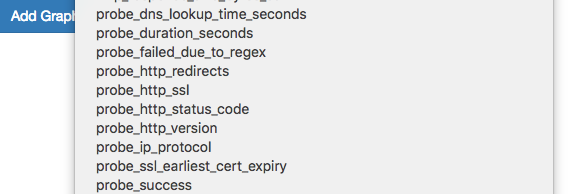
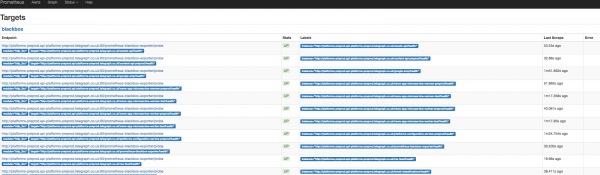
Vedem metricile și obiectivele Blackbox.
Adăugarea regulilor pentru notificări (alert)
Pentru a primi notificări de la exportatorul Blackbox, vom adăuga reguli în Prometheus Operator.
kubectl --namespace=monitoring edit prometheusrules prometheus-k8s-rules
...
  - name: blackbox-exporter
    rules:
    - alert: ProbeFailed
      expr: probe_success == 0
      for: 5m
      labels:
        severity: error
      annotations:
        summary: "Probe failed (instance {{ $labels.instance }})"
        description: "Probe failedn  VALUE = {{ $value }}n  LABELS: {{ $labels }}"
    - alert: SlowProbe
      expr: avg_over_time(probe_duration_seconds[1m]) > 1
      for: 5m
      labels:
        severity: warning
      annotations:
        summary: "Slow probe (instance {{ $labels.instance }})"
        description: "Blackbox probe took more than 1s to completen  VALUE = {{ $value }}n  LABELS: {{ $labels }}"
    - alert: HttpStatusCode
      expr: probe_http_status_code = 400
      for: 5m
      labels:
        severity: error
      annotations:
        summary: "HTTP Status Code (instance {{ $labels.instance }})"
        description: "HTTP status code is not 200-399n  VALUE = {{ $value }}n  LABELS: {{ $labels }}"
    - alert: SslCertificateWillExpireSoon
      expr: probe_ssl_earliest_cert_expiry - time() < 86400 * 30
      for: 5m
      labels:
        severity: warning
      annotations:
        summary: "SSL certificate will expire soon (instance {{ $labels.instance }})"
        description: "SSL certificate expires in 30 daysn  VALUE = {{ $value }}n  LABELS: {{ $labels }}"
    - alert: SslCertificateHasExpired
      expr: probe_ssl_earliest_cert_expiry - time()  1
      for: 5m
      labels:
        severity: warning
      annotations:
        summary: "HTTP slow requests (instance {{ $labels.instance }})"
        description: "HTTP request took more than 1sn  VALUE = {{ $value }}n  LABELS: {{ $labels }}"
    - alert: SlowPing
      expr: avg_over_time(probe_icmp_duration_seconds[1m]) > 1
      for: 5m
      labels:
        severity: warning
      annotations:
        summary: "Slow ping (instance {{ $labels.instance }})"
        description: "Blackbox ping took more than 1sn  VALUE = {{ $value }}n  LABELS: {{ $labels }}"
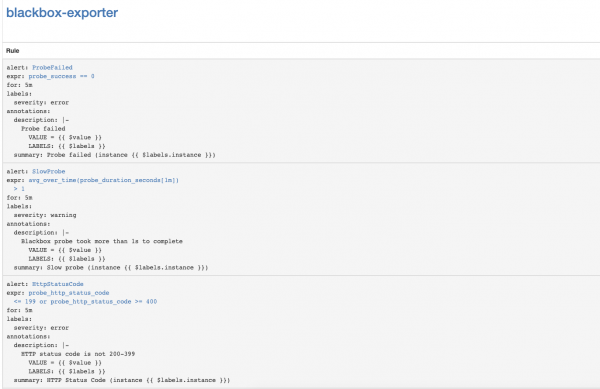
În interfața web Prometheus, accesați secțiunea Status => Rules și găsiți regulile de notificare pentru blackbox-exporter.
Configurarea notificărilor pentru expirarea certificatelor SSL ale Kubernetes API Server
Să configurăm monitorizarea expirării certificatelor SSL ale Kubernetes API Server. Acesta va trimite notificări o dată pe săptămână.
Adăugăm modulul Blackbox exporter pentru autentificarea Kubernetes API Server.
kubectl --namespace=monitoring edit configmap prometheus-blackbox-exporter
...
      kube-api:
        http:
          method: GET
          no_follow_redirects: false
          preferred_ip_protocol: ip4
          tls_config:
            insecure_skip_verify: false
            ca_file: /var/run/secrets/kubernetes.io/serviceaccount/ca.crt
          bearer_token_file: /var/run/secrets/kubernetes.io/serviceaccount/token
          valid_http_versions:
          - HTTP/1.1
          - HTTP/2
          valid_status_codes: []
        prober: http
        timeout: 5s
Adăugăm configurația de scrape a Prometheus
- job_name: 'kube-api-blackbox'
  metrics_path: /probe
  params:
    module: [kube-api]
  static_configs:
   - targets:
      - https://kubernetes.default.svc/api
  relabel_configs:
   - source_labels: [__address__]
     target_label: __param_target
   - source_labels: [__param_target]
     target_label: instance
   - target_label: __address__
     replacement: prometheus-blackbox-exporter:9115 # The blackbox exporter.
Aplicăm Secretul Prometheus
PROMETHEUS_ADD_CONFIG=$(cat prometheus-additional.yaml | base64)
cat << EOF | kubectl --namespace=monitoring apply -f -
apiVersion: v1
kind: Secret
metadata:
  name: additional-scrape-configs
type: Opaque
data:
  prometheus-additional.yaml: $PROMETHEUS_ADD_CONFIG
EOF
Adăugăm reguli de alertă
kubectl --namespace=monitoring edit prometheusrules prometheus-k8s-rules
...
  - name: k8s-api-server-cert-expiry
    rules:
    - alert: K8sAPIServerSSLCertExpiringAfterThreeMonths
      expr: probe_ssl_earliest_cert_expiry{job="kube-api-blackbox"} - time() < 86400 * 90
      for: 1w
      labels:
        severity: warning
      annotations:
        summary: "Certificatul SSL al serverului API Kubernetes va expira în trei luni (instanța {{ $labels.instance }})"
        description: "Certificatul SSL al serverului API Kubernetes expiră în 90 de zilen  VALUE = {{ $value }}n  LABELS: {{ $labels }}"
Linkuri utile
Sursa: habr.com
