

Simon Peter, creator of the self-contained AppImage package format, published the release of the helloSystem 0.8.1 distribution, based on FreeBSD 13 and positioned as a system for everyday users, which can be transitioned to by macOS enthusiasts dissatisfied with Apple's policies. The system is devoid of the complexities characteristic of modern Linux distributions, is fully under the user's control, and allows former macOS users to feel comfortable. A bootable image has been prepared for familiarization with the distribution, sized at 941 MB (torrent).
The interface resembles macOS and includes two panels — a top one with a global menu and a bottom one with an application panel. The global menu and status bar are powered by the panda-statusbar package, developed by the CyberOS distribution (formerly PandaOS). The Dock application panel is based on work from the cyber-dock project, also from the CyberOS developers. For file management and placing shortcuts on the desktop, the Filer file manager is used, based on pcmanfm-qt from the LXQt project. Falkon is offered as the default browser, with Firefox and Chromium available optionally. Applications are delivered in self-contained packages. The launch utility is used to run applications, which finds the program and analyzes errors during execution.
The project is developing a series of their own applications, such as a configurator, installer, mountarchive utility for mounting archives in the FS tree, a data recovery tool for ZFS, a disk partitioning interface, a network configuration indicator, a screenshot utility, a browser for Zeroconf servers, a volume configuration indicator, and a utility for configuring the boot environment. Development is done using Python and the Qt library. Among the supported components for application development, listed in order of preference, are PyQt, QML, Qt, KDE Frameworks, and GTK. ZFS is used as the primary filesystem, with support for mounting UFS, exFAT, NTFS, EXT4, HFS+, XFS, and MTP.
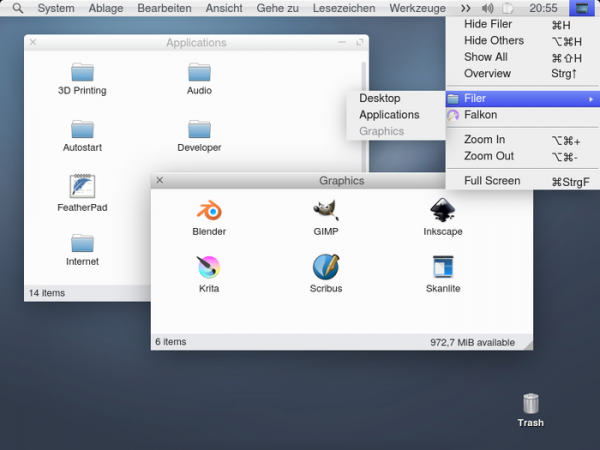
Main changes in helloSystem 0.8.1:
- The ability to connect to the network via USB tethering to an Android smartphone has been implemented.
- Support for USB sound systems with surround sound (5.1), such as BOSE Companion 5, has been added.
- On disks larger than 80 GB, swap space is enabled by default.
- Language and keyboard settings are saved in UEFI NVRAM.
- Loading of the kernel and modules has been implemented without displaying text on the screen (to show diagnostic messages during startup, press 'V', for single-user mode — 'S', and to show the boot menu — Backspace).
- The volume control menu now displays manufacturers and models of USB audio devices.
- Information about the graphics driver has been added to the 'About This Computer' dialog.
- Path auto-completion has been implemented for paths starting with the characters '~' and '/'.
- The user management application now allows the creation of users without administrative rights, deletion of users, and enabling/disabling automatic login.
- The interface of the Live build creation utility has been improved.
- Development has started on a utility for creating backups using ZFS file system capabilities.
Sursa: opennet.ro
