

Predstavujem vám tutoriál na generovanie prístupov do Kubernetes klastra pomocou Dex, dex-k8s-authenticator a GitHub.
Lokálny meme z ruskojazyčného chatu Kubernetes v
Úvod
Používame Kubernetes na vytváranie dynamických prostredí pre tím vývojárov a QA. Chceme im preto poskytnúť prístup do klastra ako pre dashboard, tak aj pre kubectl. Na rozdiel od OpenShift, čistý Kubernetes nemá natívnu autentifikáciu, takže používame na tento účel externé nástroje.
V tejto konfigurácii používame:
- — webová aplikácia na generovanie konfiguračného súboru kubectl
- — poskytovateľ OpenID Connect
- GitHub — jednoducho preto, že používame GitHub v našej firme
Skúsili sme použiť Google OIDC, ale bohužiaľ sa nám navyše využiť ich s užívateľskými skupinami, takže integrácia s GitHubom nám celkom vyhovovala. Bez mapovania skupín nebude možné vytvoriť RBAC politiky založené na skupinách.
Takže, ako vlastne funguje náš proces autorizácie v Kubernetes vizuálne:
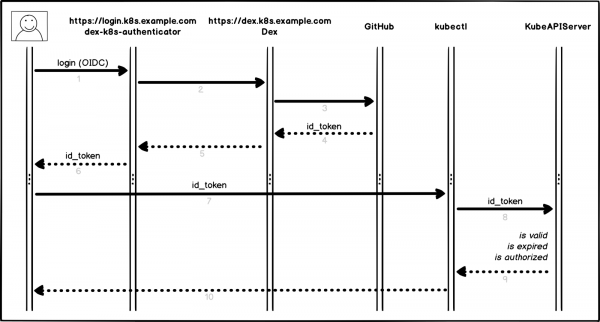
Proces autorizácie
Trochu podrobnejšie a krok za krokom:
- Používateľ sa prihlasuje do dex-k8s-authenticator (
login.k8s.example.com) - dex-k8s-authenticator presmerováva požiadavku do Dex (
dex.k8s.example.com) - Dex presmerováva na stránku autorizácie v GitHub
- GitHub generuje potrebné informačné údaje o autorizácii a vracia ich späť do Dex
- Dex odosiela získané údaje do dex-k8s-authenticator
- Používateľ dostáva OIDC token od GitHub
- dex-k8s-authenticator pridáva token do kubeconfig
- kubectl odosiela token do KubeAPIServer
- KubeAPIServer na základe predloženého tokenu vracia prístupy do kubectl
- Používateľ dostáva prístupy od kubectl
Prípravné kroky
Samozrejme, máme už nainštalovaný Kubernetes klaster (k8s.example.com), ako aj predinštalovaný HELM. Rovnako máme organizáciu na GitHub (super-org).
Ak nemáte HELM, inštalácia je .
Najprv musíme nastaviť GitHub.
Prejdite na stránku nastavení organizácie, (https://github.com/organizations/super-org/settings/applications) a vytvorte novú aplikáciu (Authorized OAuth App):
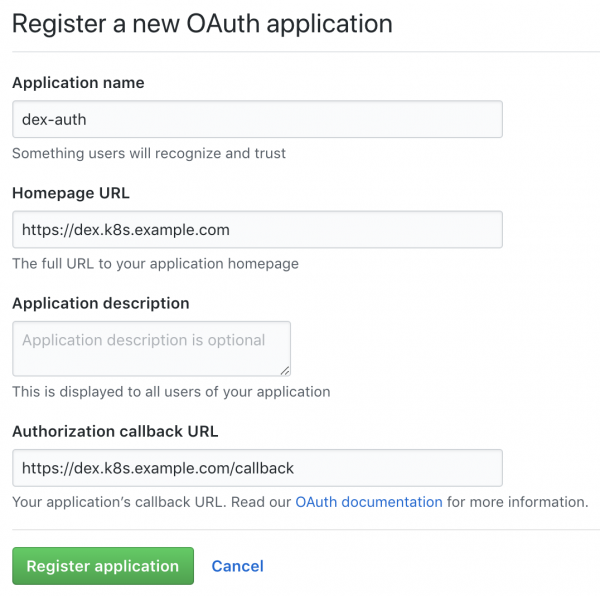
Vytvorenie novej aplikácie na GitHub
Vyplňte polia potrebnými URL, napríklad:
- URL domovskej stránky:
https://dex.k8s.example.com - URL spätného volania autorizácie:
https://dex.k8s.example.com/callback
Buďte opatrní s odkazmi, je dôležité nezabudnúť na lomky.
V odpovedi na vyplnený formulár GitHub vygeneruje ID klienta a Client secret, uložte si ich na bezpečné miesto, budú sa nám hodiť (napríklad používame na uchovávanie tajomstiev):
Client ID: 1ab2c3d4e5f6g7h8
Client secret: 98z76y54x32w1
Pripravte DNS záznamy pre subdomény login.k8s.example.com a dex.k8s.example.com, ako aj SSL certifikáty pre ingressy.
Vytvoríme SSL certifikáty:
cat <<EOF | kubectl create -f -
apiVersion: certmanager.k8s.io/v1alpha1
kind: Certificate
metadata:
  name: cert-auth-dex
  namespace: kube-system
spec:
  secretName: cert-auth-dex
  dnsNames:
    - dex.k8s.example.com
  acme:
    config:
    - http01:
        ingressClass: nginx
      domains:
      - dex.k8s.example.com
  issuerRef:
    name: le-clusterissuer
    kind: ClusterIssuer
---
apiVersion: certmanager.k8s.io/v1alpha1
kind: Certificate
metadata:
  name: cert-auth-login
  namespace: kube-system
spec:
  secretName: cert-auth-login
  dnsNames:
    - login.k8s.example.com
  acme:
    config:
    - http01:
        ingressClass: nginx
      domains:
      - login.k8s.example.com
  issuerRef:
    name: le-clusterissuer
    kind: ClusterIssuer
EOF
kubectl describe certificates cert-auth-dex -n kube-system
kubectl describe certificates cert-auth-login -n kube-system
ClusterIssuer s názvom le-clusterissuer už by mal existovať, ak nie, vytvoríme ho pomocou HELM:
helm install --namespace kube-system -n cert-manager stable/cert-manager
cat << EOF | kubectl create -f -
apiVersion: certmanager.k8s.io/v1alpha1
kind: ClusterIssuer
metadata:
  name: le-clusterissuer
  namespace: kube-system
spec:
  acme:
    server: https://acme-v02.api.letsencrypt.org/directory
    email: k8s-admin@example.com
    privateKeySecretRef:
      name: le-clusterissuer
    http01: {}
EOF
Konfigurácia KubeAPIServer
Pre fungovanie kubeAPIServer je potrebné nakonfigurovať OIDC a aktualizovať klaster:
kops edit cluster
...
  kubeAPIServer:
    anonymousAuth: false
    authorizationMode: RBAC
    oidcClientID: dex-k8s-authenticator
    oidcGroupsClaim: groups
    oidcIssuerURL: https://dex.k8s.example.com/
    oidcUsernameClaim: email
kops update cluster --yes
kops rolling-update cluster --yes
Používame na nasadenie klastrov, ale toto funguje analogicky aj pre .
Konfigurácia Dex a dex-k8s-authenticator
Pre fungovanie Dex je potrebný certifikát a kľúč z Kubernetes majstra, vytiahneme ho odtiaľto:
sudo cat /srv/kubernetes/ca.{crt,key}
-----BEGIN CERTIFICATE-----
AAAAAAAAAAABBBBBBBBBBCCCCCC
-----END CERTIFICATE-----
-----BEGIN RSA PRIVATE KEY-----
DDDDDDDDDDDEEEEEEEEEEFFFFFF
-----END RSA PRIVATE KEY-----
Skloníme repozitár dex-k8s-authenticator:
git clone git@github.com:mintel/dex-k8s-authenticator.git
cd dex-k8s-authenticator/
S pomocou values súborov môžeme flexibilne nastavovať premenné pre naše .
Opíšeme konfiguráciu pre Dex:
cat < values-dex.yml
global:
  deployEnv: prod
tls:
  certificate: |-
    -----BEGIN CERTIFICATE-----
    AAAAAAAAAAABBBBBBBBBBCCCCCC
    -----END CERTIFICATE-----
  key: |-
    -----BEGIN RSA PRIVATE KEY-----
    DDDDDDDDDDDEEEEEEEEEEFFFFFF
    -----END RSA PRIVATE KEY-----
ingress:
  enabled: true
  annotations:
    kubernetes.io/ingress.class: nginx
    kubernetes.io/tls-acme: "true"
  path: /
  hosts:
    - dex.k8s.example.com
  tls:
    - secretName: cert-auth-dex
      hosts:
        - dex.k8s.example.com
serviceAccount:
  create: true
  name: dex-auth-sa
config: |
  issuer: https://dex.k8s.example.com/
  storage: # https://github.com/dexidp/dex/issues/798
    type: sqlite3
    config:
      file: /var/dex.db
  web:
    http: 0.0.0.0:5556
  frontend:
    theme: "coreos"
    issuer: "Example Co"
    issuerUrl: "https://example.com"
    logoUrl: https://example.com/images/logo-250x25.png
  expiry:
    signingKeys: "6h"
    idTokens: "24h"
  logger:
    level: debug
    format: json
  oauth2:
    responseTypes: ["code", "token", "id_token"]
    skipApprovalScreen: true
  connectors:
  - type: github
    id: github
    name: GitHub
    config:
      clientID: $GITHUB_CLIENT_ID
      clientSecret: $GITHUB_CLIENT_SECRET
      redirectURI: https://dex.k8s.example.com/callback
      orgs:
      - name: super-org
        teams:
        - team-red
  staticClients:
  - id: dex-k8s-authenticator
    name: dex-k8s-authenticator
    secret: generatedLongRandomPhrase
    redirectURIs:
      - https://login.k8s.example.com/callback/
envSecrets:
  GITHUB_CLIENT_ID: "1ab2c3d4e5f6g7h8"
  GITHUB_CLIENT_SECRET: "98z76y54x32w1"
EOF
A pre dex-k8s-authenticator:
cat < values-auth.yml
global:
  deployEnv: prod
dexK8sAuthenticator:
  clusters:
  - name: k8s.example.com
    short_description: "k8s cluster"
    description: "Kubernetes cluster"
    issuer: https://dex.k8s.example.com/
    k8s_master_uri: https://api.k8s.example.com
    client_id: dex-k8s-authenticator
    client_secret: generatedLongRandomPhrase
    redirect_uri: https://login.k8s.example.com/callback/
    k8s_ca_pem: |
      -----BEGIN CERTIFICATE-----
      AAAAAAAAAAABBBBBBBBBBCCCCCC
      -----END CERTIFICATE-----
ingress:
  enabled: true
  annotations:
    kubernetes.io/ingress.class: nginx
    kubernetes.io/tls-acme: "true"
  path: /
  hosts:
    - login.k8s.example.com
  tls:
    - secretName: cert-auth-login
      hosts:
        - login.k8s.example.com
EOF
Nainštalujeme Dex a dex-k8s-authenticator:
helm install -n dex --namespace kube-system --values values-dex.yml charts/dex
helm install -n dex-auth --namespace kube-system --values values-auth.yml charts/dex-k8s-authenticator
Skontrolujeme funkčnosť služieb (Dex by mal vrátiť kód 400, zatiaľ čo dex-k8s-authenticator — kód 200):
curl -sI https://dex.k8s.example.com/callback | head -1
HTTP/2 400
curl -sI https://login.k8s.example.com/ | head -1
HTTP/2 200
Konfigurácia RBAC
Vytvoríme ClusterRole pre skupinu, v našom prípade s read-only prístupmi:
cat << EOF | kubectl create -f -
apiVersion: rbac.authorization.k8s.io/v1
kind: ClusterRole
metadata:
  name: cluster-read-all
rules:
  -
    apiGroups:
      - ""
      - apps
      - autoscaling
      - batch
      - extensions
      - policy
      - rbac.authorization.k8s.io
      - storage.k8s.io
    resources:
      - componentstatuses
      - configmaps
      - cronjobs
      - daemonsets
      - deployments
      - events
      - endpoints
      - horizontalpodautoscalers
      - ingress
      - ingresses
      - jobs
      - limitranges
      - namespaces
      - nodes
      - pods
      - pods/log
      - pods/exec
      - persistentvolumes
      - persistentvolumeclaims
      - resourcequotas
      - replicasets
      - replicationcontrollers
      - serviceaccounts
      - services
      - statefulsets
      - storageclasses
      - clusterroles
      - roles
    verbs:
      - get
      - watch
      - list
  - nonResourceURLs: ["*"]
    verbs:
      - get
      - watch
      - list
  - apiGroups: [""]
    resources: ["pods/exec"]
    verbs: ["create"]
EOF
Vytvoríme konfiguráciu pre ClusterRoleBinding:
cat << EOF | kubectl create -f -
apiVersion: rbac.authorization.k8s.io/v1beta1
kind: ClusterRoleBinding
metadata:
  name: dex-cluster-auth
  namespace: kube-system
roleRef:
  apiGroup: rbac.authorization.k8s.io
  kind: ClusterRole
  name: cluster-read-all
subjects:
  kind: Group
  name: "super-org:team-red"
EOF
Teraz sme pripravení na testovanie.
Testy
Prejdeme na prihlasovaciu stránku (https://login.k8s.example.com) a prihlásime sa pomocou účtu GitHub:
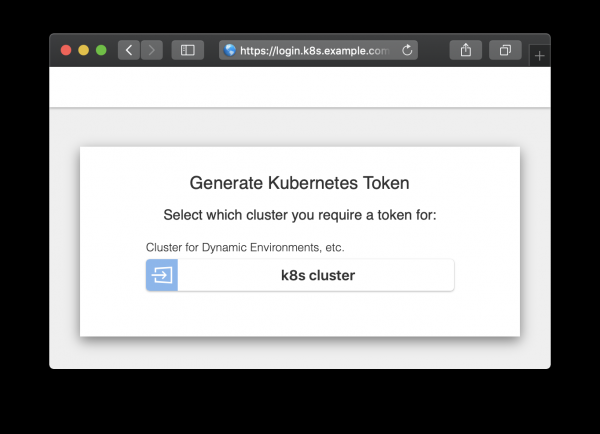
Prihlasovacia stránka
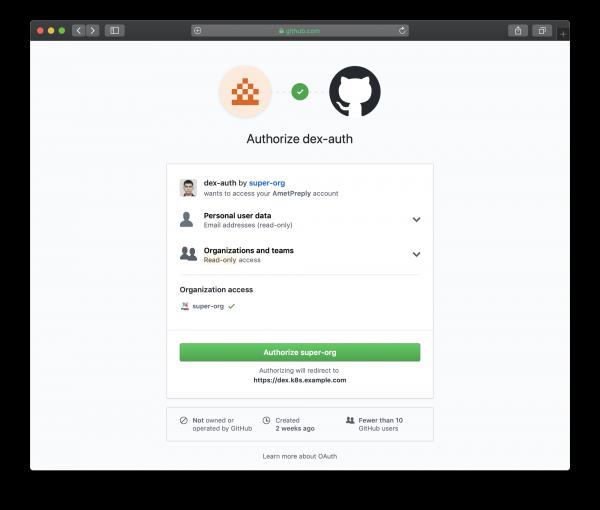
Prihlasovacia stránka presmerovaná na GitHub
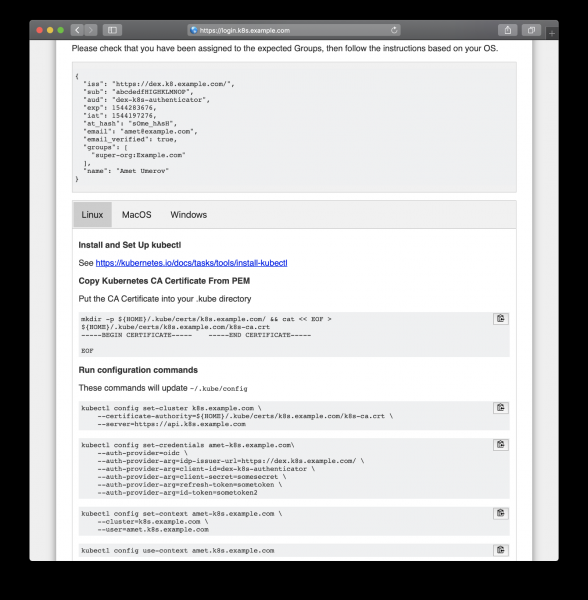
Riadi sa vygenerovanými pokynmi na získanie prístupov
Po skopírovaní z webovej stránky môžeme používať kubectl na správu zdrojov nášho klastru:
kubectl get po
NAME                READY   STATUS    RESTARTS   AGE
mypod               1/1     Running   0          3d

kubectl delete po mypod
Error from server (Forbidden): pods "mypod" is forbidden: User "amet@example.com" cannot delete pods in the namespace "default"
A funguje to, všetci používatelia GitHub v našej organizácii môžu vidieť zdroje a vstupovať do podov, avšak nemajú práva na ich zmenu.
Zdroj: habr.com
