

Ahojte všetci. V máji OTUS spúšťa , ako infraštruktúry, tak aj aplikácií pomocou Zabbix, Prometheus, Grafana a ELK. V súvislosti s tým tradične zdieľame užitočný materiál na tému.
pre Prometheus umožňuje realizovať monitorovanie externých služieb prostredníctvom HTTP, HTTPS, DNS, TCP, ICMP. V tomto článku vám ukážem, ako nastaviť monitorovanie HTTP/HTTPS pomocou Blackbox exportera. Spustíme Blackbox exporter v Kubernetes.
Prostredie
Budeme potrebovať nasledovné:
- Kubernetes
- Prometheus Operator
Konfigurácia blackbox exportera
Konfigurujeme Blackbox cez ConfigMap na nastavenie http modulu monitorovania webových služieb.
apiVersion: v1
kind: ConfigMap
metadata:
  name: prometheus-blackbox-exporter
  labels:
    app: prometheus-blackbox-exporter
data:
  blackbox.yaml: |
    modules:
      http_2xx:
        http:
          no_follow_redirects: false
          preferred_ip_protocol: ip4
          valid_http_versions:
          - HTTP/1.1
          - HTTP/2
          valid_status_codes: []
        prober: http
        timeout: 5s
Modul http_2xx sa používa na overenie, že webová služba vracia kód stavu HTTP 2xx. Podrobnejšie je konfigurácia blackbox exportera popísaná v .
Nasadenie blackbox exportera v Kubernetes klastri
Popíšte Nasadenie a Service na nasadenie v Kubernetes.
---
kind: Service
apiVersion: v1
metadata:
  name: prometheus-blackbox-exporter
  labels:
    app: prometheus-blackbox-exporter
spec:
  type: ClusterIP
  ports:
    - name: http
      port: 9115
      protocol: TCP
  selector:
    app: prometheus-blackbox-exporter

---
apiVersion: apps/v1
kind: Deployment
metadata:
  name: prometheus-blackbox-exporter
  labels:
    app: prometheus-blackbox-exporter
spec:
  replicas: 1
  selector:
    matchLabels:
      app: prometheus-blackbox-exporter
  template:
    metadata:
      labels:
        app: prometheus-blackbox-exporter
    spec:
      restartPolicy: Always
      containers:
        - name: blackbox-exporter
          image: "prom/blackbox-exporter:v0.15.1"
          imagePullPolicy: IfNotPresent
          securityContext:
            readOnlyRootFilesystem: true
            runAsNonRoot: true
            runAsUser: 1000
          args:
            - "--config.file=/config/blackbox.yaml"
          resources:
            {}
          ports:
            - containerPort: 9115
              name: http
          livenessProbe:
            httpGet:
              path: /health
              port: http
          readinessProbe:
            httpGet:
              path: /health
              port: http
          volumeMounts:
            - mountPath: /config
              name: config
        - name: configmap-reload
          image: "jimmidyson/configmap-reload:v0.2.2"
          imagePullPolicy: "IfNotPresent"
          securityContext:
            runAsNonRoot: true
            runAsUser: 65534
          args:
            - --volume-dir=/etc/config
            - --webhook-url=http://localhost:9115/-/reload
          resources:
            {}
          volumeMounts:
            - mountPath: /etc/config
              name: config
              readOnly: true
      volumes:
        - name: config
          configMap:
            name: prometheus-blackbox-exporter
Blackbox exporter je možné nasadiť pomocou nasledujúcej príkazu. Namespace monitoring sa týka Prometheus Operator.
kubectl --namespace=monitoring apply -f blackbox-exporter.yamlUistite sa, že sú všetky služby spustené pomocou nasledujúcej príkazu:
kubectl --namespace=monitoring get all --selector=app=prometheus-blackbox-exporterKontrola Blackbox
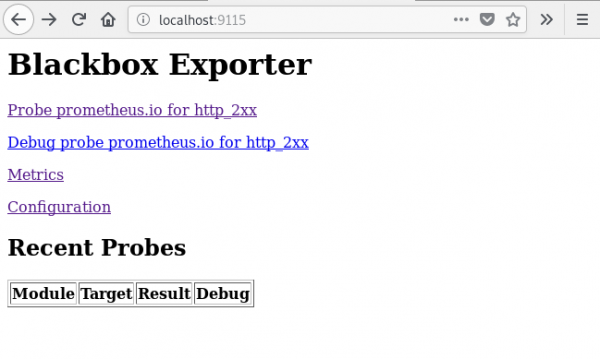
K webovému rozhraniu Blackbox exportéra môžete pristupovať pomocou port-forward:
kubectl --namespace=monitoring port-forward svc/prometheus-blackbox-exporter 9115:9115Pripojte sa k webovému rozhraniu Blackbox exportéra cez webový prehliadač na adrese :9115.
Ak prejdete na adresu , uvidíte výsledok kontroly zadaného URL ().
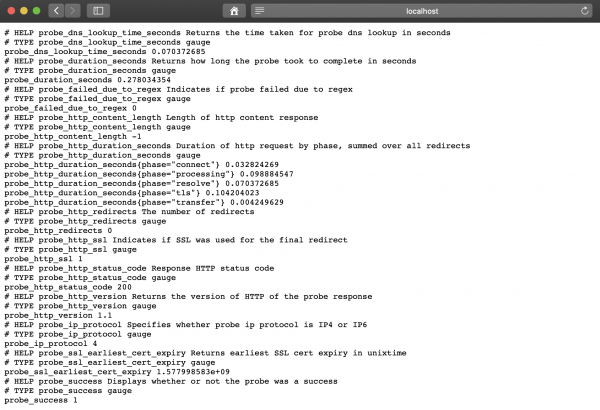
Hodnota metriky probe_success rovná 1 znamená úspešnú kontrolu. Hodnota 0 hovorí o chybe.
Nastavenie Prometheusu
Po nasadení BlackBox exportéra nastavujeme Prometheus v prometheus-additional.yaml.
- job_name: 'kube-api-blackbox'
  scrape_interval: 1w
  metrics_path: /probe
  params:
    module: [http_2xx]
  static_configs:
   - targets:
      - https://www.google.com
      - http://www.example.com
      - https://prometheus.io
  relabel_configs:
   - source_labels: [__address__]
     target_label: __param_target
   - source_labels: [__param_target]
     target_label: instance
   - target_label: __address__
     replacement: prometheus-blackbox-exporter:9115 # Blackbox exportér.
Generujeme Tajný, pomocou nasledujúceho príkazu.
PROMETHEUS_ADD_CONFIG=$(cat prometheus-additional.yaml | base64)
cat << EOF | kubectl --namespace=monitoring apply -f -
apiVersion: v1
kind: Secret
metadata:
  name: additional-scrape-configs
type: Opaque
data:
  prometheus-additional.yaml: $PROMETHEUS_ADD_CONFIG
EOF
Uvádzame additional-scrape-configs pre Prometheus Operator, pomocou additionalScrapeConfigs.
kubectl --namespace=monitoring edit prometheuses k8s
...
spec:
  additionalScrapeConfigs:
    key: prometheus-additional.yaml
    name: additional-scrape-configs
Prihlásime sa do webového rozhrania Prometheusu, skontrolujeme metriky a ciele.
kubectl --namespace=monitoring port-forward svc/prometheus-k8s 9090:9090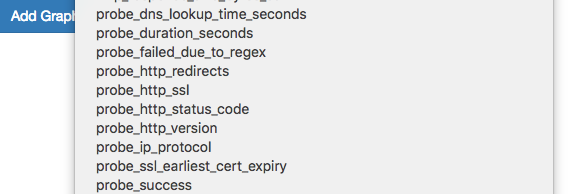
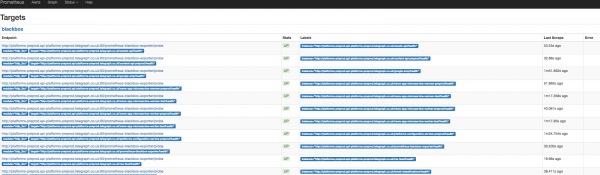
Vidíme metriky a ciele Blackbox.
Pridanie pravidiel pre upozornenia (alert)
Aby sme získali upozornenia od Blackbox exportéra, pridáme pravidlá do Prometheus Operator.
kubectl --namespace=monitoring edit prometheusrules prometheus-k8s-rules
...
  - name: blackbox-exporter
    rules:
    - alert: ProbeFailed
      expr: probe_success == 0
      for: 5m
      labels:
        severity: error
      annotations:
        summary: "Probe failed (instance {{ $labels.instance }})"
        description: "Probe failedn  VALUE = {{ $value }}n  LABELS: {{ $labels }}"
    - alert: SlowProbe
      expr: avg_over_time(probe_duration_seconds[1m]) > 1
      for: 5m
      labels:
        severity: warning
      annotations:
        summary: "Slow probe (instance {{ $labels.instance }})"
        description: "Blackbox probe took more than 1s to completen  VALUE = {{ $value }}n  LABELS: {{ $labels }}"
    - alert: HttpStatusCode
      expr: probe_http_status_code = 400
      for: 5m
      labels:
        severity: error
      annotations:
        summary: "HTTP Status Code (instance {{ $labels.instance }})"
        description: "HTTP status code is not 200-399n  VALUE = {{ $value }}n  LABELS: {{ $labels }}"
    - alert: SslCertificateWillExpireSoon
      expr: probe_ssl_earliest_cert_expiry - time() < 86400 * 30
      for: 5m
      labels:
        severity: warning
      annotations:
        summary: "SSL certificate will expire soon (instance {{ $labels.instance }})"
        description: "SSL certificate expires in 30 daysn  VALUE = {{ $value }}n  LABELS: {{ $labels }}"
    - alert: SslCertificateHasExpired
      expr: probe_ssl_earliest_cert_expiry - time()  1
      for: 5m
      labels:
        severity: warning
      annotations:
        summary: "HTTP slow requests (instance {{ $labels.instance }})"
        description: "HTTP request took more than 1sn  VALUE = {{ $value }}n  LABELS: {{ $labels }}"
    - alert: SlowPing
      expr: avg_over_time(probe_icmp_duration_seconds[1m]) > 1
      for: 5m
      labels:
        severity: warning
      annotations:
        summary: "Slow ping (instance {{ $labels.instance }})"
        description: "Blackbox ping took more than 1sn  VALUE = {{ $value }}n  LABELS: {{ $labels }}"
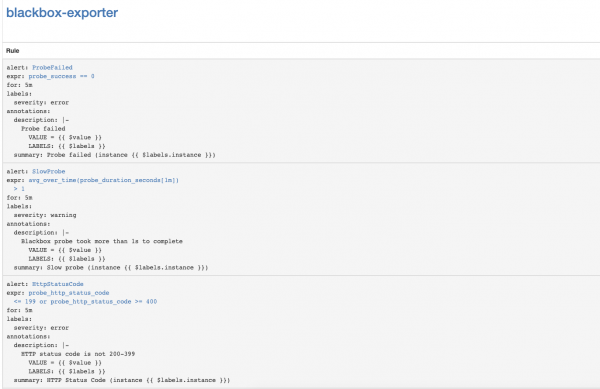
V webovom rozhraní Prometheus prejdite do sekcie Status => Rules a nájdite pravidlá upozornení pre blackbox-exporter.
Nastavenie upozornení na vypršanie platnosti SSL certifikátov Kubernetes API Server
Nastavme monitorovanie vypršania platnosti SSL certifikátov Kubernetes API Server. Upozornenia sa budú posielať raz týždenne.
Pridávame modul Blackbox exportéra pre autentifikáciu Kubernetes API Server.
kubectl --namespace=monitoring edit configmap prometheus-blackbox-exporter
...
      kube-api:
        http:
          method: GET
          no_follow_redirects: false
          preferred_ip_protocol: ip4
          tls_config:
            insecure_skip_verify: false
            ca_file: /var/run/secrets/kubernetes.io/serviceaccount/ca.crt
          bearer_token_file: /var/run/secrets/kubernetes.io/serviceaccount/token
          valid_http_versions:
          - HTTP/1.1
          - HTTP/2
          valid_status_codes: []
        prober: http
        timeout: 5s
Pridávame scrape-konfiguráciu Prometheus
- job_name: 'kube-api-blackbox'
  metrics_path: /probe
  params:
    module: [kube-api]
  static_configs:
   - targets:
      - https://kubernetes.default.svc/api
  relabel_configs:
   - source_labels: [__address__]
     target_label: __param_target
   - source_labels: [__param_target]
     target_label: instance
   - target_label: __address__
     replacement: prometheus-blackbox-exporter:9115 # The blackbox exporter.
Používame Prometheus Secret
PROMETHEUS_ADD_CONFIG=$(cat prometheus-additional.yaml | base64)
cat << EOF | kubectl --namespace=monitoring apply -f -
apiVersion: v1
kind: Secret
metadata:
  name: additional-scrape-configs
type: Opaque
data:
  prometheus-additional.yaml: $PROMETHEUS_ADD_CONFIG
EOF
Pridávame pravidlá upozornení
kubectl --namespace=monitoring edit prometheusrules prometheus-k8s-rules
...
  - name: k8s-api-server-cert-expiry
    rules:
    - alert: K8sAPIServerSSLCertExpiringAfterThreeMonths
      expr: probe_ssl_earliest_cert_expiry{job="kube-api-blackbox"} - time() < 86400 * 90
      for: 1w
      labels:
        severity: warning
      annotations:
        summary: "SSL certifikát Kubernetes API Serveru vyprší za tri mesiace (instance {{ $labels.instance }})"
        description: "SSL certifikát Kubernetes API Serveru vyprší za 90 dnín  VALUE = {{ $value }}n  LABELS: {{ $labels }}"
Užitočné odkazy
Zdroj: habr.com
