
I disponueshëm lëshimi i Firefox 70.
Ndryshimet kryesore:
- U prezantua menaxheri i ri i fjalëkalimeve — Lockwise:
- 10 vjet më parë për sigurinë e dobët të menaxherit të fjalëkalimeve njoftoi Justin Dolsku. Në vitin 2018, Vladimir Palant (zhvilluesi i Adblock Plus) përsëri e ngriti këtë problem, duke zbuluar se menaxheri i fjalëkalimeve ende përdor hashing të vetëm me SHA-1. Kjo lejon që brenda disa minutash të thyhet fjalëkalimi i një përdoruesi mesatar në kartat grafike moderne.
- Lockwise përdor algoritma të forta SHA-256 dhe AES-256-GCM.
- Më në fund u shfaq një faqe e re about:logins (стиль для userContent.css, duke lejuar që të shfaqet më shumë informacion në ekran), ku mund të krijoni regjistrime të reja, të importoni fjalëkalime nga shfletues të tjerë, si dhe të shkarkoni aplikacione për Android dhe iOS. Fjalëkalimet sinkronizohen përmes llogarisë Firefox.
- Lockwise ofron të gjeneroni fjalëkalime të forta për format me atributin autocomplete="new-password", gjithashtu njofton (signon.management.page.breach-alerts.enabled = true), nëse fjalëkalimi i ruajtur për faqen është më i vjetër se sa ndodhi rrjedhja e të dhënave nga kjo faqe (pra, nëse ka mundësi që përdoruesi të jetë prekur nga rrjedhja). Për këtë, është integruar Firefox Monitor (extensions.fxmonitor.enabled = true), i cili më parë ishte një shtesë sistematike e veçantë.
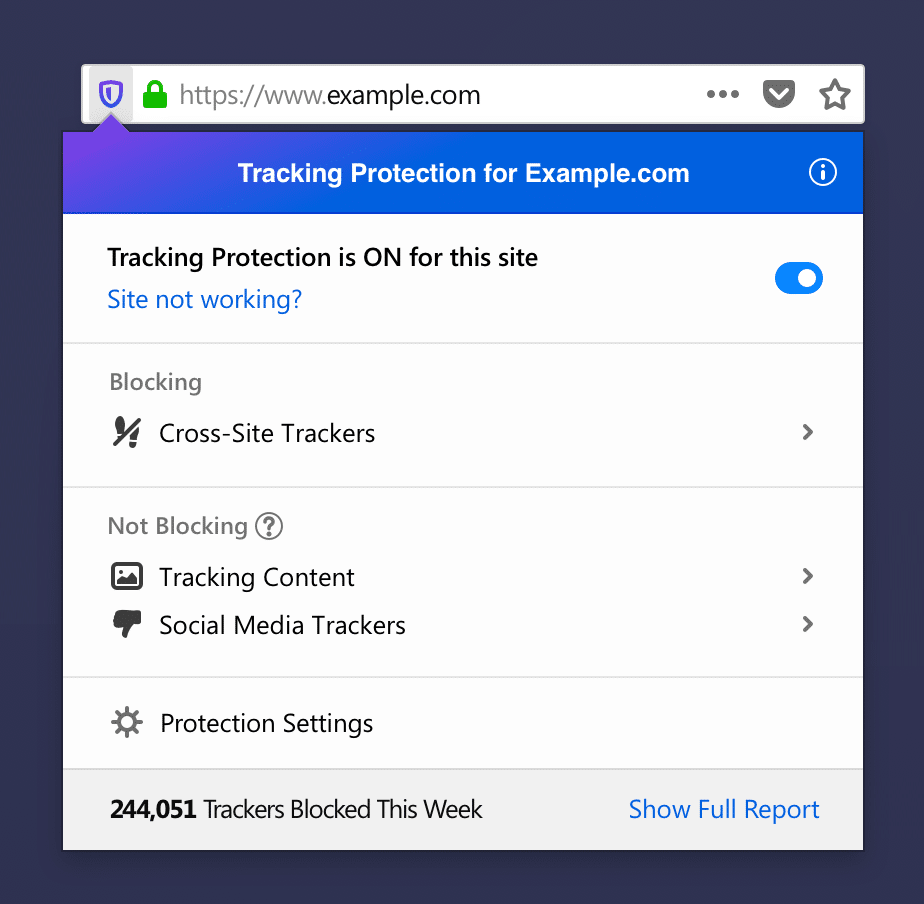
- Parametrat standard të mbrojtjes nga ndjekja tani përfshijnë mbrojtjen nga ndjekësit e mediave sociale (butonat Like, widget-et e mesazheve Twitter). Nëse në faqe ka përmbajtje të bllokuar, ikona në shiritin e adresës bëhet me ngjyrë. Ndryshime i janë nënshtruar edhe paneli që aktivizohet kur e klikoni atë: tani aty shfaqen ndjekësit e lejuar (bllokimi i të cilëve mund të shkaktojë prishjen e faqeve ose funksioneve të veçanta), si dhe një lidhje me faqen about:protections.
- Linjat që nënvijëzojnë tekstin (etiketat e nënvijëzimit ose lidhjet), tani nuk kalojnë mbi simbolet, por ndërpriten (layout.css.text-decoration-skip-ink.enabled = true)
- Duke qenë se në vitin 2019 kriptimi u bë normë (informacioni i dërguar mbi kanale të pa sigurta bëhet i disponueshëm për këdo, për shembull, për shkak të pajisjeve të keqkonfigurara të SORM), qasja në shfaqjen e statusit të sigurisë së lidhjes është ndryshuar:
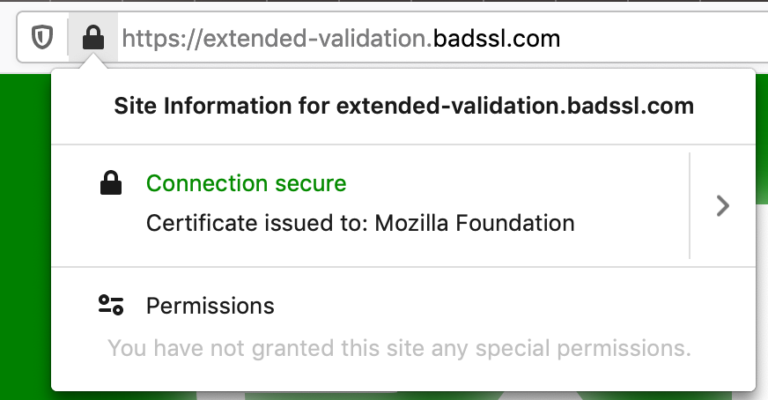
- Nëse është instaluar një lidhje të sigurt, në vend të ikonës së gjelbër shfaqet një ikonë gri (security.secure_connection_icon_color_gray = true). Kjo do të ndihmojë përdoruesit e papërvojë, të cilët e perceptojnë ngjyrën e gjelbër si sinjal se faqja është e besueshme, ndërsa ngjyra e gjelbër do të thotë vetëm se lidhja është e enkriptuar, por nuk garanton autenticitetin e burimit.
- Nëse është instaluar një lidhje të pa sigurt (HTTP ose FTP), shfaqet një ikonë e shfuqizuar (security.insecure_connection_icon.enabled = true, security.insecure_connection_icon.pbmode.enabled = true).
- Informacioni mbi certifikatat EV (certifikatat me verifikim të avancuar) është transferuar nga barra e adresës në panelin e informacionit për faqe (security.identityblock.show_extended_validation = false). Studimet tregojnë, që shfaqja e këtyre të dhënave në barre e adresës pothuajse nuk ndihmon përdoruesit - ata nuk i kushtojnë vëmendje mungesës së saj. Gjithashtu, studiuesi Jan Carroll tregoi, tregon se si është e lehtë të marrësh një certifikatë EV në emrin "Stripe, Inc" (një sistem popullor pagesash) thjesht duke regjistruar një kompani me të njëjtin emër në një shtet tjetër. Për të zbuluar ndryshimin, në çdo rast duhet të shqyrtohen detajet e plota të faqes - informacioni nga barra e adresës nuk mjafton. Një studiues tjetër, James Burton, mori një certifikatë në emrin e kompanisë së tij të regjistruar "Identity Verified", e cila gjithashtu lehtë mashtrojnë përdoruesit.
- Firefox do të tregojë një ikonë në barre e adresës, nëse faqja përdor gjeolokacion.
- Barra e adresës korrigjon automatikisht gabimet e zakonshme në protokollin URL (browser.fixup.typo.scheme = true): ttp → http, ttps → http, tps → https, ps → https, ile → file, le → file.
- Butonat e motorëve të kërkimit në barre e adresës janë të qëndruar në qendër, është e shtuar mundësia për të kaluar menjëherë në konfigurimin e tyre.
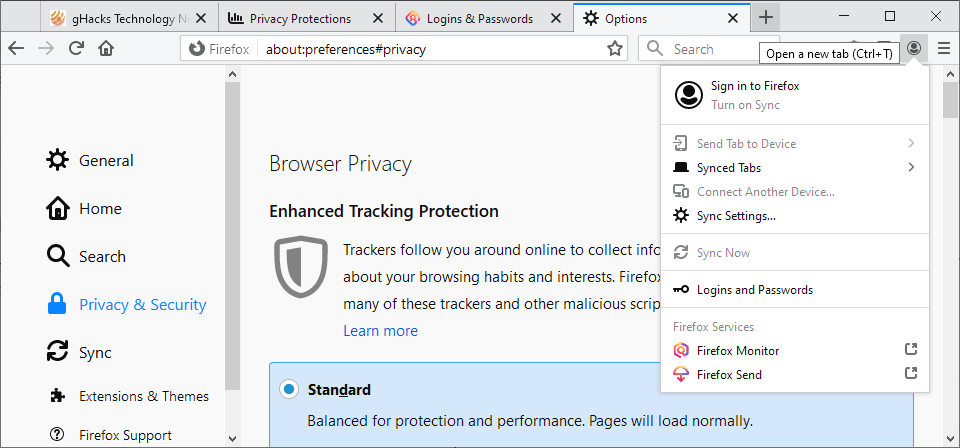
- Riorganizuar menunë e menaxhimit të llogarisë Firefox.
- Faqet e shërbimit të shfletuesit kanë mësuar të përdorin temën e errët (nëse tema e errët është e aktivizuar në sistem ose ui.systemUsesDarkTheme = true).
- Azhurnuar logoja dhe emri i shfletuesit ("Firefox Browser" në vend të "Firefox Quantum").
- Një ikonë është shtuar në panelin e veglave (dhe një enë në menunë kryesore), të cilat, duke klikuar, shfaqin informacion mbi novacionet kryesore të kësaj versioni (browser.messaging-system.whatsNewPanel.enabled = true).
- WebRender është aktivizuar në mënyrë të paracaktuar në sistemet Linux me kartela grafike nga të gjithë prodhuesit kryesorë: AMD, nVIDIA (vetëm me drejtuesin Nouveau), Intel. Kërkohet, si minimum, Mesa 18.2.
- Aktivizuar një të ri JavaScript bytecode interpreter. In some cases, page load times can improve by up to 8%.
- HTTP cache divided by the top-level source to prevent widely used by various services method to determine if a user is logged in on certain websites.
- Site permission requests (for example, for showing notifications or accessing the microphone) will forcibly exit the browser from full-screen mode (permissions.fullscreen.allowed = false). These measures are aimed at combating certain sites that lock the user in full-screen mode and force them to give permissions or install malicious extensions.
- Following Chrome, the size of the Referer header is limited to 4 kilobytes, which is sufficient for 99.90% of websites.
- E ndaluar opening any files in the browser via the FTP protocol. Instead of opening the file, it will be downloaded.
- macOS:
- Reduced by three times the energy consumption, which significantly increased after the first release of Quantum. Moreover, page loading sped up by as much as 22%, and resource expenditures for video playback decreased by 37% in some cases.
- The ability to import passwords from Chrome has been introduced.
- WebRender is enabled by default on Windows devices with integrated Intel graphics and low screen resolution (up to 1920×1200).
- Mjetet e zhvilluesve:
- The accessibility inspector panel now shows the accessibility of page elements for people using only the keyboard, as well as a color blindness simulator.
- The inspector highlights CSS definitions that do not affect the selected element, explains why this is the case, and gives advice on how to fix it.
- The debugger can set breakpoints for DOM mutations. They are triggered when a node or its attributes change or are removed from the DOM.
- Extension developers can now inspect the contents of browser.storage.local.
- The network inspector ka mësuar can search for request and response elements (headers, cookies, body).
Burimi: linux.org.ru

 Russian
 Italian
 German
 Polish
 Estonian
 Albanian
 Bulgarian
 Croatian
 Czech
 Danish
 Dutch
 English
 French
 Hungarian
 Latvian
 Norwegian
 Portuguese
 Romanian
 Slovak
 Slovenian
 Spanish
 Swedish