


Aktualisht, REST API është bërë standardi për zhvillimin e aplikacioneve web, duke lejuar ndarjen e zhvillimit në pjesë të pavarura. Për UI, në këtë moment po përdoren disa framework-e të njohura si Angular, React, Vue dhe të tjera. Ndërsa zhvilluesit e backend-it kanë mundësi të zgjedhin nga një larmi gjuhësh dhe framework-esh. Sot do të doja të flisja për një framework si . Ne në aktivisht e përdorim atë për projektet tona të brendshme. Duke përdorur nest dhe paketën , ne do të krijojmë një aplikacion të thjeshtë CRUD.
Pse NestJS
Koha e fundit, në komunitetin JavaScript kanë dalë mjaft backend framework-e. Dhe nëse në aspektin e funksionalitetit ato ofrojnë mundësi të ngjashme me ato të Nest, në një aspekt ajo sigurisht fiton — është arkitektura. Mundësitë e mëposhtme të NestJS lejojnë krijimin e aplikacioneve industriale dhe масштабime të zhvillimit në ekipe të mëdha:
- përdorimi i TypeScript si gjuhë kryesore të zhvillimit. Edhe pse NestJS mbështet JavaScript, disa funksionalitete mund të mos funksionojnë, veçanërisht kur flitet për paketa të jashtme;
- prania e një kontenjere DI, e cila lejon krijimin e komponenteve me lidhje të dobëta;
- funksionaliteti i vetë framework-ut është i ndarë në komponente të pavarura dhe të ndërrueshme. Për shembull, nën kapak, mund të përdoret si framework , ashtu edhe , për të punuar me DB, nest ofron lidhje me , , ;
- NestJS nuk varet nga platforma dhe mbështet REST, GraphQL, Websockets, gRPC etj.
Vetë framework-u është frymëzuar nga framework-u frontend Angular dhe konceptualisht ka shumë ngjashmëri me të.
Instalimi i NestJS dhe ngritja e projektit
Nest përfshin paketën /cli, который позволяет быстро развернуть базовый каркас приложения. Установим глобально данный пакет:
npm install --global @nest/cliPas instalimit, do të gjenerojmë strukturën bazë të aplikacionit tonë me emrin nest-rest. Kjo bëhet duke përdorur komandën nest new nest-rest.
nest new nest-rest
dmitrii@dmitrii-HP-ZBook-17-G3:~\/projects $ nest new nest-rest
  Ne do t'ju krijojmë aplikacionin tuaj për pak sekonda..

KRIJO /nest-rest/.prettierrc (51 bajta)
KRIJO /nest-rest/README.md (3370 bajta)
KRIJO /nest-rest/nest-cli.json (84 bajta)
KRIJO /nest-rest/nodemon-debug.json (163 bajta)
KRIJO /nest-rest/nodemon.json (67 bajta)
KRIJO /nest-rest/package.json (1805 bajta)
KRIJO /nest-rest/tsconfig.build.json (97 bajta)
KRIJO /nest-rest/tsconfig.json (325 bajta)
KRIJO /nest-rest/tslint.json (426 bajta)
KRIJO /nest-rest/src/app.controller.spec.ts (617 bajta)
KRIJO /nest-rest/src/app.controller.ts (274 bajta)
KRIJO /nest-rest/src/app.module.ts (249 bajta)
KRIJO /nest-rest/src/app.service.ts (142 bajta)
KRIJO /nest-rest/src/main.ts (208 bajta)
KRIJO /nest-rest/test/app.e2e-spec.ts (561 bajta)
KRIJO /nest-rest/test/jest-e2e.json (183 bajta)

? Cilin menaxher pakot do të përdorni? yarn
 Instalimi në proces...

  Projekti nest-rest u krijua me sukses
  Filloni me komandat e mëposhtme:

$ cd nest-rest
$ yarn run start

                          Faleminderit për instalimin e Nest
                 Ju lutemi shqyrtoni mundësinë e dhurimit për kolektivin tonë të hapur
                        për të na ndihmuar të mbajmë këtë paketë.

                 Dhuroni: https://opencollective.com/nest
Si menaxher pakot, ne do të zgjedhim yarn.
Për momentin, mund të nisni serverin me komandën npm start dhe duke kaluar në adresën mund të shihni faqen kryesore. Megjithatë, ne nuk jemi këtu për këtë dhe po vijojmë më tutje.
Po konfiguroni përshtatjen me bazën e të dhënave
Si SGBD për këtë artikull, kam zgjedhur PostgreSQL. Nuk debatohet për shijet, sipas mendimit tim, kjo është SGBD më e pjekur, që disponon të gjitha mundësitë e nevojshme. Siç u përmend, për të punuar me bazat e të dhënave, Nest ofron integrim me paketa të ndryshme. Pavarësisht se zgjedhja ime ra mbi PostgreSQL, do të ishte logjike të zgjidhja TypeORM si ORM. Do të instalojmë pakot e nevojshme për integrimin me bazën e të dhënave:
yarn add typeorm @nestjs/typeorm pg
Sipas rendit, për çfarë është i nevojshëm çdo paketë:
- typeorm — paketa e vetme me ORM-in;
- @nestjs/typeorm — paketa TypeORM për NestJS. Shton module për të importuar në modulat e projektit, si dhe një grup dekoratorësh ndihmës;
- pg — drejtuesi për të punuar me PostgreSQL.
Ok, paketat janë instaluar, tani duhet të nisim vetë bazën. Për të përgatitur bazën do të përdor docker-compose.yml me përmbajtjen e mëposhtme:
docker-compose.yml
version: '3.1'

services:
  db:
    image: postgres:11.2
    restart: always
    environment:
      POSTGRES_PASSWORD: example
    volumes:
      - ..\/db:\/var\/lib\/postgresql\/data
      - .\/postgresql.conf:\/etc\/postgresql\/postgresql.conf
    ports:
      - 5432:5432
  adminer:
    image: adminer
    restart: always
    ports:
      - 8080:8080
Siç mund të shihet, ky skedar konfigururon nisjen e 2 kontejnerëve:
- db — ky është konteineri me bazën e të dhënave. Në rastin tonë përdoret PostgreSQL versioni 11.2;
- adminer — menaxheri për administrimin e bazës së të dhënave. Ofron një ndërfaqe web për shikimin dhe menaxhimin e bazës.
Për punën me lidhjet TCP kam shtuar një konfigurim me përmbajtjen e mëposhtme.
postgresql.conf
# -----------------------------
# PostgreSQL configuration file
# -----------------------------
#
# This file consists of lines of the form:
#
# name = value
#
# (The "=" is optional.) Whitespace may be used. Comments are introduced with
# "#" anywhere on a line. The complete list of parameter names and allowed
# values can be found in the PostgreSQL documentation.
#
# The commented-out settings shown in this file represent the default values.
# Re-commenting a setting is NOT sufficient to revert it to the default value;
# you need to reload the server.
#
# This file is read on server startup and when the server receives a SIGHUP
# signal. If you edit the file on a running system, you have to SIGHUP the
# server for the changes to take effect, run "pg_ctl reload", or execute
# "SELECT pg_reload_conf()". Some parameters, which are marked below,
# require a server shutdown and restart to take effect.
#
# Any parameter can also be given as a command-line option to the server, e.g.,
# "postgres -c log_connections=on". Some parameters can be changed at run time
# with the "SET" SQL command.
#
# Memory units: kB = kilobytes Time units: ms = milliseconds
# MB = megabytes s = seconds
# GB = gigabytes min = minutes
# TB = terabytes h = hours
# d = days
#------------------------------------------------------------------------------
# FILE LOCATIONS
#------------------------------------------------------------------------------
# The default values of these variables are driven from the -D command-line
# option or PGDATA environment variable, represented here as ConfigDir.
#data_directory = 'ConfigDir' # use data in another directory
# (change requires restart)
#hba_file = 'ConfigDir/pg_hba.conf' # host-based authentication file
# (change requires restart)
#ident_file = 'ConfigDir/pg_ident.conf' # ident configuration file
# (change requires restart)
# If external_pid_file is not explicitly set, no extra PID file is written.
#external_pid_file = '' # write an extra PID file
# (change requires restart)
#------------------------------------------------------------------------------
# CONNECTIONS AND AUTHENTICATION
#------------------------------------------------------------------------------
# - Connection Settings -
listen_addresses = '*'
#listen_addresses = 'localhost' # what IP address(es) to listen on;
# comma-separated list of addresses;
# defaults to 'localhost'; use '*' for all
# (change requires restart)
#port = 5432 # (change requires restart)
#max_connections = 100 # (change requires restart)
#superuser_reserved_connections = 3 # (change requires restart)
#unix_socket_directories = '/tmp' # comma-separated list of directories
# (change requires restart)
#unix_socket_group = '' # (change requires restart)
#unix_socket_permissions = 0777 # begin with 0 to use octal notation
# (change requires restart)
#bonjour = off # advertise server via Bonjour
# (change requires restart)
#bonjour_name = '' # defaults to the computer name
# (change requires restart)
# - TCP Keepalives -
# see "man 7 tcp" for details
#tcp_keepalives_idle = 0 # TCP_KEEPIDLE, in seconds;
# 0 selects the system default
#tcp_keepalives_interval = 0 # TCP_KEEPINTVL, in seconds;
# 0 selects the system default
#tcp_keepalives_count = 0 # TCP_KEEPCNT;
# 0 selects the system default
# - Authentication -
#authentication_timeout = 1min # 1s-600s
#password_encryption = md5 # md5 or scram-sha-256
#db_user_namespace = off
# GSSAPI using Kerberos
#krb_server_keyfile = ''
#krb_caseins_users = off
# - SSL -
#ssl = off
#ssl_ca_file = ''
#ssl_cert_file = 'server.crt'
#ssl_crl_file = ''
#ssl_key_file = 'server.key'
#ssl_ciphers = 'HIGH:MEDIUM:+3DES:!aNULL' # allowed SSL ciphers
#ssl_prefer_server_ciphers = on
#ssl_ecdh_curve = 'prime256v1'
#ssl_min_protocol_version = 'TLSv1'
#ssl_max_protocol_version = ''
#ssl_dh_params_file = ''
#ssl_passphrase_command = ''
#ssl_passphrase_command_supports_reload = off
#------------------------------------------------------------------------------
# RESOURCE USAGE (except WAL)
#------------------------------------------------------------------------------
# - Memory -
#shared_buffers = 32MB # min 128kB
# (change requires restart)
#huge_pages = try # on, off, or try
# (change requires restart)
#temp_buffers = 8MB # min 800kB
#max_prepared_transactions = 0 # zero disables the feature
# (change requires restart)
# Caution: it is not advisable to set max_prepared_transactions nonzero unless
# you actively intend to use prepared transactions.
#work_mem = 4MB # min 64kB
#maintenance_work_mem = 64MB # min 1MB
#autovacuum_work_mem = -1 # min 1MB, or -1 to use maintenance_work_mem
#max_stack_depth = 2MB # min 100kB
#shared_memory_type = mmap # the default is the first option
# supported by the operating system:
# mmap
# sysv
# windows
# (change requires restart)
#dynamic_shared_memory_type = posix # the default is the first option
# supported by the operating system:
# posix
# sysv
# windows
# mmap
# (change requires restart)
# - Disk -
#temp_file_limit = -1 # limits per-process temp file space
# in kB, or -1 for no limit
# - Kernel Resources -
#max_files_per_process = 1000 # min 25
# (change requires restart)
# - Cost-Based Vacuum Delay -
#vacuum_cost_delay = 0 # 0-100 milliseconds (0 disables)
#vacuum_cost_page_hit = 1 # 0-10000 credits
#vacuum_cost_page_miss = 10 # 0-10000 credits
#vacuum_cost_page_dirty = 20 # 0-10000 credits
#vacuum_cost_limit = 200 # 1-10000 credits
# - Background Writer -
#bgwriter_delay = 200ms # 10-10000ms between rounds
#bgwriter_lru_maxpages = 100 # max buffers written/round, 0 disables
#bgwriter_lru_multiplier = 2.0 # 0-10.0 multiplier on buffers scanned/round
#bgwriter_flush_after = 0 # measured in pages, 0 disables
# - Asynchronous Behavior -
#effective_io_concurrency = 1 # 1-1000; 0 disables prefetching
#max_worker_processes = 8 # (change requires restart)
#max_parallel_maintenance_workers = 2 # taken from max_parallel_workers
#max_parallel_workers_per_gather = 2 # taken from max_parallel_workers
#parallel_leader_participation = on
#max_parallel_workers = 8 # maximum number of max_worker_processes that
# can be used in parallel operations
#old_snapshot_threshold = -1 # 1min-60d; -1 disables; 0 is immediate
# (change requires restart)
#backend_flush_after = 0 # measured in pages, 0 disables
#------------------------------------------------------------------------------
# WRITE-AHEAD LOG
#------------------------------------------------------------------------------
# - Settings -
#wal_level = replica # minimal, replica, or logical
# (change requires restart)
#fsync = on # flush data to disk for crash safety
# (turning this off can cause
# unrecoverable data corruption)
#synchronous_commit = on # synchronization level;
# off, local, remote_write, remote_apply, or on
#wal_sync_method = fsync # the default is the first option
# supported by the operating system:
# open_datasync
# fdatasync (default on Linux)
# fsync
# fsync_writethrough
# open_sync
#full_page_writes = on # recover from partial page writes
#wal_compression = off # enable compression of full-page writes
#wal_log_hints = off # also do full page writes of non-critical updates
# (change requires restart)
#wal_buffers = -1 # min 32kB, -1 sets based on shared_buffers
# (change requires restart)
#wal_writer_delay = 200ms # 1-10000 milliseconds
#wal_writer_flush_after = 1MB # measured in pages, 0 disables
#commit_delay = 0 # range 0-100000, in microseconds
#commit_siblings = 5 # range 1-1000
# - Checkpoints -
#checkpoint_timeout = 5min # range 30s-1d
#max_wal_size = 1GB
#min_wal_size = 80MB
#checkpoint_completion_target = 0.5 # checkpoint target duration, 0.0 - 1.0
#checkpoint_flush_after = 0 # measured in pages, 0 disables
#checkpoint_warning = 30s # 0 disables
# - Archiving -
#archive_mode = off # enables archiving; off, on, or always
# (change requires restart)
#archive_command = '' # command to use to archive a logfile segment
# placeholders: %p = path of file to archive
# %f = file name only
# e.g. 'test ! -f /mnt/server/archivedir/%f && cp %p /mnt/server/archivedir/%f'
#archive_timeout = 0 # force a logfile segment switch after this
# number of seconds; 0 disables
# - Archive Recovery -
# These are only used in recovery mode.
#restore_command = '' # command to use to restore an archived logfile segment
# placeholders: %p = path of file to restore
# %f = file name only
# e.g. 'cp /mnt/server/archivedir/%f %p'
# (change requires restart)
#archive_cleanup_command = '' # command to execute at every restartpoint
#recovery_end_command = '' # command to execute at completion of recovery
# - Recovery Target -
# Set these only when performing a targeted recovery.
#recovery_target = '' # 'immediate' to end recovery as soon as a
# consistent state is reached
# (change requires restart)
#recovery_target_name = '' # the named restore point to which recovery will proceed
# (change requires restart)
#recovery_target_time = '' # the time stamp up to which recovery will proceed
# (change requires restart)
#recovery_target_xid = '' # the transaction ID up to which recovery will proceed
# (change requires restart)
#recovery_target_lsn = '' # the WAL LSN up to which recovery will proceed
# (change requires restart)
#recovery_target_inclusive = on # Specifies whether to stop:
# just after the specified recovery target (on)
# just before the recovery target (off)
# (change requires restart)
#recovery_target_timeline = 'latest' # 'current', 'latest', or timeline ID
# (change requires restart)
#recovery_target_action = 'pause' # 'pause', 'promote', 'shutdown'
# (change requires restart)
#------------------------------------------------------------------------------
# REPLICATION
#------------------------------------------------------------------------------
# - Sending Servers -
# Set these on the master and on any standby that will send replication data.
#max_wal_senders = 10 # max number of walsender processes
# (change requires restart)
#wal_keep_segments = 0 # in logfile segments; 0 disables
#wal_sender_timeout = 60s # in milliseconds; 0 disables
#max_replication_slots = 10 # max number of replication slots
# (change requires restart)
#track_commit_timestamp = off # collect timestamp of transaction commit
# (change requires restart)
# - Master Server -
# These settings are ignored on a standby server.
#synchronous_standby_names = '' # standby servers that provide sync rep
# method to choose sync standbys, number of sync standbys,
# and comma-separated list of application_name
# from standby(s); '*' = all
#vacuum_defer_cleanup_age = 0 # number of xacts by which cleanup is delayed
# - Standby Servers -
# These settings are ignored on a master server.
#primary_conninfo = '' # connection string to sending server
# (change requires restart)
#primary_slot_name = '' # replication slot on sending server
# (change requires restart)
#promote_trigger_file = '' # file name whose presence ends recovery
#hot_standby = on # "off" disallows queries during recovery
# (change requires restart)
#max_standby_archive_delay = 30s # max delay before canceling queries
# when reading WAL from archive;
# -1 allows indefinite delay
#max_standby_streaming_delay = 30s # max delay before canceling queries
# when reading streaming WAL;
# -1 allows indefinite delay
#wal_receiver_status_interval = 10s # send replies at least this often
# 0 disables
#hot_standby_feedback = off # send info from standby to prevent
# query conflicts
#wal_receiver_timeout = 60s # time that receiver waits for
# communication from master
# in milliseconds; 0 disables
#wal_retrieve_retry_interval = 5s # time to wait before retrying to
# retrieve WAL after a failed attempt
#recovery_min_apply_delay = 0 # minimum delay for applying changes during recovery
# - Subscribers -
# These settings are ignored on a publisher.
#max_logical_replication_workers = 4 # taken from max_worker_processes
# (change requires restart)
#max_sync_workers_per_subscription = 2 # taken from max_logical_replication_workers
#------------------------------------------------------------------------------
# QUERY TUNING
#------------------------------------------------------------------------------
# - Planner Method Configuration -
#enable_bitmapscan = on
#enable_hashagg = on
#enable_hashjoin = on
#enable_indexscan = on
#enable_indexonlyscan = on
#enable_material = on
#enable_mergejoin = on
#enable_nestloop = on
#enable_parallel_append = on
#enable_seqscan = on
#enable_sort = on
#enable_tidscan = on
#enable_partitionwise_join = off
#enable_partitionwise_aggregate = off
#enable_parallel_hash = on
#enable_partition_pruning = on
# - Planner Cost Constants -
#seq_page_cost = 1.0 # measured on an arbitrary scale
#random_page_cost = 4.0 # same scale as above
#cpu_tuple_cost = 0.01 # same scale as above
#cpu_index_tuple_cost = 0.005 # same scale as above
#cpu_operator_cost = 0.0025 # same scale as above
#parallel_tuple_cost = 0.1 # same scale as above
#parallel_setup_cost = 1000.0 # same scale as above
#jit_above_cost = 100000 # perform JIT compilation if available
# and query more expensive than this;
# -1 disables
#jit_inline_above_cost = 500000 # inline small functions if query is
# more expensive than this; -1 disables
#jit_optimize_above_cost = 500000 # use expensive JIT optimizations if
# query is more expensive than this;
# -1 disables
#min_parallel_table_scan_size = 8MB
#min_parallel_index_scan_size = 512kB
#effective_cache_size = 4GB
# - Genetic Query Optimizer -
#geqo = on
#geqo_threshold = 12
#geqo_effort = 5 # range 1-10
#geqo_pool_size = 0 # selects default based on effort
#geqo_generations = 0 # selects default based on effort
#geqo_selection_bias = 2.0 # range 1.5-2.0
#geqo_seed = 0.0 # range 0.0-1.0
# - Other Planner Options -
#default_statistics_target = 100 # range 1-10000
#constraint_exclusion = partition # on, off, or partition
#cursor_tuple_fraction = 0.1 # range 0.0-1.0
#from_collapse_limit = 8
#join_collapse_limit = 8 # 1 disables collapsing of explicit
# JOIN clauses
#force_parallel_mode = off
#jit = on # allow JIT compilation
#plan_cache_mode = auto # auto, force_generic_plan or
# force_custom_plan
#------------------------------------------------------------------------------
# REPORTING AND LOGGING
#------------------------------------------------------------------------------
# - Where to Log -
#log_destination = 'stderr' # Valid values are combinations of
# stderr, csvlog, syslog, and eventlog,
# depending on platform. csvlog
# requires logging_collector to be on.
# This is used when logging to stderr:
#logging_collector = off # Enable capturing of stderr and csvlog
# into log files. Required to be on for
# csvlogs.
# (change requires restart)
# These are only used if logging_collector is on:
#log_directory = 'log' # directory where log files are written,
# can be absolute or relative to PGDATA
#log_filename = 'postgresql-%Y-%m-%d_%H%M%S.log' # log file name pattern,
# can include strftime() escapes
#log_file_mode = 0600 # creation mode for log files,
# begin with 0 to use octal notation
#log_truncate_on_rotation = off # If on, an existing log file with the
# same name as the new log file will be
# truncated rather than appended to.
# But such truncation only occurs on
# time-driven rotation, not on restarts
# or size-driven rotation. Default is
# off, meaning append to existing files
# in all cases.
#log_rotation_age = 1d # Automatic rotation of logfiles will
# happen after that time. 0 disables.
#log_rotation_size = 10MB # Automatic rotation of logfiles will
# happen after that much log output.
# 0 disables.
# These are relevant when logging to syslog:
#syslog_facility = 'LOCAL0'
#syslog_ident = 'postgres'
#syslog_sequence_numbers = on
#syslog_split_messages = on
# This is only relevant when logging to eventlog (win32):
# (change requires restart)
#event_source = 'PostgreSQL'
# - When to Log -
#log_min_messages = warning # values in order of decreasing detail:
# debug5
# debug4
# debug3
# debug2
# debug1
# info
# notice
# warning
# error
# log
# fatal
# panic
#log_min_error_statement = error # values in order of decreasing detail:
# debug5
# debug4
# debug3
# debug2
# debug1
# info
# notice
# warning
# error
# log
# fatal
# panic (effectively off)
#log_min_duration_statement = -1 # logs statements and their durations
# according to log_statement_sample_rate. -1 is disabled,
# 0 logs all statement, > 0 logs only statements running at
# least this number of milliseconds.
#log_statement_sample_rate = 1 # Fraction of logged statements over
# log_min_duration_statement. 1.0 logs all statements,
# 0 never logs.
# - What to Log -
#debug_print_parse = off
#debug_print_rewritten = off
#debug_print_plan = off
#debug_pretty_print = on
#log_checkpoints = off
#log_connections = off
#log_disconnections = off
#log_duration = off
#log_error_verbosity = default # terse, default, or verbose messages
#log_hostname = off
#log_line_prefix = '%m [%p] ' # special values:
# %a = application name
# %u = user name
# %d = database name
# %r = remote host and port
# %h = remote host
# %p = process ID
# %t = timestamp without milliseconds
# %m = timestamp with milliseconds
# %n = timestamp with milliseconds (as a Unix epoch)
# %i = command tag
# %e = SQL state
# %c = session ID
# %l = session line number
# %s = session start timestamp
# %v = virtual transaction ID
# %x = transaction ID (0 if none)
# %q = stop here in non-session
# processes
# %% = '%'
# e.g. '<%u%%%d> '
#log_lock_waits = off # log lock waits >= deadlock_timeout
#log_statement = 'none' # none, ddl, mod, all
#log_replication_commands = off
#log_temp_files = -1 # log temporary files equal or larger
# than the specified size in kilobytes;
# -1 disables, 0 logs all temp files
#log_timezone = 'GMT'
#------------------------------------------------------------------------------
# PROCESS TITLE
#------------------------------------------------------------------------------
#cluster_name = '' # added to process titles if nonempty
# (change requires restart)
#update_process_title = on
#------------------------------------------------------------------------------
# STATISTICS
#------------------------------------------------------------------------------
# - Query and Index Statistics Collector -
#track_activities = on
#track_counts = on
#track_io_timing = off
#track_functions = none # none, pl, all
#track_activity_query_size = 1024 # (change requires restart)
#stats_temp_directory = 'pg_stat_tmp'
# - Monitoring -
#log_parser_stats = off
#log_planner_stats = off
#log_executor_stats = off
#log_statement_stats = off
#------------------------------------------------------------------------------
# AUTOVACUUM
#------------------------------------------------------------------------------
#autovacuum = on # Enable autovacuum subprocess? 'on'
# requires track_counts to also be on.
#log_autovacuum_min_duration = -1 # -1 disables, 0 logs all actions and
# their durations, > 0 logs only
# actions running at least this number
# of milliseconds.
#autovacuum_max_workers = 3 # max number of autovacuum subprocesses
# (change requires restart)
#autovacuum_naptime = 1min # time between autovacuum runs
#autovacuum_vacuum_threshold = 50 # min number of row updates before
# vacuum
#autovacuum_analyze_threshold = 50 # min number of row updates before
# analyze
#autovacuum_vacuum_scale_factor = 0.2 # fraction of table size before vacuum
#autovacuum_analyze_scale_factor = 0.1 # fraction of table size before analyze
#autovacuum_freeze_max_age = 200000000 # maximum XID age before forced vacuum
# (change requires restart)
#autovacuum_multixact_freeze_max_age = 400000000 # maximum multixact age
# before forced vacuum
# (change requires restart)
#autovacuum_vacuum_cost_delay = 2ms # default vacuum cost delay for
# autovacuum, in milliseconds;
# -1 means use vacuum_cost_delay
#autovacuum_vacuum_cost_limit = -1 # default vacuum cost limit for
# autovacuum, -1 means use
# vacuum_cost_limit
#------------------------------------------------------------------------------
# CLIENT CONNECTION DEFAULTS
#------------------------------------------------------------------------------
# - Statement Behavior -
#client_min_messages = notice # values in order of decreasing detail:
# debug5
# debug4
# debug3
# debug2
# debug1
# log
# notice
# warning
# error
#search_path = '"$user", public' # schema names
#row_security = on
#default_tablespace = '' # a tablespace name, '' uses the default
#temp_tablespaces = '' # a list of tablespace names, '' uses
# only default tablespace
#check_function_bodies = on
#default_transaction_isolation = 'read committed'
#default_transaction_read_only = off
#default_transaction_deferrable = off
#session_replication_role = 'origin'
#statement_timeout = 0 # in milliseconds, 0 is disabled
#lock_timeout = 0 # in milliseconds, 0 is disabled
#idle_in_transaction_session_timeout = 0 # in milliseconds, 0 is disabled
#vacuum_freeze_min_age = 50000000
#vacuum_freeze_table_age = 150000000
#vacuum_multixact_freeze_min_age = 5000000
#vacuum_multixact_freeze_table_age = 150000000
#vacuum_cleanup_index_scale_factor = 0.1 # fraction of total number of tuples
# before index cleanup, 0 always performs
# index cleanup
#bytea_output = 'hex' # hex, escape
#xmlbinary = 'base64'
#xmloption = 'content'
#gin_fuzzy_search_limit = 0
#gin_pending_list_limit = 4MB
# - Locale and Formatting -
#datestyle = 'iso, mdy'
#intervalstyle = 'postgres'
#timezone = 'GMT'
#timezone_abbreviations = 'Default' # Select the set of available time zone
# abbreviations. Currently, there are
# Default
# Australia (historical usage)
# India
# You can create your own file in
# share/timezonesets/.
#extra_float_digits = 1 # min -15, max 3; any value >0 actually
# selects precise output mode
#client_encoding = sql_ascii # actually, defaults to database
# encoding
# These settings are initialized by initdb, but they can be changed.
#lc_messages = 'C' # locale for system error message
# strings
#lc_monetary = 'C' # locale for monetary formatting
#lc_numeric = 'C' # locale for number formatting
#lc_time = 'C' # locale for time formatting
# default configuration for text search
#default_text_search_config = 'pg_catalog.simple'
# - Shared Library Preloading -
#shared_preload_libraries = '' # (change requires restart)
#local_preload_libraries = ''
#session_preload_libraries = ''
#jit_provider = 'llvmjit' # JIT library to use
# - Other Defaults -
#dynamic_library_path = '$libdir'
#------------------------------------------------------------------------------
# LOCK MANAGEMENT
#------------------------------------------------------------------------------
#deadlock_timeout = 1s
#max_locks_per_transaction = 64 # min 10
# (change requires restart)
#max_pred_locks_per_transaction = 64 # min 10
# (change requires restart)
#max_pred_locks_per_relation = -2 # negative values mean
# (max_pred_locks_per_transaction
# / -max_pred_locks_per_relation) - 1
#max_pred_locks_per_page = 2 # min 0
#------------------------------------------------------------------------------
# VERSION AND PLATFORM COMPATIBILITY
#------------------------------------------------------------------------------
# - Previous PostgreSQL Versions -
#array_nulls = on
#backslash_quote = safe_encoding # on, off, or safe_encoding
#escape_string_warning = on
#lo_compat_privileges = off
#operator_precedence_warning = off
#quote_all_identifiers = off
#standard_conforming_strings = on
#synchronize_seqscans = on
# - Other Platforms and Clients -
#transform_null_equals = off
#------------------------------------------------------------------------------
# ERROR HANDLING
#------------------------------------------------------------------------------
#exit_on_error = off # terminate session on any error?
#restart_after_crash = on # reinitialize after backend crash?
#data_sync_retry = off # retry or panic on failure to fsync
# data?
# (change requires restart)
#------------------------------------------------------------------------------
# CONFIG FILE INCLUDES
#------------------------------------------------------------------------------
# These options allow settings to be loaded from files other than the
# default postgresql.conf.
#include_dir = 'conf.d' # include files ending in '.conf' from
# directory 'conf.d'
#include_if_exists = 'exists.conf' # include file only if it exists
#include = 'special.conf' # include file
#------------------------------------------------------------------------------
# CUSTOMIZED OPTIONS
#------------------------------------------------------------------------------
# Add settings for extensions hereKjo është gjithçka, mund të nisni kontejnerët me komandën docker-compose up -d. Ose në një konsolë të veçantë me komandën docker-compose up.
Tani që paketat janë instaluar dhe baza është nisur, duhet t’i lidheni mes tyre. Për atë, duhet të shtoni një skedar ormconfig.js në rrënjën e projektit me përmbajtjen e mëposhtme:
ormconfig.js
const process = require('process');

const username = process.env.POSTGRES_USER || "postgres";
const password = process.env.POSTGRES_PASSWORD || "example";

module.exports = {
  "type": "postgres",
  "host": "localhost",
  "port": 5432,
  username,
  password,
  "database": "postgres",
  "synchronize": true,
  "dropSchema": false,
  "logging": true,
  "entities": [__dirname + "\/src\/**\/*.entity.ts", __dirname + "\/dist\/**\/*.entity.js"],
  "migrations": ["migrations\/**\/*.ts"],
  "subscribers": ["subscriber\/**\/*.ts", "dist\/subscriber\/\**\/.js"],
  "cli": {
    "entitiesDir": "src",
    "migrationsDir": "migrations",
    "subscribersDir": "subscriber"
  }
}
Kjo konfigurim do të përdoret për cli typeorm.
Le të ndalemi në këtë konfigurim më në detaje. Në rreshtat 3 dhe 4 ne marrim emrin e përdoruesit dhe fjalëkalimin nga variablat e ambientit. Kjo është e dobishme kur keni disa ambiente (dev, stage, prodhimi, etj). Së pari, emri i përdoruesit është postgres, fjalëkalimi — example. Në të tjerat, konfigurimi është triviale, prandaj do të ndalemi vetëm te parametrat më interesantë:
- synchronize — tregon nëse skema e bazës së të dhënave duhet të krijohet automatikisht gjatë nisjes së aplikacionit. Keni kujdes me këtë opsion dhe mos e përdorni në prodhim, përndryshe do të humbisni të dhëna. Ky opsion është i dobishëm gjatë zhvillimit dhe debuggimit të aplikacionit. Si një alternativë për këtë opsion, mund të përdorni komandën
schema:syncnga CLI TypeORM. - dropSchema — të ardhura e skemës çdo herë kur bëhet lidhja. Po ashtu, si opsioni i mëparshëm, ky opsion duhet të përdoret vetëm gjatë zhvillimit dhe debuggimit të aplikacionit.
- entities — për cilat rrugë të kërkoni përshkrimin e modeleve. Keni kujdes që mbështetet kërkimi sipas maske.
- cli.entitiesDir — dosja ku si standard duhet të ruhen modelet e krijuara nga CLI TypeORM.
Që të mund të përdorim të gjitha mundësitë e TypeORM në aplikacionin tonë Nest, duhet të importojmë modul TypeOrmModule në AppModule. Pra, juaj AppModule do të duket si më poshtë:
app.module.ts
import { Module } from '@nestjs/common';
import { AppController } from './app.controller';
import { AppService } from './app.service';
import { TypeOrmModule } from '@nestjs/typeorm';
import * as process from "process";

const username = process.env.POSTGRES_USER || 'postgres';
const password = process.env.POSTGRES_PASSWORD || 'example';

@Module({
  imports: [
    TypeOrmModule.forRoot({
      type: 'postgres',
      host: 'localhost',
      port: 5432,
      username,
      password,
      database: 'postgres',
      entities: [__dirname + '/**/*.entity{.ts,.js}'],
      synchronize: true,
    }),
  ],
  controllers: [AppController],
  providers: [AppService],
})
export class AppModule {}
Si keni vënë re, në metodën forRoot kalon konfigurimi i njëjtë për funksionimin me databazën, si në skedarin ormconfig.ts
Ika edhe një hap përfundimtar - të shtojmë disa detyra për të punuar me TypeORM në package.json. Çështja është se CLI është shkruar në javascript dhe ekzekutohet në ambientin nodejs. Megjithatë, të gjitha modelet dhe migrimet tona do të jenë të shkruara në typescript. Prandaj, është e nevojshme të bëjmë transpilitimin e migrimeve dhe modeleve tona para përdorimit të CLI. Për këtë do të na nevojitet paketa ts-node:
yarn add -D ts-node
Pas kësaj, do të shtojmë komandat e nevojshme në package.json:
"typeorm": "ts-node -r tsconfig-paths/register ./node_modules/typeorm/cli.js",
"migration:generate": "yarn run typeorm migration:generate -n",
"migration:create": "yarn run typeorm migration:create -n",
"migration:run": "yarn run typeorm migration:run"
Komanda e parë, typeorm, shton një mbështetje në formën e ts-node për ekzekutimin e cli TypeORM. Komandat e tjera janë shkurtime të dobishme që ju si zhvillues do të përdorni praktikisht çdo ditë:
migration:generate — krijimi i një migrimi mbi bazën e ndryshimeve në modelet tuaja.
migration:create — krijimi i një migrimi të zbrazët.
migration:run — ekzekutimi i migrimeve.
Tani, me të vërtetë gjithçka është bërë, ne kemi shtuar paketat e nevojshme, konfigurour aplikacionin për të punuar me databazën si me cli ashtu edhe prej aplikacionit dhe gjithashtu kemi ekzekutuar DBMS. Ka ardhur koha të shtojmë logjikën në aplikacionin tonë.
Instalimi i paketimeve për krijimin e CRUD
Duke përdorur vetëm Nest, mund të krijoni një API që lejon krijimin, leximin, azhurnimin dhe fshirjen e një entiteti. Një zgjidhje e tillë do të ishte ekstremisht fleksibël, por për disa raste mund të jetë tepër e komplikuar. Për shembull, nëse ju nevojitet të krijoni një prototip shpejt, shpeshherë mund të heqni dorë nga fleksibiliteti për shkak të shpejtësisë së zhvillimit. Shumë framework-e ofrojnë funksionalitetin e gjenerimit të CRUD sipas përshkrimit të modelit të të dhënave të një entiteti. Dhe Nest nuk është përjashtim! Ky funksionalitet ofrohet nga paketa . Mundësitë e saj janë shumë interesante:
- instalim dhe konfigurim të lehtë;
- pavarësi nga DBMS;
- një gjuhë e fuqishme kërkese me mundësi filtrimi, faqesh, renditjeje, ngarkimit të lidhjeve dhe entiteteve të ngjashme, keqkesht dhe etj.;
- paketë për formimin e kërkesave në front-end;
- rivalizim i lehtë i metodave të kontrolluesit;
- konfigurim i vogël;
- mbështetje për dokumentacionin swagger.
Funksionaliteti është i ndarë në disa paketa:
- — paketa bazë, e cila ofron dekoratorin () për krijimin e rrugëve, konfigurimin dhe validimin;
- — paketë që ofron ndërtuesin/parsing e kërkesave për përdorim në anën e frontend;
- — paketë për integrimin me TypeORM, që ofron shërbimin bazë TypeOrmCrudService me metoda CRUD për punë me entitete në DB.
Në këtë udhëzues do të na nevojiten paketat jsx/crud dhe jsx/crud-typeorm. Për të filluar, t'i instalojmë ato
yarn add @nestjsx/crud class-transformer class-validatorPaketa dhe në këtë aplikacion janë të nevojshme për përshkrimin deklarativ të rregullave të transformimit të instancave të modeleve dhe validimin e kërkesave hyrëse përkatësisht. Këto paketa janë nga një autor, prandaj ndërfaqet janë të ngjashme.
Zbatimi direkt i CRUD
Si një shembull modeli do të marrim listën e përdoruesve. Përdoruesit do të kenë këto fusha: id, username, displayName, email. id — fushë auto-incrementale, email dhe username — fusha unike. E thjeshtë! E vetmja gjë që mbetet është të realizojmë idenë tonë si një aplikacion Nest.
Fillimisht duhet të krijojmë modul users, i cili do të përgjigjet për punën me përdoruesit. Do të përdorim cli nga NestJS, dhe në direktorinë kryesore të projektit tonë do të ekzekutojmë komandën nest g module users.
nest g module users
dmitrii@dmitrii-HP-ZBook-17-G3:~/projects/nest-rest git:(master*)$ nest g module users
CREATE /src/users/users.module.ts (82 bytes)
UPDATE /src/app.module.ts (312 bytes)
Në këtë modul do të shtojmë një dosje entitetesh, ku do të ruhen modelet e këtij moduli. Në veçanti, do të shtojmë këtu skedarin user.entity.ts me përshkrimin e modelit të përdoruesve:
user.entity.ts
import { Column, Entity, PrimaryGeneratedColumn } from 'typeorm';

@Entity()
export class User {
  @PrimaryGeneratedColumn()
  id: string;

  @Column({unique: true})
  email: string;

  @Column({unique: true})
  username: string;

  @Column({nullable: true})
  displayName: string;
}
Për ta bërë këtë model "të dukshëm" për aplikacionin tonë, është e nevojshme të importoni në modul UsersModule importo TypeOrmModule users.module.ts
users.module.ts
import { Module } from '@nestjs/common';
import { UsersController } from './controllers/users/users.controller';
import { UsersService } from './services/users/users.service';
import { TypeOrmModule } from '@nestjs/typeorm';
import { User } from './entities/user.entity';

@Module({
  controllers: [UsersController],
  providers: [UsersService],
  imports: [
    TypeOrmModule.forFeature([User])
  ]
})
export class UsersModule {}
Pra ndaj këtu ne importojmë TypeOrmModule, ku si parametër i metodës forFeature shënojmë listën e modeleve që i përkasin këtij moduli.
Mbetej të krijonim entitetin përkatës në bazën e të dhënave. Për këto qëllime shërben mekanizmi i migrimeve. Për të krijuar një migrim bazuar në ndryshimet në modele, është e nevojshme të ekzekutohet komanda npm run migration:generate -- CreateUserTable:
Titulli i spolerit
$ npm run migration:generate -- CreateUserTable
Migrimi /home/dmitrii/projects/nest-rest/migrations/1563346135367-CreateUserTable.ts është gjeneruar me sukses.
E përfunduar në 1.96s.
Nuk na duhej të shkruanim migrimin dorazi, gjithçka ndodhi magjikisht. A nuk është kjo një mrekulli! Megjithatë, kjo nuk është e gjitha. Le të shohim skedarin e krijuar të migrimit:
1563346135367-CreateUserTable.ts
import {MigrationInterface, QueryRunner} from "typeorm";

export class CreateUserTable1563346816726 implements MigrationInterface {

    public async up(queryRunner: QueryRunner): Promise {
        await queryRunner.query(`CREATE TABLE "user" ("id" SERIAL NOT NULL, "email" character varying NOT NULL, "username" character varying NOT NULL, "displayName" character varying, CONSTRAINT "UQ_e12875dfb3b1d92d7d7c5377e22" UNIQUE ("email"), CONSTRAINT "UQ_78a916df40e02a9deb1c4b75edb" UNIQUE ("username"), CONSTRAINT "PK_cace4a159ff9f2512dd42373760" PRIMARY KEY ("id"))`);
    }

    public async down(queryRunner: QueryRunner): Promise {
        await queryRunner.query(`DROP TABLE "user"`);
    }

}
Siç mund të vërehet, u gjenerua automatikisht jo vetëm metoda për të ekzekutuar migrimin, por edhe metoda për ta rikthyer atë. Fantastike!
Mbetej vetëm ta aplikonim këtë migrim. Kjo bëhet me komandën e mëposhtme:
npm run migration:run.Tani, ndryshimet e skemës kaluan në bazën e të dhënave.
Tani do të krijojmë një shërbim që do të respondojë për punën me përdoruesit dhe do ta trashëgojmë atë nga TypeOrmCrudService. Në parametrin e konstruktorit prind duhet të kalojmë repozitorin e entitetit të interesit, në rastin tonë User repozitori.
users.service.ts
import { Injectable } from '@nestjs/common';
import { TypeOrmCrudService } from '@nestjsx/crud-typeorm';
import { User } from '../..//entities/user.entity';
import { InjectRepository } from '@nestjs/typeorm';
import { Repository } from 'typeorm';

@Injectable()
export class UsersService extends TypeOrmCrudService{
  constructor(@InjectRepository(User) usersRepository: Repository){
    super(usersRepository);
  }
}
Ky shërbim do të na nevojitet në kontrollorin users. Për të krijuar një kontrollor, shkruani në konsolë nest g controller users/controllers/users
nest g controller users/controllers/users
dmitrii@dmitrii-HP-ZBook-17-G3:~\/projects\/nest-rest git:(master*)$ nest g controller users\/controllers\/users
CREATE \/src\/users\/controllers\/users\/users.controller.spec.ts (486 bytes)
CREATE \/src\/users\/controllers\/users\/users.controller.ts (99 bytes)
UPDATE \/src\/users\/users.module.ts (188 bytes)
Të hapim këtë kontrollor dhe ta redaktojmë për të shtuar pak magji jsx\/crud. Në klasë UsersController do të shtojmë dekoratorin në vijim:
@Crud({
  model: {
    type: User
  }
}) — është një dekorator që shton në kontrollor metodat e nevojshme për të punuar me modelin. Lloji i modelit përcaktohet në fushën model.type të konfigurimit të dekoratorit.
Hapi i dytë — është e nevojshme të zbatohet ndërfaqja CrudController<User>. "Në mbledhje" kodi i kontrollorit duket si më poshtë:
import { Controller } from '@nestjs\/common';
import { Crud, CrudController } from '@nestjsx\/crud';
import { User } from '..\/..\/entities\/user.entity';
import { UsersService } from '..\/..\/services\/users\/users.service';

@Crud({
  model: {
    type: User
  }
})
@Controller('users')
export class UsersController implements CrudController<User>{
  constructor(public service: UsersService){}
}
Dhe kjo është gjithçka! Tani kontrollori mbështet të gjithë setin e operacioneve me modelin! Nuk e besoni? Le të provojmë aplikacionin tonë në veprim!
Krijimi i skenarëve të kërkesave në TestMace
Për të testuar shërbimin tonë, do të përdorim IDE për punë me API . Pse TestMace? Në krahasim me produktet e ngjashme, ai ka këto përparësi:
- punë e fuqishme me variabla. Aktualisht ekzistojnë disa lloje variablash, secili prej të cilëve kryen një rol të caktuar: variabla të ndërtuara, variabla dinamike, variabla ambienti. Çdo variabël i përket një nyjeje me mbështetje të mekanizmit të trashëgimisë;
- krijim të lehtë të skenarëve pa programim. Kështu flitet më poshtë;
- format njerëzor që lejon ruajtjen e projektit në sistemet e kontrollit të versioneve;
- autoplotësim, ndriçim sintaksor, ndriçim të vlerave të variablave;
- mbështetje për përshkrimin e API me mundësinë e importit nga Swagger.
Le të nisnim serverin tonë me komandën npm start dhe të përpiqemi të aksesojmë listën e përdoruesve. Lista e përdoruesve, sipas konfigurimit tonë të kontrollorëve, mund të merret në url localhost:3000\/users. Le të bëjmë një kërkesë në këtë url.
Pas nisjes së TestMace, mund të shihni një ndërfaqe të tillë:
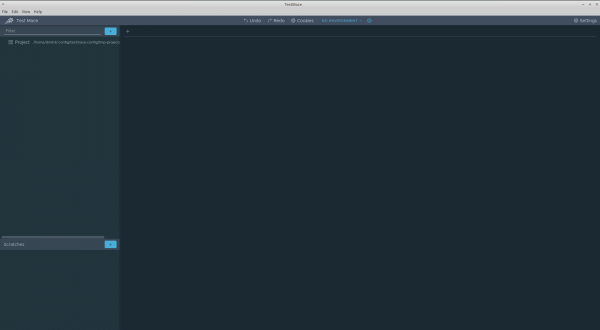
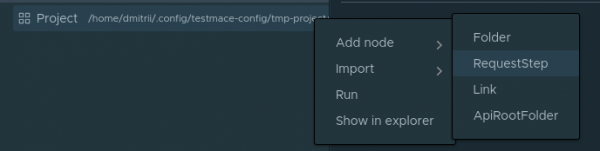
Në maj të majtë ndodhet një pemë projektesh me nyjën rrënjë . Le të provojmë të krijojmë kërkesën e parë për të marrë listën e përdoruesve. Për këtë, do të krijojmë nyjen. Kjo bëhet në menunë kontekstuale të nyjës së Projektit Shto nyjë -> RequestStep.
Në fushën URL shtoni localhost:3000/users dhe kryeni kërkesën. Do të marrim kodin 200 me një masë të zbrazët në trupin e përgjigjes. Nuk është çudi, ne ende nuk kemi shtuar askënd.
Le të krijojmë një skenar që do të përfshijë hapat e mëposhtëm:
- krijimi i përdoruesit;
- kërkesa për id-në e përdoruesit të sapokrijuar;
- fshirja e përdoruesit me id, të krijuar në hapin 1.
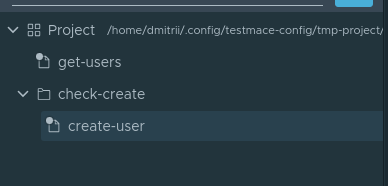
Pra, le të fillojmë. Për lehtësi, le të krijojmë një nyje të tipit . Në thelb, kjo është vetëm një dosje, ku do të ruajmë të gjithë skenarin. Për të krijuar një nyje Folder, është e nevojshme të zgjidhni në menunë kontekstuale të nyjës Project Shto nyjë -> Folder. Do ta quajmë nyjen check-create. Brenda nyjës check-create do të krijojmë kërkesën tonë të parë për krijimin e përdoruesit. Do ta quajmë nyjën e sapokrijuar create-user. Kështu, deri në këtë moment, hierarkia e nyjeve do të duket si më poshtë:
Le të kalojmë në skedën e hapur create-user nyja. Të shtojmë parametrat e mëposhtëm për kërkesën:
- Lloji i kërkesës — POST
- URL — localhost:3000/users
- Trupi — JSON me vlerën
{"email": "user@user.com", "displayName": "Përdorues i ri", "username": "user"}
Të kryejmë këtë kërkesë. Aplikacioni ynë thotë se shënimi është krijuar.
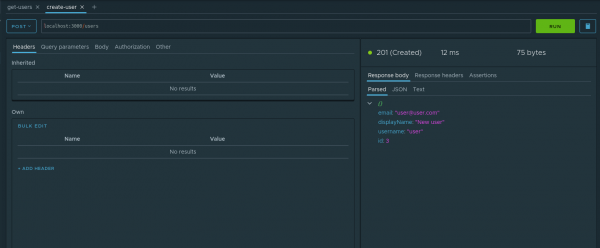
Mirë, le të verifikojmë këtë fakt. Që në hapat e ardhshëm të operojmë me id-në e përdoruesit të krijuar, ky parametr duhet të ruhet. Për këtë, mekanizmi është veçanërisht i përshtatshëm. Le të shqyrtojmë se si funksionojnë ato në shembullin tonë. Në skedën parsed të përgjigjes, te nyja id, në menunë kontekstuale duhet të zgjidhni opsionin Cakto në variabël. Në dritaren dialog duhet të vendosni parametrat e mëposhtëm:
- Nyja — në cilën nga paraardhësit të krijoni variablën dinamikë. Do të zgjedhim check-create
- Emri i variablës — emri i kësaj variabël. Do ta quajmë
userId.
Këtu është si duket procesi i krijimit të një variable dinamike:
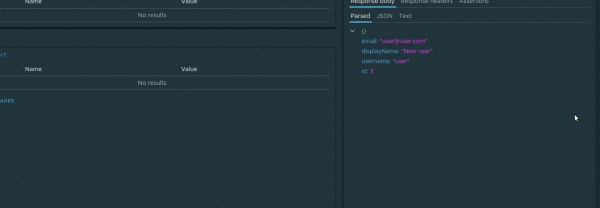
Tani, me çdo ekzekutimin e kësaj kërkese, vlera e variablës dinamike do të azhurnohet. Dhe, pasi variablat dinamike mbështesin mekanizmin e trashëgimisë hierarkike, variabla userId do të jetë e disponueshme te pasardhësit check-create e nyjës në çdo nivel të thellësisë.
Në kërkesën e ardhshme, kjo variabël do na vijë në ndihmë. Konkretisht, ne do të kërkojmë përsëri përdoruesin e sapokrijuar. Si pasardhës i nyjës check-create do të krijojmë kërkesën check-if exists me parametrin url të barabartë me localhost:3000/users/${$dynamicVar.userId}. Ndërtimi i tillë ${variable_name} është marrja e vlerës së variablës. Duke qenë se kemi një variabël dinamike, për ta marrë atë, është e nevojshme të referohesh në objektin $dynamicVar, domethenë i plotë në variablën dinamike userId do të duket si më poshtë ${$dynamicVar.userId}. Do të realizojmë kërkesën dhe do të sigurohemi që të dhënat të kërkohen saktë.
Ka mbetur vetëm një hap — të bëjmë një kërkesë për fshirje. Kjo na nevojitet jo vetëm për të kontrolluar funksionimin e fshirjes, por gjithashtu, thënë ndryshe, për të pastruar pas vetes në bazën e të dhënave, pasi fushat email dhe username janë unike. Pra, në nodin check-create do të krijojmë kërkesën delete-user me parametrat e mëposhtëm
- Lloji i kërkesës — DELETE
- URL —
localhost:3000/users/${$dynamicVar.userId}
E nisim. Presim. Shijojmë rezultatin)
Tani mund ta nisim plotësisht këtë skenar në çdo moment. Për ta nisur skenarin, duhen zgjedhur nga menuja kontekstuale check-create nodi dhe pika Ekzekuto.
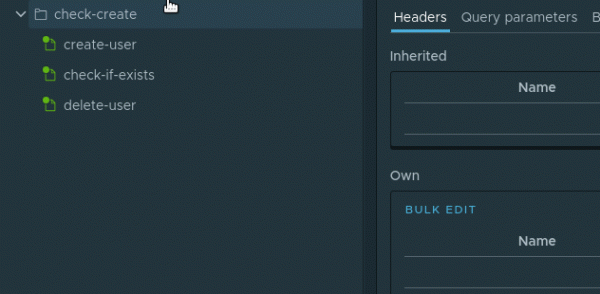
Nodet në skenar do të ekzekutohen njëri pas tjetrit
Ky skenar mund ta ruani në projektin tuaj duke realizuar File -> Ruaj projektin.
Përfundim
Në formatin e këtij artikulli nuk ka mundur të përfshihen të gjitha karakteristikat e mjeteve të përdorura. Sa për fajtorin kryesor — paketën jsx/crud — mbeten pa shpjegim temat e mëposhtme:
- verifikimi dhe transformimi i personalizuar i modeleve;
- gjuhë e fuqishme kërkimesh dhe përdorimi i saj i lehtë në front;
- mbivendosja dhe shtimi i metodave të reja në crud-kontrollerët;
- mbështetje për swagger;
- menaxhimi i cache-it.
Megjithatë, edhe ajo që përshkruhet në artikull është e mjaftueshme për të kuptuar se edhe një framework i tillë sipërmarrës si NestJS ka në arsenalin e tij mjete për prototipizimin e shpejtë të aplikacioneve. Dhe një IDE kaq e mrekullueshme si lejon të ruash ritmin e vendosur.
Kodi burimor i këtij artikulli, së bashku me projektin , është i disponueshëm në repository . Për të hapur projektin mjafton të realizoni në aplikacion File -> Hap projektin.
Burimi: habr.com
