

نوټ. ژباړه: د مقالې لیکوال - ایرکان ایرول، د SAP انجنیر - د ټیم فعالیت میکانیزمونو خپله مطالعه شریکوي kubectl exec، هرچا ته دومره پیژني څوک چې د کوبرنیټس سره کار کوي. هغه د ټول الګوریتم سره د Kubernetes سرچینې کوډ (او اړونده پروژو) لیستونو سره یوځای کیږي، کوم چې تاسو ته اجازه درکوي چې موضوع په ژوره توګه د اړتیا سره سم پوه شي.
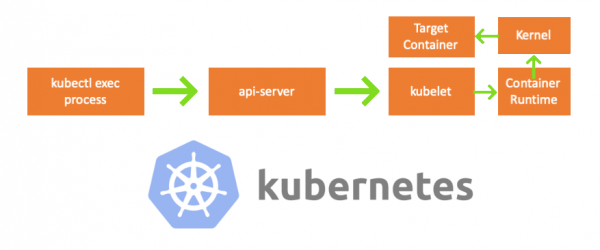
یوه جمعه، یو همکار ما ته راغی او پوښتنه یې وکړه چې څنګه په پوډ کې کمانډ پلي کړئ . زه نشم کولی ځواب ورکړم او ناڅاپه پوه شوم چې زه د عملیاتو میکانیزم په اړه هیڅ نه پوهیږم kubectl exec. هو، ما د دې جوړښت په اړه ځینې نظرونه درلودل، مګر زه د دوی د سموالي په اړه 100٪ ډاډه نه وم او له همدې امله پریکړه وکړه چې دا مسله حل کړم. د بلاګونو، اسنادو او سرچینې کوډونو مطالعې کولو سره، ما ډیر نوي شیان زده کړل، او پدې مقاله کې زه غواړم خپلې موندنې او پوهه شریک کړم. که کوم څه غلط وي، مهرباني وکړئ ما سره اړیکه ونیسئ .
د چمتو کولو لپاره
په MacBook کې د کلستر جوړولو لپاره، ما کلون وکړ . بیا ما د کوبیلټ تشکیل کې د نوډونو IP پتې سمې کړې ، ځکه چې ډیفالټ ترتیبات اجازه نه ورکوي kubectl exec. تاسو کولی شئ د دې اصلي لامل په اړه نور ولولئ .
- هر موټر = زما ماک بوک
- د ماسټر نوډ IP = 192.168.205.10
- د کارګر نوډ IP = 192.168.205.11
- د API سرور بندر = 6443
اجزاء
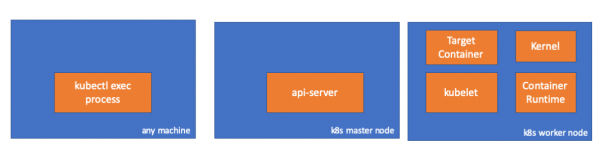
- د kubectl اجرا کولو پروسه: کله چې موږ د "kubectl exec..." اجرا کوو، پروسه پیل کیږي. دا په هر ماشین کې د K8s API سرور ته لاسرسي سره ترسره کیدی شي. نوټ ژباړه: د کنسول لیستونو کې نور، لیکوال د "کوم ماشین" تبصره کاروي، دا په ګوته کوي چې راتلونکی کمانډونه په داسې ماشینونو کې اجرا کیدی شي چې Kubernetes ته لاسرسی ولري.
- : په ماسټر نوډ کې یوه برخه چې Kubernetes API ته لاسرسی چمتو کوي. دا په Kubernetes کې د کنټرول الوتکې لپاره مخکینۍ برخه ده.
- : یو اجنټ چې په کلستر کې په هر نوډ کې تیریږي. دا په پوډ کې د کانټینرونو عملیات یقیني کوي.
- (د کانټینر چلولو وخت): سافټویر د کانټینرونو چلولو لپاره مسؤل دی. مثالونه: ډاکر، CRI-O، کانټینرډ ...
- کندې: د کارګر نوډ کې د OS کرنل؛ د پروسې مدیریت مسولیت لري.
- هدف (هدف) کانتینر: یو کانټینر چې د پوډ برخه ده او د کارګر نوډونو څخه یو باندې تیریږي.
هغه څه چې ما کشف کړل
1. د پیرودونکي اړخ فعالیت
په نوم ځای کې یو پوډ جوړ کړئ default:
// any machine
$ kubectl run exec-test-nginx --image=nginx
بیا موږ د exec کمانډ اجرا کوو او د نورو لیدنو لپاره 5000 ثانیې انتظار کوو:
// any machine
$ kubectl exec -it exec-test-nginx-6558988d5-fgxgg -- sh
# sleep 5000
د kubectl پروسه ښکاري (زموږ په قضیه کې د pid = 8507 سره):
// any machine
$ ps -ef |grep kubectl
501  8507  8409   0  7:19PM ttys000    0:00.13 kubectl exec -it exec-test-nginx-6558988d5-fgxgg -- sh
که موږ د پروسې د شبکې فعالیت وګورو، موږ به وګورو چې دا د api-server سره اړیکې لري (192.168.205.10.6443):
// any machine
$ netstat -atnv |grep 8507
tcp4       0      0  192.168.205.1.51673    192.168.205.10.6443    ESTABLISHED 131072 131768   8507      0 0x0102 0x00000020
tcp4       0      0  192.168.205.1.51672    192.168.205.10.6443    ESTABLISHED 131072 131768   8507      0 0x0102 0x00000028
راځئ چې کوډ وګورو. Kubectl د exec فرعي سرچینې سره د POST غوښتنه رامینځته کوي او د REST غوښتنه لیږي:
              req := restClient.Post().
                        Resource("pods").
                        Name(pod.Name).
                        Namespace(pod.Namespace).
                        SubResource("exec")
                req.VersionedParams(&corev1.PodExecOptions{
                        Container: containerName,
                        Command:   p.Command,
                        Stdin:     p.Stdin,
                        Stdout:    p.Out != nil,
                        Stderr:    p.ErrOut != nil,
                        TTY:       t.Raw,
                }, scheme.ParameterCodec)

return p.Executor.Execute("POST", req.URL(), p.Config, p.In, p.Out, p.ErrOut, t.Raw, sizeQueue)()
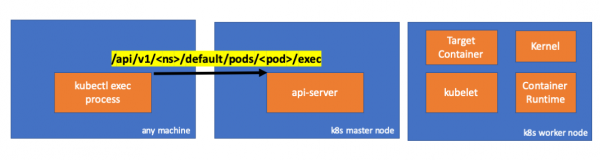
2. د ماسټر نوډ اړخ کې فعالیت
موږ کولی شو غوښتنه د api-server اړخ کې هم وګورو:
handler.go:143] kube-apiserver: POST "/api/v1/namespaces/default/pods/exec-test-nginx-6558988d5-fgxgg/exec" satisfied by gorestful with webservice /api/v1
upgradeaware.go:261] Connecting to backend proxy (intercepting redirects) https://192.168.205.11:10250/exec/default/exec-test-nginx-6558988d5-fgxgg/exec-test-nginx?command=sh&input=1&output=1&tty=1
Headers: map[Connection:[Upgrade] Content-Length:[0] Upgrade:[SPDY/3.1] User-Agent:[kubectl/v1.12.10 (darwin/amd64) kubernetes/e3c1340] X-Forwarded-For:[192.168.205.1] X-Stream-Protocol-Version:[v4.channel.k8s.io v3.channel.k8s.io v2.channel.k8s.io channel.k8s.io]]
په یاد ولرئ چې د HTTP غوښتنه کې د پروتوکول بدلولو غوښتنه شامله ده. تاسو ته اجازه درکوي انفرادي stdin/stdout/stderr/spdy-error "streams" په یو واحد TCP پیوستون کې ملټي پلیکس کړئ.
د API سرور غوښتنه ترلاسه کوي او دا یې بدلوي PodExecOptions:
// PodExecOptions is the query options to a Pod's remote exec call
type PodExecOptions struct {
        metav1.TypeMeta

        // Stdin if true indicates that stdin is to be redirected for the exec call
        Stdin bool

        // Stdout if true indicates that stdout is to be redirected for the exec call
        Stdout bool

        // Stderr if true indicates that stderr is to be redirected for the exec call
        Stderr bool

        // TTY if true indicates that a tty will be allocated for the exec call
        TTY bool

        // Container in which to execute the command.
        Container string

        // Command is the remote command to execute; argv array; not executed within a shell.
        Command []string
}()
د اړینو کړنو ترسره کولو لپاره، api-server باید پوه شي چې کوم پوډ ته اړتیا لري چې اړیکه ونیسي:
// ExecLocation returns the exec URL for a pod container. If opts.Container is blank
// and only one container is present in the pod, that container is used.
func ExecLocation(
        getter ResourceGetter,
        connInfo client.ConnectionInfoGetter,
        ctx context.Context,
        name string,
        opts *api.PodExecOptions,
) (*url.URL, http.RoundTripper, error) {
        return streamLocation(getter, connInfo, ctx, name, opts, opts.Container, "exec")
}()
البته، د پای ټکی په اړه معلومات د نوډ په اړه د معلوماتو څخه اخیستل کیږي:
        nodeName := types.NodeName(pod.Spec.NodeName)
        if len(nodeName) == 0 {
                // If pod has not been assigned a host, return an empty location
                return nil, nil, errors.NewBadRequest(fmt.Sprintf("pod %s does not have a host assigned", name))
        }
nodeInfo, err := connInfo.GetConnectionInfo(ctx, nodeName)()
هورې! کوبلیټ اوس یو بندر لري (node.Status.DaemonEndpoints.KubeletEndpoint.Port)، کوم چې د API سرور سره نښلول کیدی شي:
// GetConnectionInfo retrieves connection info from the status of a Node API object.
func (k *NodeConnectionInfoGetter) GetConnectionInfo(ctx context.Context, nodeName types.NodeName) (*ConnectionInfo, error) {
        node, err := k.nodes.Get(ctx, string(nodeName), metav1.GetOptions{})
        if err != nil {
                return nil, err
        }

        // Find a kubelet-reported address, using preferred address type
        host, err := nodeutil.GetPreferredNodeAddress(node, k.preferredAddressTypes)
        if err != nil {
                return nil, err
        }

        // Use the kubelet-reported port, if present
        port := int(node.Status.DaemonEndpoints.KubeletEndpoint.Port)
        if port <= 0 {
                port = k.defaultPort
        }

        return &ConnectionInfo{
                Scheme:    k.scheme,
                Hostname:  host,
                Port:      strconv.Itoa(port),
                Transport: k.transport,
        }, nil
}()
د اسنادو څخه :
دا اړیکې د کوبیلټ HTTPS پای ټکي سره رامینځته شوي. په ډیفالټ ډول، apiserver د کبلیټ سند نه تاییدوي، کوم چې اړیکه د مینځني مینځني (MITM) بریدونو او بریدونو لپاره زیانمنونکي کوي. ناامنه په غیر معتبر او/یا عامه شبکو کې د کار کولو لپاره.
اوس د API سرور پای ټکی پیژني او پیوستون رامینځته کوي:
// Connect returns a handler for the pod exec proxy
func (r *ExecREST) Connect(ctx context.Context, name string, opts runtime.Object, responder rest.Responder) (http.Handler, error) {
        execOpts, ok := opts.(*api.PodExecOptions)
        if !ok {
                return nil, fmt.Errorf("invalid options object: %#v", opts)
        }
        location, transport, err := pod.ExecLocation(r.Store, r.KubeletConn, ctx, name, execOpts)
        if err != nil {
                return nil, err
        }
        return newThrottledUpgradeAwareProxyHandler(location, transport, false, true, true, responder), nil
}()
راځئ وګورو چې په ماسټر نوډ کې څه پیښیږي.
لومړی، موږ د کارګر نوډ IP معلوموو. زموږ په قضیه کې دا 192.168.205.11 دی:
// any machine
$ kubectl get nodes k8s-node-1 -o wide
NAME         STATUS   ROLES    AGE   VERSION   INTERNAL-IP      EXTERNAL-IP   OS-IMAGE             KERNEL-VERSION      CONTAINER-RUNTIME
k8s-node-1   Ready    <none>   9h    v1.15.3   192.168.205.11   <none>        Ubuntu 16.04.6 LTS   4.4.0-159-generic   docker://17.3.3
بیا د کوبیلټ بندر تنظیم کړئ (زموږ په قضیه کې 10250):
// any machine
$ kubectl get nodes k8s-node-1 -o jsonpath='{.status.daemonEndpoints.kubeletEndpoint}'
map[Port:10250]
اوس د دې وخت دی چې شبکه وګورئ. ایا د کارګر نوډ (192.168.205.11) سره اړیکه شتون لري؟ دا دی! که تاسو یوه پروسه وژني exec، دا به ورک شي ، نو زه پوهیږم چې پیوستون د api-server لخوا د exec کمانډ اجرا کیدو په پایله کې رامینځته شوی.
// master node
$ netstat -atn |grep 192.168.205.11
tcp        0      0 192.168.205.10:37870    192.168.205.11:10250    ESTABLISHED
… 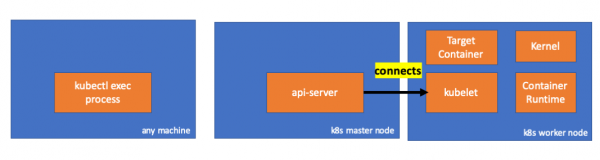
د kubectl او api-server ترمنځ اړیکه لاهم خلاصه ده. برسیره پردې، یو بل اړیکه شتون لري چې د api-server او kubelet سره اړیکه لري.
3. د کارګر نوډ فعالیت
اوس راځئ چې د کارګر نوډ سره وصل کړو او وګورو چې پدې کې څه پیښیږي.
تر ټولو لومړی، موږ ګورو چې د هغې سره اړیکه هم جوړه شوې ده (دوهم کرښه)؛ 192.168.205.10 د ماسټر نوډ IP دی:
 // worker node
  $ netstat -atn |grep 10250
  tcp6       0      0 :::10250                :::*                    LISTEN
  tcp6       0      0 192.168.205.11:10250    192.168.205.10:37870    ESTABLISHED
زموږ د ټیم په اړه څه sleep؟ هوری، هغه هم هلته ده!
 // worker node
  $ ps -afx
  ...
  31463 ?        Sl     0:00      _ docker-containerd-shim 7d974065bbb3107074ce31c51f5ef40aea8dcd535ae11a7b8f2dd180b8ed583a /var/run/docker/libcontainerd/7d974065bbb3107074ce31c51
  31478 pts/0    Ss     0:00          _ sh
  31485 pts/0    S+     0:00              _ sleep 5000
  …
مګر انتظار وکړئ: کبلیټ دا څنګه لرې کړ؟ کوبیلټ یو ډیمون لري چې د API سرور غوښتنو لپاره د بندر له لارې API ته لاسرسی چمتو کوي:
// Server is the library interface to serve the stream requests.
type Server interface {
        http.Handler

        // Get the serving URL for the requests.
        // Requests must not be nil. Responses may be nil iff an error is returned.
        GetExec(*runtimeapi.ExecRequest) (*runtimeapi.ExecResponse, error)
        GetAttach(req *runtimeapi.AttachRequest) (*runtimeapi.AttachResponse, error)
        GetPortForward(*runtimeapi.PortForwardRequest) (*runtimeapi.PortForwardResponse, error)

        // Start the server.
        // addr is the address to serve on (address:port) stayUp indicates whether the server should
        // listen until Stop() is called, or automatically stop after all expected connections are
        // closed. Calling Get{Exec,Attach,PortForward} increments the expected connection count.
        // Function does not return until the server is stopped.
        Start(stayUp bool) error
        // Stop the server, and terminate any open connections.
        Stop() error
}()
کوبیلټ د اجرایی غوښتنو لپاره د ځواب پای ټکی محاسبه کوي:
func (s *server) GetExec(req *runtimeapi.ExecRequest) (*runtimeapi.ExecResponse, error) {
        if err := validateExecRequest(req); err != nil {
                return nil, err
        }
        token, err := s.cache.Insert(req)
        if err != nil {
                return nil, err
        }
        return &runtimeapi.ExecResponse{
                Url: s.buildURL("exec", token),
        }, nil
}()
مغشوش کیږه مه. دا د قوماندې پایله نه راګرځوي، مګر د اړیکو پای ټکی:
type ExecResponse struct {
        // Fully qualified URL of the exec streaming server.
        Url                  string   `protobuf:"bytes,1,opt,name=url,proto3" json:"url,omitempty"`
        XXX_NoUnkeyedLiteral struct{} `json:"-"`
        XXX_sizecache        int32    `json:"-"`
}()
کوبیلیټ انٹرفیس پلي کوي RuntimeServiceClient، کوم چې د کانټینر چلولو انٹرفیس برخه ده (موږ د دې په اړه نور څه لیکلي، د بیلګې په توګه، - نږدې ژباړه.):
په kubernetes/kubernetes کې د cri-api څخه اوږد لیست
// For semantics around ctx use and closing/ending streaming RPCs, please refer to https://godoc.org/google.golang.org/grpc#ClientConn.NewStream.
type RuntimeServiceClient interface {
        // Version returns the runtime name, runtime version, and runtime API version.
        Version(ctx context.Context, in *VersionRequest, opts ...grpc.CallOption) (*VersionResponse, error)
        // RunPodSandbox creates and starts a pod-level sandbox. Runtimes must ensure
        // the sandbox is in the ready state on success.
        RunPodSandbox(ctx context.Context, in *RunPodSandboxRequest, opts ...grpc.CallOption) (*RunPodSandboxResponse, error)
        // StopPodSandbox stops any running process that is part of the sandbox and
        // reclaims network resources (e.g., IP addresses) allocated to the sandbox.
        // If there are any running containers in the sandbox, they must be forcibly
        // terminated.
        // This call is idempotent, and must not return an error if all relevant
        // resources have already been reclaimed. kubelet will call StopPodSandbox
        // at least once before calling RemovePodSandbox. It will also attempt to
        // reclaim resources eagerly, as soon as a sandbox is not needed. Hence,
        // multiple StopPodSandbox calls are expected.
        StopPodSandbox(ctx context.Context, in *StopPodSandboxRequest, opts ...grpc.CallOption) (*StopPodSandboxResponse, error)
        // RemovePodSandbox removes the sandbox. If there are any running containers
        // in the sandbox, they must be forcibly terminated and removed.
        // This call is idempotent, and must not return an error if the sandbox has
        // already been removed.
        RemovePodSandbox(ctx context.Context, in *RemovePodSandboxRequest, opts ...grpc.CallOption) (*RemovePodSandboxResponse, error)
        // PodSandboxStatus returns the status of the PodSandbox. If the PodSandbox is not
        // present, returns an error.
        PodSandboxStatus(ctx context.Context, in *PodSandboxStatusRequest, opts ...grpc.CallOption) (*PodSandboxStatusResponse, error)
        // ListPodSandbox returns a list of PodSandboxes.
        ListPodSandbox(ctx context.Context, in *ListPodSandboxRequest, opts ...grpc.CallOption) (*ListPodSandboxResponse, error)
        // CreateContainer creates a new container in specified PodSandbox
        CreateContainer(ctx context.Context, in *CreateContainerRequest, opts ...grpc.CallOption) (*CreateContainerResponse, error)
        // StartContainer starts the container.
        StartContainer(ctx context.Context, in *StartContainerRequest, opts ...grpc.CallOption) (*StartContainerResponse, error)
        // StopContainer stops a running container with a grace period (i.e., timeout).
        // This call is idempotent, and must not return an error if the container has
        // already been stopped.
        // TODO: what must the runtime do after the grace period is reached?
        StopContainer(ctx context.Context, in *StopContainerRequest, opts ...grpc.CallOption) (*StopContainerResponse, error)
        // RemoveContainer removes the container. If the container is running, the
        // container must be forcibly removed.
        // This call is idempotent, and must not return an error if the container has
        // already been removed.
        RemoveContainer(ctx context.Context, in *RemoveContainerRequest, opts ...grpc.CallOption) (*RemoveContainerResponse, error)
        // ListContainers lists all containers by filters.
        ListContainers(ctx context.Context, in *ListContainersRequest, opts ...grpc.CallOption) (*ListContainersResponse, error)
        // ContainerStatus returns status of the container. If the container is not
        // present, returns an error.
        ContainerStatus(ctx context.Context, in *ContainerStatusRequest, opts ...grpc.CallOption) (*ContainerStatusResponse, error)
        // UpdateContainerResources updates ContainerConfig of the container.
        UpdateContainerResources(ctx context.Context, in *UpdateContainerResourcesRequest, opts ...grpc.CallOption) (*UpdateContainerResourcesResponse, error)
        // ReopenContainerLog asks runtime to reopen the stdout/stderr log file
        // for the container. This is often called after the log file has been
        // rotated. If the container is not running, container runtime can choose
        // to either create a new log file and return nil, or return an error.
        // Once it returns error, new container log file MUST NOT be created.
        ReopenContainerLog(ctx context.Context, in *ReopenContainerLogRequest, opts ...grpc.CallOption) (*ReopenContainerLogResponse, error)
        // ExecSync runs a command in a container synchronously.
        ExecSync(ctx context.Context, in *ExecSyncRequest, opts ...grpc.CallOption) (*ExecSyncResponse, error)
        // Exec prepares a streaming endpoint to execute a command in the container.
        Exec(ctx context.Context, in *ExecRequest, opts ...grpc.CallOption) (*ExecResponse, error)
        // Attach prepares a streaming endpoint to attach to a running container.
        Attach(ctx context.Context, in *AttachRequest, opts ...grpc.CallOption) (*AttachResponse, error)
        // PortForward prepares a streaming endpoint to forward ports from a PodSandbox.
        PortForward(ctx context.Context, in *PortForwardRequest, opts ...grpc.CallOption) (*PortForwardResponse, error)
        // ContainerStats returns stats of the container. If the container does not
        // exist, the call returns an error.
        ContainerStats(ctx context.Context, in *ContainerStatsRequest, opts ...grpc.CallOption) (*ContainerStatsResponse, error)
        // ListContainerStats returns stats of all running containers.
        ListContainerStats(ctx context.Context, in *ListContainerStatsRequest, opts ...grpc.CallOption) (*ListContainerStatsResponse, error)
        // UpdateRuntimeConfig updates the runtime configuration based on the given request.
        UpdateRuntimeConfig(ctx context.Context, in *UpdateRuntimeConfigRequest, opts ...grpc.CallOption) (*UpdateRuntimeConfigResponse, error)
        // Status returns the status of the runtime.
        Status(ctx context.Context, in *StatusRequest, opts ...grpc.CallOption) (*StatusResponse, error)
} ()
دا په ساده ډول د کانټینر چلولو انٹرفیس له لارې میتود ته زنګ وهلو لپاره gRPC کاروي:
type runtimeServiceClient struct {
        cc *grpc.ClientConn
}()
func (c *runtimeServiceClient) Exec(ctx context.Context, in *ExecRequest, opts ...grpc.CallOption) (*ExecResponse, error) {
        out := new(ExecResponse)
        err := c.cc.Invoke(ctx, "/runtime.v1alpha2.RuntimeService/Exec", in, out, opts...)
        if err != nil {
                return nil, err
        }
        return out, nil
}()
د کانټینر چلولو وخت د پلي کولو مسولیت لري RuntimeServiceServer:
په kubernetes/kubernetes کې د cri-api څخه اوږد لیست
// RuntimeServiceServer is the server API for RuntimeService service.
type RuntimeServiceServer interface {
        // Version returns the runtime name, runtime version, and runtime API version.
        Version(context.Context, *VersionRequest) (*VersionResponse, error)
        // RunPodSandbox creates and starts a pod-level sandbox. Runtimes must ensure
        // the sandbox is in the ready state on success.
        RunPodSandbox(context.Context, *RunPodSandboxRequest) (*RunPodSandboxResponse, error)
        // StopPodSandbox stops any running process that is part of the sandbox and
        // reclaims network resources (e.g., IP addresses) allocated to the sandbox.
        // If there are any running containers in the sandbox, they must be forcibly
        // terminated.
        // This call is idempotent, and must not return an error if all relevant
        // resources have already been reclaimed. kubelet will call StopPodSandbox
        // at least once before calling RemovePodSandbox. It will also attempt to
        // reclaim resources eagerly, as soon as a sandbox is not needed. Hence,
        // multiple StopPodSandbox calls are expected.
        StopPodSandbox(context.Context, *StopPodSandboxRequest) (*StopPodSandboxResponse, error)
        // RemovePodSandbox removes the sandbox. If there are any running containers
        // in the sandbox, they must be forcibly terminated and removed.
        // This call is idempotent, and must not return an error if the sandbox has
        // already been removed.
        RemovePodSandbox(context.Context, *RemovePodSandboxRequest) (*RemovePodSandboxResponse, error)
        // PodSandboxStatus returns the status of the PodSandbox. If the PodSandbox is not
        // present, returns an error.
        PodSandboxStatus(context.Context, *PodSandboxStatusRequest) (*PodSandboxStatusResponse, error)
        // ListPodSandbox returns a list of PodSandboxes.
        ListPodSandbox(context.Context, *ListPodSandboxRequest) (*ListPodSandboxResponse, error)
        // CreateContainer creates a new container in specified PodSandbox
        CreateContainer(context.Context, *CreateContainerRequest) (*CreateContainerResponse, error)
        // StartContainer starts the container.
        StartContainer(context.Context, *StartContainerRequest) (*StartContainerResponse, error)
        // StopContainer stops a running container with a grace period (i.e., timeout).
        // This call is idempotent, and must not return an error if the container has
        // already been stopped.
        // TODO: what must the runtime do after the grace period is reached?
        StopContainer(context.Context, *StopContainerRequest) (*StopContainerResponse, error)
        // RemoveContainer removes the container. If the container is running, the
        // container must be forcibly removed.
        // This call is idempotent, and must not return an error if the container has
        // already been removed.
        RemoveContainer(context.Context, *RemoveContainerRequest) (*RemoveContainerResponse, error)
        // ListContainers lists all containers by filters.
        ListContainers(context.Context, *ListContainersRequest) (*ListContainersResponse, error)
        // ContainerStatus returns status of the container. If the container is not
        // present, returns an error.
        ContainerStatus(context.Context, *ContainerStatusRequest) (*ContainerStatusResponse, error)
        // UpdateContainerResources updates ContainerConfig of the container.
        UpdateContainerResources(context.Context, *UpdateContainerResourcesRequest) (*UpdateContainerResourcesResponse, error)
        // ReopenContainerLog asks runtime to reopen the stdout/stderr log file
        // for the container. This is often called after the log file has been
        // rotated. If the container is not running, container runtime can choose
        // to either create a new log file and return nil, or return an error.
        // Once it returns error, new container log file MUST NOT be created.
        ReopenContainerLog(context.Context, *ReopenContainerLogRequest) (*ReopenContainerLogResponse, error)
        // ExecSync runs a command in a container synchronously.
        ExecSync(context.Context, *ExecSyncRequest) (*ExecSyncResponse, error)
        // Exec prepares a streaming endpoint to execute a command in the container.
        Exec(context.Context, *ExecRequest) (*ExecResponse, error)
        // Attach prepares a streaming endpoint to attach to a running container.
        Attach(context.Context, *AttachRequest) (*AttachResponse, error)
        // PortForward prepares a streaming endpoint to forward ports from a PodSandbox.
        PortForward(context.Context, *PortForwardRequest) (*PortForwardResponse, error)
        // ContainerStats returns stats of the container. If the container does not
        // exist, the call returns an error.
        ContainerStats(context.Context, *ContainerStatsRequest) (*ContainerStatsResponse, error)
        // ListContainerStats returns stats of all running containers.
        ListContainerStats(context.Context, *ListContainerStatsRequest) (*ListContainerStatsResponse, error)
        // UpdateRuntimeConfig updates the runtime configuration based on the given request.
        UpdateRuntimeConfig(context.Context, *UpdateRuntimeConfigRequest) (*UpdateRuntimeConfigResponse, error)
        // Status returns the status of the runtime.
        Status(context.Context, *StatusRequest) (*StatusResponse, error)
} ()
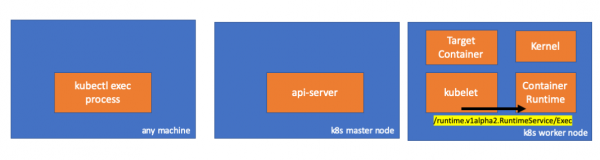
که داسې وي، موږ باید د کیبلیټ او کانټینر د چلولو ترمنځ اړیکه وګورو، سمه ده؟ راځئ چې وګورو.
دا کمانډ د exec کمانډ څخه دمخه او وروسته پرمخ وړئ او توپیرونه وګورئ. زما په قضیه کې توپیر دا دی:
// worker node
$ ss -a -p |grep kubelet
...
u_str  ESTAB      0      0       * 157937                * 157387                users:(("kubelet",pid=5714,fd=33))
...
هومم... د یونیکس ساکټونو له لارې د کیوبیلټ (pid=5714) او نامعلوم شی ترمنځ نوی اړیکه. دا څه کیدای شي؟ دا سمه ده، دا ډاکر دی (pid = 1186)!
// worker node
$ ss -a -p |grep 157387
...
u_str  ESTAB      0      0       * 157937                * 157387                users:(("kubelet",pid=5714,fd=33))
u_str  ESTAB      0      0      /var/run/docker.sock 157387                * 157937                users:(("dockerd",pid=1186,fd=14))
...
لکه څنګه چې تاسو په یاد ولرئ، دا د ډاکر ډیمون پروسه ده (pid = 1186) چې زموږ کمانډ اجرا کوي:
// worker node
$ ps -afx
...
 1186 ?        Ssl    0:55 /usr/bin/dockerd -H fd://
17784 ?        Sl     0:00      _ docker-containerd-shim 53a0a08547b2f95986402d7f3b3e78702516244df049ba6c5aa012e81264aa3c /var/run/docker/libcontainerd/53a0a08547b2f95986402d7f3
17801 pts/2    Ss     0:00          _ sh
17827 pts/2    S+     0:00              _ sleep 5000
...
4. د کانټینر چلولو وخت کې فعالیت
راځئ چې د CRI-O سرچینې کوډ معاینه کړو ترڅو پوه شو چې څه پیښیږي. په ډاکر کې منطق ورته دی.
د پلي کولو لپاره یو سرور مسؤل دی RuntimeServiceServer:
// Server implements the RuntimeService and ImageService
type Server struct {
        config          libconfig.Config
        seccompProfile  *seccomp.Seccomp
        stream          StreamService
        netPlugin       ocicni.CNIPlugin
        hostportManager hostport.HostPortManager

        appArmorProfile string
        hostIP          string
        bindAddress     string

        *lib.ContainerServer
        monitorsChan      chan struct{}
        defaultIDMappings *idtools.IDMappings
        systemContext     *types.SystemContext // Never nil

        updateLock sync.RWMutex

        seccompEnabled  bool
        appArmorEnabled bool
}()
// Exec prepares a streaming endpoint to execute a command in the container.
func (s *Server) Exec(ctx context.Context, req *pb.ExecRequest) (resp *pb.ExecResponse, err error) {
        const operation = "exec"
        defer func() {
                recordOperation(operation, time.Now())
                recordError(operation, err)
        }()

        resp, err = s.getExec(req)
        if err != nil {
                return nil, fmt.Errorf("unable to prepare exec endpoint: %v", err)
        }

        return resp, nil
}()
د سلسلې په پای کې، د کانټینر چلولو وخت د کارګر نوډ کې کمانډ اجرا کوي:
// ExecContainer prepares a streaming endpoint to execute a command in the container.
func (r *runtimeOCI) ExecContainer(c *Container, cmd []string, stdin io.Reader, stdout, stderr io.WriteCloser, tty bool, resize <-chan remotecommand.TerminalSize) error {
        processFile, err := prepareProcessExec(c, cmd, tty)
        if err != nil {
                return err
        }
        defer os.RemoveAll(processFile.Name())

        args := []string{rootFlag, r.root, "exec"}
        args = append(args, "--process", processFile.Name(), c.ID())
        execCmd := exec.Command(r.path, args...)
        if v, found := os.LookupEnv("XDG_RUNTIME_DIR"); found {
                execCmd.Env = append(execCmd.Env, fmt.Sprintf("XDG_RUNTIME_DIR=%s", v))
        }
        var cmdErr, copyError error
        if tty {
                cmdErr = ttyCmd(execCmd, stdin, stdout, resize)
        } else {
                if stdin != nil {
                        // Use an os.Pipe here as it returns true *os.File objects.
                        // This way, if you run 'kubectl exec <pod> -i bash' (no tty) and type 'exit',
                        // the call below to execCmd.Run() can unblock because its Stdin is the read half
                        // of the pipe.
                        r, w, err := os.Pipe()
                        if err != nil {
                                return err
                        }
                        go func() { _, copyError = pools.Copy(w, stdin) }()

                        execCmd.Stdin = r
                }
                if stdout != nil {
                        execCmd.Stdout = stdout
                }
                if stderr != nil {
                        execCmd.Stderr = stderr
                }

                cmdErr = execCmd.Run()
        }

        if copyError != nil {
                return copyError
        }
        if exitErr, ok := cmdErr.(*exec.ExitError); ok {
                return &utilexec.ExitErrorWrapper{ExitError: exitErr}
        }
        return cmdErr
}()
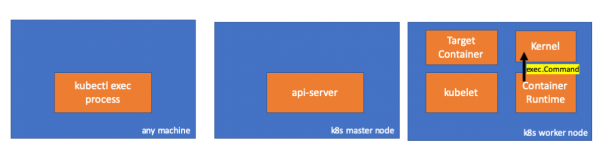
په نهایت کې ، کرنل دا حکمونه اجرا کوي:
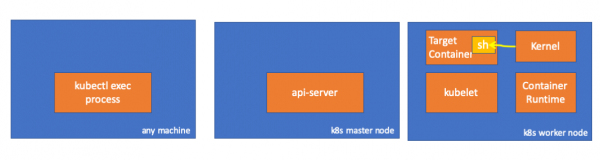
د
- د API سرور کولی شي د کوبیلټ سره پیوستون هم پیل کړي.
- لاندې اړیکې دوام لري تر هغه چې د متقابل اجرایوي سیشن پای ته ورسیږي:
- د kubectl او api-server ترمنځ؛
- د api-server او kubectl ترمنځ؛
- د کبلیټ او کانټینر چلولو وخت ترمنځ.
- Kubectl یا api-server نشي کولی د کارګر نوډونو کې هیڅ شی پرمخ بوځي. کوبیلټ چلولی شي، مګر دا د دې شیانو د ترسره کولو لپاره د کانټینر چلولو سره هم اړیکه لري.
سرچینې
- بحث"په kubernetes-dev کې؛
- مقاله "»
- بحث""په سرور غلطی کې.
PS د ژباړونکي څخه
زموږ په بلاګ کې هم ولولئ:
- "په کبرنیټس کې څه پیښیږي کله چې تاسو د کیوبیکل چلول کوئ؟" и ;
- «»
- «»
- «".
سرچینه: www.habr.com
