

Sonatype Nexus wani dandali ne wanda aka haɗa ta hanyar da masu haɓakawa za su iya wakili, adanawa da sarrafa abubuwan dogaro na Java (Maven), Docker, Python, Ruby, NPM, Hoton Bower, fakitin RPM, gitlfs, Apt, Go, Nuget, da rarraba amincin software.
Me yasa kuke buƙatar Sonatype Nexus?
- Don adana kayan tarihi na sirri;
- Don adana kayan tarihi waɗanda ake zazzage su daga Intanet;
Abubuwan da aka goyan baya a cikin ainihin kunshin Sonatype Nexus:
- Java, Maven (jar)
- Docker
- Python (pip)
- Ruby (gem)
- NPM
- Mai jan ciki
- Yum (rpm)
- gitlfs
- raw
- Apt (bashi)
- Go
- Nuget
Abubuwan Kayayyakin Taimakon Al'umma:
- mawaki
- Conan
- CPAN
- Farashin ELPA
- Hanya
- P2
- R
Shigar da Sonatype Nexus ta amfani da
bukatun
- Karanta game da amfani da mai yiwuwa akan Intanet.
- Sanya mai yiwuwa
pip install ansibleakan wurin aiki inda littafin wasan ke gudana. - Saiti akan wurin aiki inda littafin wasan ke gudana.
- Saiti akan wurin aiki inda littafin wasan ke gudana.
- An gwada wannan rawar a kan CentOS 7, Ubuntu Xenial (16.04) da Bionic (18.04), Debian Jessie da Stretch
jmespathDole ne a shigar da ɗakin karatu akan wurin aiki inda littafin wasan ke gudana. Don girka:sudo pip install -r requirements.txt- Ajiye fayil ɗin playbook (misali a ƙasa) zuwa fayil ɗin nexus.yml
- Gudu shigarwa na Nexus
ansible-playbook -i host nexus.yml
Misali littafin wasa mai yiwuwa don shigar da nexus ba tare da LDAP tare da Maven (java), Docker, Python, Ruby, NPM, Bower, RPM da wuraren ajiyar gitlfs.
---
- name: Nexus
  hosts: nexus
  become: yes

  vars:
    nexus_timezone: 'Asia/Omsk'
    nexus_admin_password: "admin123"
    nexus_public_hostname: 'apatsev-nexus-playbook'
    httpd_setup_enable: false
    nexus_privileges:
      - name: all-repos-read
        description: 'Read & Browse access to all repos'
        repository: '*'
        actions:
          - read
          - browse
      - name: company-project-deploy
        description: 'Deployments to company-project'
        repository: company-project
        actions:
          - add
          - edit
    nexus_roles:
      - id: Developpers # maps to the LDAP group
        name: developers
        description: All developers
        privileges:
          - nx-search-read
          - all-repos-read
          - company-project-deploy
        roles: []
    nexus_local_users:
      - username: jenkins # used as key to update
        first_name: Jenkins
        last_name: CI
        email: support@company.com
        password: "s3cr3t"
        roles:
          - Developpers # role ID here
    nexus_blobstores:
      - name: company-artifacts
        path: /var/nexus/blobs/company-artifacts
    nexus_scheduled_tasks:
      - name: compact-blobstore
        cron: '0 0 22 * * ?'
        typeId: blobstore.compact
        taskProperties:
          blobstoreName: 'company-artifacts'

    nexus_repos_maven_proxy:
      - name: central
        remote_url: 'https://repo1.maven.org/maven2/'
        layout_policy: permissive
      - name: jboss
        remote_url: 'https://repository.jboss.org/nexus/content/groups/public-jboss/'
      - name: vaadin-addons
        remote_url: 'https://maven.vaadin.com/vaadin-addons/'
      - name: jaspersoft
        remote_url: 'https://jaspersoft.artifactoryonline.com/jaspersoft/jaspersoft-repo/'
        version_policy: mixed
    nexus_repos_maven_hosted:
      - name: company-project
        version_policy: mixed
        write_policy: allow
        blob_store: company-artifacts
    nexus_repos_maven_group:
      - name: public
        member_repos:
          - central
          - jboss
          - vaadin-addons
          - jaspersoft

    # Yum. Change nexus_config_yum to true for create yum repository
    nexus_config_yum: true
    nexus_repos_yum_hosted:
      - name: private_yum_centos_7
        repodata_depth: 1
    nexus_repos_yum_proxy:
      - name: epel_centos_7_x86_64
        remote_url: http://download.fedoraproject.org/pub/epel/7/x86_64
        maximum_component_age: -1
        maximum_metadata_age: -1
        negative_cache_ttl: 60
      - name: centos-7-os-x86_64
        remote_url: http://mirror.centos.org/centos/7/os/x86_64/
        maximum_component_age: -1
        maximum_metadata_age: -1
        negative_cache_ttl: 60
    nexus_repos_yum_group:
      - name: yum_all
        member_repos:
          - private_yum_centos_7
          - epel_centos_7_x86_64

    # NPM. Change nexus_config_npm to true for create npm repository
    nexus_config_npm: true
    nexus_repos_npm_hosted: []
    nexus_repos_npm_group:
      - name: npm-public
        member_repos:
          - npm-registry
    nexus_repos_npm_proxy:
      - name: npm-registry
        remote_url: https://registry.npmjs.org/
        negative_cache_enabled: false

    # Docker. Change nexus_config_docker to true for create docker repository
    nexus_config_docker: true
    nexus_repos_docker_hosted:
      - name: docker-hosted
        http_port: "{{ nexus_docker_hosted_port }}"
        v1_enabled: True
    nexus_repos_docker_proxy:
      - name: docker-proxy
        http_port: "{{ nexus_docker_proxy_port }}"
        v1_enabled: True
        index_type: "HUB"
        remote_url: "https://registry-1.docker.io"
        use_nexus_certificates_to_access_index: false
        maximum_component_age: 1440
        maximum_metadata_age: 1440
        negative_cache_enabled: true
        negative_cache_ttl: 1440
    nexus_repos_docker_group:
      - name: docker-group
        http_port: "{{ nexus_docker_group_port }}"
        v1_enabled: True
        member_repos:
          - docker-hosted
          - docker-proxy

    # Bower. Change nexus_config_bower to true for create bower repository
    nexus_config_bower: true
    nexus_repos_bower_hosted:
      - name: bower-hosted
    nexus_repos_bower_proxy:
      - name: bower-proxy
        index_type: "proxy"
        remote_url: "https://registry.bower.io"
        use_nexus_certificates_to_access_index: false
        maximum_component_age: 1440
        maximum_metadata_age: 1440
        negative_cache_enabled: true
        negative_cache_ttl: 1440
    nexus_repos_bower_group:
      - name: bower-group
        member_repos:
          - bower-hosted
          - bower-proxy

    # Pypi. Change nexus_config_pypi to true for create pypi repository
    nexus_config_pypi: true
    nexus_repos_pypi_hosted:
      - name: pypi-hosted
    nexus_repos_pypi_proxy:
      - name: pypi-proxy
        index_type: "proxy"
        remote_url: "https://pypi.org/"
        use_nexus_certificates_to_access_index: false
        maximum_component_age: 1440
        maximum_metadata_age: 1440
        negative_cache_enabled: true
        negative_cache_ttl: 1440
    nexus_repos_pypi_group:
      - name: pypi-group
        member_repos:
          - pypi-hosted
          - pypi-proxy

    # rubygems. Change nexus_config_rubygems to true for create rubygems repository
    nexus_config_rubygems: true
    nexus_repos_rubygems_hosted:
      - name: rubygems-hosted
    nexus_repos_rubygems_proxy:
      - name: rubygems-proxy
        index_type: "proxy"
        remote_url: "https://rubygems.org"
        use_nexus_certificates_to_access_index: false
        maximum_component_age: 1440
        maximum_metadata_age: 1440
        negative_cache_enabled: true
        negative_cache_ttl: 1440
    nexus_repos_rubygems_group:
      - name: rubygems-group
        member_repos:
          - rubygems-hosted
          - rubygems-proxy

    # gitlfs. Change nexus_config_gitlfs to true for create gitlfs repository
    nexus_config_gitlfs: true
    nexus_repos_gitlfs_hosted:
      - name: gitlfs-hosted

  roles:
    - { role: geerlingguy.java }
    # Debian/Ubuntu only
    # - { role: geerlingguy.apache, apache_create_vhosts: no, apache_mods_enabled: ["proxy_http.load", "headers.load"], apache_remove_default_vhost: true, tags: ["geerlingguy.apache"] }
    # RedHat/CentOS only
    - { role: geerlingguy.apache, apache_create_vhosts: no, apache_remove_default_vhost: true, tags: ["geerlingguy.apache"] }
    - { role: ansible-thoteam.nexus3-oss, tags: ['ansible-thoteam.nexus3-oss'] }
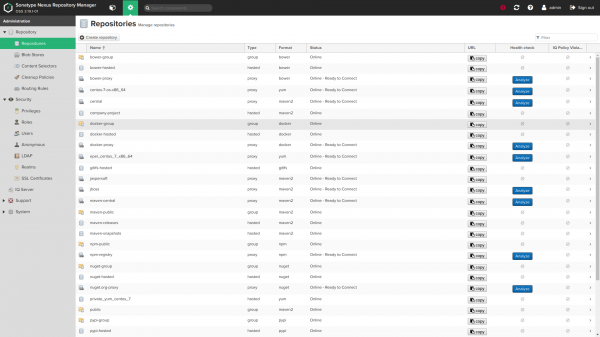
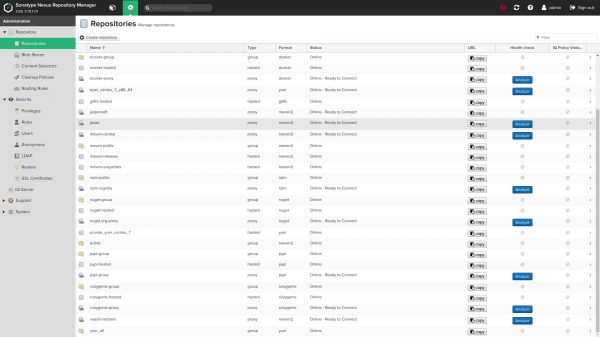
Screenshots:
Matsayi masu canzawa
Matsayin Matsala
Canje-canje tare da ƙimar tsoho (duba default/main.yml):
Gabaɗaya masu canji
    nexus_version: ''
    nexus_timezone: 'UTC'
Ta hanyar tsoho, aikin zai shigar da sabuwar sigar Nexus. Kuna iya gyara sigar ta canza canjin nexus_version. Duba samuwa iri a .
Idan kun canza zuwa sabon sigar, aikin zai yi ƙoƙarin sabunta shigarwar Nexus ɗin ku.
Idan kuna amfani da tsohuwar sigar Nexus fiye da na baya-bayan nan, ya kamata ku tabbatar da cewa baku amfani da fasalulluka waɗanda babu su a cikin sakin da aka shigar (misali, ana samun ma'ajiyar yum ma'ajiyar don nexus fiye da 3.8.0, git lfs repo. don nexus fiye da 3.3.0 da dai sauransu)
nexus timezone shine sunan yankin lokaci na Java, wanda zai iya zama da amfani a hade tare da waɗannan maganganun cron don ayyukan nexus_scheduled.
tashar tashar Nexus da hanyar mahallin
    nexus_default_port: 8081
    nexus_default_context_path: '/'
Tashar tashar jiragen ruwa da hanyar mahallin tsarin haɗin Java. nexus_default_context_path dole ne ya ƙunshi slash na gaba lokacin da aka saita shi, misali: nexus_default_context_path: '/nexus/'.
Nexus OS Mai amfani da Ƙungiya
    nexus_os_group: 'nexus'
    nexus_os_user: 'nexus'
Mai amfani da ƙungiyar da aka yi amfani da su don mallakar fayilolin Nexus da gudanar da sabis ɗin za a ƙirƙira su ta rawar idan ɗaya ya ɓace.
nexus_os_user_home_dir: '/home/nexus'Bada izinin canza tsoffin kundin adireshin gida don mai amfani da nexus
kundayen adireshi misali na Nexus
    nexus_installation_dir: '/opt'
    nexus_data_dir: '/var/nexus'
    nexus_tmp_dir: "{{ (ansible_os_family == 'RedHat') | ternary('/var/nexus-tmp', '/tmp/nexus') }}"
Nexus Catalogs.
nexus_installation_dirya ƙunshi shigar fayiloli masu aiwatarwanexus_data_dirya ƙunshi duk tsari, ma'ajiyar ajiya da kayan tarihi da aka sauke. Hanyoyi masu shinge na al'adanexus_data_dirza a iya musamman, duba a kasanexus_blobstores.nexus_tmp_dirya ƙunshi duk fayilolin wucin gadi. An koma tsohuwar hanyar redhat daga/tmpdon shawo kan matsalolin matsaloli tare da hanyoyin tsaftacewa ta atomatik. Duba #168.
Yana saita Amfanin Ƙwaƙwalwar Ƙwaƙwalwar Nexus JVM
    nexus_min_heap_size: "1200M"
    nexus_max_heap_size: "{{ nexus_min_heap_size }}"
    nexus_max_direct_memory: "2G"
Waɗannan su ne saitunan tsoho na Nexus. Don Allah kar a canza waɗannan dabi'u Idan baka karanta ba kuma ba su fahimci abin da suke yi ba.
A matsayin gargaɗi na biyu, ga wani yanki daga wannan daftarin aiki na sama:
Ba a ba da shawarar ƙara ƙwaƙwalwar tulin JVM sama da ƙimar da aka ba da shawarar ba a ƙoƙarin haɓaka aiki. Wannan na iya haifar da akasin haka, yana haifar da aikin da ba dole ba don tsarin aiki.
Kalmar sirrin mai gudanarwa
nexus_admin_password: 'changeme'Kalmar kalmar sirri ta "admin" don saitin. Wannan yana aiki ne kawai akan shigarwar tsoho ta farko. Da fatan za a duba [Canja kalmar wucewa ta admin bayan shigarwa na farko](# change-admin-password-after-first-install) idan kuna son canza shi daga baya ta amfani da rawar.
Ana ba da shawarar sosai cewa kar a adana kalmar sirrinku a cikin madaidaicin rubutu a cikin littafin wasan kwaikwayo, amma don amfani da [ɓoye-ɓoye-wuri] () (ko dai cikin layi ko a cikin wani fayil daban wanda aka ɗora masa misali sun haɗa da_vars)
Samun shiga mara izini ta tsohuwa
nexus_anonymous_access: falseAn kashe hanyar da ba a sani ba ta tsohuwa. Kara karantawa game da .
Sunan mai masaukin baki na jama'a
    nexus_public_hostname: 'nexus.vm'
    nexus_public_scheme: https
Sunan yanki da tsari cikakke (https ko http) wanda misalin Nexus zai kasance ga abokan cinikinsa.
Samun damar API don wannan rawar
    nexus_api_hostname: localhost
    nexus_api_scheme: http
    nexus_api_validate_certs: "{{ nexus_api_scheme == 'https' }}"
    nexus_api_context_path: "{{ nexus_default_context_path }}"
    nexus_api_port: "{{ nexus_default_port }}"
Waɗannan masu canji suna sarrafa yadda rawar ke haɗawa da Nexus API don samarwa.
Don masu amfani masu ci gaba kawai. Wataƙila ba kwa son canza waɗannan saitunan tsoho
Saitin wakili na baya
    httpd_setup_enable: false
    httpd_server_name: "{{ nexus_public_hostname }}"
    httpd_default_admin_email: "admin@example.com"
    httpd_ssl_certificate_file: 'files/nexus.vm.crt'
    httpd_ssl_certificate_key_file: 'files/nexus.vm.key'
    # httpd_ssl_certificate_chain_file: "{{ httpd_ssl_certificate_file }}"
    httpd_copy_ssl_files: true
Saiti .
Don yin wannan kuna buƙatar shigar da httpd. Lura: lokacin don httpd_setup_enable saita darajartrue, lambobin sadarwa 127.0.0.1:8081, haka ba kasancewa kai tsaye ta hanyar tashar HTTP 8081 daga adireshin IP na waje.
Tsohuwar sunan mai masaukin da aka yi amfani da shi shine nexus_public_hostname. Idan kuna buƙatar sunaye daban-daban saboda wasu dalilai, zaku iya saita httpd_server_name da wata ma'ana ta daban.
С httpd_copy_ssl_files: true (ta tsohuwa) waɗannan takaddun shaida na sama yakamata su kasance a cikin kundin littafin wasan ku kuma za a kwafi zuwa uwar garken kuma a saita su a cikin apache.
Idan kana son amfani da takaddun takaddun shaida akan uwar garken, shigar httpd_copy_ssl_files: false kuma samar da masu canji masu zuwa:
    # These specifies to the vhost where to find on the remote server file
    # system the certificate files.
    httpd_ssl_cert_file_location: "/etc/pki/tls/certs/wildcard.vm.crt"
    httpd_ssl_cert_key_location: "/etc/pki/tls/private/wildcard.vm.key"
    # httpd_ssl_cert_chain_file_location: "{{ httpd_ssl_cert_file_location }}"
httpd_ssl_cert_chain_file_location na zaɓi ne kuma yakamata a bar shi ba a saita shi ba idan ba kwa son tsara fayil ɗin sarkar
httpd_default_admin_email: "admin@example.com"Saita tsoho adireshin imel na admin
Kanfigareshan LDAP
Haɗin LDAP da yankin tsaro an kashe su ta tsohuwa
    nexus_ldap_realm: false
ldap_connections: [], kowane kashi yayi kama da haka:
    nexus_ldap_realm: true
    ldap_connections:
      - ldap_name: 'My Company LDAP' # used as a key to update the ldap config
        ldap_protocol: 'ldaps' # ldap or ldaps
        ldap_hostname: 'ldap.mycompany.com'
        ldap_port: 636
        ldap_use_trust_store: false # Wether or not to use certs in the nexus trust store
        ldap_search_base: 'dc=mycompany,dc=net'
        ldap_auth: 'none' # or simple
        ldap_auth_username: 'username' # if auth = simple
        ldap_auth_password: 'password' # if auth = simple
        ldap_user_base_dn: 'ou=users'
        ldap_user_filter: '(cn=*)' # (optional)
        ldap_user_object_class: 'inetOrgPerson'
        ldap_user_id_attribute: 'uid'
        ldap_user_real_name_attribute: 'cn'
        ldap_user_email_attribute: 'mail'
        ldap_user_subtree: false
        ldap_map_groups_as_roles: false
        ldap_group_base_dn: 'ou=groups'
        ldap_group_object_class: 'posixGroup'
        ldap_group_id_attribute: 'cn'
        ldap_group_member_attribute: 'memberUid'
        ldap_group_member_format: '${username}'
        ldap_group_subtree: false
Misalin daidaitawar LDAP don tabbatarwa mara suna (daurin da ba a sani ba), wannan kuma tsari ne na "ƙananan":
    nexus_ldap_realm: true
    ldap_connection:
      - ldap_name: 'Simplest LDAP config'
        ldap_protocol: 'ldaps'
        ldap_hostname: 'annuaire.mycompany.com'
        ldap_search_base: 'dc=mycompany,dc=net'
        ldap_port: 636
        ldap_use_trust_store: false
        ldap_user_id_attribute: 'uid'
        ldap_user_real_name_attribute: 'cn'
        ldap_user_email_attribute: 'mail'
        ldap_user_object_class: 'inetOrgPerson'
Misali tsarin LDAP don ingantaccen tabbaci (ta amfani da asusun DSA):
    nexus_ldap_realm: true
    ldap_connections:
      - ldap_name: 'LDAP config with DSA'
        ldap_protocol: 'ldaps'
        ldap_hostname: 'annuaire.mycompany.com'
        ldap_port: 636
        ldap_use_trust_store: false
        ldap_auth: 'simple'
        ldap_auth_username: 'cn=mynexus,ou=dsa,dc=mycompany,dc=net'
        ldap_auth_password: "{{ vault_ldap_dsa_password }}" # better keep passwords in an ansible vault
        ldap_search_base: 'dc=mycompany,dc=net'
        ldap_user_base_dn: 'ou=users'
        ldap_user_object_class: 'inetOrgPerson'
        ldap_user_id_attribute: 'uid'
        ldap_user_real_name_attribute: 'cn'
        ldap_user_email_attribute: 'mail'
        ldap_user_subtree: false
Misalin daidaitawar LDAP don tabbatarwa mai sauƙi (ta amfani da asusun DSA) + ƙungiyoyin da aka tsara azaman matsayin:
    nexus_ldap_realm: true
    ldap_connections
      - ldap_name: 'LDAP config with DSA'
        ldap_protocol: 'ldaps'
        ldap_hostname: 'annuaire.mycompany.com'
        ldap_port: 636
        ldap_use_trust_store: false
        ldap_auth: 'simple'
        ldap_auth_username: 'cn=mynexus,ou=dsa,dc=mycompany,dc=net'
        ldap_auth_password: "{{ vault_ldap_dsa_password }}" # better keep passwords in an ansible vault
        ldap_search_base: 'dc=mycompany,dc=net'
        ldap_user_base_dn: 'ou=users'
        ldap_user_object_class: 'inetOrgPerson'
        ldap_user_id_attribute: 'uid'
        ldap_user_real_name_attribute: 'cn'
        ldap_user_email_attribute: 'mail'
        ldap_map_groups_as_roles: true
        ldap_group_base_dn: 'ou=groups'
        ldap_group_object_class: 'groupOfNames'
        ldap_group_id_attribute: 'cn'
        ldap_group_member_attribute: 'member'
        ldap_group_member_format: 'uid=${username},ou=users,dc=mycompany,dc=net'
        ldap_group_subtree: false
Misali tsarin LDAP don tabbatarwa mai sauƙi (ta amfani da asusun DSA) + ƙungiyoyin da aka tsara taswira da ƙarfi azaman matsayi:
    nexus_ldap_realm: true
    ldap_connections:
      - ldap_name: 'LDAP config with DSA'
        ldap_protocol: 'ldaps'
        ldap_hostname: 'annuaire.mycompany.com'
        ldap_port: 636
        ldap_use_trust_store: false
        ldap_auth: 'simple'
        ldap_auth_username: 'cn=mynexus,ou=dsa,dc=mycompany,dc=net'
        ldap_auth_password: "{{ vault_ldap_dsa_password }}" # better keep passwords in an ansible vault
        ldap_search_base: 'dc=mycompany,dc=net'
        ldap_user_base_dn: 'ou=users'
        ldap_user_object_class: 'inetOrgPerson'
        ldap_user_id_attribute: 'uid'
        ldap_user_real_name_attribute: 'cn'
        ldap_user_email_attribute: 'mail'
        ldap_map_groups_as_roles: true
        ldap_map_groups_as_roles_type: 'dynamic'
        ldap_user_memberof_attribute: 'memberOf'
Gata
    nexus_privileges:
      - name: all-repos-read # used as key to update a privilege
        # type: <one of application, repository-admin, repository-content-selector, repository-view, script or wildcard>
        description: 'Read & Browse access to all repos'
        repository: '*'
        actions: # can be add, browse, create, delete, edit, read or  * (all)
          - read
          - browse
        # pattern: pattern
        # domain: domain
        # script_name: name
jerin don saituna. Dubi takaddun da GUI don bincika sauye-sauye da ake buƙatar saita dangane da nau'in gata.
Waɗannan abubuwan an haɗa su tare da tsoffin ƙima masu zuwa:
    _nexus_privilege_defaults:
      type: repository-view
      format: maven2
      actions:
        - read
Matsayi (cikin Nexus wannan yana nufin)
    nexus_roles:
      - id: Developpers # can map to a LDAP group id, also used as a key to update a role
        name: developers
        description: All developers
        privileges:
          - nx-search-read
          - all-repos-read
        roles: [] # references to other role names
jerin don saituna.
Masu amfani
    nexus_local_users: []
      # - username: jenkins # used as key to update
      #   state: present # default value if ommited, use 'absent' to remove user
      #   first_name: Jenkins
      #   last_name: CI
      #   email: support@company.com
      #   password: "s3cr3t"
      #   roles:
      #     - developers # role ID
Na gida (marasa LDAP) masu amfani/jerin lissafin don ƙirƙira a cikin nexus.
Jerin masu amfani/asusu na gida (wanda ba LDAP ba) don ƙirƙira a cikin Nexus.
      nexus_ldap_users: []
      # - username: j.doe
      #   state: present
      #   roles:
      #     - "nx-admin"
Ldap taswirar masu amfani/matsaloli. Jiha absent zai cire matsayi daga mai amfani idan akwai daya.
Ba a share masu amfani da Ldap. Ƙoƙarin saita matsayi ga mai amfani da babu shi zai haifar da kuskure.
Masu zaɓen abun ciki
  nexus_content_selectors:
  - name: docker-login
    description: Selector for docker login privilege
    search_expression: format=="docker" and path=~"/v2/"
Don ƙarin bayani game da zaɓin abun ciki, duba .
Don amfani da zaɓin abun ciki, ƙara sabon gata tare da type: repository-content-selector kuma masu dacewacontentSelector
- name: docker-login-privilege
  type: repository-content-selector
  contentSelector: docker-login
  description: 'Login to Docker registry'
  repository: '*'
  actions:
  - read
  - browse
Blobstores da wuraren ajiya
nexus_delete_default_repos: falseShare ma'ajiyar bayanai daga nexus shigar tsoho na farko. Ana aiwatar da wannan matakin ne kawai akan shigar farko (lokacin nexus_data_dir an gano komai).
Cire ma'ajiyar ajiya daga tsohowar tsoho don Nexus. Ana yin wannan matakin ne kawai yayin shigarwa na farko (lokacin nexus_data_dir komai).
nexus_delete_default_blobstore: falseShare tsoho kantin sayar da kaya daga nexus shigar da tsoho tsoho na farko. Ana iya yin hakan kawai idan nexus_delete_default_repos: true kuma duk wuraren da aka tsara (duba ƙasa) suna da bayyane blob_store: custom. Ana aiwatar da wannan matakin ne kawai akan shigar farko (lokacin nexus_data_dir an gano komai).
An kashe cire ma'ajiyar tsutsa (kayan aikin binary) ta tsohuwa daga tsarin farko. Don cire ma'ajiyar tsummoki (kayan aikin binary), kashe nexus_delete_default_repos: true. Ana yin wannan matakin ne kawai yayin shigarwa na farko (lokacin nexus_data_dir komai).
    nexus_blobstores: []
    # example blobstore item :
    # - name: separate-storage
    #   type: file
    #   path: /mnt/custom/path
    # - name: s3-blobstore
    #   type: S3
    #   config:
    #     bucket: s3-blobstore
    #     accessKeyId: "{{ VAULT_ENCRYPTED_KEY_ID }}"
# secretAccessKey: "{{ VAULT_ENCRYPTED_ACCESS_KEY }}"don ƙirƙirar. Ba za a iya sabunta hanyar bulobstore da kantin sayar da kayan ajiya ba bayan ƙirƙirar farko (duk wani sabuntawa anan za a yi watsi da shi akan sake samarwa).
Ana samar da saitin kantin sayar da kayan kwalliya akan S3 azaman dacewa kuma baya cikin gwajin sarrafa kansa da muke gudanarwa akan travis. Lura cewa adanawa akan S3 ana bada shawarar ne kawai don abubuwan da aka tura akan AWS.
Halitta . Ba za a iya sabunta hanyar ajiya da ma'ajiyar ajiya ba bayan ƙirƙirar farko (duk wani sabuntawa anan za a yi watsi da shi idan an sake shigar da shi).
Ana ba da saitin ma'ajin bulo akan S3 azaman dacewa. Da fatan za a lura cewa ana ba da shawarar ajiyar S3 ne kawai don abubuwan da aka tura akan AWS.
    nexus_repos_maven_proxy:
      - name: central
        remote_url: 'https://repo1.maven.org/maven2/'
        layout_policy: permissive
        # maximum_component_age: -1
        # maximum_metadata_age: 1440
        # negative_cache_enabled: true
        # negative_cache_ttl: 1440
      - name: jboss
        remote_url: 'https://repository.jboss.org/nexus/content/groups/public-jboss/'
        # maximum_component_age: -1
        # maximum_metadata_age: 1440
        # negative_cache_enabled: true
        # negative_cache_ttl: 1440
    # example with a login/password :
    # - name: secret-remote-repo
    #   remote_url: 'https://company.com/repo/secure/private/go/away'
    #   remote_username: 'username'
    #   remote_password: 'secret'
    #   # maximum_component_age: -1
    #   # maximum_metadata_age: 1440
    #   # negative_cache_enabled: true
    #   # negative_cache_ttl: 1440
A sama akwai ƙayyadaddun misali Maven.
    nexus_repos_maven_hosted:
      - name: private-release
        version_policy: release
        write_policy: allow_once  # one of "allow", "allow_once" or "deny"
Maven daidaitawa. Saitin cache mara kyau na zaɓi ne kuma zai tsoho zuwa ƙimar da ke sama idan an tsallake shi.
Kanfigareshan Maven. Tsarin cache mara kyau (-1) zaɓi ne kuma zai tsoho zuwa ƙimar da ke sama idan ba a ƙayyade ba.
    nexus_repos_maven_group:
      - name: public
        member_repos:
          - central
          - jboss
Kanfigareshan Maven.
Dukkan nau'ikan ma'ajin ajiya guda uku an haɗa su tare da tsoffin ƙima masu zuwa:
    _nexus_repos_maven_defaults:
      blob_store: default # Note : cannot be updated once the repo has been created
      strict_content_validation: true
      version_policy: release # release, snapshot or mixed
      layout_policy: strict # strict or permissive
      write_policy: allow_once # one of "allow", "allow_once" or "deny"
      maximum_component_age: -1  # Nexus gui default. For proxies only
      maximum_metadata_age: 1440  # Nexus gui default. For proxies only
      negative_cache_enabled: true # Nexus gui default. For proxies only
      negative_cache_ttl: 1440 # Nexus gui default. For proxies only
Docker, Pypi, Raw, Rubygems, Bower, NPM, Git-LFs da nau'ikan ma'ajiyar yum:
gani defaults/main.yml don waɗannan zaɓuɓɓuka:
Docker, Pypi, Raw, Rubygems, Bower, NPM, Git-LFs da yum ma'ajiyar ana kashe su ta tsohuwa:
Duba defaults/main.yml don waɗannan zaɓuɓɓuka:
      nexus_config_pypi: false
      nexus_config_docker: false
      nexus_config_raw: false
      nexus_config_rubygems: false
      nexus_config_bower: false
      nexus_config_npm: false
      nexus_config_gitlfs: false
      nexus_config_yum: false
Lura cewa ƙila za ku buƙaci kunna wasu iyakokin tsaro idan kuna son amfani da wasu nau'ikan wuraren ajiya ban da maven. Wannan karya ce ta tsohuwa
nexus_nuget_api_key_realm: false
nexus_npm_bearer_token_realm: false
nexus_docker_bearer_token_realm: false  # required for docker anonymous access
Hakanan za'a iya kunna daular mai amfani mai nisa ta amfani da shi
nexus_rut_auth_realm: truekuma ana iya daidaita take ta hanyar ma'ana
nexus_rut_auth_header: "CUSTOM_HEADER"Ayyukan da aka tsara
    nexus_scheduled_tasks: []
    #  #  Example task to compact blobstore :
    #  - name: compact-docker-blobstore
    #    cron: '0 0 22 * * ?'
    #    typeId: blobstore.compact
    #    task_alert_email: alerts@example.org  # optional
    #    taskProperties:
    #      blobstoreName: {{ nexus_blob_names.docker.blob }} # all task attributes are stored as strings by nexus internally
    #  #  Example task to purge maven snapshots
    #  - name: Purge-maven-snapshots
    #    cron: '0 50 23 * * ?'
    #    typeId: repository.maven.remove-snapshots
    #    task_alert_email: alerts@example.org  # optional
    #    taskProperties:
    #      repositoryName: "*"  # * for all repos. Change to a repository name if you only want a specific one
    #      minimumRetained: "2"
    #      snapshotRetentionDays: "2"
    #      gracePeriodInDays: "2"
    #    booleanTaskProperties:
    #      removeIfReleased: true
    #  #  Example task to purge unused docker manifest and images
    #  - name: Purge unused docker manifests and images
    #    cron: '0 55 23 * * ?'
    #    typeId: "repository.docker.gc"
    #    task_alert_email: alerts@example.org  # optional
    #    taskProperties:
    #      repositoryName: "*"  # * for all repos. Change to a repository name if you only want a specific one
    #  #  Example task to purge incomplete docker uploads
    #  - name: Purge incomplete docker uploads
    #    cron: '0 0 0 * * ?'
    #    typeId: "repository.docker.upload-purge"
    #    task_alert_email: alerts@example.org  # optional
    #    taskProperties:
# age: "24" don saituna. typeId da takamaiman aikitaskProperties/booleanTaskProperties za ku iya tsammani ko dai:
- daga java irin matsayi
org.sonatype.nexus.scheduling.TaskDescriptorSupport - duba tsarin ƙirƙirar ɗawainiya na HTML a cikin burauzar ku
- daga duba buƙatun AJAX a cikin burauza lokacin saita ɗawainiya da hannu.
Dole ne a bayyana kaddarorin ayyuka a cikin madaidaicin toshe yaml dangane da nau'in su:
taskPropertiesdon duk kaddarorin kirtani (watau sunaye na ajiya, sunaye ma'ajiyar, lokutan lokaci...).booleanTaskPropertiesdon duk kaddarorin ma'ana (watau galibi akwatunan rajista a cikin GUI na aikin ƙirƙirar haɗin gwiwa).
Taimako
      nexus_backup_configure: false
      nexus_backup_cron: '0 0 21 * * ?'  # See cron expressions definition in nexus create task gui
      nexus_backup_dir: '/var/nexus-backup'
      nexus_restore_log: '{{ nexus_backup_dir }}/nexus-restore.log'
      nexus_backup_rotate: false
      nexus_backup_rotate_first: false
      nexus_backup_keep_rotations: 4  # Keep 4 backup rotation by default (current + last 3)
Ba za a saita madadin ba har sai kun canza nexus_backup_configure в true.
A wannan yanayin, za a saita aikin rubutun da aka tsara don gudana akan Nexus
a tazarar da aka kayyade a nexus_backup_cron (tsoho 21:00 kowace rana).
Duba [samfurin groovy don wannan aikin](samfuran/backup.groovy.j2) don cikakkun bayanai.
Wannan aikin da aka tsara ya kasance mai zaman kansa daga wasu nexus_scheduled_taskswanda ku
sanar a cikin littafin wasan ku.
Idan kana so ka juya/share madadin, shigar nexus_backup_rotate: true kuma saita adadin madadin da kuke son adanawa ta amfani da nexus_backup_keep_rotations (default 4).
Lokacin amfani da juyawa, idan kuna son adana ƙarin sarari diski yayin aiwatar da madadin,
Kuna iya shigarwa nexus_backup_rotate_first: true. Wannan zai saita pre-juyawa/sharewa kafin madadin. Ta hanyar tsoho, juyawa yana faruwa bayan an ƙirƙiri madadin. Da fatan za a lura cewa a cikin wannan yanayin tsofaffin madadin
za a share kafin a yi madadin na yanzu.
Hanyar farfadowa
Guda littafin wasa tare da siga -e nexus_restore_point=<YYYY-MM-dd-HH-mm-ss>
(misali, 2017-12-17-21-00-00 na Disamba 17, 2017 a 21:00
Cire nexus
Gargaɗi: Wannan zai share bayanan ku na yanzu gaba ɗaya. Tabbatar yin ajiyar wuri a baya idan ya cancanta
Yi amfani da mai canzawa nexus_purgeidan kana buƙatar sake farawa daga karce kuma sake shigar da misalin nexus tare da cire duk bayanan.
ansible-playbook -i your/inventory.ini your_nexus_playbook.yml -e nexus_purge=trueCanja kalmar sirrin mai gudanarwa bayan shigarwa na farko
nexus_default_admin_password: 'admin123'Bai kamata a canza wannan a cikin littafin wasan ku ba. Wannan madaidaicin yana cike da tsohuwar kalmar wucewa ta Nexus lokacin shigar da farko kuma yana tabbatar da cewa zamu iya canza kalmar wucewar admin zuwa nexus_admin_password.
Idan kuna son canza kalmar wucewa ta mai gudanarwa bayan shigarwa na farko, zaku iya canza shi zuwa tsohuwar kalmar sirri na ɗan lokaci daga layin umarni. Bayan canji nexus_admin_password a cikin littafin wasanku zaku iya gudu:
ansible-playbook -i your/inventory.ini your_playbook.yml -e nexus_default_admin_password=oldPasswordTashar Telegram akan Nexus Sonatype:
Masu amfani da rajista kawai za su iya shiga cikin binciken. don Allah.
Wadanne ma'ajiyar kayan tarihi kuke amfani da su?
Sonatype Nexus kyauta ne
Sonatype Nexus ya biya
Kayan kere kere kyauta ne
An biya kayan aikin kere-kere
Harbour
ɓangaren litattafan almara
9 masu amfani sun kada kuri'a. Masu amfani 3 sun kaurace.
source: www.habr.com
