

ملحوظة. ترجمة.: كاتب المقال - إركان إيرول، مهندس من شركة SAP - يشاركنا دراسته لآليات عمل الفريق kubectl execمألوف جدًا لكل من يعمل مع Kubernetes. وهو يرافق الخوارزمية بأكملها بقوائم كود مصدر Kubernetes (والمشاريع ذات الصلة)، والتي تتيح لك فهم الموضوع بعمق حسب الضرورة.
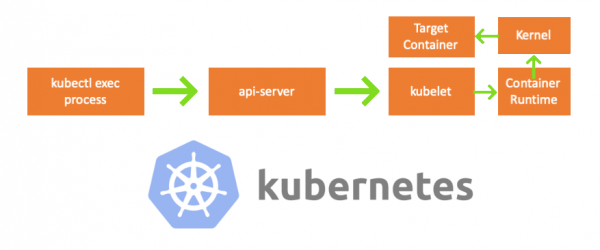
في أحد أيام الجمعة، اقترب مني أحد زملائي وسألني عن كيفية تنفيذ أمر في الكبسولة باستخدام . لم أستطع الرد عليه وأدركت فجأة أنني لا أعرف شيئًا عن آلية العمل kubectl exec. نعم، كانت لدي أفكار معينة حول جهازه، ولكن لم أكن متأكدًا بنسبة 100% من صحتها ولذلك قررت معالجة هذه المشكلة. بعد أن درست المدونات والوثائق وكود المصدر، تعلمت الكثير، وفي هذه المقالة أريد أن أشارك اكتشافاتي وفهمي. إذا كان هناك شيء خاطئ، يرجى الاتصال بي على .
تدريب
لإنشاء مجموعة على جهاز MacBook، قمت بالاستنساخ . ثم قمت بتصحيح عناوين IP الخاصة بالعقد في تكوين kubelet'a، نظرًا لأن الإعدادات الافتراضية لم تسمح بذلك kubectl exec. يمكنك قراءة المزيد عن السبب الرئيسي لذلك .
- أي جهاز = جهاز MacBook الخاص بي
- العقدة الرئيسية IP = 192.168.205.10
- عقدة IP العاملة = 192.168.205.11
- منفذ خادم API = 6443
مكونات
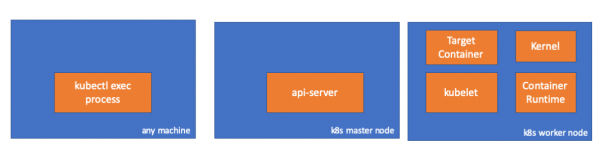
- عملية kubectl exec: عندما نقوم بـ "kubectl exec..." تبدأ العملية. يمكنك القيام بذلك على أي جهاز لديه إمكانية الوصول إلى خادم K8s API. ملحوظة. ترجمة: علاوة على ذلك، في قوائم وحدة التحكم، يستخدم المؤلف التعليق "أي جهاز"، مما يعني أنه يمكن تنفيذ الأوامر التالية على أي من هذه الأجهزة التي لديها إمكانية الوصول إلى Kubernetes.
- : مكون على العقدة الرئيسية يوفر الوصول إلى Kubernetes API. هذه هي الواجهة الأمامية لمستوى التحكم في Kubernetes.
- : الوكيل الذي يعمل على كل عقدة في المجموعة. يوفر عمل الحاويات في الكبسولة.
- (container runtime): البرنامج المسؤول عن تشغيل الحاويات. أمثلة: Docker، وCRI-O، والحاويات...
- نواة: نواة نظام التشغيل على العقدة العاملة؛ مسؤول عن إدارة العملية.
- الهدف (هدف) حاوية: حاوية تشكل جزءًا من حجرة وتعمل على إحدى العقد العاملة.
ماذا اكتشفت
1. النشاط من جانب العميل
إنشاء جراب في مساحة الاسم default:
// any machine
$ kubectl run exec-test-nginx --image=nginx
ثم ننفذ الأمر exec وننتظر 5000 ثانية لمزيد من الملاحظات:
// any machine
$ kubectl exec -it exec-test-nginx-6558988d5-fgxgg -- sh
# sleep 5000
تظهر عملية kubectl (مع pid=8507 في حالتنا):
// any machine
$ ps -ef |grep kubectl
501  8507  8409   0  7:19PM ttys000    0:00.13 kubectl exec -it exec-test-nginx-6558988d5-fgxgg -- sh
إذا تحققنا من نشاط الشبكة للعملية، فسنجد أن لها اتصالات بخادم API (192.168.205.10.6443):
// any machine
$ netstat -atnv |grep 8507
tcp4       0      0  192.168.205.1.51673    192.168.205.10.6443    ESTABLISHED 131072 131768   8507      0 0x0102 0x00000020
tcp4       0      0  192.168.205.1.51672    192.168.205.10.6443    ESTABLISHED 131072 131768   8507      0 0x0102 0x00000028
دعونا نلقي نظرة على الكود. يقوم Kubectl بإنشاء طلب POST باستخدام مصدر فرعي exec ويرسل طلب REST:
              req := restClient.Post().
                        Resource("pods").
                        Name(pod.Name).
                        Namespace(pod.Namespace).
                        SubResource("exec")
                req.VersionedParams(&corev1.PodExecOptions{
                        Container: containerName,
                        Command:   p.Command,
                        Stdin:     p.Stdin,
                        Stdout:    p.Out != nil,
                        Stderr:    p.ErrOut != nil,
                        TTY:       t.Raw,
                }, scheme.ParameterCodec)

return p.Executor.Execute("POST", req.URL(), p.Config, p.In, p.Out, p.ErrOut, t.Raw, sizeQueue)()
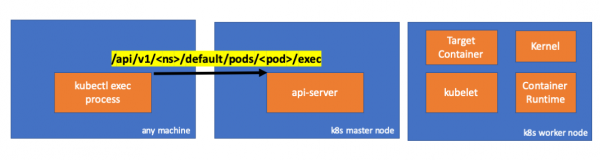
2. النشاط على جانب العقدة الرئيسية
يمكننا أيضًا ملاحظة الطلب من جانب خادم واجهة برمجة التطبيقات:
handler.go:143] kube-apiserver: POST "/api/v1/namespaces/default/pods/exec-test-nginx-6558988d5-fgxgg/exec" satisfied by gorestful with webservice /api/v1
upgradeaware.go:261] Connecting to backend proxy (intercepting redirects) https://192.168.205.11:10250/exec/default/exec-test-nginx-6558988d5-fgxgg/exec-test-nginx?command=sh&input=1&output=1&tty=1
Headers: map[Connection:[Upgrade] Content-Length:[0] Upgrade:[SPDY/3.1] User-Agent:[kubectl/v1.12.10 (darwin/amd64) kubernetes/e3c1340] X-Forwarded-For:[192.168.205.1] X-Stream-Protocol-Version:[v4.channel.k8s.io v3.channel.k8s.io v2.channel.k8s.io channel.k8s.io]]
لاحظ أن طلب HTTP يتضمن طلب تغيير البروتوكول. يسمح بتعدد إرسال "تدفقات" منفصلة من أخطاء stdin/stdout/stderr/spdy عبر اتصال TCP واحد.
يتلقى خادم API الطلب ويحوله إلى PodExecOptions:
// PodExecOptions is the query options to a Pod's remote exec call
type PodExecOptions struct {
        metav1.TypeMeta

        // Stdin if true indicates that stdin is to be redirected for the exec call
        Stdin bool

        // Stdout if true indicates that stdout is to be redirected for the exec call
        Stdout bool

        // Stderr if true indicates that stderr is to be redirected for the exec call
        Stderr bool

        // TTY if true indicates that a tty will be allocated for the exec call
        TTY bool

        // Container in which to execute the command.
        Container string

        // Command is the remote command to execute; argv array; not executed within a shell.
        Command []string
}()
لتنفيذ الإجراءات المطلوبة، يحتاج خادم واجهة برمجة التطبيقات إلى معرفة أي حجرة يحتاج إلى الاتصال بها:
// ExecLocation returns the exec URL for a pod container. If opts.Container is blank
// and only one container is present in the pod, that container is used.
func ExecLocation(
        getter ResourceGetter,
        connInfo client.ConnectionInfoGetter,
        ctx context.Context,
        name string,
        opts *api.PodExecOptions,
) (*url.URL, http.RoundTripper, error) {
        return streamLocation(getter, connInfo, ctx, name, opts, opts.Container, "exec")
}()
بالطبع، البيانات المتعلقة بنقطة النهاية مأخوذة من المعلومات المتعلقة بالعقدة:
        nodeName := types.NodeName(pod.Spec.NodeName)
        if len(nodeName) == 0 {
                // If pod has not been assigned a host, return an empty location
                return nil, nil, errors.NewBadRequest(fmt.Sprintf("pod %s does not have a host assigned", name))
        }
nodeInfo, err := connInfo.GetConnectionInfo(ctx, nodeName)()
مرحا! لدى Kubelet الآن منفذ (node.Status.DaemonEndpoints.KubeletEndpoint.Port) الذي يمكن لخادم API الاتصال به:
// GetConnectionInfo retrieves connection info from the status of a Node API object.
func (k *NodeConnectionInfoGetter) GetConnectionInfo(ctx context.Context, nodeName types.NodeName) (*ConnectionInfo, error) {
        node, err := k.nodes.Get(ctx, string(nodeName), metav1.GetOptions{})
        if err != nil {
                return nil, err
        }

        // Find a kubelet-reported address, using preferred address type
        host, err := nodeutil.GetPreferredNodeAddress(node, k.preferredAddressTypes)
        if err != nil {
                return nil, err
        }

        // Use the kubelet-reported port, if present
        port := int(node.Status.DaemonEndpoints.KubeletEndpoint.Port)
        if port <= 0 {
                port = k.defaultPort
        }

        return &ConnectionInfo{
                Scheme:    k.scheme,
                Hostname:  host,
                Port:      strconv.Itoa(port),
                Transport: k.transport,
        }, nil
}()
من التوثيق :
يتم إنهاء هذه الاتصالات عند نقطة نهاية HTTPS الخاصة بـ kubelet. افتراضيًا، لا يتحقق خادم apiserver من شهادة kubelet، مما يجعل الاتصال عرضة لهجمات "man-in-the-middle" (MITM) و غير آمن للعمل في شبكات غير موثوقة و/أو عامة.
الآن يعرف خادم API نقطة النهاية وينشئ اتصالاً:
// Connect returns a handler for the pod exec proxy
func (r *ExecREST) Connect(ctx context.Context, name string, opts runtime.Object, responder rest.Responder) (http.Handler, error) {
        execOpts, ok := opts.(*api.PodExecOptions)
        if !ok {
                return nil, fmt.Errorf("invalid options object: %#v", opts)
        }
        location, transport, err := pod.ExecLocation(r.Store, r.KubeletConn, ctx, name, execOpts)
        if err != nil {
                return nil, err
        }
        return newThrottledUpgradeAwareProxyHandler(location, transport, false, true, true, responder), nil
}()
دعونا نرى ما يحدث على العقدة الرئيسية.
أولاً، اكتشف عنوان IP الخاص بالعقدة العاملة. في حالتنا، هذا هو 192.168.205.11:
// any machine
$ kubectl get nodes k8s-node-1 -o wide
NAME         STATUS   ROLES    AGE   VERSION   INTERNAL-IP      EXTERNAL-IP   OS-IMAGE             KERNEL-VERSION      CONTAINER-RUNTIME
k8s-node-1   Ready    <none>   9h    v1.15.3   192.168.205.11   <none>        Ubuntu 16.04.6 LTS   4.4.0-159-generic   docker://17.3.3
ثم قم بتعيين منفذ kubelet (10250 في حالتنا):
// any machine
$ kubectl get nodes k8s-node-1 -o jsonpath='{.status.daemonEndpoints.kubeletEndpoint}'
map[Port:10250]
الآن حان الوقت لاختبار الشبكة. هل هناك اتصال بالعقدة العاملة (192.168.205.11)؟ إنها! إذا كنت "تقتل" هذه العملية exec، سوف يختفي، لذلك أعلم أنه تم إنشاء الاتصال بواسطة خادم واجهة برمجة التطبيقات نتيجة لأمر exec الذي تم تنفيذه.
// master node
$ netstat -atn |grep 192.168.205.11
tcp        0      0 192.168.205.10:37870    192.168.205.11:10250    ESTABLISHED
… 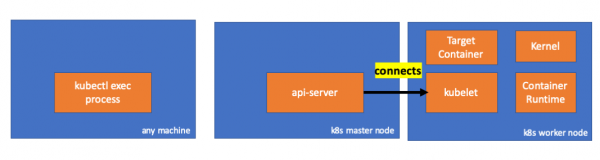
لا يزال الاتصال بين kubectl وapi-server مفتوحًا. بالإضافة إلى ذلك، هناك اتصال آخر يربط بين خادم API وKubelet.
3. النشاط على العقدة العاملة
الآن دعونا نتصل بالعقدة العاملة ونرى ما يحدث فيها.
أولًا، نرى أن الاتصال به قد ثبت أيضًا (السطر الثاني)؛ 192.168.205.10 هو عنوان IP للعقدة الرئيسية:
 // worker node
  $ netstat -atn |grep 10250
  tcp6       0      0 :::10250                :::*                    LISTEN
  tcp6       0      0 192.168.205.11:10250    192.168.205.10:37870    ESTABLISHED
ماذا عن فريقنا sleep؟ مرحبًا، إنها هناك أيضًا!
 // worker node
  $ ps -afx
  ...
  31463 ?        Sl     0:00      _ docker-containerd-shim 7d974065bbb3107074ce31c51f5ef40aea8dcd535ae11a7b8f2dd180b8ed583a /var/run/docker/libcontainerd/7d974065bbb3107074ce31c51
  31478 pts/0    Ss     0:00          _ sh
  31485 pts/0    S+     0:00              _ sleep 5000
  …
لكن مهلا، كيف تمكن كوبيليت من تحقيق هذا؟ يحتوي kubelet على برنامج خفي يفتح الوصول إلى واجهة برمجة التطبيقات من خلال المنفذ لطلبات خادم واجهة برمجة التطبيقات:
// Server is the library interface to serve the stream requests.
type Server interface {
        http.Handler

        // Get the serving URL for the requests.
        // Requests must not be nil. Responses may be nil iff an error is returned.
        GetExec(*runtimeapi.ExecRequest) (*runtimeapi.ExecResponse, error)
        GetAttach(req *runtimeapi.AttachRequest) (*runtimeapi.AttachResponse, error)
        GetPortForward(*runtimeapi.PortForwardRequest) (*runtimeapi.PortForwardResponse, error)

        // Start the server.
        // addr is the address to serve on (address:port) stayUp indicates whether the server should
        // listen until Stop() is called, or automatically stop after all expected connections are
        // closed. Calling Get{Exec,Attach,PortForward} increments the expected connection count.
        // Function does not return until the server is stopped.
        Start(stayUp bool) error
        // Stop the server, and terminate any open connections.
        Stop() error
}()
يحسب Kubelet نقطة نهاية الاستجابة لطلبات exec:
func (s *server) GetExec(req *runtimeapi.ExecRequest) (*runtimeapi.ExecResponse, error) {
        if err := validateExecRequest(req); err != nil {
                return nil, err
        }
        token, err := s.cache.Insert(req)
        if err != nil {
                return nil, err
        }
        return &runtimeapi.ExecResponse{
                Url: s.buildURL("exec", token),
        }, nil
}()
لا تخلط بين. لا يُرجع نتيجة الأمر، بل يُرجع نقطة النهاية للاتصال:
type ExecResponse struct {
        // Fully qualified URL of the exec streaming server.
        Url                  string   `protobuf:"bytes,1,opt,name=url,proto3" json:"url,omitempty"`
        XXX_NoUnkeyedLiteral struct{} `json:"-"`
        XXX_sizecache        int32    `json:"-"`
}()
تطبق Kubelet واجهة RuntimeServiceClient، والذي يعد جزءًا من واجهة وقت تشغيل الحاوية (كتبنا المزيد عن ذلك، على سبيل المثال، - تقريبا. ترجمة.):
قائمة طويلة من cri-api في kubernetes/kubernetes
// For semantics around ctx use and closing/ending streaming RPCs, please refer to https://godoc.org/google.golang.org/grpc#ClientConn.NewStream.
type RuntimeServiceClient interface {
        // Version returns the runtime name, runtime version, and runtime API version.
        Version(ctx context.Context, in *VersionRequest, opts ...grpc.CallOption) (*VersionResponse, error)
        // RunPodSandbox creates and starts a pod-level sandbox. Runtimes must ensure
        // the sandbox is in the ready state on success.
        RunPodSandbox(ctx context.Context, in *RunPodSandboxRequest, opts ...grpc.CallOption) (*RunPodSandboxResponse, error)
        // StopPodSandbox stops any running process that is part of the sandbox and
        // reclaims network resources (e.g., IP addresses) allocated to the sandbox.
        // If there are any running containers in the sandbox, they must be forcibly
        // terminated.
        // This call is idempotent, and must not return an error if all relevant
        // resources have already been reclaimed. kubelet will call StopPodSandbox
        // at least once before calling RemovePodSandbox. It will also attempt to
        // reclaim resources eagerly, as soon as a sandbox is not needed. Hence,
        // multiple StopPodSandbox calls are expected.
        StopPodSandbox(ctx context.Context, in *StopPodSandboxRequest, opts ...grpc.CallOption) (*StopPodSandboxResponse, error)
        // RemovePodSandbox removes the sandbox. If there are any running containers
        // in the sandbox, they must be forcibly terminated and removed.
        // This call is idempotent, and must not return an error if the sandbox has
        // already been removed.
        RemovePodSandbox(ctx context.Context, in *RemovePodSandboxRequest, opts ...grpc.CallOption) (*RemovePodSandboxResponse, error)
        // PodSandboxStatus returns the status of the PodSandbox. If the PodSandbox is not
        // present, returns an error.
        PodSandboxStatus(ctx context.Context, in *PodSandboxStatusRequest, opts ...grpc.CallOption) (*PodSandboxStatusResponse, error)
        // ListPodSandbox returns a list of PodSandboxes.
        ListPodSandbox(ctx context.Context, in *ListPodSandboxRequest, opts ...grpc.CallOption) (*ListPodSandboxResponse, error)
        // CreateContainer creates a new container in specified PodSandbox
        CreateContainer(ctx context.Context, in *CreateContainerRequest, opts ...grpc.CallOption) (*CreateContainerResponse, error)
        // StartContainer starts the container.
        StartContainer(ctx context.Context, in *StartContainerRequest, opts ...grpc.CallOption) (*StartContainerResponse, error)
        // StopContainer stops a running container with a grace period (i.e., timeout).
        // This call is idempotent, and must not return an error if the container has
        // already been stopped.
        // TODO: what must the runtime do after the grace period is reached?
        StopContainer(ctx context.Context, in *StopContainerRequest, opts ...grpc.CallOption) (*StopContainerResponse, error)
        // RemoveContainer removes the container. If the container is running, the
        // container must be forcibly removed.
        // This call is idempotent, and must not return an error if the container has
        // already been removed.
        RemoveContainer(ctx context.Context, in *RemoveContainerRequest, opts ...grpc.CallOption) (*RemoveContainerResponse, error)
        // ListContainers lists all containers by filters.
        ListContainers(ctx context.Context, in *ListContainersRequest, opts ...grpc.CallOption) (*ListContainersResponse, error)
        // ContainerStatus returns status of the container. If the container is not
        // present, returns an error.
        ContainerStatus(ctx context.Context, in *ContainerStatusRequest, opts ...grpc.CallOption) (*ContainerStatusResponse, error)
        // UpdateContainerResources updates ContainerConfig of the container.
        UpdateContainerResources(ctx context.Context, in *UpdateContainerResourcesRequest, opts ...grpc.CallOption) (*UpdateContainerResourcesResponse, error)
        // ReopenContainerLog asks runtime to reopen the stdout/stderr log file
        // for the container. This is often called after the log file has been
        // rotated. If the container is not running, container runtime can choose
        // to either create a new log file and return nil, or return an error.
        // Once it returns error, new container log file MUST NOT be created.
        ReopenContainerLog(ctx context.Context, in *ReopenContainerLogRequest, opts ...grpc.CallOption) (*ReopenContainerLogResponse, error)
        // ExecSync runs a command in a container synchronously.
        ExecSync(ctx context.Context, in *ExecSyncRequest, opts ...grpc.CallOption) (*ExecSyncResponse, error)
        // Exec prepares a streaming endpoint to execute a command in the container.
        Exec(ctx context.Context, in *ExecRequest, opts ...grpc.CallOption) (*ExecResponse, error)
        // Attach prepares a streaming endpoint to attach to a running container.
        Attach(ctx context.Context, in *AttachRequest, opts ...grpc.CallOption) (*AttachResponse, error)
        // PortForward prepares a streaming endpoint to forward ports from a PodSandbox.
        PortForward(ctx context.Context, in *PortForwardRequest, opts ...grpc.CallOption) (*PortForwardResponse, error)
        // ContainerStats returns stats of the container. If the container does not
        // exist, the call returns an error.
        ContainerStats(ctx context.Context, in *ContainerStatsRequest, opts ...grpc.CallOption) (*ContainerStatsResponse, error)
        // ListContainerStats returns stats of all running containers.
        ListContainerStats(ctx context.Context, in *ListContainerStatsRequest, opts ...grpc.CallOption) (*ListContainerStatsResponse, error)
        // UpdateRuntimeConfig updates the runtime configuration based on the given request.
        UpdateRuntimeConfig(ctx context.Context, in *UpdateRuntimeConfigRequest, opts ...grpc.CallOption) (*UpdateRuntimeConfigResponse, error)
        // Status returns the status of the runtime.
        Status(ctx context.Context, in *StatusRequest, opts ...grpc.CallOption) (*StatusResponse, error)
} ()
إنه يستخدم فقط gRPC لاستدعاء الطريقة من خلال واجهة وقت تشغيل الحاوية:
type runtimeServiceClient struct {
        cc *grpc.ClientConn
}()
func (c *runtimeServiceClient) Exec(ctx context.Context, in *ExecRequest, opts ...grpc.CallOption) (*ExecResponse, error) {
        out := new(ExecResponse)
        err := c.cc.Invoke(ctx, "/runtime.v1alpha2.RuntimeService/Exec", in, out, opts...)
        if err != nil {
                return nil, err
        }
        return out, nil
}()
وقت تشغيل الحاوية هو المسؤول عن التنفيذ RuntimeServiceServer:
قائمة طويلة من cri-api في kubernetes/kubernetes
// RuntimeServiceServer is the server API for RuntimeService service.
type RuntimeServiceServer interface {
        // Version returns the runtime name, runtime version, and runtime API version.
        Version(context.Context, *VersionRequest) (*VersionResponse, error)
        // RunPodSandbox creates and starts a pod-level sandbox. Runtimes must ensure
        // the sandbox is in the ready state on success.
        RunPodSandbox(context.Context, *RunPodSandboxRequest) (*RunPodSandboxResponse, error)
        // StopPodSandbox stops any running process that is part of the sandbox and
        // reclaims network resources (e.g., IP addresses) allocated to the sandbox.
        // If there are any running containers in the sandbox, they must be forcibly
        // terminated.
        // This call is idempotent, and must not return an error if all relevant
        // resources have already been reclaimed. kubelet will call StopPodSandbox
        // at least once before calling RemovePodSandbox. It will also attempt to
        // reclaim resources eagerly, as soon as a sandbox is not needed. Hence,
        // multiple StopPodSandbox calls are expected.
        StopPodSandbox(context.Context, *StopPodSandboxRequest) (*StopPodSandboxResponse, error)
        // RemovePodSandbox removes the sandbox. If there are any running containers
        // in the sandbox, they must be forcibly terminated and removed.
        // This call is idempotent, and must not return an error if the sandbox has
        // already been removed.
        RemovePodSandbox(context.Context, *RemovePodSandboxRequest) (*RemovePodSandboxResponse, error)
        // PodSandboxStatus returns the status of the PodSandbox. If the PodSandbox is not
        // present, returns an error.
        PodSandboxStatus(context.Context, *PodSandboxStatusRequest) (*PodSandboxStatusResponse, error)
        // ListPodSandbox returns a list of PodSandboxes.
        ListPodSandbox(context.Context, *ListPodSandboxRequest) (*ListPodSandboxResponse, error)
        // CreateContainer creates a new container in specified PodSandbox
        CreateContainer(context.Context, *CreateContainerRequest) (*CreateContainerResponse, error)
        // StartContainer starts the container.
        StartContainer(context.Context, *StartContainerRequest) (*StartContainerResponse, error)
        // StopContainer stops a running container with a grace period (i.e., timeout).
        // This call is idempotent, and must not return an error if the container has
        // already been stopped.
        // TODO: what must the runtime do after the grace period is reached?
        StopContainer(context.Context, *StopContainerRequest) (*StopContainerResponse, error)
        // RemoveContainer removes the container. If the container is running, the
        // container must be forcibly removed.
        // This call is idempotent, and must not return an error if the container has
        // already been removed.
        RemoveContainer(context.Context, *RemoveContainerRequest) (*RemoveContainerResponse, error)
        // ListContainers lists all containers by filters.
        ListContainers(context.Context, *ListContainersRequest) (*ListContainersResponse, error)
        // ContainerStatus returns status of the container. If the container is not
        // present, returns an error.
        ContainerStatus(context.Context, *ContainerStatusRequest) (*ContainerStatusResponse, error)
        // UpdateContainerResources updates ContainerConfig of the container.
        UpdateContainerResources(context.Context, *UpdateContainerResourcesRequest) (*UpdateContainerResourcesResponse, error)
        // ReopenContainerLog asks runtime to reopen the stdout/stderr log file
        // for the container. This is often called after the log file has been
        // rotated. If the container is not running, container runtime can choose
        // to either create a new log file and return nil, or return an error.
        // Once it returns error, new container log file MUST NOT be created.
        ReopenContainerLog(context.Context, *ReopenContainerLogRequest) (*ReopenContainerLogResponse, error)
        // ExecSync runs a command in a container synchronously.
        ExecSync(context.Context, *ExecSyncRequest) (*ExecSyncResponse, error)
        // Exec prepares a streaming endpoint to execute a command in the container.
        Exec(context.Context, *ExecRequest) (*ExecResponse, error)
        // Attach prepares a streaming endpoint to attach to a running container.
        Attach(context.Context, *AttachRequest) (*AttachResponse, error)
        // PortForward prepares a streaming endpoint to forward ports from a PodSandbox.
        PortForward(context.Context, *PortForwardRequest) (*PortForwardResponse, error)
        // ContainerStats returns stats of the container. If the container does not
        // exist, the call returns an error.
        ContainerStats(context.Context, *ContainerStatsRequest) (*ContainerStatsResponse, error)
        // ListContainerStats returns stats of all running containers.
        ListContainerStats(context.Context, *ListContainerStatsRequest) (*ListContainerStatsResponse, error)
        // UpdateRuntimeConfig updates the runtime configuration based on the given request.
        UpdateRuntimeConfig(context.Context, *UpdateRuntimeConfigRequest) (*UpdateRuntimeConfigResponse, error)
        // Status returns the status of the runtime.
        Status(context.Context, *StatusRequest) (*StatusResponse, error)
} ()
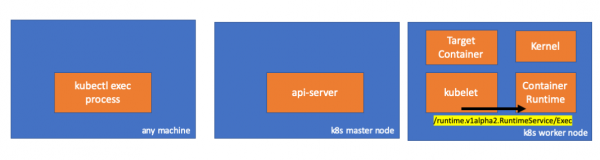
إذا كان الأمر كذلك، فيجب أن نرى اتصالًا بين kubelet ووقت تشغيل الحاوية، أليس كذلك؟ دعونا تحقق.
قم بتشغيل هذا الأمر قبل وبعد أمر exec ولاحظ الفرق. في حالتي الفرق هو:
// worker node
$ ss -a -p |grep kubelet
...
u_str  ESTAB      0      0       * 157937                * 157387                users:(("kubelet",pid=5714,fd=33))
...
هممم... اتصال مقبس يونكس جديد بين kubelet (معرف المنتج = 5714) وشيء غير معروف. ماذا يمكن أن يكون؟ هذا صحيح، إنه Docker (معرف المنتج = 1186)!
// worker node
$ ss -a -p |grep 157387
...
u_str  ESTAB      0      0       * 157937                * 157387                users:(("kubelet",pid=5714,fd=33))
u_str  ESTAB      0      0      /var/run/docker.sock 157387                * 157937                users:(("dockerd",pid=1186,fd=14))
...
كما تتذكر، هذه هي عملية docker daemon (pid=1186) التي تنفذ أمرنا:
// worker node
$ ps -afx
...
 1186 ?        Ssl    0:55 /usr/bin/dockerd -H fd://
17784 ?        Sl     0:00      _ docker-containerd-shim 53a0a08547b2f95986402d7f3b3e78702516244df049ba6c5aa012e81264aa3c /var/run/docker/libcontainerd/53a0a08547b2f95986402d7f3
17801 pts/2    Ss     0:00          _ sh
17827 pts/2    S+     0:00              _ sleep 5000
...
4. النشاط في وقت تشغيل الحاوية
دعونا نفحص كود مصدر CRI-O لفهم ما يحدث. في Docker، المنطق مشابه.
هناك خادم مسؤول عن التنفيذ RuntimeServiceServer:
// Server implements the RuntimeService and ImageService
type Server struct {
        config          libconfig.Config
        seccompProfile  *seccomp.Seccomp
        stream          StreamService
        netPlugin       ocicni.CNIPlugin
        hostportManager hostport.HostPortManager

        appArmorProfile string
        hostIP          string
        bindAddress     string

        *lib.ContainerServer
        monitorsChan      chan struct{}
        defaultIDMappings *idtools.IDMappings
        systemContext     *types.SystemContext // Never nil

        updateLock sync.RWMutex

        seccompEnabled  bool
        appArmorEnabled bool
}()
// Exec prepares a streaming endpoint to execute a command in the container.
func (s *Server) Exec(ctx context.Context, req *pb.ExecRequest) (resp *pb.ExecResponse, err error) {
        const operation = "exec"
        defer func() {
                recordOperation(operation, time.Now())
                recordError(operation, err)
        }()

        resp, err = s.getExec(req)
        if err != nil {
                return nil, fmt.Errorf("unable to prepare exec endpoint: %v", err)
        }

        return resp, nil
}()
في نهاية السلسلة، ينفذ وقت تشغيل الحاوية الأمر على العقدة العاملة:
// ExecContainer prepares a streaming endpoint to execute a command in the container.
func (r *runtimeOCI) ExecContainer(c *Container, cmd []string, stdin io.Reader, stdout, stderr io.WriteCloser, tty bool, resize <-chan remotecommand.TerminalSize) error {
        processFile, err := prepareProcessExec(c, cmd, tty)
        if err != nil {
                return err
        }
        defer os.RemoveAll(processFile.Name())

        args := []string{rootFlag, r.root, "exec"}
        args = append(args, "--process", processFile.Name(), c.ID())
        execCmd := exec.Command(r.path, args...)
        if v, found := os.LookupEnv("XDG_RUNTIME_DIR"); found {
                execCmd.Env = append(execCmd.Env, fmt.Sprintf("XDG_RUNTIME_DIR=%s", v))
        }
        var cmdErr, copyError error
        if tty {
                cmdErr = ttyCmd(execCmd, stdin, stdout, resize)
        } else {
                if stdin != nil {
                        // Use an os.Pipe here as it returns true *os.File objects.
                        // This way, if you run 'kubectl exec <pod> -i bash' (no tty) and type 'exit',
                        // the call below to execCmd.Run() can unblock because its Stdin is the read half
                        // of the pipe.
                        r, w, err := os.Pipe()
                        if err != nil {
                                return err
                        }
                        go func() { _, copyError = pools.Copy(w, stdin) }()

                        execCmd.Stdin = r
                }
                if stdout != nil {
                        execCmd.Stdout = stdout
                }
                if stderr != nil {
                        execCmd.Stderr = stderr
                }

                cmdErr = execCmd.Run()
        }

        if copyError != nil {
                return copyError
        }
        if exitErr, ok := cmdErr.(*exec.ExitError); ok {
                return &utilexec.ExitErrorWrapper{ExitError: exitErr}
        }
        return cmdErr
}()
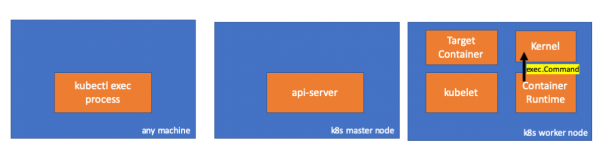
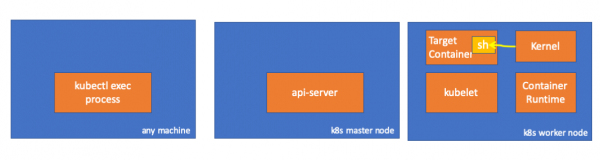
وأخيرا، تقوم النواة بتنفيذ الأوامر:
تذكير
- يمكن لخادم API أيضًا تهيئة الاتصال بـ kubelet.
- تستمر الاتصالات التالية حتى نهاية جلسة exec التفاعلية:
- بين kubectl وapi-server؛
- بين خادم API وKubectl؛
- بين kubelet ووقت تشغيل الحاوية.
- لا يمكن لـ Kubectl أو api-server تشغيل أي شيء على العقد العاملة. يمكن تشغيل kubelet، ولكنه يتفاعل أيضًا مع وقت تشغيل الحاوية لهذه الإجراءات.
موارد
- مناقشة "» في kubernetes-dev؛
- شرط ""؛
- مناقشة "» على خطأ الخادم.
PS من المترجم
اقرأ أيضًا على مدونتنا:
- "ماذا يحدث في Kubernetes عند تشغيل kubectl run؟" и ;
- «"؛
- «"؛
- «".
المصدر: www.habr.com
