

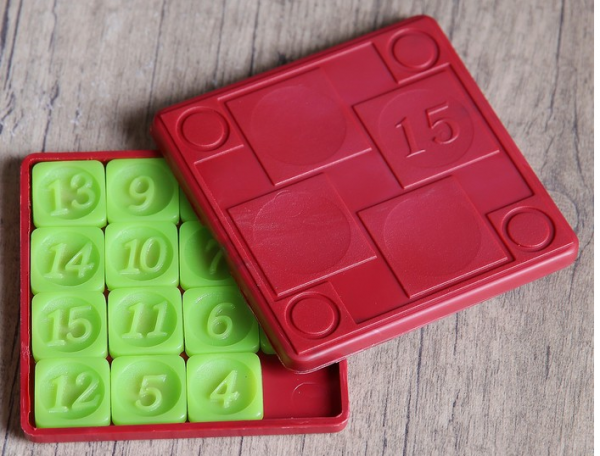
“Mười lăm” hay “Mười lăm” là một ví dụ điển hình về trò chơi logic đơn giản phổ biến trên toàn thế giới. Để giải được câu đố, bạn cần sắp xếp các ô vuông có số theo thứ tự từ nhỏ nhất đến lớn nhất. Nó không dễ dàng, nhưng nó thú vị.
Trong hướng dẫn hôm nay, chúng tôi trình bày cách phát triển Mười lăm trong Java 8 bằng Eclipse. Để phát triển giao diện người dùng, chúng tôi sẽ sử dụng API Swing.
Chúng tôi nhắc nhở: cho tất cả độc giả của "Habr" - giảm giá 10 rúp khi đăng ký bất kỳ khóa học Skillbox nào bằng mã khuyến mại "Habr".
Hộp kỹ năng khuyến nghị: Khóa học giáo dục trực tuyến .
Thiết kế trò chơi
Ở giai đoạn này, bạn cần xác định các thuộc tính:
- Kích thước - kích thước của sân chơi;
- nbTiles - số lượng thẻ trong trường. nbTiles = size*size - 1;
- Ô xếp là thẻ là mảng một chiều gồm các số nguyên. Mỗi thẻ sẽ nhận được một giá trị duy nhất trong phạm vi [0, nbTiles]. Số XNUMX biểu thị một hình vuông trống;
- BlankPos - vị trí của hình vuông trống.
Logic trò chơi
Chúng ta cần xác định phương thức đặt lại được sử dụng để khởi tạo một vị trí trò chơi mới. Bằng cách này, chúng tôi đặt giá trị cho từng phần tử của mảng thẻ. Chà, vậy thì chúng ta đặt BlankPos ở vị trí cuối cùng của mảng.
Chúng ta cũng cần một phương thức xáo trộn để xáo trộn mảng thẻ. Chúng tôi không đưa thẻ trống vào quá trình xáo trộn để giữ nguyên vị trí.
Vì chỉ một nửa số vị trí bắt đầu có thể có của câu đố có đáp án nên bạn cần kiểm tra kết quả xáo trộn thu được để đảm bảo rằng bố cục hiện tại thậm chí có thể giải được. Để làm điều này, chúng ta định nghĩa phương thức isSolvable.
Nếu một thẻ cụ thể được đặt trước một thẻ có giá trị cao hơn thì thẻ đó được coi là đảo ngược. Khi có chỗ trống, số lần đảo ngược phải là số chẵn thì câu đố mới có thể giải được. Vì vậy, chúng tôi đếm số lần đảo ngược và trả về true nếu số đó là số chẵn.
Sau đó, điều quan trọng là xác định phương thức isSolved để kiểm tra xem ván bài Game Of Fifteen của chúng ta đã được giải chưa. Đầu tiên chúng ta nhìn vào chỗ trống ở đâu. Nếu ở vị trí ban đầu thì căn chỉnh hiện tại là mới, chưa được quyết định trước đó. Sau đó, chúng tôi lặp qua các ô theo thứ tự ngược lại và nếu giá trị của thẻ khác với chỉ mục tương ứng +1 thì chúng tôi sẽ trả về sai. Nếu không, khi kết thúc phương thức, đã đến lúc trả về giá trị đúng vì câu đố đã được giải.
Một phương thức khác cần được xác định là newGame. Cần phải tạo một phiên bản mới của trò chơi. Để làm điều này, chúng tôi đặt lại sân chơi, sau đó xáo trộn nó và tiếp tục cho đến khi có thể phân giải được vị trí chơi.
Đây là một mã ví dụ với logic chính của thẻ:
private void newGame() {
  do {
    reset(); // reset in initial state
    shuffle(); // shuffle
  } while(!isSolvable()); // make it until grid be solvable

  gameOver = false;
}

private void reset() {
  for (int i = 0; i < tiles.length; i++) {
    tiles[i] = (i + 1) % tiles.length;
  }

  // we set blank cell at the last
  blankPos = tiles.length - 1;
}

private void shuffle() {
  // don't include the blank tile in the shuffle, leave in the solved position
  int n = nbTiles;

  while (n > 1) {
    int r = RANDOM.nextInt(n--);
    int tmp = tiles[r];
    tiles[r] = tiles[n];
    tiles[n] = tmp;
  }
}

// Only half permutations of the puzzle are solvable/
// Whenever a tile is preceded by a tile with higher value it counts
// as an inversion. In our case, with the blank tile in the solved position,
// the number of inversions must be even for the puzzle to be solvable
private boolean isSolvable() {
  int countInversions = 0;

  for (int i = 0; i < nbTiles; i++) {
    for (int j = 0; j < i; j++) {
      if (tiles[j] > tiles[i])
        countInversions++;
    }
  }

  return countInversions % 2 == 0;
}

private boolean isSolved() {
  if (tiles[tiles.length - 1] != 0) // if blank tile is not in the solved position ==> not solved
    return false;

  for (int i = nbTiles - 1; i >= 0; i--) {
    if (tiles[i] != i + 1)
      return false;
  }

  return true;
}
Cuối cùng, bạn cần lập trình chuyển động của các thẻ trong mảng. Mã này sẽ được gọi sau thông qua lệnh gọi lại để phản hồi chuyển động của con trỏ. Trò chơi của chúng tôi sẽ hỗ trợ nhiều chuyển động của ô cùng một lúc. Do đó, sau khi chuyển vị trí được nhấn trên màn hình thành thẻ, chúng tôi sẽ nhận được vị trí của thẻ trống và tìm hướng chuyển động để hỗ trợ một số chuyển động của thẻ đó cùng một lúc.
Đây là một ví dụ về mã:
// get position of the click
int ex = e.getX() - margin;
int ey = e.getY() - margin;

// click in the grid ?
if (ex < 0 || ex > gridSize  || ey < 0  || ey > gridSize)
  return;

// get position in the grid
int c1 = ex / tileSize;
int r1 = ey / tileSize;

// get position of the blank cell
int c2 = blankPos % size;
int r2 = blankPos / size;

// we convert in the 1D coord
int clickPos = r1 * size + c1;

int dir = 0;

// we search direction for multiple tile moves at once
if (c1 == c2  &&  Math.abs(r1 - r2) > 0)
  dir = (r1 - r2) > 0 ? size : -size;
else if (r1 == r2 && Math.abs(c1 - c2) > 0)
  dir = (c1 - c2) > 0 ? 1 : -1;

if (dir != 0) {
  // we move tiles in the direction
  do {
    int newBlankPos = blankPos + dir;
    tiles[blankPos] = tiles[newBlankPos];
    blankPos = newBlankPos;
  } while(blankPos != clickPos);

tiles[blankPos] = 0;
Chúng tôi phát triển giao diện người dùng bằng API Swing
Đã đến lúc làm việc trên giao diện. Đầu tiên chúng ta học lớp Jpanel. Sau đó, chúng tôi vẽ các thẻ trên trường - để tính kích thước của từng thẻ, chúng tôi sẽ sử dụng dữ liệu được chỉ định trong tham số của hàm tạo trò chơi:
gridSize = (dim  -  2 * margin);
tileSize = gridSize / size;
Ký quỹ cũng là một tham số được đặt trong hàm tạo trò chơi.
Bây giờ chúng ta cần định nghĩa phương thức drawGrid để vẽ lưới và các điểm trên màn hình. Chúng tôi phân tích mảng thẻ và chuyển đổi tọa độ thành tọa độ giao diện người dùng. Sau đó vẽ từng điểm có số tương ứng ở giữa:
private void drawGrid(Graphics2D g) {
  for (int i = 0; i < tiles.length; i++) {
    // we convert 1D coords to 2D coords given the size of the 2D Array
    int r = i / size;
    int c = i % size;
    // we convert in coords on the UI
    int x = margin + c * tileSize;
    int y = margin + r * tileSize;

    // check special case for blank tile
    if(tiles[i] == 0) {
      if (gameOver) {
        g.setColor(FOREGROUND_COLOR);
        drawCenteredString(g, "u2713", x, y);
      }

      continue;
    }

    // for other tiles
    g.setColor(getForeground());
    g.fillRoundRect(x, y, tileSize, tileSize, 25, 25);
    g.setColor(Color.BLACK);
    g.drawRoundRect(x, y, tileSize, tileSize, 25, 25);
    g.setColor(Color.WHITE);

    drawCenteredString(g, String.valueOf(tiles[i]), x , y);
  }
}
Cuối cùng, hãy ghi đè phương thức PaintComponent, phương thức này xuất phát từ lớp JPane. Sau đó, chúng tôi sử dụng phương thức drawGrid, theo sau là phương thức drawStartMessage để hiển thị thông báo nhắc chúng tôi nhấp để bắt đầu trò chơi:
private void drawStartMessage(Graphics2D g) {
  if (gameOver) {
    g.setFont(getFont().deriveFont(Font.BOLD, 18));
    g.setColor(FOREGROUND_COLOR);
    String s = "Click to start new game";
    g.drawString(s, (getWidth() - g.getFontMetrics().stringWidth(s)) / 2,
        getHeight() - margin);
  }
}

private void drawCenteredString(Graphics2D g, String s, int x, int y) {
  // center string s for the given tile (x,y)
  FontMetrics fm = g.getFontMetrics();
  int asc = fm.getAscent();
  int desc = fm.getDescent();
  g.drawString(s,  x + (tileSize - fm.stringWidth(s)) / 2,
      y + (asc + (tileSize - (asc + desc)) / 2));
}

@Override
protected void paintComponent(Graphics g) {
  super.paintComponent(g);
  Graphics2D g2D = (Graphics2D) g;
  g2D.setRenderingHint(RenderingHints.KEY_ANTIALIASING, RenderingHints.VALUE_ANTIALIAS_ON);
  drawGrid(g2D);
  drawStartMessage(g2D);
}
Phản ứng với hành động của người dùng trong giao diện người dùng
Để trò chơi có thể chạy theo tiến trình của nó, cần phải xử lý các hành động của người dùng trong giao diện người dùng. Để thực hiện việc này, hãy thêm triển khai MouseListener vào Jpanel và mã để di chuyển các điểm, đã được hiển thị ở trên:
addMouseListener(new MouseAdapter() {
  @Override
  public void mousePressed(MouseEvent e) {
    // used to let users to interact on the grid by clicking
    // it's time to implement interaction with users to move tiles to solve the game !
    if (gameOver) {
      newGame();
    } else {
      // get position of the click
      int ex = e.getX() - margin;
      int ey = e.getY() - margin;

      // click in the grid ?
      if (ex < 0 || ex > gridSize  || ey < 0  || ey > gridSize)
        return;

      // get position in the grid
      int c1 = ex / tileSize;
      int r1 = ey / tileSize;

      // get position of the blank cell
      int c2 = blankPos % size;
      int r2 = blankPos / size;

      // we convert in the 1D coord
      int clickPos = r1 * size + c1;

      int dir = 0;

      // we search direction for multiple tile moves at once
      if (c1 == c2  &&  Math.abs(r1 - r2) > 0)
        dir = (r1 - r2) > 0 ? size : -size;
      else if (r1 == r2 && Math.abs(c1 - c2) > 0)
        dir = (c1 - c2) > 0 ? 1 : -1;

      if (dir != 0) {
        // we move tiles in the direction
        do {
          int newBlankPos = blankPos + dir;
          tiles[blankPos] = tiles[newBlankPos];
          blankPos = newBlankPos;
        } while(blankPos != clickPos);

        tiles[blankPos] = 0;
      }

      // we check if game is solved
      gameOver = isSolved();
    }

    // we repaint panel
    repaint();
  }
});
Chúng tôi đặt mã vào hàm tạo của lớp GameOfFifteen. Cuối cùng, chúng ta gọi phương thức newGame để bắt đầu một trò chơi mới.
Mã trò chơi đầy đủ
Bước cuối cùng trước khi xem trò chơi hoạt động là ghép tất cả các thành phần mã lại với nhau. Đây là những gì xảy ra:
import java.awt.BorderLayout;
import java.awt.Color;
import java.awt.Dimension;
import java.awt.Font;
import java.awt.FontMetrics;
import java.awt.Graphics;
import java.awt.Graphics2D;
import java.awt.RenderingHints;
import java.awt.event.MouseAdapter;
import java.awt.event.MouseEvent;
import java.util.Random;

import javax.swing.JFrame;
import javax.swing.JPanel;
import javax.swing.SwingUtilities;

// We are going to create a Game of 15 Puzzle with Java 8 and Swing
// If you have some questions, feel free to read comments ;)
public class GameOfFifteen extends JPanel { // our grid will be drawn in a dedicated Panel

  // Size of our Game of Fifteen instance
  private int size;
  // Number of tiles
  private int nbTiles;
  // Grid UI Dimension
  private int dimension;
  // Foreground Color
  private static final Color FOREGROUND_COLOR = new Color(239, 83, 80); // we use arbitrary color
  // Random object to shuffle tiles
  private static final Random RANDOM = new Random();
  // Storing the tiles in a 1D Array of integers
  private int[] tiles;
  // Size of tile on UI
  private int tileSize;
  // Position of the blank tile
  private int blankPos;
  // Margin for the grid on the frame
  private int margin;
  // Grid UI Size
  private int gridSize;
  private boolean gameOver; // true if game over, false otherwise

  public GameOfFifteen(int size, int dim, int mar) {
    this.size = size;
    dimension = dim;
    margin = mar;

    // init tiles
    nbTiles = size * size - 1; // -1 because we don't count blank tile
    tiles = new int[size * size];

    // calculate grid size and tile size
    gridSize = (dim - 2 * margin);
    tileSize = gridSize / size;

    setPreferredSize(new Dimension(dimension, dimension + margin));
    setBackground(Color.WHITE);
    setForeground(FOREGROUND_COLOR);
    setFont(new Font("SansSerif", Font.BOLD, 60));

    gameOver = true;

    addMouseListener(new MouseAdapter() {
      @Override
      public void mousePressed(MouseEvent e) {
        // used to let users to interact on the grid by clicking
        // it's time to implement interaction with users to move tiles to solve the game !
        if (gameOver) {
          newGame();
        } else {
          // get position of the click
          int ex = e.getX() - margin;
          int ey = e.getY() - margin;

          // click in the grid ?
          if (ex < 0 || ex > gridSize  || ey < 0  || ey > gridSize)
            return;

          // get position in the grid
          int c1 = ex / tileSize;
          int r1 = ey / tileSize;

          // get position of the blank cell
          int c2 = blankPos % size;
          int r2 = blankPos / size;

          // we convert in the 1D coord
          int clickPos = r1 * size + c1;

          int dir = 0;

          // we search direction for multiple tile moves at once
          if (c1 == c2  &&  Math.abs(r1 - r2) > 0)
            dir = (r1 - r2) > 0 ? size : -size;
          else if (r1 == r2 && Math.abs(c1 - c2) > 0)
            dir = (c1 - c2) > 0 ? 1 : -1;

          if (dir != 0) {
            // we move tiles in the direction
            do {
              int newBlankPos = blankPos + dir;
              tiles[blankPos] = tiles[newBlankPos];
              blankPos = newBlankPos;
            } while(blankPos != clickPos);

            tiles[blankPos] = 0;
          }

          // we check if game is solved
          gameOver = isSolved();
        }

        // we repaint panel
        repaint();
      }
    });

    newGame();
  }

  private void newGame() {
    do {
      reset(); // reset in intial state
      shuffle(); // shuffle
    } while(!isSolvable()); // make it until grid be solvable

    gameOver = false;
  }

  private void reset() {
    for (int i = 0; i < tiles.length; i++) {
      tiles[i] = (i + 1) % tiles.length;
    }

    // we set blank cell at the last
    blankPos = tiles.length - 1;
  }

  private void shuffle() {
    // don't include the blank tile in the shuffle, leave in the solved position
    int n = nbTiles;

    while (n > 1) {
      int r = RANDOM.nextInt(n--);
      int tmp = tiles[r];
      tiles[r] = tiles[n];
      tiles[n] = tmp;
    }
  }

  // Only half permutations of the puzzle are solvable.
  // Whenever a tile is preceded by a tile with higher value it counts
  // as an inversion. In our case, with the blank tile in the solved position,
  // the number of inversions must be even for the puzzle to be solvable
  private boolean isSolvable() {
    int countInversions = 0;

    for (int i = 0; i < nbTiles; i++) {
      for (int j = 0; j < i; j++) {
        if (tiles[j] > tiles[i])
          countInversions++;
      }
    }

    return countInversions % 2 == 0;
  }

  private boolean isSolved() {
    if (tiles[tiles.length - 1] != 0) // if blank tile is not in the solved position ==> not solved
      return false;

    for (int i = nbTiles - 1; i >= 0; i--) {
      if (tiles[i] != i + 1)
        return false;
    }

    return true;
  }

  private void drawGrid(Graphics2D g) {
    for (int i = 0; i < tiles.length; i++) {
      // we convert 1D coords to 2D coords given the size of the 2D Array
      int r = i / size;
      int c = i % size;
      // we convert in coords on the UI
      int x = margin + c * tileSize;
      int y = margin + r * tileSize;

      // check special case for blank tile
      if(tiles[i] == 0) {
        if (gameOver) {
          g.setColor(FOREGROUND_COLOR);
          drawCenteredString(g, "u2713", x, y);
        }

        continue;
      }

      // for other tiles
      g.setColor(getForeground());
      g.fillRoundRect(x, y, tileSize, tileSize, 25, 25);
      g.setColor(Color.BLACK);
      g.drawRoundRect(x, y, tileSize, tileSize, 25, 25);
      g.setColor(Color.WHITE);

      drawCenteredString(g, String.valueOf(tiles[i]), x , y);
    }
  }

  private void drawStartMessage(Graphics2D g) {
    if (gameOver) {
      g.setFont(getFont().deriveFont(Font.BOLD, 18));
      g.setColor(FOREGROUND_COLOR);
      String s = "Click to start new game";
      g.drawString(s, (getWidth() - g.getFontMetrics().stringWidth(s)) / 2,
          getHeight() - margin);
    }
  }

  private void drawCenteredString(Graphics2D g, String s, int x, int y) {
    // center string s for the given tile (x,y)
    FontMetrics fm = g.getFontMetrics();
    int asc = fm.getAscent();
    int desc = fm.getDescent();
    g.drawString(s,  x + (tileSize - fm.stringWidth(s)) / 2,
        y + (asc + (tileSize - (asc + desc)) / 2));
  }

  @Override
  protected void paintComponent(Graphics g) {
    super.paintComponent(g);
    Graphics2D g2D = (Graphics2D) g;
    g2D.setRenderingHint(RenderingHints.KEY_ANTIALIASING, RenderingHints.VALUE_ANTIALIAS_ON);
    drawGrid(g2D);
    drawStartMessage(g2D);
  }

  public static void main(String[] args) {
    SwingUtilities.invokeLater(() -> {
      JFrame frame = new JFrame();
      frame.setDefaultCloseOperation(JFrame.EXIT_ON_CLOSE);
      frame.setTitle("Game of Fifteen");
      frame.setResizable(false);
      frame.add(new GameOfFifteen(4, 550, 30), BorderLayout.CENTER);
      frame.pack();
      // center on the screen
      frame.setLocationRelativeTo(null);
      frame.setVisible(true);
    });
  }


}
Cuối cùng, hãy chơi!
Đã đến lúc khởi chạy trò chơi và thử nghiệm nó. Trường này sẽ trông như thế này:
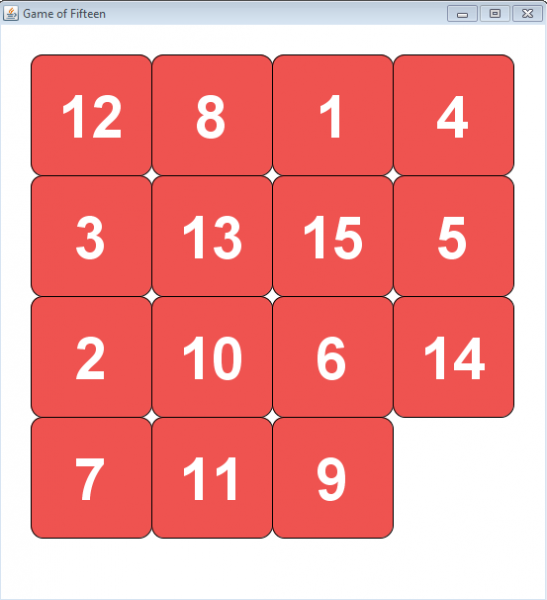
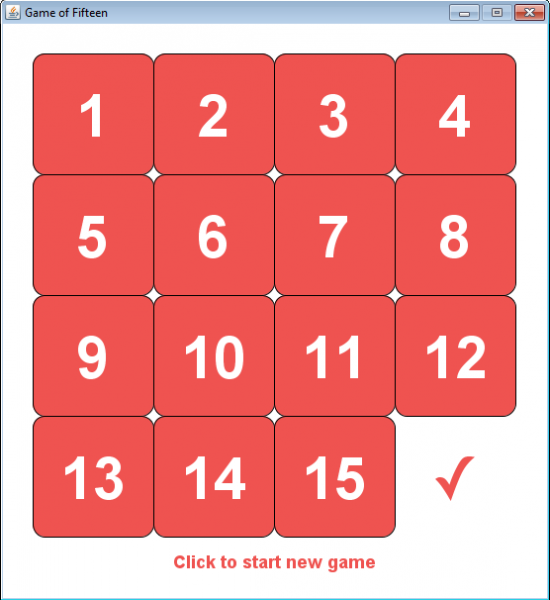
Hãy thử giải câu đố. Nếu mọi thứ suôn sẻ, chúng tôi nhận được điều này:
Đó là tất cả. Bạn có mong đợi nhiều hơn? 🙂
Hộp kỹ năng khuyến nghị:
- khóa học thực hành .
- Khóa học trực tuyến được áp dụng .
- Khóa học thực hành hai năm .
Nguồn: www.habr.com
