

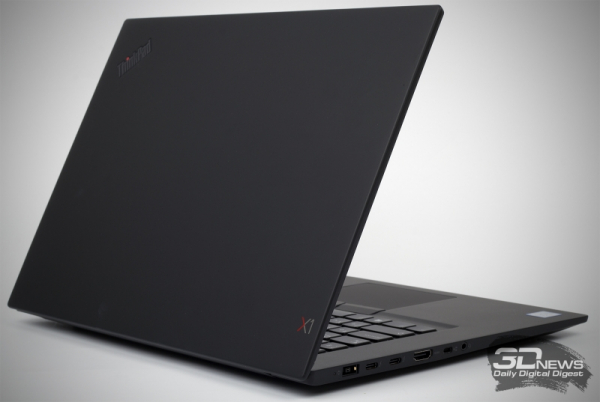
The Lenovo ThinkPad X1 Extreme series of notebooks, in addition to a very impressive pedigree, has several advantages for those who need a powerful yet easily transportable laptop. The computer we tested is equipped with a fast 6-core Intel processor and GeForce GTX 1050 Ti discrete graphics. At the same time, "Extreme" is quite realistic to consider a compact model equipped with a 15-inch screen.
Specifications, equipment and software
There are several modifications of the Lenovo ThinkPad X1 Extreme on sale, but in any case, each of them uses the GeForce GTX 1050 Ti mobile graphics in the Max-Q design. All possible iron combinations are listed in the table below.
| Lenovo ThinkPad X1 Extreme | |
| Display | 15,6", 1920 × 1080, IPS, matte 15,6", 3840 × 2160, IPS, glossy, touch |
| CPU | Intel Core i7-8750H, 6/12 cores/threads, 2,2 (4,1) GHz, 45W Intel Core i5-8300H, 4/8 cores/threads, 2,3 (4,0) GHz, 45W |
| Video card | NVIDIA GeForce GTX 1050 Ti Max-Q 4 GB |
| RAM | Up to 64 GB, DDR4-2666, 2 channels |
| Installing Drives | 2 × M.2 in PCI Express x4 3.0 or SATA 6Gb/s mode |
| Optical drive | No |
| Interfaces | 2 x USB 3.1 Gen1 Type-A 2 x Thunderbolt 3 1 x USB 3.1 Gen2 Type-A 1 x 3,5mm mini jack 1 x HDMI 1 × smart card reader 1 × card reader 1 x mini Ethernet |
| Built-in battery | 80 Wh |
| External power supply | 135 W |
| dimensions | 361 × 245 × 18,4 mm |
| Notebook weight | With FHD - 1,7 kg With 4K - 1,8 kg |
| Operating system | Windows 10 x64 Pro |
| Warranty | 3 years |
| Price in Russia according to Yandex.Market | 201 rubles for a test model |
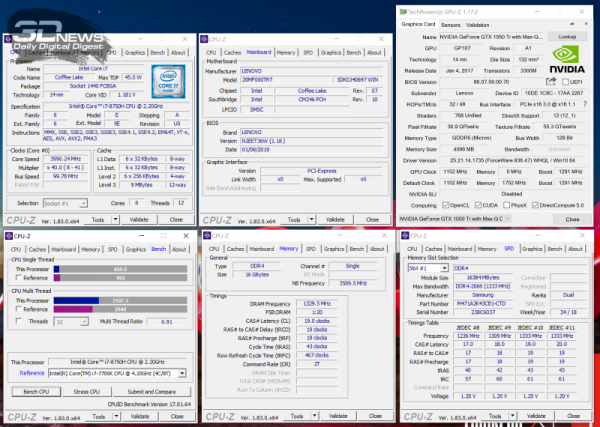
As you can see, perhaps the most upgraded version of the Lenovo ThinkPad X1 Extreme has arrived in our test lab. So, the laptop is equipped with a 4K screen, a 6-core Core i7-8750H processor, 16 GB of RAM and a 512 GB solid state drive. Such a modification costs an average of 201 rubles in Moscow retail. For a model with a Full HD display, Core i000-5H, 8300 GB of RAM and 16 GB of SSD in the capital, they ask for around 256 rubles. In all cases, a professional version of the Windows 153 operating system is installed on the laptop.
All Lenovo ThinkPad X1 Extreme series laptops are equipped with the Intel Wireless-AC 9560, which supports IEEE 802.11b/g/n/ac standards at 2,4 and 5 GHz with a maximum throughput of up to 1,73 Gbps and Bluetooth 5 .
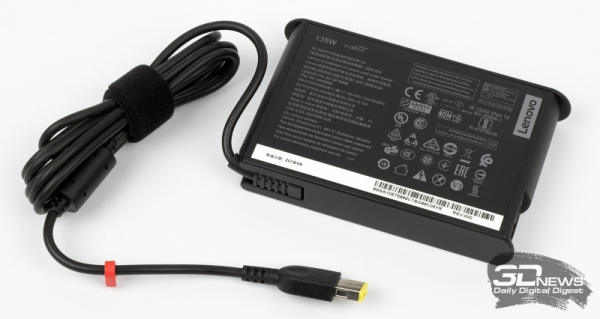
Extreme only came with an external power supply with a power of 135 W and a weight of about 400 g.
Appearance and input devices
Just one word - ThinkPad - is enough to understand what a Lenovo laptop looks like. The body of the "Extreme" is entirely made of plastic. All parts, except for the display frame, are provided with a velvety soft touch coating. The material is not easily soiled - after two weeks of working with the device, I boldly declare: only the touchpad attracts fingerprints to itself, while the rest of the parts remain clean.
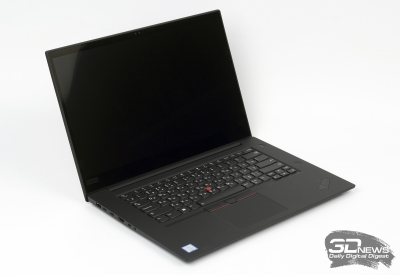 | 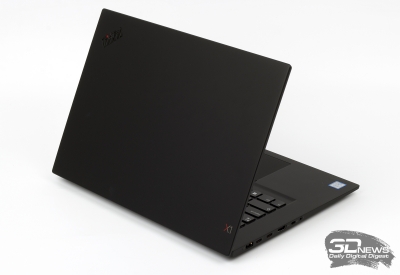 |
When turned off, the Lenovo ThinkPad X1 Extreme appears to have a near bezel-less display. However, it is not. In the case of the test model, the 4K display is placed in a black frame. As a result, the total thickness of the frames on the left and right is 8 mm, on the top - 13 mm, on the bottom - 23 mm. The webcam is located on top.
The laptop lid in the Lenovo ThinkPad X1 Extreme opens 180 degrees, which is generally typical for this series. Unfortunately, you won't be able to open the laptop with one hand: rather tight hinges are used in the design of the laptop, which, on the other hand, allow you to clearly and securely hold the screen.
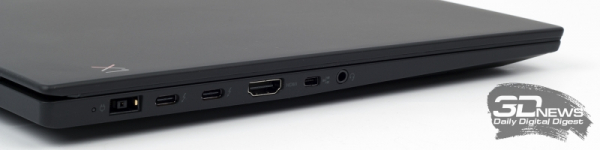
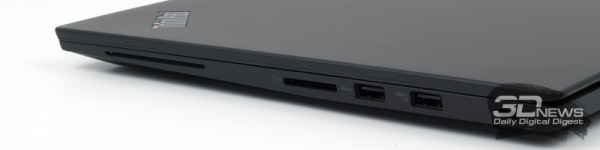
As I said, the undoubted advantages of the ThinkPad X1 Extreme are its size and weight. So, any version of the Lenovo laptop weighs less than 2 kg, so carrying the device every day with you will not be difficult. The thickness of "Extreme" is only 18,4 mm.
On the left side of the Lenovo ThinkPad X1 Extreme there is a connector for connecting the power supply, two Thunderbolt 3 ports at once, combined with USB 3.1 Gen2 type C, an HDMI 2.0 output, a mini-Ethernet connector (an adapter for a full-fledged RJ-45 is included) and 3,5 .4mm headphone jack. On the right side of the laptop are a smart card reader, a card reader that supports 3.1 formats of external storage devices, two USB 1 GenXNUMX A-type and a Kensington lock slot.
In my opinion, the model under consideration with functionality is all right. As you can see, the Lenovo ThinkPad X1 Extreme supports up to four independent monitors. In addition, the optional IR camera supports Glance technology for comprehensive face, iris and eye movement detection. For example, with its help it is possible to move windows with just a movement of the eyes.
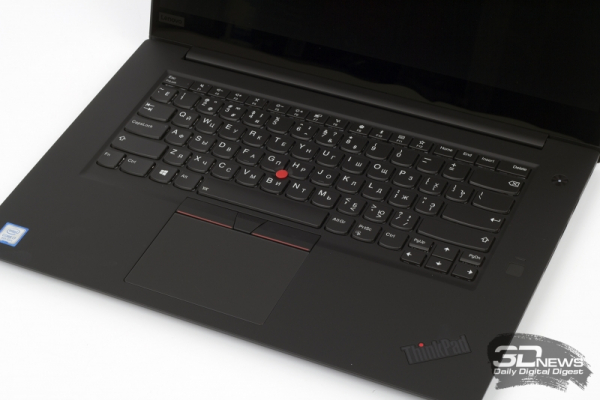
The Lenovo ThinkPad X1 Extreme keyboard is a true classic. Of course, for those users who have never used such a keyboard, it will be unusual at first to deal with the left Ctrl, non-standard PgUp, PgDn and PrtSc, but you get used to this arrangement of buttons pretty quickly. But Extreme has very large and convenient Shift, Enter, Tab and Backspace. And, unlike many ultrabooks, the ThinkPad X1 Extreme has quite a lot of key travel, with a tangible clear pressure. Typing on this keyboard is very comfortable. The F1-F12 series works in combination with the Fn button by default, while priority is given to their multimedia functions.
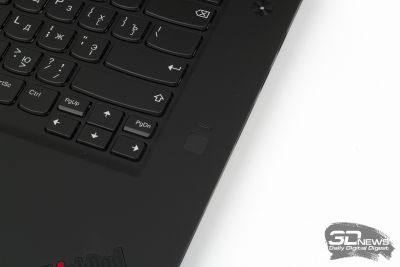 | 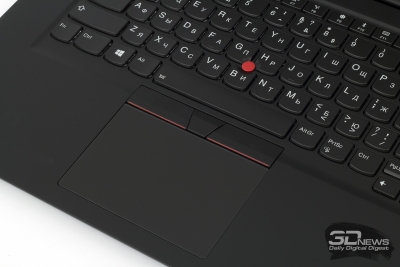 |
The keyboard in the Lenovo ThinkPad X1 Extreme is equipped with two-level white backlighting. The Match-on-Chip fingerprint sensor is located on the right side of the case. Like all other full-fledged ThinkPads, X1 Extreme is equipped with two manipulators: a touchpad with three buttons and a TrackPoint mini-joystick. The manufacturer claims that the Lenovo ThinkPad X1 Extreme is not afraid of even getting liquid on the keyboard.
The touch panel of the device is quite convenient to use. The coating, at first glance, seems to be the same as on the case, but in fact it turns out to be more “rubber” and more pleasant to the touch, respectively.
As for the webcam, the Lenovo ThinkPad X1 Extreme uses a 720p 30Hz sensor. This is enough for Skype calls - and nothing more. I will add that unlocking the operating system is possible, including with the help of face identification (Windows Hello technology), and controlling various functions using a voice command system (virtual assistant Cortana).
The webcam comes with a ThinkShutter privacy shutter for those who think Big Brother is watching them.
Internal arrangement and upgrade options
The laptop is quite easy to disassemble: unscrew a few screws and carefully remove the plastic bottom.
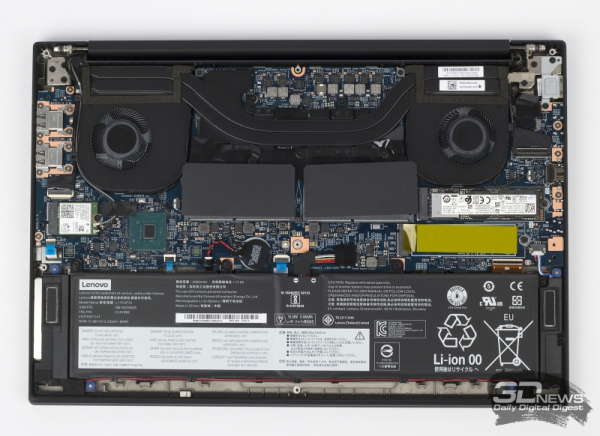
As you can see, the processor and mobile graphics are cooled by a single array of heatpipes and fans. Given that the system uses a fairly powerful 45-watt CPU, there are some concerns about how efficient such a cooler will be. At the same time, the manufacturer claims that the device meets the requirements of twelve military standards, and has also passed more than 200 tests for performance in extreme conditions. The Lenovo ThinkPad X1 Extreme is said to perform reliably in arctic snow and dust storms, in zero gravity and in heavy rain.
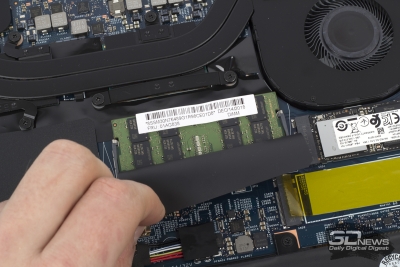 | 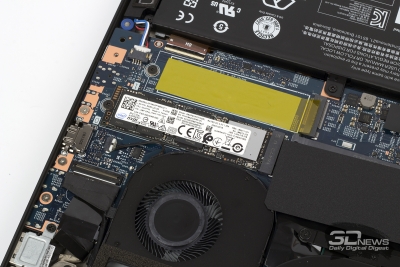 |
The test instance has 16 GB of RAM installed in the form of a single Samsung module. The die operates at an effective frequency of 2666 MHz with a latency of 19-19-19-43. The Windows operating system is installed on a 512 GB Intel SSDPEKKF8G512L NVMe drive. It is not possible to install a 1-inch hard drive or SSD in the Lenovo ThinkPad X2,5 Extreme.
Possible actions for a subsequent upgrade of the laptop are obvious: another 16-gigabyte RAM module is asked for here. You will also be able to install a second SSD over time as the Lenovo ThinkPad X1 Extreme motherboard has two M.2 slots.
Source: 3dnews.ru
