

In our work, we actively use the platform SonarQube to maintain code quality at a high level. When integrating one of the projects written in VueJs+Typescript, problems arose. Therefore, I would like to explain in detail how we managed to resolve them.

This article will discuss, as mentioned above, the SonarQube platform. A little theory — what it actually is for those who hear about it for the first time:
SonarQube (formerly Sonar) — an open-source platform for continuous inspection and measurement of code quality.
It supports code analysis and error detection according to programming standards MISRA C, MISRA C++, MITRE/CWE, and CERT Secure Coding Standards. Additionally, it can recognize errors from the OWASP Top 10 and CWE/SANS Top 25 programming errors.
Although the platform uses various ready-made tools, SonarQube consolidates the results into a unified dashboard, maintaining a history of runs and thereby allowing one to see the overall trend of software quality changes during development.
For more details, you can check
It supports a wide range of programming languages. According to the information from the link above, this includes over 25 languages. To support a specific language, the corresponding plugin must be installed. The community version includes a plugin to work with Javascript (including typescript), although the wiki states otherwise. The Javascript responsibility lies with the plugin SonarJS, for Typescript SonarTS respectively.
To send coverage information, the official client sonarqube-scanner, which, using settings from the config-file, sends this data to the server SonarQube for further consolidation and aggregation.
For Javascript there are So, let's start the step-by-step implementation SonarQube downward API support (simultaneously with this in Vue-project using Typescript.
To deploy the server, we will use SonarQube sonar.yaml docker-compose.
version: '1' services: simplesample-sonar: image: sonarqube:lts ports: - 9001:9000 - 9092:9092 network_mode: bridge:
docker-compose -f sonar.yml upStarting:
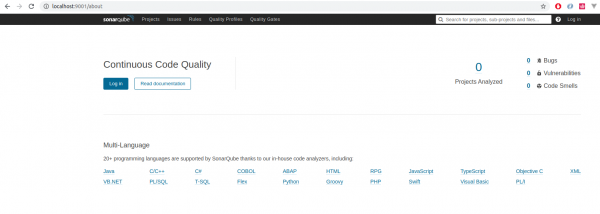
After that, it will be available at the address –Currently, there are no projects in it, and this is justified. We will rectify this situation. I took the official example project for SonarQube VueJS+TS+Jest. .
Let's clone it: git clone https://github.com/vuejs/vue-test-utils-typescript-example.gitFirst, we need to install the client
, which is calledsonar-scanner SonarQube, for npmthere is a wrapper: npm there is a wrapper:
yarn add sonarqube-scannerAnd let's add the command to scripts to work with it.
package.json:
{
 …
   scripts: {
      ...
      "sonar": "sonar-scanner"
      ...
   },
 …
}
Next, to use the scanner, you need to set the project settings in a special file. Let's start with the basics.
sonar-project.properties:
sonar.host.url=http://localhost:9001

sonar.projectKey=test-project-vuejs-ts
sonar.projectName=Test Application (VueJS+TS)

sonar.sources=src
# sonar.tests=
sonar.test.inclusions=src/**/*tests*/**
sonar.sourceEncoding=UTF-8- sonar.host.url – the address Sonarof it;
- sonar.projectKey – the unique project identifier on the server Sonarof it;
- sonar.projectName – its name, which can be changed at any time, as the project is identified by projectKey;
- sonar.sources – the folder with the source files, usually this is src, but it can be anything. This folder is specified relative to the root folder, which is the folder from where the scanner is launched;
- sonar.tests – a parameter that goes alongside the previous one. This is the folder where tests are located. In this project, there is no such folder, and the test is next to the tested component in the folder 'test', so we will ignore it for now and use the next parameter;
- sonar.test.inclusions – the path for tests using a pattern, there can be several items listed through commas;
- sonar.sourceEncoding – encoding for the source files.
For the first run of the scanner, everything is ready except for the main prerequisite: launching the test engine to collect the coverage information that the scanner will later use.
But for this, you need to configure the test engine to produce this information. In this project, the test engine is Jest. And its settings are located in the corresponding section of the file package.json.
Let's add these settings:
"collectCoverage": true,
"collectCoverageFrom": [
      "src/**/*",
      "!src/main.ts",
      "!src/App.vue",
      "!src/**/*d.*",
      "!src/**/*__tests__*"
],
That is, we set the flag for the need to calculate coverage and the source (along with exceptions) based on which it will be formed.
Now let's run the test:
yarn testWe will see the following:
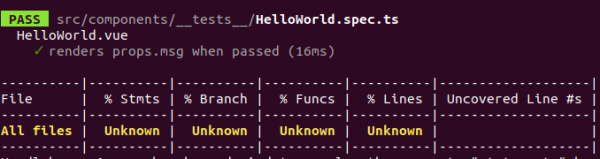
The reason is that there is no actual code in the component. Let's fix this.
HelloWorld.vue:
...
methods: {
    calc(n) {
      return n + 1;
    }
  },
mounted() {
  this.msg1 = this.msg + this.calc(1);
},
...
This will be enough for calculating the coverage.
After restarting the test, we will verify this:
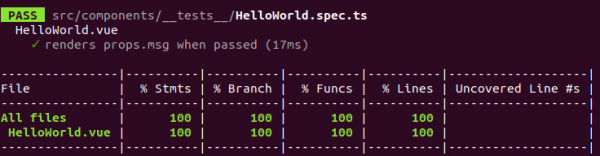
On the screen, we should see coverage information, and a folder will be created in the project directory coverage with test coverage information in a universal format LCOV (LTP GCOV extension).
Gcov — a free utility for analyzing code coverage. Gcov generates the exact number of executions for each statement in the program and allows annotations to be added to the source code. Gcov is included as a standard utility in the GCC package.
Lcov — a graphical interface for gcov. It collects gcov files for multiple source files and creates a set of HTML pages with code and coverage information. Pages for easier navigation are also generated. Lcov supports line, function, and branch coverage.
After executing the tests, coverage information will be located in coverage/lcov.info.
We need to specify Sonarwhere to obtain it. Therefore, we will add the following lines to its configuration file. But there is one thing to note: projects can be multilingual, meaning that in the folder src the source code for several programming languages may be present, and the association with one or another, in turn, is determined by the extension of the respective plugins. Coverage information may be stored in different locations for different programming languages, so each programming language has its own section for this setup. Our project uses Typescript, so we need a configuration section specifically for it:
sonar-project.properties:
sonar.typescript.coveragePlugin=lcov
sonar.typescript.lcov.reportPaths=coverage/lcov.info
Everything is ready for the first run of the scanner. I want to note that the project in Sonaris automatically created on the first run of the scanner for this project. In subsequent runs, the information will be accumulated to observe the dynamics of project parameters over time.
So, let's use the command created earlier in package.json:
yarn run sonar Note: You can also use the parameter -X for more detailed logging.
If the scanner is launched for the first time, the scanner's binary will be downloaded first. After that, it starts scanning the server Sonarfor the installed plugins, thereby calculating the supported programming languages. Other various parameters for its operation are also loaded: quality profiles, active rules, metrics repository, server rules.
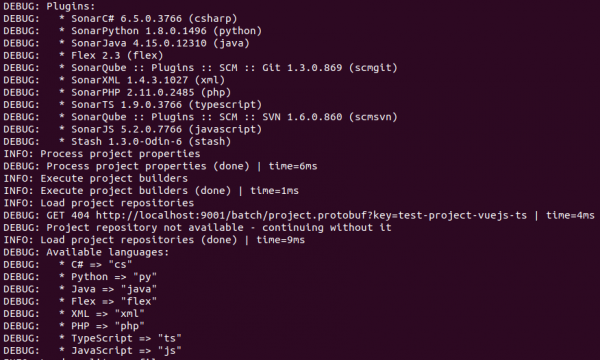

Note: we will not delve into them in this article, but you can always refer to official sources.
Next, analysis of the folder begins src regarding the presence of source files for all (unless explicitly specified for a particular) supported programming languages, followed by their indexing.
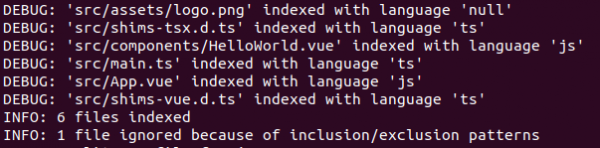
Next are some other various analyses that we do not focus on in this article (such as linting, code duplication detection, etc.).
At the very end of the scanner's operation, all collected information is aggregated, archived, and sent to the server.
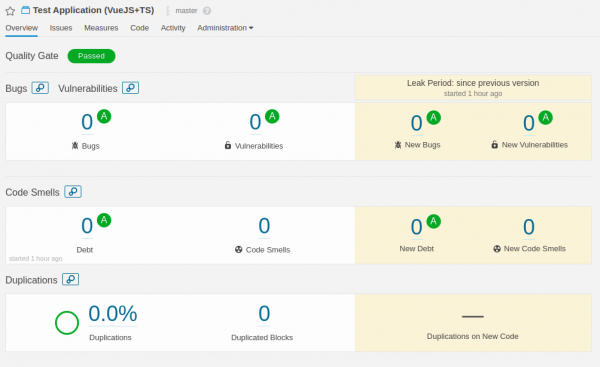
After that, we can see what we got in the web interface:
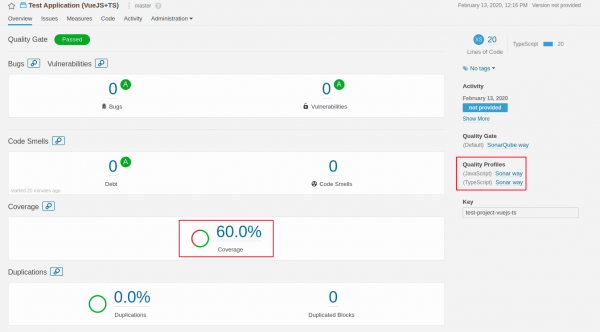
As we can see, something came out, and it even shows some coverage, but it does not match our Jest-report.
Let's dig into it. We will look at the project in more detail, click on the coverage value, and "dive" into the detailed report by files:
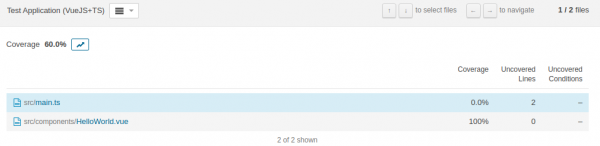
Here we see, in addition to the main file being analyzed, HelloWorld.vue, there is also a file main.ts, which spoils the entire picture of coverage. But how could this be, we had excluded it from the coverage calculation. Yes, that's correct, but it was at the level Jest, but the scanner indexed it, so it ended up in its calculations.
Let's fix this:
sonar-project.properties:
...
sonar.exclusions=src/main.ts
...
I would like to clarify: in addition to the folders specified in this parameter, all folders listed in the parameter are also added. sonar.test.inclusions.
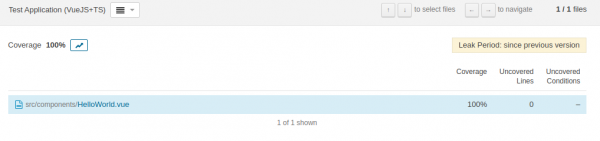
After running the scanner, we see the correct information:

Let's discuss the next point – Quality profiles. I mentioned earlier the support for multiple programming languages simultaneously. This is exactly what we are observing. But we know that our project is written in Sonar, so why burden the scanner with unnecessary manipulations and checks. We will specify the language for analysis by adding another parameter to the configuration file TS: Sonar... sonar.language=ts ...
sonar-project.properties:
We will run the scanner again and check the result:The coverage has completely disappeared.
If we look at the scanner log, we can see the following line:
This means that our project files were simply not indexed.

The situation is as follows: officially, support for
VueJs is provided in the plugin , which is responsible for SonarJSBut this support is not present in the plugin Javascript.
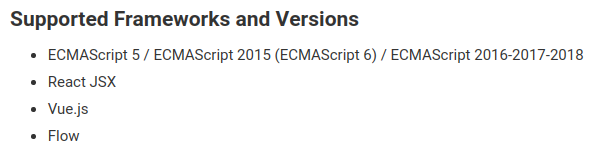
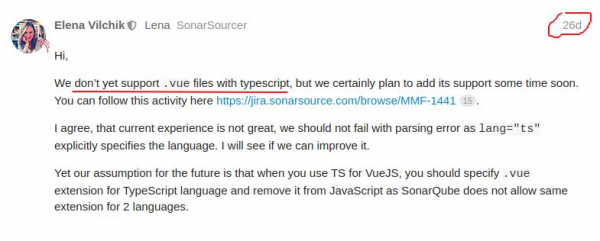
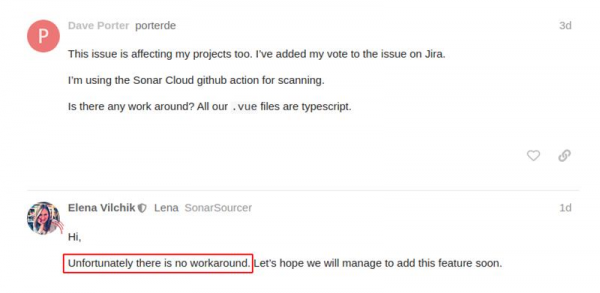
, about which an official ticket has been created in the bug tracker. SonarTS for TSHere are some responses from one of the developers of SonarQube, confirming this fact. Sonar... sonar.language=ts ...
But everything was working for us, you might argue. Yes, that is true, let's try to slightly
“hack” If there is support for.
.vue -files-files Sonarthen let’s try to tell him to consider them as Typescript.
Let’s add the parameter:
sonar-project.properties:
...
sonar.typescript.file.suffixes=.ts,.tsx,.vue
...
Let’s run the scanner:

And voilà, everything has returned to normal, with only one profile for Typescript. This means we solved the issue with support for VueJs+TS for SonarQube.
Let’s try to go further and improve the coverage information a bit.
What have we done so far:
- added to the project Sonar-the scanner;
- configured Jest to generate coverage information;
- configured Sonar-the scanner;
- resolved the support issue for -files-files + Typescript.
Besides test coverage, there are other interesting quality criteria for code, such as code duplication and the number of lines (which contributes to calculations of complexity-related coefficients) of the project.
In the current implementation of the plugin for working with TS (SonarTS) will not work CPD (Copy Paste Detector) and line count -files-files.
To create a synthetic situation for code duplication, we will simply duplicate the component file with a different name, also adding a main.ts dummy function and duplicating it with a different name. To check duplication as in -files, and in .ts -files.
main.ts:
...
function name(params:string): void {
  console.log(params);
}
...
To do this, it is necessary to temporarily comment out the configuration line:
sonar-project.properties:
...
sonar.exclusions=src/main.ts
...
Let’s restart the scanner along with the tests:
yarn test && yarn run sonarOf course, our coverage will drop, but that's not of interest right now.
In terms of line duplication, we will see:
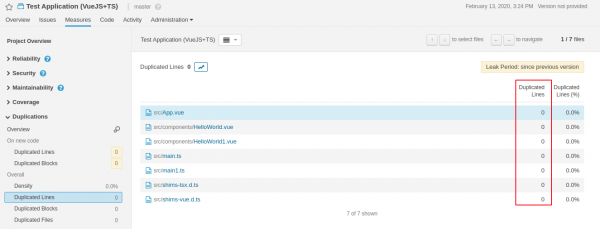
For verification, we will use CPD-utility – jscpd:
npx jscpd src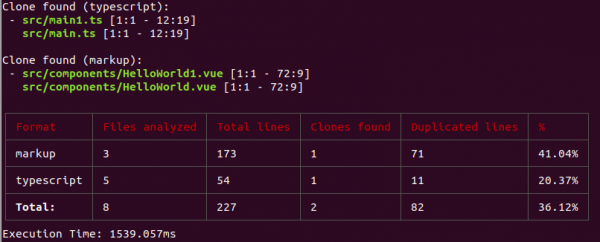
For lines of code:
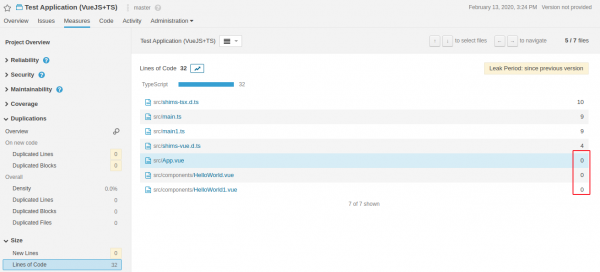
This may be resolved in future versions of the SonarJS(TS) plugins. I want to note that they are gradually merging these two plugins into one, which I think is correct.Now I would like to consider the option of improving coverage information. SonarJSSo far, we see test coverage as a percentage across the entire project and by files specifically. But there is an opportunity to expand this indicator with information about the number of
-tests across the project, as well as by files.
There is a library that can service-convert the report into a format for
generic test data JestLet’s install this library into our project: Sonar... sonar.language=ts ...
yarn add jest-sonar-reporter — .
And add it to the configuration
…
"testResultsProcessor": "jest-sonar-reporter"
…
Now let’s run the test: Jest:
package.json:
After that, a file will be created at the root of the projecttest-report.xml
yarn testWe will activate it in the configuration … sonar.testExecutionReportPaths=test-report.xml ….
And we will restart the scanner: Sonar... sonar.language=ts ...
sonar-project.properties:
…
sonar.testExecutionReportPaths=test-report.xml
…
And we will restart the scanner:
yarn run sonarLet's see what has changed in the interface Sonar... sonar.language=ts ...

And nothing has changed. The fact is that Sonar does not consider the files listed in the Jest report as test files. serviceTo fix this situation, we will use a configuration parameter Sonar sonar.tests, in which we will explicitly specify the folders with tests (currently, we have only one):
sonar-project.properties:
…
sonar.tests=src/components/__tests__
…
Let's restart the scanner:
yarn run sonarLet's see what has changed in the interface:

Now we can see the number of our servicetest files and, by clicking inside, we can view the distribution of this number across the project's files:

Conclusion
So, we have reviewed the tool for continuous analysis. SonarQubeWe successfully integrated it with a project written in VueJs+TS. We resolved some compatibility issues. We enhanced the informativeness of the test coverage metric. In this article, we have only looked at one of the criteria for code quality (possibly one of the main ones), but SonarQube it supports other quality criteria, including security testing. However, not all these features are fully available in the communityversion. One of the interesting and useful features is the integrations SonarQube with various code repository management systems, such as GitLab and BitBucket. This is to prevent a merge pull(merge) requestinto the main branch of the repository when coverage degrades. But that is the story for another article.
PS: All the code described in the article is available in .
Only registered users can participate in the survey. , please.
Are you using the SonarQube platform:
26,3%Yes5
15,8%No3
15,8%Heard about this platform and want to use it3
10,5%Heard about this platform and do not want to use it2
0,0%Using another platform0
31,6%Hearing about it for the first time6
19 users voted. 3 users abstained.
Source: habr.com
