

I present the continuation of my article . Last time we evaluated their advantages and disadvantages using open sources. Now I have tested each of the services that were mentioned last time. The results of this evaluation are below.
I note that it is not possible to evaluate absolutely all the possibilities of these products in a sane time - there are too many nuances. But I tried to add the most important technical characteristics to the article, which became a kind of "reference point" of the article. Disclaimer: The review is subjective, this is not a scientific study.
So, the assessment was carried out according to the following criteria:
- Registration, convenience of registration and work with the client of the service before the start of the game;
- Convenience of working with the service client after the start of the game;
- Cost;
- Server characteristics;
- Configurator functions and game launch options when working with the site;
- The maximum configuration of the service virtual machine;
- Personal impressions.
The most important thing here is the quality of the video stream, since the gamer wants to play on the cloud service, as on his own computer, without lags and friezes. Therefore, we take into account another important factor - the proximity of servers to Russia. Here, by the way, lies the problem for users from the Russian Federation - services such as Shadow, GeForce Now, Vortex and Parsec will have a ping for Russia of 40-50, so you won’t be able to play shooters, with a few exceptions.
And, of course, only services that are already available were tested. For this reason, Google Stadia is not in the second part. Well, since I wanted to compare the service from Google with analogues from Sony and Microsoft, I leave them for later.
V
Registration, convenience of registration and work with the client of the service before the start of the game
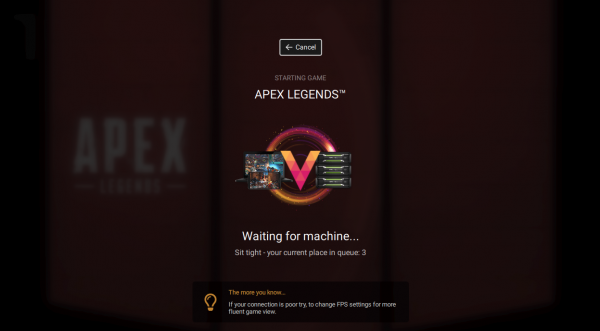
Registration is seamless and takes minimal time. It takes about a minute from registration to starting a game, with no hidden pitfalls. The website, while not perfect, is close. Furthermore, a huge number of platforms are supported, including tablets, mobile devices, and smart TVs. Windows, macOS, Chrome. You can play in the browser or use native apps for various platforms.
Convenience of working with the service client after the start of the game
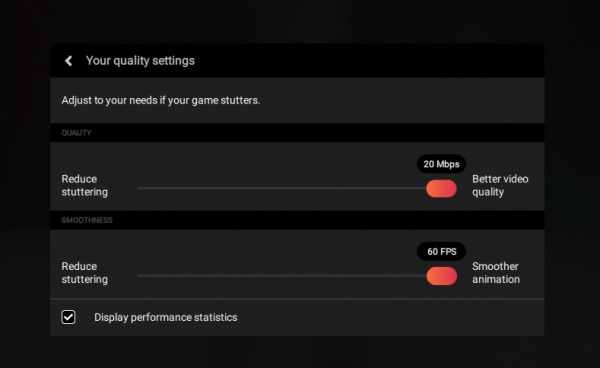
The settings interface is minimalistic - there is a bitrate and FPS configurator, which is called by pressing and holding the ESC key. All this is quite user friendly. Settings are retained for 30 days after the end of the subscription. But the ability to connect to a specific server is impossible, the system does everything automatically.
A small problem is that the clipboard is only internal, which means that you will not be able to copy text from your computer to the Vortex server (for example, access data).
The client application is very convenient, there are various features, but there are just a minimum of bugs.
As for the installed games, there are about 100 of them, unfortunately, you cannot add your own games. Games are adapted to the service, optimal settings are given for each.
Price
The cost of the game is $10 for 100 hours. Approximately 7 rubles per hour, which is not so much. There are no additional services - just connect and play for the specified price.
In order to access paid games like GTA V, Witcher, you need to connect your Steam account to Vortex.
Server Specifications
The location of the servers is assessed by their proximity to the Russian Federation. So, the closest server to Russia, judging by the ping, is located in Germany (ping is about 60).
Bitrate - 4-20 Mbps. Video stream resolution (max.) 1366*768.
At maximum settings, The Witcher 3 produces 25-30 FPS.
Best VM Configuration
Unfortunately, we only managed to find out that Nvidia Grid M60-2A is used as the GPU.
Personal impressions
The site of the service impresses immediately. Lots of platforms to play on, great service. The only drawback is weak iron. So most games won't even run at 1080p, let alone 4K. Perhaps the service was created for the game for mobile devices and laptops, where the display resolution is by no means 4K.
Playkey
Registration, convenience of registration and work with the client of the service before the start of the game
For the most part, the site is used as a client, where the game is selected and the launch is configured. The user needs to answer a few questions about the games before being able to start playing. From registration to launch takes an average of 2-3 minutes.
Convenience of working with the service client after the start of the game
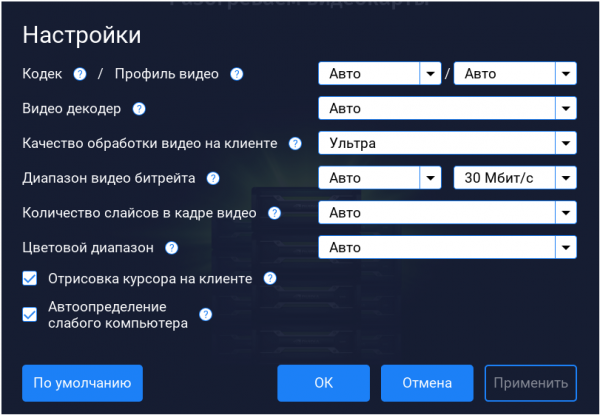
The configurator is convenient, inside there is a complete description of all functions available to the user. It is called by the key combination Ctrl+F2. Before using the configurator, it is better to study the knowledge base on the site. In addition, the clipboard is shared with the virtual machine, so text data can be sent to the virtual machine from the local machine.
The client application is also convenient, the window scale can be changed. There are a lot of games, plus most launchers are available. There is an automatic setting, plus the gamer's weak hardware is detected, and if the device is really not very productive, the video stream adapts accordingly. You can choose a decoder for processing the video stream - CPU or GPU.
You can add your own games, but progress is saved only for those games that are added from launchers.
On the positive side, the full color range of the video stream, which allows you to get real black and white colors, and not their shades.
Games are adapted for the service, so they run without problems - I did not see any errors.
Price
The cost of the server is from 1 ruble per minute, subject to the purchase of the maximum package. There are no additional services, everything is quite transparent.
Servers
One of the game servers is located in Moscow. The bitrate is 4-40 Mb/s. FPS is selected on the site, you can choose 33, 45 and 60 frames per second.
It was possible to get information about the codecs used - H.264 and H.265.
Video stream resolution is up to 1920*1080. The site has a choice of other parameters, including 1280*720.
Playkey provides the ability to control the number of slices in a video frame. Let me explain what a slice is - this is a part of a frame that is encoded independently of the entire frame. Those. the frame is a kind of puzzle, where individual elements exist independently of each other. If the frame is equal to a slice, then the loss of the slice due to connection problems will mean the loss of the frame. If the frame consists of 8 slices, then the loss of even half of them will mean blurring the frame, but not its complete loss.
Reed-Solomon codes are also used here, so that in case of loss of information during its transmission, information can be restored. The fact is that each frame is supplied with packets of specialized data, which make it possible to restore the frame or part of it if problems arise.
Gameplay video for The Witcher 3 (outrageous graphics settings). It turns out about 60 FPS for 1080TI and 50 FPS for M60:


Maximum server specifications:
- CPU: Xeon E5 2690 v4 2.6 GHZ (8 VM cores)
- GPU: GeForce GTX 1080 Ti
- RAM: 16 GB
- SSD: 10TB (1TB free)
- HV Architecture: KVM
Personal impressions
Despite some shortcomings, the service provides a mountain of opportunities for the user. A big plus is the productive hardware, so the game will not lag and slow down. And I also liked the fact that the rendered cursor does not lag behind the user's mouse movements. Some other services have this flaw, which is of course a known issue.
Parsec
Registration, convenience of registration and work with the client of the service before the start of the game
Registration on the site is convenient and fast, there are no problems with this. In the application, you need to select a server and start it. The advantage is that you can play with a friend on the same server (Split Screen). Multiplayer supports up to 5 people. It takes several minutes from registration to launch (in my case, 5, since the server started for a long time).
Convenience of working with the service client after the start of the game
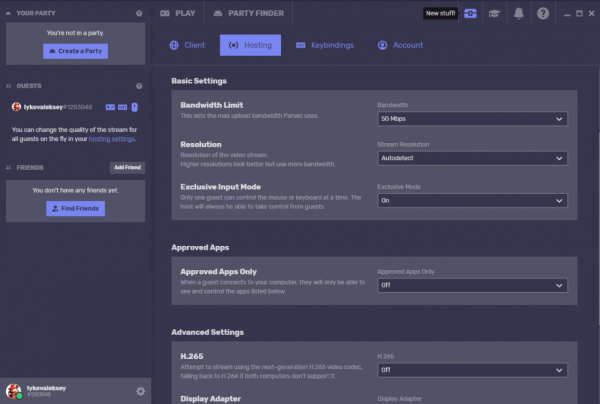
The configurator is cool, it has a lot of functions. If desired, you can configure your own binds. The configurator is called using a shortcut on the desktop of the virtual machine.
The clipboard of the local computer is shared with the virtual machine. It is possible to upload your own games, and not only licensed ones, if you understand what I mean ... And not only games, but also software. It downloads at around 90Mbps, so The Witcher 3 downloaded in just 15 minutes.
At the same time, it is also possible to save the settings and progress of downloaded games. This is not a free feature, you need to rent a hard drive to activate it. This service costs about $11 per 100 GB per month. You can rent up to 1 TB.
Unfortunately, the games are not adapted, some simply do not start, and if they do start, then with bugs.
Price
The cost of working with the service ranges from $0,5 to $2,16 per hour. The server is located in Germany. In addition, you have to rent a hard drive, as mentioned above.
There are no additional services other than hard disk rental.
Servers
Located servers in GermanyThe bitrate is 5-50 Mbps. As for the frame rate, I estimate it to be 45-60 FPS, which is Vsync. The codecs are H.264 and H.265. You can choose between CPU and GPU decoders.
Video stream resolution is up to 4K. Video of Witcher 3 gameplay at maximum speed:

Maximum server specifications:
- CPU: Xeon E5 2686 V4 2.3GHz
- GPU: Nvidia Grid M60 8 GB
- RAM: 12 GB
- SSD: 500 GB (470 GB free)
- HV Architecture: Xen
Personal impressions
In general, everything is excellent. In addition to the usual features, it is possible to play with friends on the same PC. A convenient configurator, but somewhat complicated pricing, and the cost of renting a server itself is a bit overpriced.
Drova
It is worth recalling here that the service allows not only playing in the cloud, but also renting a car for other gamers (mining). The service, in fact, works according to the p2p scheme.
Registration, convenience of registration and work with the client of the service before the start of the game
Everything is good, convenient and fast registration. Unfortunately, the client application does not look very good - the interface could be improved. The time from registration to launch is approximately 1 minute, provided that you quickly select a game server.
Convenience of working with the service client after the start of the game
There is a small configurator with a minimalistic interface. It is called by the key combination Ctrl+Alt+D. Everything is ok here. But there is no clipboard, the number of installed games depends on the selected server, and there is no possibility to upload your own games.
True, both the settings and the game process are saved. A positive point is the ability to choose the server to which you connect.
Unfortunately, there is no automatic adjustment based on the capabilities of the gamer's hardware.
Price
Pricing is quite complicated, in general - up to 48 rubles per hour. In fairness, it must be said that promotions are constantly held, thanks to which you can choose a cheaper package. So, at the time of this writing, a package was available with a service rental price of 25 rubles per hour.
It is possible to rent out the machine time of your PC for 80% of the cost of payment by Drova clients. Payments are made on QIWI.
Plus, you can play the first 10 minutes for free. Before linking the card, you are given the opportunity to play for about 60 minutes. Well, there is also a streaming console, which is important for all sorts of bloggers and streamers.
Servers
There are servers in Germany, Russia (moreover, many cities), Ukraine. You can choose the closest server and play with minimal lag.
The frame rate is not bad - from 30 to 144 FPS. There is only one codec - H.264. Video stream resolution is up to 1080p.
Video gameplay all with the same Witcher 3 at maximum speed below.

Maximum server specifications:
- CPU: I5 8400
- GPU: NVIDIA GeForce GTX 1080 ti / 11GB
- RAM: 16 GB
Personal impressions
An excellent service where you can not only spend money, but also earn money, and becoming a miner is quite simple. But most of the advantages here are just for those who provide machine time.
But when you start playing, problems appear. Often there are messages about a low connection speed, they require you to turn off WiFi while the game is being played with an Ethernet cable connected. In some cases, the video stream may simply “freeze”. Color rendition leaves much to be desired, the color gamut can be compared with what we see in Rage 2.
Shadow
Registration, convenience of registration and work with the client of the service before the start of the game
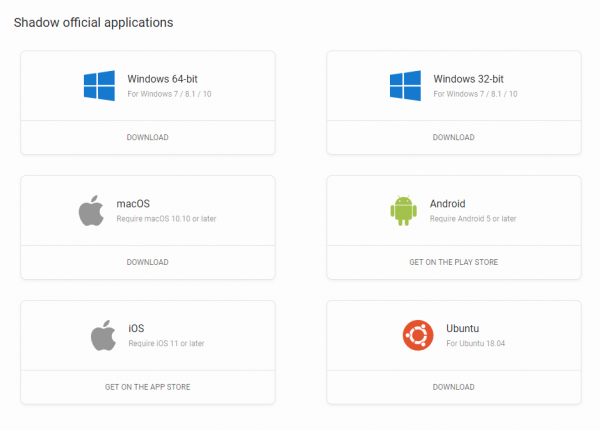
Hassle-free registration on the website, the client application exists for different operating systems. I have Windows, from the moment of registration to the launch it took about 5 minutes (most of the time is setup) Windows after starting the session).
Convenience of working with the service client after the start of the game
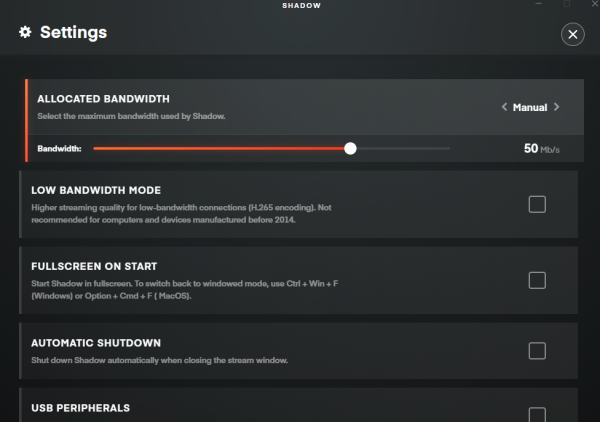
The service has a concise configurator with a relatively small number of options. The configurator is called in the settings of the client application. There is a clipboard. There are no games installed, but the desktop is available.
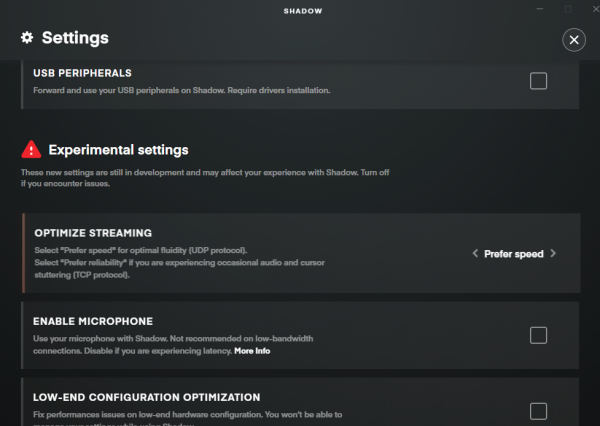
A positive point is the ability to download your own games and software (and again, not only licensed ones). The Witcher 3 loaded in 20 minutes, with download speeds up to 70 Mbps.
Both settings and game progress are saved, there are no problems with this. Saved on a 256 GB SSD.
Unfortunately, there is no adaptation of games for the service.
Price
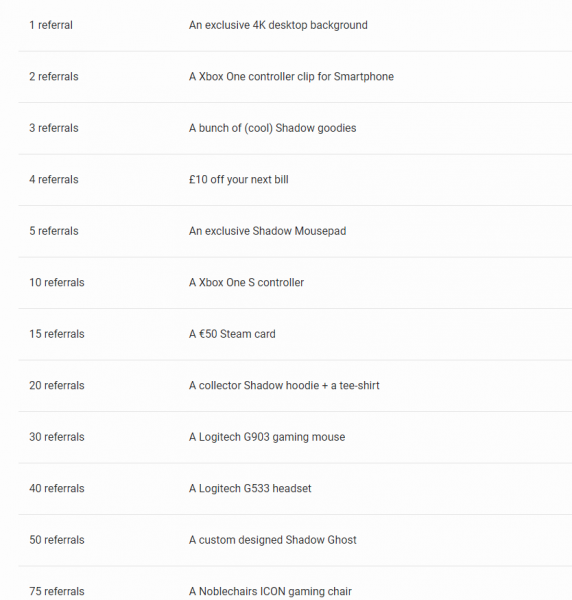
The cost of working with the service is about 2500 rubles per month (the price is shown in pounds, 31,95 pounds).
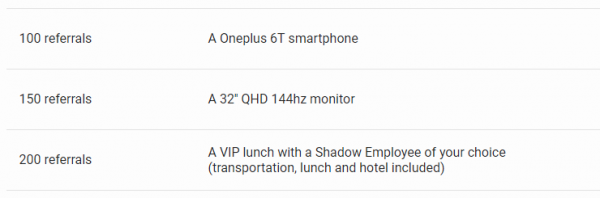
Plus - the presence of a referral system with large prizes and the payment of a certain percentage when friends purchase the services of the service. For each invitee, 10 pounds is paid, plus prizes are given - both to the invitee and to the inviter.
Servers
The servers closest to the Russian Federation are located in Paris. The bit rate is 5-70 Mbps. Codecs - H.264 and H.265. It is possible to select a decoder for processing the video stream - CPU or GPU. The resolution of the video stream is up to 4K.
Witcher 3 at maximum speed:

Maximum server specifications:
- CPU: Xeon E5 2678 V3 2.5x8 GHZ
- GPU: NVIDIA Quadro P5000 16GB
- RAM: 12 GB
- SSD: 256GB
Personal impressions
Good service but a bit slow. So, the same Witcher 3 loaded about 25-30 minutes. Allocation of space takes a long time. In principle, the service is ideal for those who plan to use unlicensed games, since Shadow does not have its own titles. At the same time, the service costs only about 2500 rubles per month, which is very inexpensive.
Unfortunately, the color scheme of the video stream has not been improved, it is rather faded.
On the other hand, the performance of the servers is at the level, which makes it possible to play all modern games. The "bottleneck" of servers is a relatively weak processor with a frequency of 2,5 GHz.
Loud play
Registration, convenience of registration and work with the client of the service before the start of the game
In order to download the service client, you must enter the password on the site, and then enter the password in the client and another client. As a result, there are quite a lot of body movements. The main problem is that you have to work with two clients. First, we load one, and with its help, the second, final one. But be that as it may, 1 minute passes from the moment of registration to the game session.
Convenience of working with the service client after the start of the game
Not a very convenient configurator, by default the video stream quality settings are low. The configurator is called by the Alt+F1 combination. In order to change the default settings, you must first start the session by minimizing the client application. As far as you can understand, there is no automatic setting, so the game may not start.
There is a clipboard, but only internal, so passwords will have to be entered manually. The client window is scaled, but only by Alt + P, which is far from obvious.
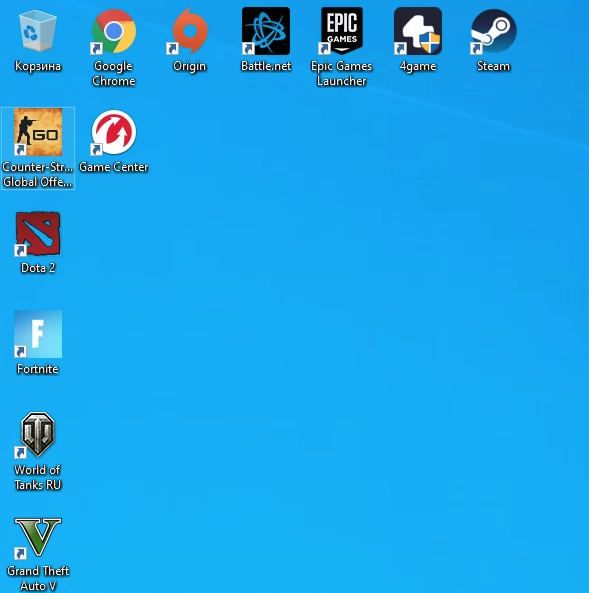
The number of installed games is minimal - if you want more games, you need to download them. The same Witcher took about 20 minutes to load at speeds up to 60 Mbps.
On the positive side, you can select a connection server, and the user is shown the characteristics of each server.
Price
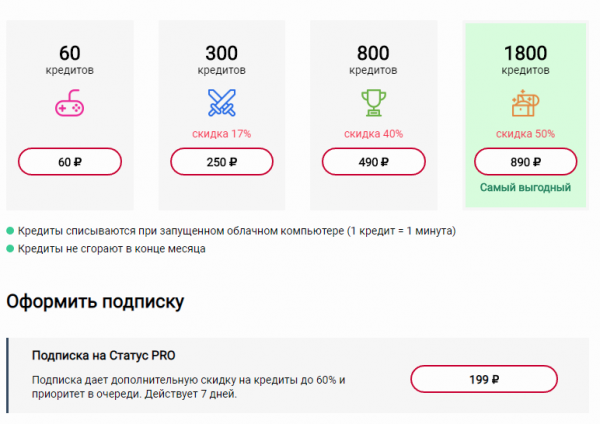
Pretty complex pricing. The average price is from 50 kopecks per minute, depending on the package.
There are additional services. So, if you wish, you can subscribe to the PRO status, which gives an additional discount on credits up to 60% and priority in the server queue. The subscription is valid for 7 days and costs 199 rubles.
In addition, saving games is an additional option, it costs 500 rubles a month, but you have to play on the same server, which is not always convenient.
Servers
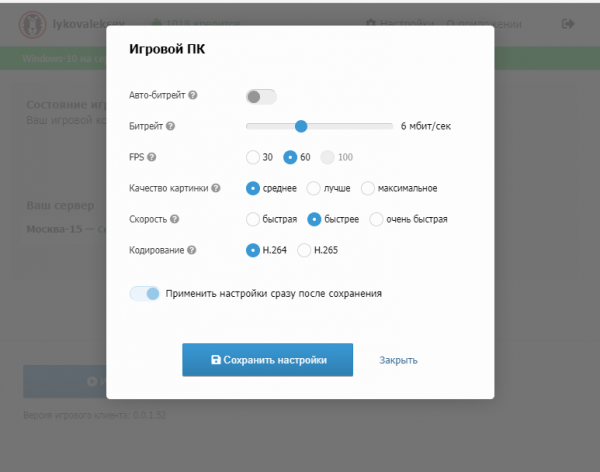
There are servers in Moscow. The bitrate is 3-20 Mbps, FPS - 30 and 60 (there is an option to select 100 FPS, but it is not active yet). The quality of the video stream can be selected from three options - medium, best and maximum. Codecs - H.264 and H.265. There is no possibility to select a decoder for video stream processing.
The resolution is up to 4K, judging by the resolution of the desktop (there is no official information).
Witcher 3 at maximum speed:

Maximum server specifications:
- CPU: Xeon E5 2686 V4 2.3GHz
- GPU: Nvidia Grid M60 8 GB
- RAM: 12 GB
- SSD: 500GB (470GB free)
- HV Architecture: Xen
Personal impressions
The service is not bad, but it is not activated on the servers. WindowsThe service description on the website often differs from what the user actually receives. Reviews on third-party resources indicate that technical support rarely helps the player.
In order to play your own games, you need to use the same server. Unfortunately, if it is closed or transferred, all settings will be lost forever, but there will be no compensation for this. As mentioned above, a plus for some players is that LoudPlay allows you to play unlicensed games.
The video stream is often "blurred", because in some cases the bitrate is simply not enough.
Nvidia GeForce NOW
Registration, convenience of registration and work with the client of the service before the start of the game
The biggest drawback is that the service is still in beta, and you need to get a key to register.
The application is quite convenient, there is a tutorial that helps you figure out what to press and what to do. True, there are problems with the translation.
If there is a key, you need to download the client and you can start the session.
Convenience of working with the service client after the start of the game
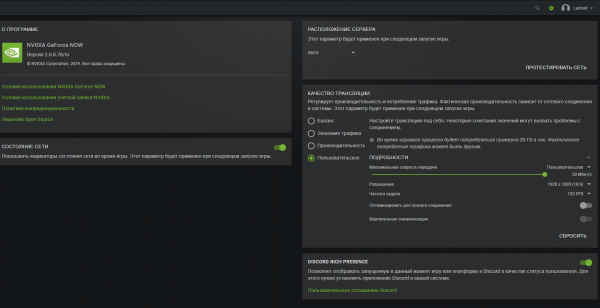
After downloading the client, the user receives a fairly advanced configurator with a large number of functions for customization. Particularly demanding players will be pleased - there are also pre-configured settings.
Unfortunately, the service does not work with the clipboard, but hot-keys are recognized normally.
There are about 400 games installed at once - this is more than on any other service, plus there is also the opportunity to download your own games. Optimized for NVIDIA GeForce NOW has the ability to save settings and game progress.
Price
Unfortunately, it is not known, during the beta test, the use of the service is completely free.
Servers
It was not possible to determine exactly, judging by the ping, the nearest servers are located either very close to Russia or in the Russian Federation.
Bitrate 5-50 Mbps. FPS - 30, 60 and 120. One codec - H.264. Video stream resolution - up to 1920*1200.
Maximum server specifications:
- CPU: Xeon E5 2697 V4 2.3GHz
- GPU: Nvidia Tesla P40, GTX 1080c
Witcher 3 at maximum speed:

Apex Legends High Settings:

Personal impressions
The service is very high quality, there are settings for literally every taste. Games run without problems, and with default graphics settings. There is no motion blur, but there is a simplification of the "picture", perhaps to speed up data transfer. On the other hand, the image is very clear.
Shooters are excellent, there are no lags and no problems. Plus, there is a streaming console that displays useful information.
The disadvantages include the lack of a clipboard and micro-lag, they appeared in some games. Perhaps this is due to the SSD settings, or maybe the problem is that the servers do not have the most powerful processor. Server build balance is something Nvidia needs to work on.
However, the gameplay is stable, FPS is normal. There is no detailed description of the games, which would be quite logical. The name of the game does not always fit into the "tile".
There is a vertical synchronization function in the client, which can have a positive effect on the smoothness of the video stream. Well, plus you can add the game to your own library for faster launch.
A huge plus is the tutorial, thanks to which you can quickly understand the purpose of various functions of the application and service.
After testing all of these services, my favorites are PlayKey, GeForce NOW and Parsec. The first two - because everything works almost without problems. The third is because you can play whatever you want, if, of course, the game starts. Again, these are very subjective conclusions that relate only to personal preferences. What cloud service do you prefer?
Source: habr.com

