

Today I would like to tell you how to set up a 1C server on Linux. debian 9 with the publication of web services.
What are web services 1c?
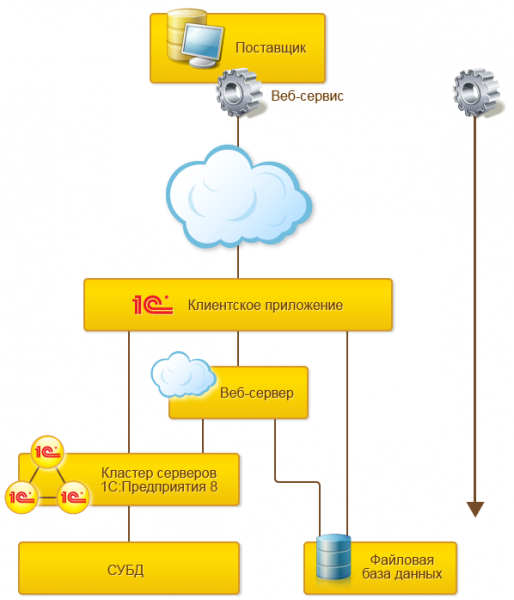
is one of the platform mechanisms used for integration with other information systems. It is a means of supporting SOA (Service-Oriented Architecture) - service-oriented architecture, which is the modern standard for integrating applications and information systems. In fact, this is an opportunity to create an html page with data, which can then be accessed by any other application and retrieved.
Pros - works quickly (even with a fairly large amount of data), relatively convenient.
Cons - your 1c programmer will grumble at you for a long time while writing a web service for your database. The thing is very peculiar in writing.
I won't tell you how to write ... I'll tell you how to publish it on Linux from the server console, and also a little about installing 1C server on Linux.
So, we have debian 9 netinst, let's get started:
Install PostgresPro (Please note that it is not free, and is distributed only as part of the familiarization with the possibilities):
# apt-get update -y# apt-get install -y wget gnupg2 || apt-get install -y gnupg# wget -O - http://repo.postgrespro.ru/keys/GPG-KEY-POSTGRESPRO | apt-key add -# echo deb http://repo.postgrespro.ru/pgpro-archive/pgpro-11.4.1/debian stretch main > /etc/apt/sources.list.d/postgrespro-std.list# apt-get update -y# apt-get install -y postgrespro-std-11-server# /opt/pgpro/std-11/bin/pg-setup initdb# /opt/pgpro/std-11/bin/pg-setup service enable# service postgrespro-std-11 start# su - postgres# /opt/pgpro/std-11/bin/psql -U postgres -c "alter user postgres with password 'ВашПароль';"Let's tell postgresql to listen to all addresses and not just localhost
# nano /var/lib/pgpro/std-11/data/postgresql.confUncomment and change which addresses to listen to:
...
#listen_addresses = 'localhost'
...
For
...
listen_addresses = '*'
...
Next, let's allow users from our network to log in
# nano /var/lib/pgpro/std-11/data/pg_hba.confLet's change:
# IPv4 local connections:
host all all 127.0.0.1/32 md5
+
host all all 192.168.188.0/24 md5
host all all 127.0.0.1/32 md5
You can read more about the various Postgres installations for 1s .
Further we put 1s the server.
Upload the archive downloaded from the 1c site to the server (in my case, deb64_8_3_15_1534.tar.gz)
# tar -xzf deb64_8_3_15_1534.tar.gz
# dpkg -i *.deba couple more little things:
# apt install imagemagick unixodbc libgsf-binNow let's install Apache2
# apt install apache2Through the administration console or through the 1c client, we create a database and fill in our configuration ...
Now we publish the database:
go to the folder with 1s.
# cd /opt/1C/v8.3/x86_64/
./webinst -publish -apache24 -wsdir Test -dir /var/www/test/ -connstr "Srvr=10.7.12.108;Ref=test;" -confPath /etc/apache2/apache2.confWe climb into var/www/test/ and see what appeared there.
# cd /var/www/test# nano default.vrd«
v8.1c.ru/8.2/virtual-resource-system"
href="http://www.w3.org/2001/XMLSchema">www.w3.org/2001/XMLSchema"
href="http://www.w3.org/2001/XMLSchema-instance">www.w3.org/2001/XMLSchema-instance"
base="/Test"
ib="Srvr=192.168.188.150;Ref=Test;">
<standardOdata enable="false"
reuseSessions="autouse"
sessionMaxAge="20"
poolSize="10"
poolTimeout="5"/>
«
These are the schemes that are needed to launch the 1c web client ... now you can access our test database from the browser at the address “http://ServerAddress/Test” (case is important! This is Linux) or specify the “base location type” address in the client http://ServerAddress/Test" and the client will work with the published database.
BUT
But what about web services? (in my test configuration there are two of them: WebBuh for data exchange with accounting and toplog integration with the wms system of the company of the same name).
Well, let's add a couple of lines to our vrd file...
v8.1c.ru/8.2/virtual-resource-system"
href="http://www.w3.org/2001/XMLSchema">www.w3.org/2001/XMLSchema"
href="http://www.w3.org/2001/XMLSchema-instance">www.w3.org/2001/XMLSchema-instance"
base="/TestWeb"
ib="Srvr=IP_addres;Ref=TestWebServ">
<standardOdata enable="false"
reuseSessions="autouse"
sessionMaxAge="20"
poolSize="10"
poolTimeout="5"/>
 # Вот тут начинается код который публикует веб-сервисы
 <point name="WebBuh" # Имя веб-сервиса в конфигураторе
 alias="Web_buh.1cws" # Web_buh.1cws - алиас веб-сервиса в браузере
 enable="true" # дальше я думаю строки и так понятны
 reuseSessions="autouse"
 sessionMaxAge="20"
 poolSize="10"
 poolTimeout="5"/>
 <point name="TopLog" # второй веб сервис
 alias="toplog.1cws" # toplog.1cws
 enable="true"
 reuseSessions="autouse"
 sessionMaxAge="20"
 poolSize="10"
 poolTimeout="5"/>
save.
And now our web service is available at "http://ServerAddress/Test/Web_buh.1cws?"
Why did you have to do it by hand?
Since our server is without a graphical shell, it will not work to run the configurator on it, and, accordingly, publish it using regular means. The remote configurator installed on the client does not publish web services on the server. Therefore, we have to edit the config manually according to the template described above.
- Thank you
Source: habr.com
