

Two-factor authentication
Everything you read in was about identifying based on what the requester knows. They know their email address, know how to access it (i.e., they know their email password), and know the answers to security questions.
"Knowledge" is considered one factor of authentication; two other common factors are something you have, such as a physical device, and something you are, such as fingerprints or retinal scans.
In most cases, performing biometric identification is not feasible, especially when we talk about the security of web applications, so in two-factor authentication (2FA), the second attribute used is typically "something you have." One popular option for this second factor is a physical token, such as :
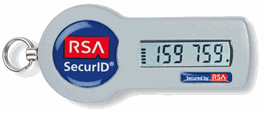
A physical token is often used for authentication in corporate VPNs and financial services. For authentication in the service, both a password and a code from the token (which often changes) in combination with a PIN need to be used. Theoretically, for identification, an attacker would need to know the password, have the token, and also know the token's PIN. In the password reset scenario, the password is obviously unknown, but possessing the token can be used to verify account ownership. Of course, like with any implementation of protection, , but it definitely raises the entry barrier.
One of the main challenges of this approach is the cost and logistics of implementation; we are talking about distributing physical devices to each client and training them on a new process. Additionally, users need to have the device with them, which is not always the case with a physical token. Another option is to implement the second authentication factor using SMS, which in the case of 2FA can serve as confirmation that the person performing the reset process has the mobile phone of the account owner. Here's how Google does it:
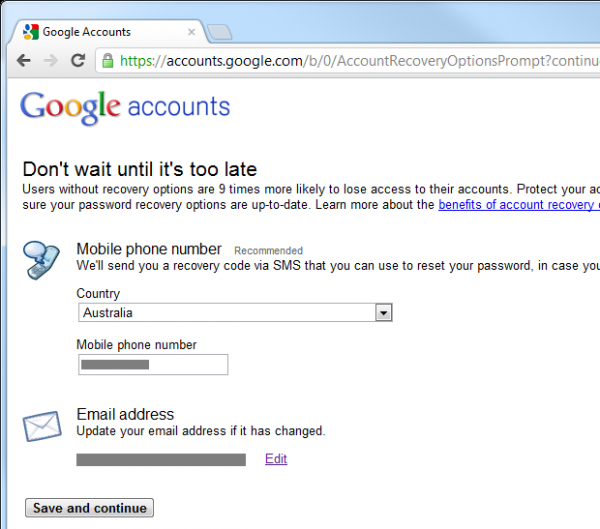
It is also necessary to enable , but that means that during the next password reset, your mobile phone may become a second authentication factor. Allow me to demonstrate this using my iPhone for reasons that will soon become clear:
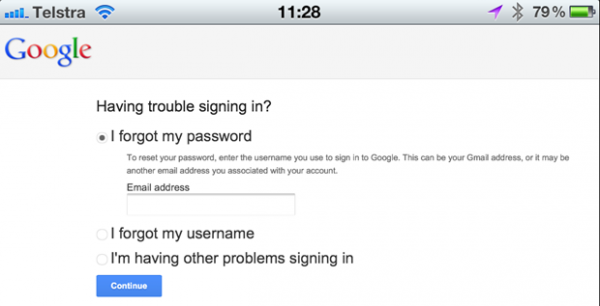
After identifying the email address, the Google account determines that 2FA is enabled and we can reset the account using verification sent via SMS to the account owner's mobile phone:
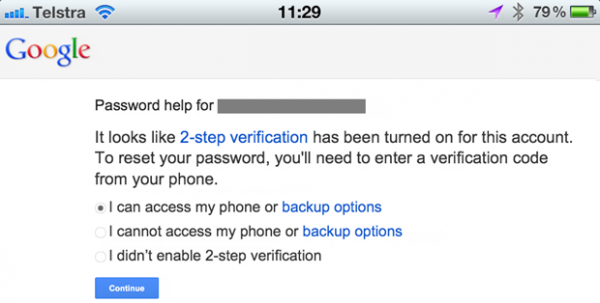
Now we need to choose how to start the reset process:
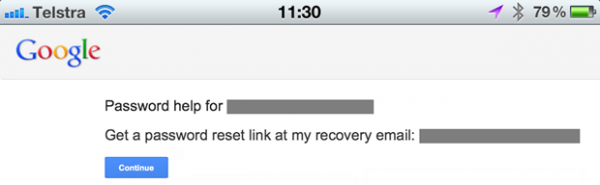
This action results in an email being sent to the registered address:
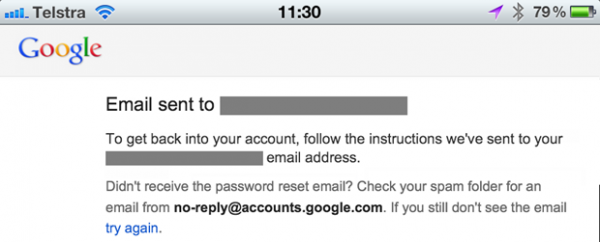
This email contains the reset URL:
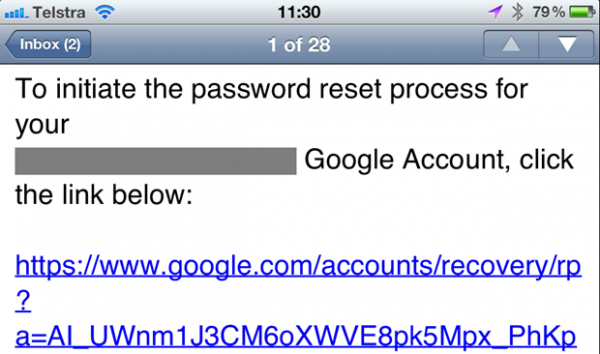
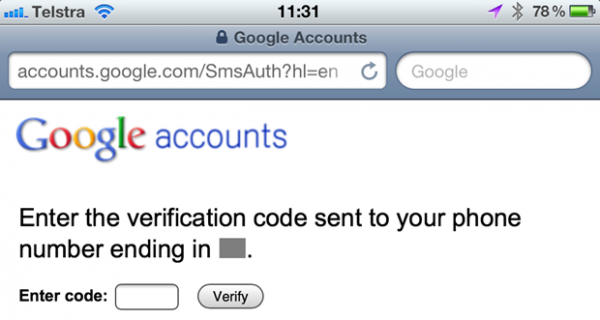
When accessing the reset URL, an SMS is sent and the website prompts for it to be entered:
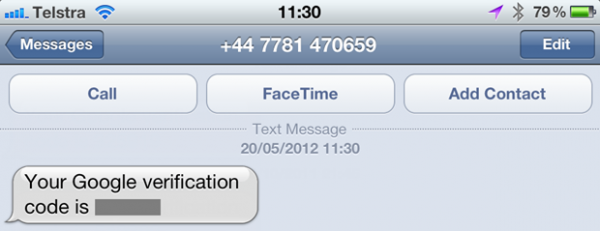
Here is the SMS:
After entering it in the browser, we return to the classic password reset territory:
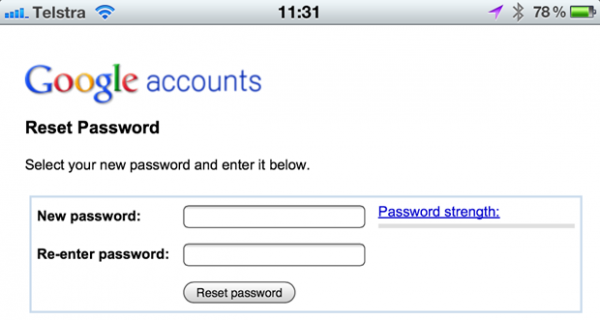
This may seem slightly verbose, and it is, but the form confirms that the person performing the reset has access to both the email address and mobile phone of the account owner. However, this can be up to nine times more secure than resetting the password solely via email. Yet, there are issues...
The problem relates to smartphones. The device shown below can authenticate only one factor — it can receive SMS but not emails:

However, this device can receive SMS and receive password reset emails:

The issue is that we consider email as the first authentication factor and SMS (or even an app that generates tokens) as the second, but today they are combined in one device. Naturally, this means that if someone gains access to your smartphone, all this convenience boils down to us returning to a single channel; this second factor "something you have" means you also have the first factor. And all this is protected by a four-digit PIN... if the phone even has a PIN and it was locked.
Yes, the 2FA feature implemented by Google does provide additional protection, but it is not protected "from stupidity" and certainly does not rely on two completely independent channels.
Username reset versus email address reset
Should password resets be allowed only via email address? Or should the user have the option to reset it using their username as well? The problem with resetting via username is that there's no way to notify the user of an incorrect username, without revealing that someone else could have an account with that name. In the previous section, resetting via email ensured that the legitimate owner of that email would always receive feedback without publicly disclosing their existence in the system. This is impossible with just a username.
So the answer is brief: only email. If you try to reset using just a username, there will be instances where users are left confused about what happened, or you will be revealing the existence of accounts. Yes, it's just a username, not an email address, and yes, anyone can choose any (available) username, but there is still a high likelihood that you will be indirectly revealing account owners due to users' tendency to reuse usernames.
So what happens when someone forgets their username? Assuming the username is not an email address (which is often the case), the process is similar to how password resets begin — we enter the email address and then send a message to that address without disclosing its existence. The only difference this time is that the message contains only the username, not the password reset URL. Or, it could say in the email that there is no account for that address.
Identity verification and accuracy of email addresses
A key aspect of password resets, and arguably, the most critical aspect is verifying the identity of the person attempting the reset. Is this really the legitimate account owner, or is someone trying to hack in or cause inconvenience to the owner?
It is evident that email is the most convenient and widely used channel for identity verification. It is not protected from careless handling ("by an idiot"), and there are many cases where the simple ability to receive emails at the account owner's address is insufficient if a high degree of confidence in identification is required (which is why 2FA is used). However, it is almost always the starting point of the reset process.
If email is to play a role in ensuring confidence, the first thing to do is to ensure that the email address is actually correct. If someone makes a typo, the reset won't start, obviously. The email verification process at registration is a reliable way to check the validity of the address. We've all seen this in practice: you register, and they send you an email with a unique URL that you need to click, confirming that you are indeed the owner of that email account. The inability to log in until this process is completed ensures motivation to verify the address.
As with many other aspects of security, this model reduces usability in exchange for providing a higher degree of security regarding user identity verification. This may be acceptable for a site that users highly value and will gladly add another step to the process (paid services, banking, etc.), but such measures may deter users if they perceive the account as "disposable" and simply use it, for example, just as a means to comment on a post.
Identifying who initiated the reset process
It is clear that there are reasons for malicious use of the reset function, and attackers can exploit it in many different ways. One simple trick we can use to help confirm the source of the request (this trick usually works) is to include in the reset request email the IP address of the requester. This provides the recipient with some information to identify the source of the request.
Here is an example from the reset function that I am currently integrating into ASafaWeb:
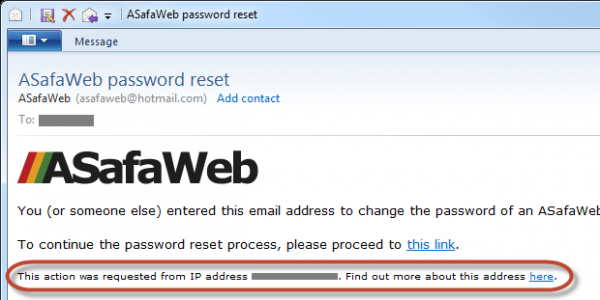
The link "find out more" takes the user to the website , providing information such as the location and organization of the requesting reset:
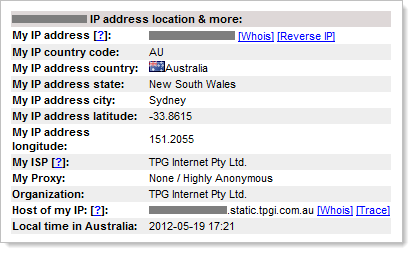
Of course, anyone wanting to hide their identity has many ways to obfuscate their real IP address, but this is a convenient way to add partial identification of the requester, and in in the majority of some cases, it will give you a good idea of who is making the password reset request.
Email change notification
This post is infused with one theme — communication; inform the account owner as much as possible about what’s happening at every stage of the process, without revealing anything that could be used maliciously. The same applies to the situation when the password has actually changed — let the owner know!
Reasons for changing the password can come from two sources:
- Changing the password after logging in because the user wants a new password
- Resetting the password without logging in because the user forgot it
Although this post primarily discusses resets, notifying in the first case reduces the risk of someone changing the password without the knowledge of the legitimate owner. How can this happen? A common scenario is obtaining the password of the legitimate owner (a reused password leaked from another source; a password obtained through keylogging; a guessable password, etc.), after which the attacker decides to change it, thereby locking the owner out. Without an email notification, the actual owner won’t know about the password change.
Of course, in the case of a password reset, the owner should have already initiated the process themselves (or bypassed the aforementioned identification checks), so the change should not might come as a surprise to them, however, an email confirmation will provide positive feedback and additional verification. In addition, it ensures consistency with the scenario described above.
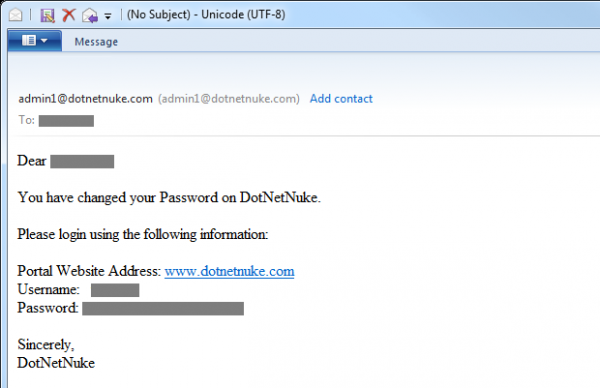
Oh, and just in case it’s not obvious — don’t send the new password by email! Some may find this amusing, but :
Logs, logs, logs and more logs
The password reset feature is attractive to attackers: either the attacker wants to gain access to someone else's account or simply cause inconvenience to the account/system owner. Many of the practices described above help reduce the likelihood of abuse, but they do not prevent it, and they certainly won’t stop people from attempting to exploit the feature in unintended ways.
A priceless practice for detecting malicious behavior is logging, and I mean very detailed logging.Log failed login attempts, password resets, password changes (i.e., when the user is already logged in), and practically everything that might help you understand what's happening; this will be very useful in the future. Log even individual parts of the process, for example, a good reset function should include initiating the reset through the website (log the request and login attempts for a reset with an incorrect username or email), log visits to the reset URL (including attempts to use an invalid token), and then record the success or failure of the answer to the security question.
When I talk about logging, I mean not only recording the fact that a page was loaded but also gathering as much additional information as possible, if it is not confidential.Guys, please do not log passwords! The logs should register the identity of the authenticated user (they will be authenticated if they change an existing password or attempt to reset someone else's password after logging in), any usernames or email addresses they try, plus any reset tokens they attempt to use. But it's also worth logging aspects such as IP addresses and, if possible, even request headers. This allows you to reconstruct not only what the what user (or attacker) is trying to do, but also who who they are.
Delegating responsibility to other performers.
If you think all of this represents a huge amount of work, you're not alone. In fact, building a reliable account management system is no simple task. It's not that it’s technically challenging; it just has many nuances. It’s not only about resetting passwords; there’s a whole registration process, secure password storage, handling multiple failed login attempts, etc. However, but there's still a lot more to be done.
Today, there are many third-party providers who willingly take on all the pains and abstract it all into a managed service. Among such services are OpenID, OAuth, and even Facebook. Some people (OpenID has indeed been very successful on Stack Overflow), however, others .
Undoubtedly, a service like OpenID solves many developers' problems, but it also undoubtedly adds new ones. Do they play a role? Yes, but it is clear that we do not see widespread usage of authentication service providers. Banks, airlines, and even stores—all implement their own authentication mechanisms, and there are very significant reasons for this.
Malicious resets
An important aspect of each of the examples mentioned above is that an old password is considered worthless only after confirming the identity of the account owner.This is important because if an account could be reset up to without identity verification, it would allow for all sorts of malicious actions.
Here's an example: someone participates in bidding on an auction site, and near the end of the bidding process, they disrupt competitors by initiating a reset process, thereby eliminating them from the auction. Clearly, if a poorly designed reset function can be exploited, it could lead to serious negative outcomes. It’s worth noting that account lockouts through incorrect login attempts are a similar situation, but that’s a topic for another post.
As I mentioned earlier, allowing anonymous users to reset the password of any account simply by knowing its email address creates a perfect situation for a denial-of-service attack. This may not be the usual type we talk about, but there’s no quicker way to lock access to an account than through a poorly thought-out password reset feature. , which we are accustomed to discussing, but there is no faster way to block access to an account than through a poorly designed password reset feature.
The weakest link
From the perspective of securing an individual account, everything written above is great, but you always need to keep in mind the ecosystem surrounding the account you are protecting. Let me give you an example:
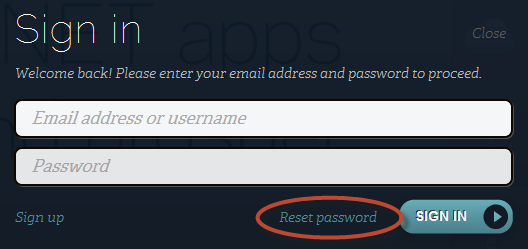
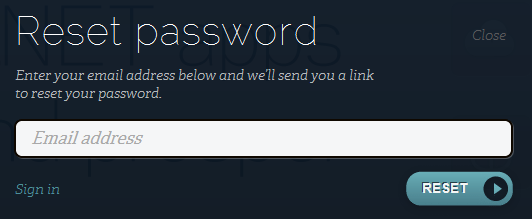
ASafaWeb is hosted on an amazing service provided by AppHarbor. The account reset process for hosting works like this:
Step 1:
Step 2:
Step 3:

Step 4:
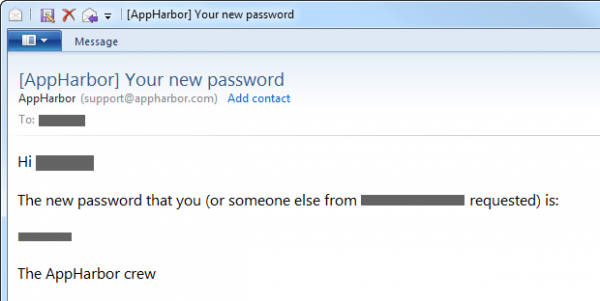
After reading all the preceding information, it’s easy to see what aspects we would implement differently in an ideal world. However, I want to point out that if I launch a site like ASafaWeb on the AppHarbor service, and then come up with great security questions and answers, add a second authentication factor, and do everything else by the book, that does not negate the fact that the weakest link in the entire process can break it all. If someone successfully authenticates to AppHarbor using my information, they can change the password for any ASafaWeb account to whatever they want!
The point is that the resilience of the security implementation should be viewed holistically: you need to model the threats of each entry point into the system, even if it's a superficial process like logging into AppHarbor. This should give me a good idea of how much effort I need to invest in the ASafaWeb password reset process.
Putting it all together
This post contains a lot of information, so I want to condense it into a simple visual scheme:
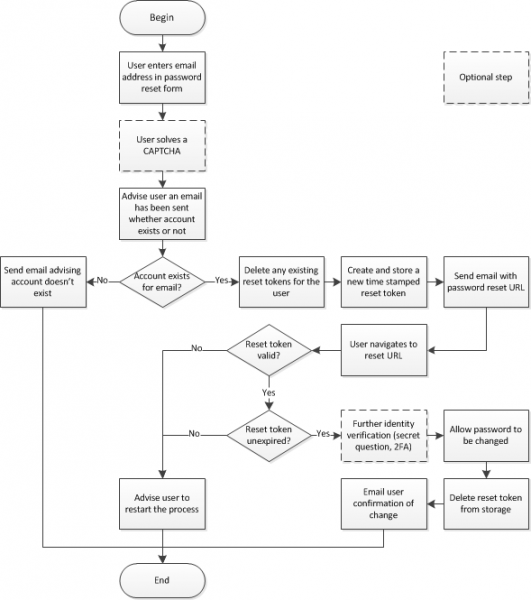
Remember that you should perform detailed logging of each of these points. That’s it; it's simple!
Summary
My post seems comprehensive, but there is a wealth of additional materials that I could Include it, but decided to appear from this for brevity: the role of the recovery email address, the situation where you lose access to the email linked to your account (for example, you left your job), and so on. As I mentioned earlier, the reset function is not that complicated; there are just many perspectives on it.
Even though the reset is not that difficult, it is often implemented incorrectly. Above, we saw a couple of examples where the implementation take the parameter led to problems, and there are many more precedents where an incorrect reset really caused issues. Recently, it was discovered that This is a serious negative outcome!
So be careful with your reset functions, at different points, and when designing the function, don't take off your black hat, because there is a high likelihood that someone else will put it on!
Advertising
VDSina offers affordable pay-as-you-go options, with each server connected to a 500 Megabit internet channel and protected against DDoS attacks for free!
Source: habr.com
