

This article will provide a brief narrative about what such an ordinary-looking thing as NetBIOScan reveal for a potential attacker/pentester.
The demonstrated application area of reconnaissance techniques relates to internal, meaning isolated and inaccessible from the outside networks. Such networks are typically found in even the smallest companies.
On its own, NetBIOS it is generally used to obtain a network name. This will be enough to achieve at least four things.
Host Discovery
Thanks to the fact that NetBIOS can use UDP as a transport, its speed allows for the discovery of hosts in very large networks. For example, the tool nbtscan, which is part of the eponymous package, can resolve addresses in a network of the form 192.168.0.0/16 in just 2 seconds (which can overload the network), whereas traditional TCP scanning would take dozens of minutes. This feature can be used as a host discovery technique (host sweep) in very large networks about which nothing is known before running nmap. Although the result does not guarantee 100% detection, as mainly Windows hosts will respond—and not all of them—it will still help determine the approximate ranges in which live hosts are present.
Host Identification
Using the results obtained from names derived from IP addresses:
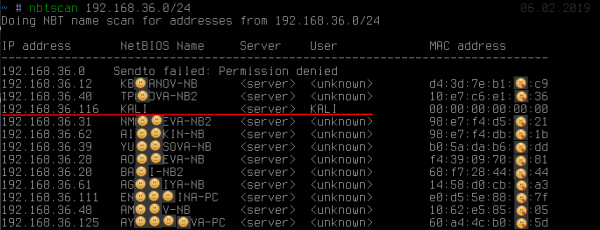
one can see: aside from the fact that the name reveals the owner of the workstation (though this is often not the case), one of the addresses stands out from the rest. We can see that the name KALIwas obtained. This behavior is typically characteristic of unix-implementation SMB/NetBIOS as part of the software package samba or very old Windows 2000..
Name Retrieval KALI, while on other hosts this <unknown> indicates the presence of the so-called null-session.Under default settings, SMB-servers are inclined towards it. linux Null-session allows for completely anonymous access (as we entered no passwords, as seen in the screenshot) to gather a considerable amount of additional information, such as local password policies, a list of local users, groups, and shared resources (shares): Often on
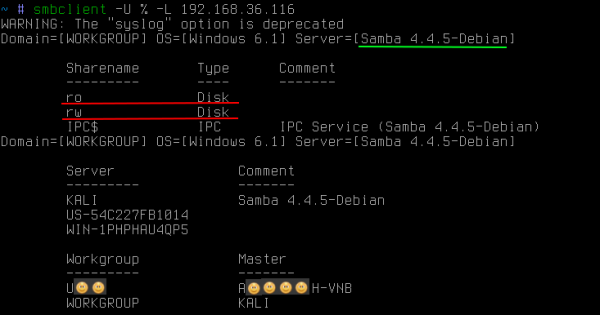
linux SMB. Linux SMB-servers may have publicly accessible shares not just for reading but even for writing. The presence of both carries various threats, the use of which is beyond the scope of this article.
NetBIOS also allows you to obtain names of all types stored by the workstation:
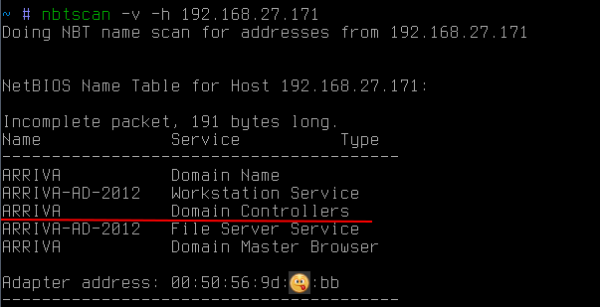
in this case, it allows you to know that the host is also a domain controller ARRIVA.
It is also worth paying additional attention to the fact that NetBIOS allows you to obtain mac-address. Unlike ARP requests, NetBIOS requests can extend beyond the subnet. This can be useful if, for example, you need to find a laptop or specific hardware in the network, knowing its manufacturer. Since the first three octets mac-addresses identify the manufacturer, you can send such NetBIOS-requests to all known subnets to try to find the desired device (http://standards-oui.ieee.org/oui.txt).
Determining the affiliation to domain
Often when moving through internal corporate networks, there is a need to attack the workstation that is part of the domain (for example, to escalate privileges to that of a domain administrator) or vice versa. In this case, NetBIOS once again can help:
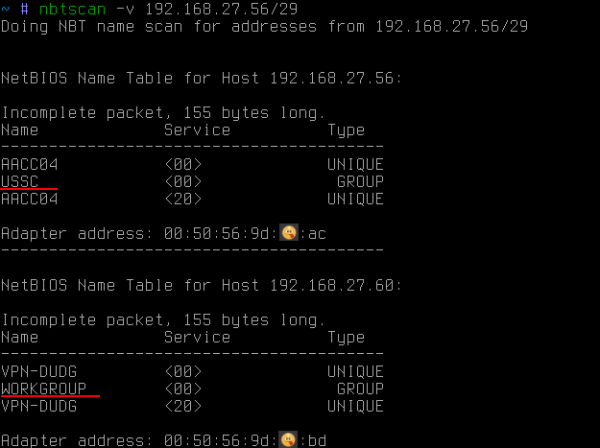
In this instance, with the help of NetBIOS all names of all types have been obtained. Among them, besides the PC name (which was already obtained earlier), you can also see the workgroup name. By default, for windows it is usually something like WORKGROUP or IVAN-PC, but if the workstation is in a domain, then its workgroup is its domain name.
Thus, with the help of NetBIOS you can find out whether the workstation is in the domain and, if so, in which one.
If you need to obtain a list of domain hosts within a subnet, then a single broadcast request with the name of the desired domain will suffice:

as a result, all hosts in the domain will respond.
Detecting multihomed hosts
And finally, another possibly very little-known technique, which is simply indispensable for finding paths in secured, possibly even physically isolated networks. These could be shop floor networks of enterprises filled with controllers. Access to this network for an attacker means being able to influence the technological process, and for the enterprise, the risk of incurring colossal losses.
So, the essence is that even if a network is isolated from the corporate network, some administrators, either out of laziness or for other reasons, like to activate another network card on their PCs to gain access to that very network. This is, of course, done in violation of various corporate firewall rules. Convenient, yes, but not very safe, especially if you get hacked, then you become a bridge into that network and will bear the responsibility.
However, there is one problem for the attacker — finding that particular administrator who has connected to the protected network in such an illegal manner. Moreover, this is a challenging problem for the network security team itself. In large enterprises, this is truly a complex task, akin to finding a needle in a haystack.
In this situation, the obvious options for the attacker would be two:
1. try to use every PC in the corporate subnet as a gateway to the required network. This would be very convenient, but it rarely happens since windows hosts IP forwarding is almost always disabled. Moreover, such a check is only possible within its subnet, and it requires the attacker to know the target address from the isolated network exactly.
2. attempt to remotely access each host and execute the simple command ipconfig/ifconfig. And it's not all that straightforward. Even if the attacker has acquired domain administrator rights, firewalls and local firewalls have not been canceled. Therefore, this task cannot be 100% automated. As a result, it becomes painfully necessary to access each host, overcoming network firewalls (often blocking port 445/tcp), in the hope of finally seeing the desired network interface.
However, there is a much simpler way. There is one extremely simple technique that allows you to obtain a list of network interfaces from a particular host. Let's say we have some host:
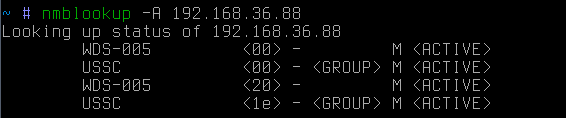
it is a reverse resolve of the IP address to the network name. If we now attempt to do a direct resolve from the network name to the IP address:

we will find out that this host is also a gateway (presumably) to some other network. It is worth noting that in this case, the request was sent as a broadcast. In other words, it will be heard only by hosts within the attacker's subnet.
If the target host is outside the subnet, a targeted request can be sent:
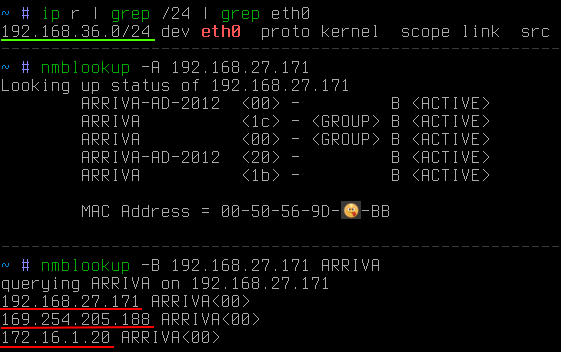
In this case, it is clear that the target is outside the attacker's subnet. The -B key was used to specify that the request should be sent to a specific address rather than broadcast.
Now, we just need to quickly gather information from the entire interesting subnet, rather than just one address. For this, a small python-script can be used:
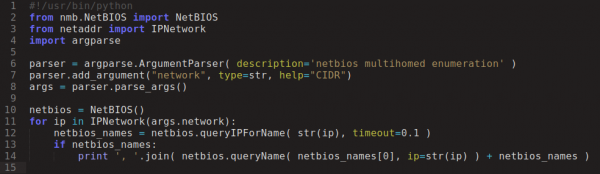
And after a few seconds:
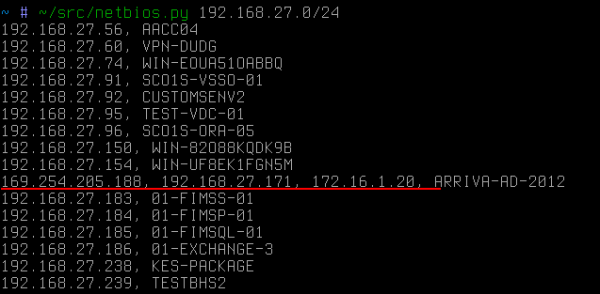
In this improvised case, the dedicated host would become the first target for the attacker if they were pursuing the 172.16.1/24 network.

Duplicate names on different IPs indicate that the host also has two network cards, but already in one subnet. It is worth noting that NetBIOS does not disclose alias-s (which can easily be computed via ARP requests as IPs with the same mac). In this case, the IP address have different mac.
Another example of using this technique is public Wi-Fi. Sometimes, you may encounter a situation where, among guest devices, personnel working in a closed corporate segment connects to a public network. Then, using this reconnaissance technique, the attacker can quickly outline a path to enter the closed network:
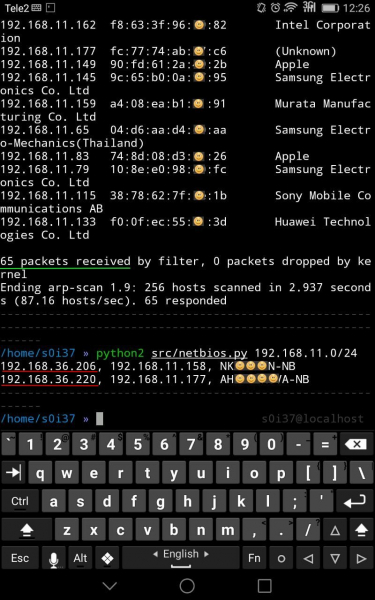
In this case, among 65 clients of the public Wi-Fi, there were two workstations with an additional interface, likely related to the corporate network.
If traffic filtering on port 445/tcp, preventing remote access to the system (remote code execution), is sometimes observed between network segments or directly on workstations, then, in this case, the name resolution on NetBIOS uses port 137/udp, whose intentional blocking is rarely encountered, as it would significantly hinder network convenience, for instance, network environments might disappear, etc.
As they say, enumeration is the key
Is there protection against this? There is none, as it is not a vulnerability at all. It is merely the standard functionality of what little is available by default in windows (in linux (behavior differs slightly). And if you, unexpectedly, circumvented the network routing rules to connect to the closed segment, the attacker will definitely find you and do so very quickly.
Source: habr.com
