

After six months of development, the GNOME 46 desktop environment has been released. For a quick evaluation of GNOME 46's capabilities, specialized Live builds based on openSUSE and an installation image prepared as part of the GNOME OS initiative are available. GNOME 46 is also already included in experimental builds. Ubuntu 24.04 and Fedora 40.
In the new release:
- Added a global search function, called using the keyboard shortcut Ctrl+Shift+F or through the new “Search” button in the file manager. The function allows you to simultaneously search in several places predefined in the settings (in addition to the home directory, you can specify other directories to search), as well as use previously available options to search the contents of files and filter files by type and date of last modification.
- The Nautilus file manager (GNOME Files) has undergone significant code refactoring and performance optimizations. The problem with progressive rendering on the screen has been resolved - the contents of the window are now updated instantly. A new progress indicator for long-running operations has been added to the bottom of the sidebar, allowing you to track work in the context of individual operations and immediately see which operations are still in progress and which have already been completed.
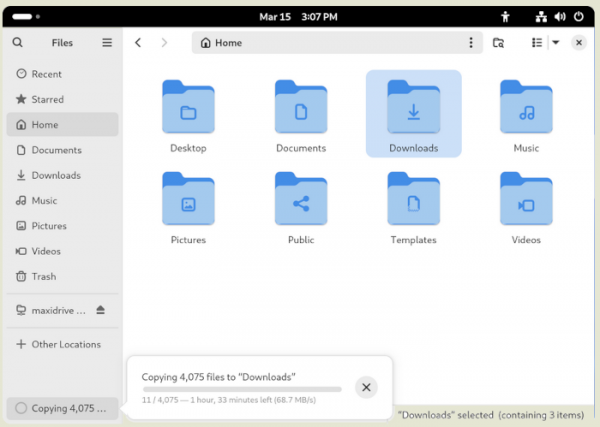
A search feature has been added to the file manager settings interface and an option has been offered to display more detailed information about the date and time. To quickly go to the address bar, you now just need to click on the area with the file path. In navigation mode using thumbnails (grid view), visual tags have been added to highlight favorite files marked with an asterisk. In the sidebar in the “Other Locations” section, available network devices are displayed.
- The “Online Accounts” interface, designed to manage connections to external services, has been significantly updated. Added support for connecting to Microsoft OneDrive and setting up an account for Microsoft 365. Once connected, the “OneDrive” button appears in the sidebar of the file manager, with which you can view content from the “OneDrive” storage, similar to how you navigate through local files.
The interface design for setting up Online Accounts has been modernized. A new type of account has been added - WebDAV, which provides tools for accessing external calendar schedulers and address books. When connecting to accounts, the default web browser is used, which made it possible to add support for additional authentication methods, such as USB tokens.
- A setting has been added that allows you to remotely connect to your desktop using the RDP protocol and use an external system as a full-fledged workstation. Among other things, you can connect to new systems and remotely configure screen settings.
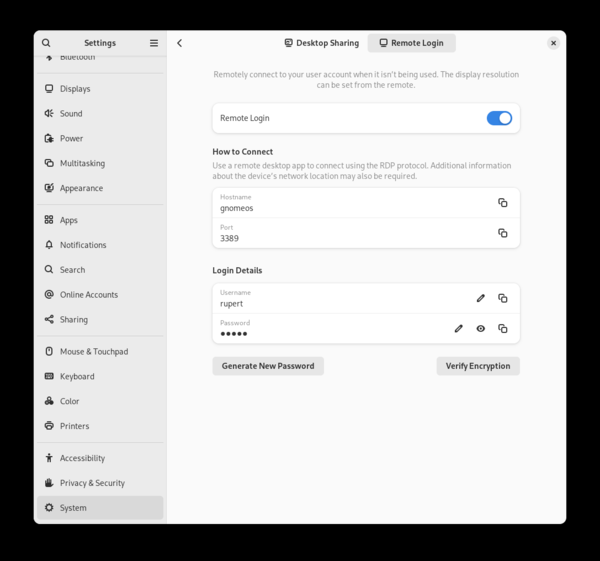
- Updated GNOME configuration interface. Navigation through settings has been simplified. A new System section has been added, which includes parameters for localization, language, date/time, SSH, user accounts and remote desktop connection. The settings for connected drives and the default application selection interface have been moved to the Apps section. The description of settings has been expanded and tooltips have been improved. Improved keyboard navigation. Content loading has been accelerated when customizing the appearance and the preview of changes made has been improved.
The touchpad settings have been expanded - options have been added to configure actions when pressing the second (right) button, touching with two fingers and clicking in the corner of the touchpad. We've also added a toggle to disable touchpad lock while typing, which may be required for some apps and games. Improved control of pressure settings for Wacom styluses.
- Facilities for people with disabilities have been expanded. Added a function to temporarily disable the Orca screen reader by pressing Ctrl+Alt+Shift+Q. Added a command to Orca to display system status information. Improved keyboard navigation across tables. Added experimental support for the Spiel speech synthesis framework.
- Added an updated set of standard avatars that are displayed when the user has not explicitly uploaded an avatar for his account.
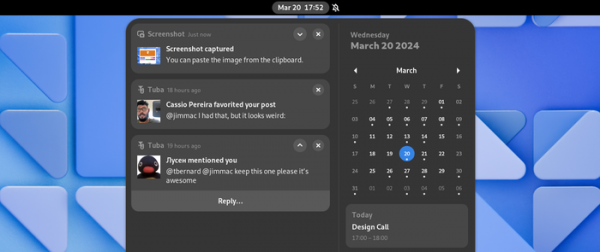
- Improved notification system. The header of each notification includes information about the application that sent the notification. Provided the ability to expand notifications in a list to use notification-related actions (for example, quickly send a reply to a message).
- Added new keyboard shortcuts for launching applications. To launch pinned applications by number in the list, you can use the combinations Super+<number> and Super+Ctrl+<number> (in the second case, the application will launch in a new window).
- The on-screen keyboard has been improved, with separate layouts for entering phone numbers, email and URLs. Added automatic capitalization mode.
- By default, Tap to click gesture processing is enabled.
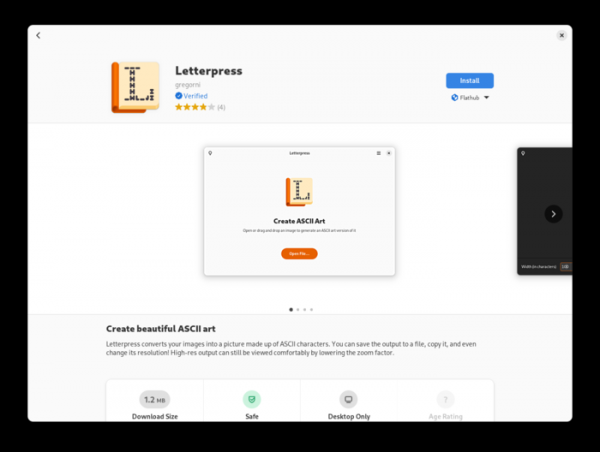
- The application manager (GNOME Software) has been improved, which now shows special labels for verified applications from Flathub, the publication of which is carried out by direct developers from the main project, and not by third parties. The interface of the settings section has been changed. Added the ability to merge metadata in AppStream format obtained from different sources.
- In GNOME Maps, the interface for editing points of interest on OpenStreetMap maps has been redesigned, route construction has been improved, support for a dark theme has been added, a new map display style has been implemented, and information about floors has been displayed.
- The interface for working with add-ons for GNOME Shell has been redesigned. Navigation through the list of installed add-ons has been simplified. It is possible to disable add-ons that have been automatically deactivated.
- Improved design and performance of the calendar planner.
- Added a mode for quickly launching a timer in the clock (just click on the area with the duration of time).
- Improved address book. Added the ability to import multiple files in VCard format at once. The import confirmation dialog provides a preview of the names of the transferred contacts.
- A new graph with statistics on I/O intensity has been added to the program for tracking free disk space.
- Performance has been optimized and resource consumption has been reduced. For example, memory consumption during search has been reduced, screencast recording performance has been improved, resources have been used more efficiently in the image viewer, and the operation of the terminal emulator has been significantly accelerated.
- Improved malware protection in the image viewer and search engine.
- Improved rendering of interface elements, increased text clarity, and improved output quality with fractional scaling. GTK uses a new rendering engine, which is based on the Vulkan API, performs edge smoothing, can use any number of colors in gradients, and supports fractional scaling.
- Added experimental support for the VRR (Variable Refresh Rate) mechanism, which allows you to adaptively change the monitor's refresh rate to ensure smooth, tear-free gaming and video playback. To enable experimental VRR support, run the command 'gsettings set org.gnome.mutter experimental-features "['variable-refresh-rate']"' and then enable VRR in the display settings.
- The GNOME Web browser (Epiphany) allows closing pinned tabs; added support for authentication using smart cards (PKCS #11); an option to send a link to email (“Send Link by Email…”) has been added to the context menu shown for links; support for accessing Google Safe Browsing servers has been discontinued; Actions for developers are hidden in the context menu by default.
- Updated versions of libraries GTK 4.14, Libadwaita 1.5, WebKitGTK 2.44.
- Reduced dependencies in the Mutter window manager. Removed or upgraded dependencies zenity, libcanberra, gnome-desktop, gnome-settings-daemon, gtk, json-glib, gdk-pixbuf, cairo and X11, which are no longer required when building Mutter.

Source: opennet.ru

