

Google has released version 142 of the Chrome web browser. At the same time, a stable release of the open-source project Chromium, which serves as the foundation for Chrome, is also available. The Chrome browser differs from Chromium by incorporating Google logos, a crash reporting system, modules for playing protected content (DRM), an automatic update system, consistent Sandbox isolation, provision of keys to Google API, and transmission of RLZ parameters during search queries. For those needing more time to update, an Extended Stable branch is separately maintained, lasting 8 weeks. The next release, Chrome 143, is scheduled for December 2nd.
Key changes in Chrome 142:
- Protection against accessing the local system when interacting with public websites has been implemented. When accessing from a public or internal network (intranet) to IP addresses the local system or loopback interface (127.0.0.0/8), the browser will prompt the user with a confirmation dialog for the operation. This protection covers attempts to load resources, fetch() requests, and iframe inserts. Protection is not yet applied to connections through WebSockets, WebTransport, and WebRTC, but will be added for these technologies later.
Access to internal resources is exploited by attackers to carry out CSRF attacks on routers, access points, printers, corporate web interfaces, and other devices and services that only accept requests from the local network. Additionally, scanning internal resources can be used for indirect identification or gathering information about the local network.
- A unified, simplified interface for linking to a Google account and synchronizing data such as saved passwords and bookmarks has been proposed. Synchronization is integrated with the account login and is not presented as a separate feature in settings. Users can connect Chrome to their Google account and use it to store passwords, bookmarks, browsing history, and tabs. This feature is currently activated for a portion of users, and coverage will gradually increase.
- A new process isolation model called 'Origin Isolation' has been implemented, where each content source (origin) is isolated based on its protocol. domain and the port, for example, "https://foo.example.com"), is isolated in a separate rendering process. Since increased isolation fragmentation could lead to higher memory consumption and increased CPU load, the new isolation mode is activated only on systems with more than 4 GB of RAM. On less powerful hardware, the old isolation approach will continue to be used, where all different content sources associated with a single site (for example, foo.example.com and bar.example.com) are isolated in a separate process.
- On systems with Windows and macOS that do not use centralized Chrome management, there is an automatic disabling of forcibly installed browser extensions that have been found to have non-critical violations of the Chrome Web Store directory rules. Non-critical violations include the presence of potential vulnerabilities, imposing the extension without user knowledge, manipulation of metadata, violation of user data handling rules, and misleading functionality. If desired, users can re-enable the disabled extension.
- In the Android version, similar to desktop system builds, a warning about fraudulent pages identified by a large language model based on content analysis is implemented. AI usage is applied in the Enhanced Safe Browsing mode. The AI model executes on the client side, but if there are suspicions of dubious content, an additional verification takes place on Google servers.
- The implementation of the DTLS (Datagram Transport Layer Security, analogous to TLS for UDP) protocol used for WebRTC connections includes the use of post-quantum encryption algorithms.
- The status of activation set during user activity on a page is retained after navigating to another page within the same domain. This activation retention simplifies the development of multi-page web applications and addresses issues such as setting input focus when the site displays its virtual keyboard.
- CSS has added the pseudo-classes ":target-before" and ":target-after" to define previous and next markers relative to the current scroll position (":target-current").
- In style containers ('@container') and the 'if()' function, the use of range syntax, as defined in the Media Queries Level 4 specification, is now permitted. This allows the use of standard mathematical comparison operators and logical operators to define ranges of values. For example, you can now specify '@container style(—inner-padding > 1em)' and 'background-color: if(style(attr(data-columns, type) > 2): lightblue; else: white);'
- The elements "<button>" and "<a>" have been enhanced with support for the "interestfor" attribute, which allows for organizing actions such as displaying a pop-up in situations where the user shows interest in the element. Signs of interest as recognized by the browser include scenarios such as hovering over and holding the pointer on the element, pressing hotkeys, or maintaining touch on a touchscreen. When interest is detected on an element with the "interestfor" attribute, the browser generates an InterestEvent.
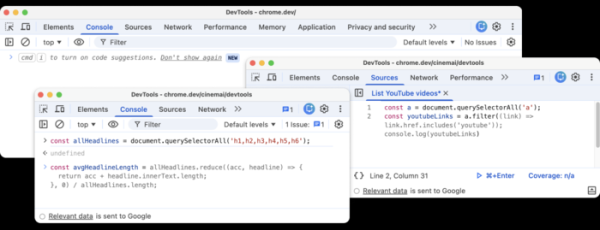
- Improvements have been made to the web developer tools. A button for quickly calling the AI assistant has been added to the top right corner. The context menu item 'Ask AI' has been renamed to 'Debug with AI' and enhanced with the capability to perform immediate actions based on context. In the web console and code panel, the AI assistant Gemini can now generate code recommendations.

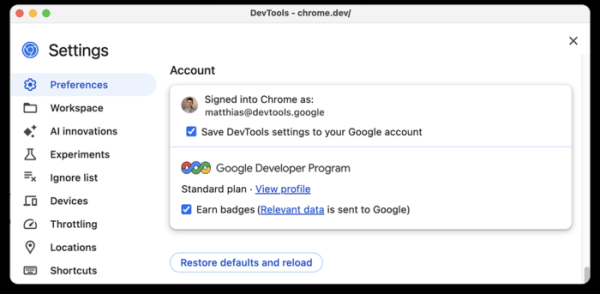
The integration with the GDP (Google Developer Program) service has been enabled in the web developer tools. Developers can now connect to their GDP profile directly from Chrome DevTools and earn bonuses for completing specific tasks within this interface.

In addition to new features and bug fixes, the new version addresses 20 vulnerabilities. Many of these vulnerabilities were identified through automated testing using tools such as AddressSanitizer, MemorySanitizer, Control Flow Integrity, LibFuzzer, and AFL. No critical issues that could bypass all levels of browser protection and execute code on the system outside the sandbox environment have been detected. As part of the bug bounty program for this release, Google has established 20 rewards totaling $130,000 (two rewards of $50,000, one reward of $10,000, and three rewards of $3,000, two rewards of $2,000, and three rewards of $1,000). The amount for 8 of the rewards has not yet been determined.
Additionally, it is worth noting the discovery of an unpatched vulnerability in the Blink engine that leads to crashes and hangs in the browser when executing certain JavaScript code. This vulnerability is caused by architectural issues in the rendering engine, related to the lack of limits on the intensity of operations updating the "document.title" property. The absence of constraints allows for utilizing "document.title" to make tens of millions of changes to the DOM per second, which leads to the interface freezing after a few seconds due to blocking the main thread and significant memory consumption, and the browser crashes after 15-60 seconds.
Source: opennet.ru
