

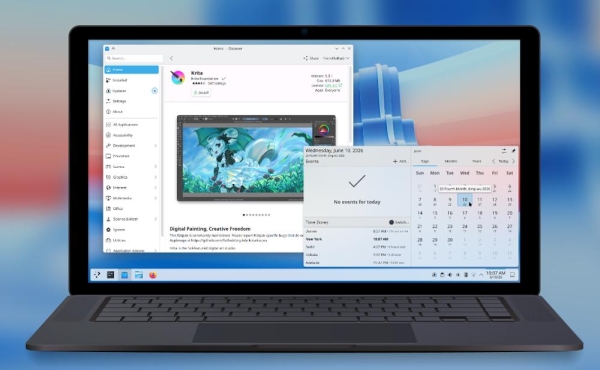
The KDE project has released a stable release. KDE Plasma 6.7 - a new version of the free desktop environment for Linux and UNIX-like systems. official announcement The release is described as an update focused on improving usability, performance, and visual integrity of the desktop. A full list of changes is published in KDE Plasma 6.7.0 changelog, and a brief overview of the release also brought Phoronix.
Major changes
Virtual desktops are separate for each screen.
One of the major changes in Plasma 6.7 is support for independent virtual desktops across different monitors. This allows, for example, switching desktops on one screen without changing the window set on the other. KDE notes that this feature has been highly anticipated for over two decades.Quickly switch between light and dark themes.
A global theme toggle switch has been added to the Brightness and Color widget. In Plasma 6.6, KDE already added the ability to create custom global themes and schedule them, and Plasma 6.7 makes manual switching faster and more visible.New background apps section in the system tray.
The system tray now shows not only traditional background apps, but also apps that use the new "Background Apps" mechanism. This is especially relevant for Flatpak apps, which can run in the background without a classic tray icon.Checking the microphone volume level.
Plasma 6.7 adds the ability to test microphone volume. This helps you quickly determine whether the sound you're receiving is too quiet or too loud, without having to wait for callers to complain.Enter special characters by holding down a key.
When the virtual keyboard is enabled, Plasma now supports long-pressing special characters. This behavior is familiar from mobile keyboards and simplifies entering accents and additional character variations.Printing improvements.
The printer icon in the system tray now shows the number of active jobs. Additionally, KDE has made it easier to connect to printers published in Windows-networks, and added a new print queue management tool, useful for both home users and administrators with several frequently used printers.Faster switching of desktops in Overview.
In Overview mode, accessed via Meta + W, you can now switch virtual desktops by scrolling or using the Page Up and Page Down keys. This makes Overview not only a window preview but also a more convenient way to navigate between workspaces.Simplified addition of favorite applications.
You can now drag and drop favorite apps into the app drawer, Application Launcher, and Application Dashboard. This is a small change, but it reduces the number of steps required to customize your workspace.Discover improvements.
The Discover app center now features a more prominent install button, redesigned app cards with additional information, and clearer sorting. Installed apps are now grouped by type, making it easier to find the right app in the list.Convenient comparison of time in different time zones.
The digital clock widget now shows how much the selected time zones differ from local time. This is useful when working with teams across multiple countries: you no longer have to manually calculate the difference between, say, Berlin and Denver.Type-ahead desktop search.
A "type-ahead" search mode has been added for desktop icons: while typing, you can quickly select a file or folder by name. If desired, this behavior can be reverted to KRunner launching via the desktop settings.The return of Oxygen and Air.
To celebrate KDE's 30th anniversary, the developers have updated the Oxygen theme, familiar from KDE 4, to a state comparable to the current Breeze theme. Air, a light version of Oxygen, has also returned. The themes have been updated, gaining support for responsive transparency, support for different panel positions, and other improvements. The classic KDE 4 wallpapers, Air and Horos, have also returned.Breeze development.
The default Breeze theme features rounded highlights in lists and grids for many apps, and menu items now display a visual tap effect. Notifications are also more visible: they appear with an animation sliding in from the nearest edge of the screen.Technical preview of the Union theme system.
Plasma 6.7 includes the first public version of Union, a new theme engine designed to simplify the styling of Plasma, QtQuick, and QtWidgets applications through a unified CSS-like approach. Union is currently disabled by default and is intended for testing, but it is an important step toward a unified theme engine in future KDE releases.ICC profiles along with HDR.
In Plasma 6.7, you no longer have to choose between ICC profile color management and HDR content: both modes can be used simultaneously. This is important for users with modern monitors who require both accurate color reproduction and a high dynamic range.Setting up adaptive backlighting on AMD laptops.
A number of modern laptops with AMD processors now offer the ability to control adaptive backlight modulation, including the hue-shifting effect at very low brightness levels. This gives you greater control over display performance and power consumption.Performance and power consumption optimizations.
KDE developers specifically highlight optimizations for CPU-rendered applications, full-screen windows, and systems with integrated Intel graphics. Phoronix previously highlighted KWin improvements for Wayland scripts with wl_shm and UDMABUF, which should reduce unnecessary buffer copies and lower CPU load.Additional Wayland and portal improvements.
The release includes support for new Wayland protocols and portals. Related changes include enhanced background application management mechanisms, improvements for full-screen windows, and further preparation of Plasma for broader use of Wayland.Other improvements to the working environment.
Plasma 6.7 adds network connection mirroring, mouse and stylus pointer synchronization, setting your preferred calendar app, hotkeys for global push-to-talk mode and clearing notification history, a selection of mixed-skin emoji, storage preferences in System Monitor, a “Recent Locations” option in the application menu, and customizable sorting in the window list widget.
Source: linux.org.ru
