


TL;DR: I admire Haiku, but there is still room for improvement
— an operating system that pleasantly surprised me. Day two. Don't get me wrong: I'm still amazed at how easily it makes things that are hard to do in desktop environments LinuxI'm eager to learn how it works and am also enthusiastic about using it daily. However, the day for a full transition hasn't arrived yet: I don't want to suffer.
WonderBrush bitmap graphics editor - if you know where to find it
In principle, it is expected for a version below 1.0. However, don't underestimate the amazing accomplishments given Mac OS X in its pre-release days, and given the size of the Haiku team.
I usually express my thoughts about #LinuxUsability (, , , , , ), so don't be surprised by Haiku's usability quibbles. Most of them, fortunately, relate to various improvements.
This was the preface, and now let's pay attention to some troubles.
Trouble number 1: problems with the browser
There are 3 browsers based on : basic () and two additional ones in Qt (QupZilla, obsolete and ) that can be installed from the repository. None work correctly. The main browser has problems with functionality and rendering (for example, it is impossible to resolve captcha when entering ), and additional ones have big performance problems on Haiku.
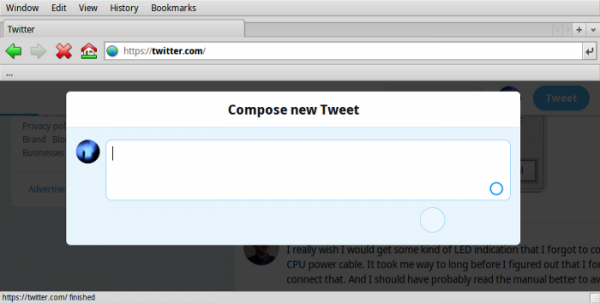
This is what Twitter looks like in WebPositive, Haiku's main browser
QupZilla and OtterBrowser lag heavily on unreliable internet connections (for example, on the train). Switching between tabs becomes impossible if data doesn't flow smoothly. It's impossible to open a new tab while the current one is downloading data over the network. Everything lags, despite the light load. These browsers are likely not fully optimized for Haiku's multithreading, or have other issues with Haiku [on Linux It happens to me sometimes too - approx. translator].
With QupZilla, I was unable to write anything on Medium…
. It seems to me that this investment will pay off on Haiku as well. Especially given the increased importance of web applications, and even more so given that native applications are not yet available for all use cases.
Kenneth Kocienda and Richard Williamson's story: how Safari and Webkit came about
Trouble #2: Launcher and Dock
In the upper right corner of the screen is , a bizarre concoction made from the Start Menu from Windows with some Dock features and some other capabilities thrown in.
deskbar
Since this was perhaps a key user experience element for BeOS, it lacks the features of a modern desktop environment: I need a program launcher like , triggered via Alt+Space. Launching apps on click is slow. There is a "Find" tool looking like undercover, but it's not designed to run apps smoothly, even if given a boost.
Spotlight on Mac OS X Leopard launched by Command + Spacebar
There is installed in . At the first start, it is completely empty, and it is not entirely clear how to add anything to it. In addition, he appears in an inconvenient place on the screen with no obvious way to change position. Well, how do I put it on the left or bottom of the screen, like the Dock in Mac OS X? I think that UX in this case is unknowable.
, also installed from . Already better. Shown at the bottom of the screen. I did not expect a bit that the order of the icons would be reversed: the basket is at the beginning, but in general it looks promising.
How to set it as default instead of Deskbar? If you click on the Deskbar icon in DockBert and select "close" - it will of course close ... and reappear after half a second. (The developers said that this is, in principle, a bug in DockBert). It would be nice if DockBert was smart enough to understand what the user needs and do it. By default, DockBert doesn't have app icons, but it does show "drag here" so you know how to add everything. However, I wasn't able to uninstall the apps either by right-clicking or dragging the icon from DockBert.
I try . I found it by accident . Looks the way I want. With an emphasis on "looks". Because it doesn't work yet: it's still a Beta version. It is written in Qt4, so I doubt that it will be taken into the installation image.

HiQDoc.
Basically, I'm not the only one who thinks that the situation with Dock and Launcher is complicated. On this topic, I even found .
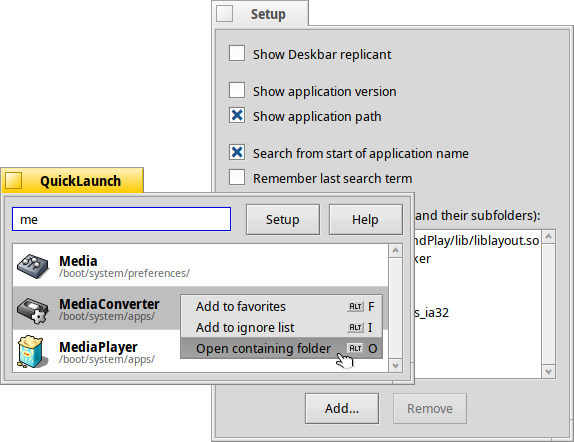
QuickLaunch
Then I found out about , which is recommended to be launched by adding a combination of buttons in the Shortcuts settings.
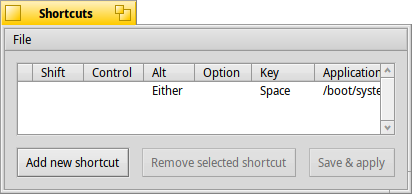
Shortcuts settings in Haiku
It would be nice if things like this were configured to "just work" by default. Did I say Alt+Space? Well, basically, QuickLaunch might ask you if you need to set up a keyboard shortcut when you first launch it. Doing this in the Shortcuts settings is cumbersome.

A window that prompts you to enter "application" in the Shortcuts settings. No kidding
I'm willing to bet that most users don't know what to enter as an "application", namely: /boot/system/apps/QuickLaunch (Just QuickLaunch does not work).
Quick fix: make QuickLaunch the default and give it the default alt+space shortcut.
Fortunately, I have information from the developers that at some point they may include it as an improvement or replacement for the good old Deskbar. Maybe... someday... Fingers crossed! (Leave a request, or it will never be. ). Another developer said, quote: “In my opinion, follow the path Windows"That is, including a search field in the start menu, it's quite simple for the Beta version, I would say it will make a huge difference for many." Agreed! (Again: application or not).
Why does QuickLaunch find the screenshot program twice, in /boot/system/apps and /boot/system/bin? The developers are aware because in the file /boot/system/apps/QuickLaunch/ReadMe.html.
/system/bin was not previously processed, ported programs often end up in the /bin directory, which is a bad idea. You can remove unwanted CLI applications, for example, using the "Add to ignore list" button in the context menu
quick fix: filter apps from /system/bin that also exist in /system/apps
Trouble #3: No Hardware Acceleration
BeOS was littered with demos. No BeOS video was complete without multiple windows playing different videos. An amazing achievement for the time. Haiku comes with 3D demos showing 3d fonts moving in space. (Hey, Haiku isn't preparing for an IPO, is it?)

BeOS in 1995, on which Haiku is based. At the time, it ran on two PowerPC 603 processors clocked at 66 MHz.
We want to become Linux in the world of sound and video.
, CEO
Surprisingly, video and 3D are not actually hardware accelerated in Haiku. I guess games too.
Developers и there is documentation for hardware acceleration (“you need about two man-months”). 3D acceleration will be through Mesa (Haiku, as already mentioned, uses Mesa and LLVMPipe as the basis for OpenGL), for video you can rely on or make your own solution (I know that Haiku already uses FFMpeg internally, it's just impossible to use VDPAU or other similar API without accelerated drivers).
Cross your fingers!
Trouble number 4: programs are not searched
I know there are quite a few CLI programs already ported to Haiku, but I don't see them in HaikuDepot. Not even hints. There are no "haiku..." or "port..." commands on the command line
~/testing> haikuports
bash: haikuports: command not found
Googling, I from where I downloaded avrdude. When launched by double-clicking, a window with unsatisfied dependencies appeared. It would be nice if this didn't happen. (One of the reasons why I like .app for Mac and for Linux).
From the developers, I learned that "theoretically" there is preventing this. Apparently she needs more love.
What should be done? there are instructions for those who wish to port programs to Haiku, but no instructions for those who simply wish to use the ported programs. This is where I got stuck.
A developer told me: “We don’t mention HaikuPorts because 99.9% Users are not required to know or care how exactly these packages are created and appear in HaikuDepot." I agree. The conversation is about HaikuDepot, and how to get something from there, because the HaikuDepot interface does not show this (for example, avrdude cli). Apparently, there should be a checkbox that displays CLI applications in the HaikuDepot interface, but I did not find it, or maybe it does not exist. ("Recommended" or "All packages"... do you need it? No, I don't want to look at "all" packages, I'm guessing a lot of libraries will be shown. Something like the good old ).
Instead I . Also do not know how to install it (They say that HaikuArchives is a “repository of supported software”, and also that “all worthwhile programs are already in HaikuPorts” - integrators are needed).
Googling a bit more, I found:
/> pkgman search avrdudeStatus Name Description
-------------------------------
avrdude A tool to up/download to AVR microcontrollersWow! It would be nice to make this team more visible. One of the developers confirmed that "pkgman is the cli equivalent for HaikuDepot". Why wasn't she named then? haikudepot?
First of all, I installed command_not_found-0.0.1~git-3-any.hpkg. Now I can do this:
/> file /bin/bash
DEBUG:main:Entered CNF: file
This application is aviaiblible via pkgman install file
quick solution: add
command_not_found-*-any.hpkgto the default setting.
Haiku's developer believes that "in Haiku, unlike Linux, there's no real need for command-not-found" because "you can just run pkgman install cmd:commandname." How could I, a "mere mortal," know that?!
Packages, package managers, dependencies. The one in Haiku is certainly a lot smarter than most, but it's still a package manager:
/> pkgman install avrdude100% repochecksum-1 [65 bytes]
Validating checksum for Haiku…done.
100% repochecksum-1 [64 bytes]
Validating checksum for HaikuPorts... done.
100% repocache-2 [951.69 KiB]
Validating checksum for HaikuPorts... done.
Encountered problems:
problem 1: nothing provides lib:libconfuse>=2.7 needed by libftdi-1.4–7
solution 1:
- do not install “providing avrdude”
Please select a solution, skip the problem for now or quit.
select [1/s/q]:
Package managers do what package managers always do, one way or another, regardless of the operating system. There's a reason why I'm drawn - I already told you, no? - To .app and .
In addition, some very popular open source applications are missing here:
/> pkgman install inkscape
100% repochecksum-1 [65 bytes]
Validating checksum for Haiku…done.
100% repochecksum-1 [64 bytes]
Validating checksum for HaikuPorts…done.
*** Failed to find a match for “inkscape”: Name not found
The answer from the developers: "Since there is no Gtk, there will be no Inkscape." Understood. Another developer added: “But we have an amazing WonderBrush.” I didn’t know about this, but it’s not visible in HaikuDepot, and where would it be from? (correction: should have switched to the All Packages tab! Completely missed that point!)
/> pkgman install gimp
100% repochecksum-1 [65 bytes]
Validating checksum for Haiku... done.
100% repochecksum-1 [64 bytes]
Validating checksum for HaikuPorts... done.
*** Failed to find a match for “gimp”: Name not found/> pkgman install arduino
100% repochecksum-1 [65 bytes]
Validating checksum for Haiku... done.
100% repochecksum-1 [64 bytes]
Validating checksum for HaikuPorts... done.
*** Failed to find a match for “arduino”: Name not foundI'm aware that "arduino was there before"... where did it all go?
Among other things, I was surprised by the fact of "technological talkativeness": so many lines are displayed just like that in the end to give out: "this software is not available."
Trouble number 5: various roughness that should be corrected
Switching between applications
Boring without alt+tab to switch apps. Ctrl+tab works, but it's kind of ugly.
Hint from the developers: if I enable the layout from Windows, Cmd and Ctrl will swap places, and alt+Tab will become familiar. But I want to feel like a Mac while working on a PC keyboard!
Developer Note: "Switching ctrl+tab to alt+tab will surprise some users." Simple solution: enable both! (As a Mac user, Windows и Linux with Gnome, KDE, Xfce I still don't know what to expect).
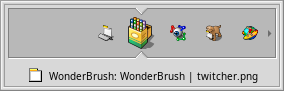
Switch apps via ctrl+tab using Twitcher. In places it appears, sometimes not the first time
Worse still, ctrl+tab sometimes shows a window with application icons, sometimes it doesn't. Among other things, the order of switching applications looks random: StyledEdit-WebPositive-back StyledEdit-WebPositive-StyledEdit-window with application icons… Software error? (Maybe someone knows if there is a Gif-image recording tool for Haiku?) Amendment: This is a feature, not a bug.
A short press of ctrl+tab switches directly to the previous app without showing the Twitcher window. If you hold the combinations longer, you get what I'm already used to.
Shortcuts
If we talk about keyboard shortcuts, then as soon as you realize that everything is similar to the Mac, you will automatically try to use familiar shortcuts ... For example, in the "Open ..." and "Save as ..." dialog boxes, I want to press alt + d for the directory "working table, and so on.
The developers "have the option to add this", "to the improvement request about the file dialogs". I would create such a ticket if there was a local issue tracker on GitHub or GitLab where I have accounts.
But, as I explained earlier, I cannot register in their system. (As you may have guessed, I want to emphasize the ease of doing things like this when using public services like GitHub or GitLab). Amendment:
Inconsistencies
Qt applications and native applications differ in behavior. For example, it is possible to remove the last word with alt+backspace in Qt applications, but not in native applications. Perhaps there are other differences when editing text. I would like these inconsistencies to be removed.
Correction: I haven't finished writing this article yet (I showed it first on the Haiku developer channel for comments), as it turns out that this inconsistency has been fixed! Incredible! How I love open source projects! Thank you, !
Notes
I'm still in the process of learning Haiku and it continues to impress me. Even though today I focused on describing the annoyances, I can't help reminding why this operating system is so intriguing. Below are a few examples. Just a reminder to see how conceptually correct things are done in Haiku.
If you double-click on an executable file that does not have the required libraries, Linux I can't see anything. Haiku will have a nice graphical dialog with information about the problem. I've been dreaming of things like this for a long time. Linux, and I'm still thrilled that Haiku got it right. This example demonstrates that the operating system is consistent at all levels. The result is elegance, beauty, and simplicity, even in areas like error handling.
Fascinating peek under the hood.
The documentation for QuickLaunch says:
There can be 2 reasons why QuickLaunch won't find the app:
- The application is not on a BeFS partition, or the BeFS partition is not formatted to support queries.
- The application does not have the proper BEOS:APP_SIG attribute. In this case, ask the app developer to add it, or try following
this advice: if you are using an application or script that is not displayed in QuickLaunch (and is in a writable place) - try adding these attributes in the terminal.addattr BEOS:TYPE application/x-vnd.Be-elfexecutable /path/to/your/app-or-script
addattr BEOS:APP_SIG application/x-vnd.anything-unique /path/to/your/app-or-script
This gives some insight into how the magic like Launch Services actually works, which I continue to admire ().
No less exciting is "Open with ..."
Select a file, press alt+I, and then on the information screen you can choose which application can open a particular file.
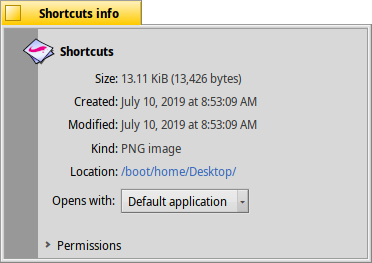
In Haiku, I can override the application to open one particular file. Cool?
This all works even with the missing file name extension, and I can finally specify that different files of the same type should open in different applications, which is very difficult, if not almost impossible, in desktop environments. Linux.
Conclusion
As I wrote yesterday, Haiku opened my eyes, showed me how a desktop environment can "just work". On the second day, I also found a few points that clearly need to be improved.
Neither of them will stop me from working. I'm really excited about the future of this personal desktop operating system. It's a welcome evolution beyond "work environments." Linux", continuing to show serious problems that cannot be resolved in the near future, .
Hope for Haiku.
Try it yourself! After all, the Haiku project provides images for booting from DVD or USB, generated . To install, just download the image and burn it to a USB flash drive using
Got questions? We invite you to the Russian-speaking .
Error overview:
From the author of the translation: this is the second article in the series about Haiku.
List of articles:
Source: habr.com

