

Modern web browsers allow you to open a large number of tabs at the same time, because of which the user can easily forget which one is playing a video or a musical composition. Therefore, it is not always possible to quickly pause playback if you need to answer a call or focus on something. This can be fixed by the Chrome 79 web browser, which received a tool that makes interacting with media content much more convenient.
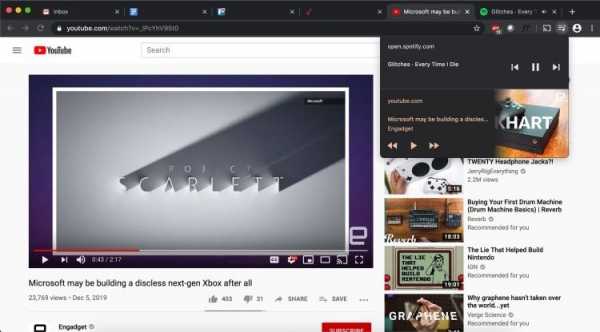
A special button with three horizontal stripes and a note symbol is located on the toolbar. After clicking on it, you will see all the content currently playing inside the browser, which will be presented as a list in a pop-up window. The new tool is endowed with several buttons that allow you to stop and continue playback, as well as switch to the next or previous record.
When a user interacts with YouTube videos using the new tool, an image will appear showing where the viewing was stopped. If there is no need to control the recordings being played, the control tool can be closed, and to return it you will need to reload the corresponding tab on which the content is playing.
This feature was previously available in test builds of Chromium and is now part of the Chrome 79 web browser. The new feature is not currently available to all users. Apparently, the deployment of the media content management tool is still ongoing and will soon be available to all users of the Chrome web browser.
Source: 3dnews.ru
