

Google has released version 147 of the Chrome web browser. Simultaneously, a stable release of the open-source Chromium project, which forms the basis of Chrome, is available. Chrome differs from Chromium by using Google logos, having a crash reporting system, modules for playing DRM-protected video content, an automatic update system, mandatory Sandbox isolation, providing keys to Google APIs, and transmitting RLZ parameters during searches. For those needing more time to update, an Extended Stable branch is also supported, with an accompanying period of 8 weeks. The next release, Chrome 148, is scheduled for May 5.
Key changes in Chrome 147 (1, 2, 3, 4):
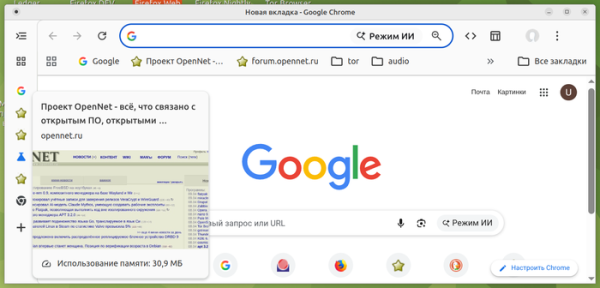
- A vertical tab display mode has been added, replacing the top horizontal tab bar with a sidebar containing vertical tabs. Vertical tabs can be shown in expanded mode (icon + part of the description) and collapsed mode (icons only). Hovering over a sidebar tab displays a preview of its content. Management of tab groups has been simplified. A new option "Show Tabs Vertically" has been added to the context menu that appears when right-clicking on the tab strip. If this option does not appear by default, it can be activated via the setting "chrome://flags/#vertical-tabs".


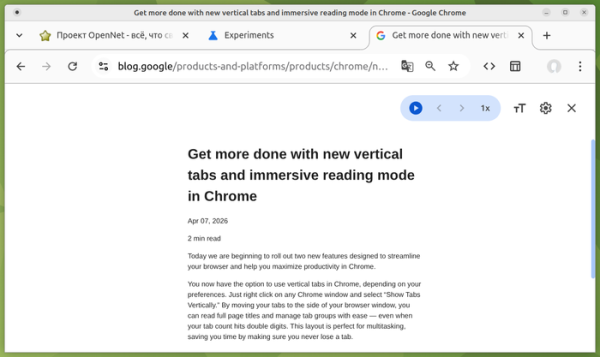
- The reading mode has been revamped, displaying only the meaningful text of the page while hiding all accompanying controls, banners, menus, navigation bars, and other non-content-related parts of the page. In the new version, analogous to Firefox, the significant content is shown in the full visible area rather than in a narrow sidebar next to the original page as it used to be. If the new mode is not applied by default, it can be activated via the setting "chrome://flags/#read-anything-immersive-reading-mode".

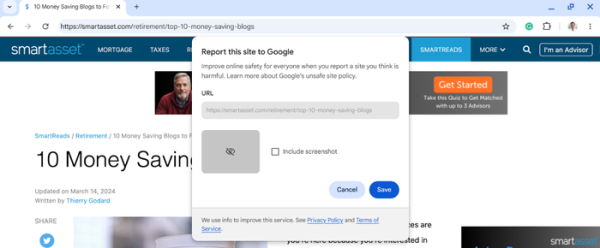
- A button has been added to the "Help" menu for submitting complaints to be added to the block list of web pages created for fraud or phishing. The button appears when the "Safe Browsing" mode is enabled.

- Enhanced protections against access to the local system when interacting with public websites. Access from websites to IP addresses Accessing internal resources from a local network (intranet or internal addresses) or the loopback interface (127.0.0.0/8) will require user confirmation for the operation. This protection now applies not only to attempts to load resources over HTTP/HTTPS, fetch() requests, and iframe embeds, but also to connections established through WebSockets and WebTransport, as well as fetch requests initiated via the WindowClient.navigate() method. Attackers use access to internal resources for indirect identification and to carry out CSRF attacks on routers, access points, printers, corporate web interfaces, and other devices and services that only accept requests from the local network.
- The functionality for parsing XML has been transitioned from libxml2 to a new library written in Rust with a focus on security. This change only concerns XML; as announced earlier, support for XSLT will soon be discontinued.
- The method startViewTransition() can now be applied not only to the entire page but also to individual HTML elements.
- A new CSS function contrast-color() has been added, which returns the opposite variant of a specified color (for white it will return black, and for black it will return white). This function can be used to select background color for a given text color and vice versa.
- The CSS property 'border-shape' has been introduced, allowing for non-rectangular borders for elements, such as round or polygonal frames. The 'border-shape' property accepts the same types of shapes as the 'clip-path' property, but unlike the latter, it defines the outline, decodes it, and clips the content that extends beyond the outline.
- The CSSPseudoElement interface has been added, allowing interaction with CSS pseudo-elements from JavaScript.
- In the link element, the ability to use the 'rel=modulepreload' attribute has been implemented for preloading not only scripts but also CSS style modules () and JSON data ().
- The behavior for calculating the width of borders and outlines in the CSS properties border-width, outline-width, and column-rule-width has been standardized with Firefox and WebKit-based browsers. Previously, the width in these properties was reset to zero, regardless of the values assigned, if the properties border-style, outline-style, or column-rule-style were set to 'none' or 'hidden'. Now the values for border-width, outline-width, and column-rule-width will always reflect the values specified by the developer, regardless of the content of the '*-style' properties.
- The Math.sumPrecise() method has been introduced to calculate the sum of array elements and other iterable objects with precision exceeding that of standard summation in a loop (avoiding precision loss during intermediate result storage).
- The attribute Request.isReloadNavigation has been added, allowing the determination of whether the page has been reloaded, for example, after clicking the 'Refresh' button or invoking the methods location.reload() and history.go(0).
- To reduce the precision of indirect identification, the logic for rounding the memory size returned through the Device Memory API, which provides information about the size of RAM, has been changed. This information can be useful for creating lightweight versions of web applications that load for devices with limited RAM or for enabling enhanced features when there is a large amount of memory available. In builds for the Android platform, the memory size is now rounded to 1, 2, 4, and 8, while for other platforms it is rounded to 2, 4, 8, 16, and 32.
- An API for Web Printing has been implemented for Isolated Web Apps (IWA), providing methods to detect the presence of printers, send documents to print, and manage the print queue. The attribute names and semantics used in the API correspond to the Internet Printing Protocol (IPP).
- The WebNN API has been implemented in the 'Origin trials' mode, allowing the use of operating system services for machine learning and the associated hardware capabilities.
- Improvements have been made to the web development tools. The built-in AI assistant now features automatic context selection. The 'Device Mode' panel used for testing website performance on different mobile devices has been updated. The Network panel now supports automatic decoding of compressed content in requests sent with the Content-Encoding: gzip or deflate header. The ability to apply regular expressions for filtering CSS styles has been provided.

In addition to new features and bug fixes, the new version has addressed 60 vulnerabilities. Many of these vulnerabilities were identified through automated testing using tools such as AddressSanitizer, MemorySanitizer, Control Flow Integrity, LibFuzzer, and AFL. Two issues (buffer overflow and integer overflow in WebML) have been assigned a critical danger level, indicating that these vulnerabilities can bypass all browser security measures and execute code outside the sandbox environment. As part of the bug bounty program for this release, Google has established 60 rewards and paid out $118,000 (two rewards of $43,000, two of $11,000, and single rewards of $4,000, $3,000, $2,000, and $1,000. The amounts for 52 rewards are yet to be determined.
Source: opennet.ru
