


IP ATC Asterisk is a powerful combine in the field of IP telephony. And the FreePBX web interface, created for Asterisk, greatly simplifies configuration and lowers the login threshold.
If you can think of any task related to IP telephony, then it can almost certainly be implemented in Asterisk. But be sure that you will need perseverance and endurance.
We were faced with the task of setting up e-mail notifications about missed calls. More precisely, to notify via e-mail of those cases when an incoming call went to the queue, but no one (of the agents) answered this incoming call.
Surprisingly, we did not find regular tools for solving this problem in FreePBX. I'll tell you about how we solved this problem under the cut.
foreword
Before solving the problem “on the forehead”, we, of course, searched for information on the Internet, but did not find a turnkey solution (maybe we searched badly, but what can you do ...).
There are not as many skills to work directly in Asterisk as we would like, so the solution proposed , was not fully understood and was discarded.
Liked the solution even though it didn't work. From here it was emphasized that you need to work in Asterisk in the context of queues [ext-queues]. And since we are working in Freepbx, we need to work in the “extensions_override_freepbx.conf” configuration file. We noticed that it is convenient to “catch missed calls” before the hangupcall event (end of call).
After reading the discussion , there was an idea that you need to filter the "Disposition" variable in the CDR for all agents in the queue. And after reading information, quite specific steps were formed to solve the problem.
What we have:
There is FreePBX 13.0.197, which uses Asterisk 13.12.1. The OS version is SHMZ release 6.6 (Final). The distribution is based on CentOS.
Asterisk is configured with IVR (voice menu) that distributes incoming calls to different Queues (queues). Each queue is assigned Agents, i.e. operators.
Theory
What's going on in Asterisk
When an incoming call arrives on Asterisk, that call goes to the IVR. The caller makes a choice by pressing a certain number on the phone and gets into a certain queue. After that, all free agents of the queue simultaneously receive a call.
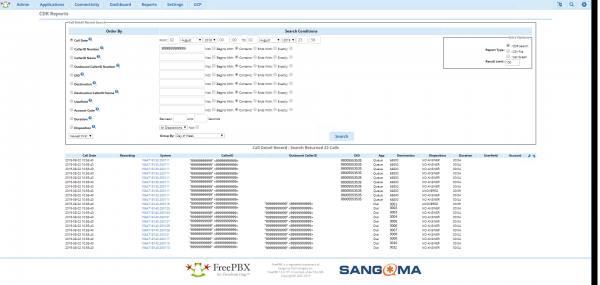
In order to better understand what is happening at this moment and what happens next, let's turn to the Report CDR (Fig. 1).
Ris.1
When an incoming call entered the queue, the value of the “Disposition” variable for all agents became equal to “NO ANSWER”, if the agents were not busy at that moment. The variable "Disposition" could take on other values (see below). ), except for the value "ANSWERED". And at the moment when one of the agents answers the incoming call, the value of the variable "Disposition" of this agent becomes equal to "ANSWERED".
From the Report CDR, you can see that when the call went to the queue (in the App column, the value becomes "Queue"), then all events appear with the same "uniqueid" (System column).
Briefly about CDR
It is important to understand what a CDR is, and at what point the data that we observe in the Report CDR is entered into the CDR. CDR, relative to the operating system, is the database in which Asterisk writes detailed call records (see below). ). In our case, this is a database called asteriskcdrdb, which is located in mysql. Empirically, we have established that data about a call with a certain “uniqueid” is entered into asteriskcdrdb not immediately after the occurrence of any event, but after the hangupcall event (end of the call).
The principle of operation of the created solution
Since we have more knowledge in bash than knowledge in Asterisk, the main idea is the following. Before the hangupcall event, call a bash script. Pass 3 parameters to this script. The first parameter is "uniqueid", for filtering the data received from the CDR. The second parameter is "CALLERID(num)" (caller's number) to know who to call back. The third parameter is "NODEST" (number of the queue) in which the call was received, in order to know what the call was about and to whom to send an e-mail notification of a missed call.
The bash script should connect to the asteriskcdrdb database in mysql and take all the values of the "Disposition" variable with a specific "uniqueid". The following values should be excluded from the received data: "NO ANSWER", "BUSY", "FAILED", "UNKNOWN". As a result, either “ANSWERED” will remain - the incoming call was answered, or nothing at all - a missed call.
Further, if the call was missed, then the script should send an e-mail notification.
Looking ahead, I will note an important point. Asterisk executes commands sequentially, waiting for them to complete (which is generally logical). And we will call the bash script before the hangupcall command is executed. Thus, at the time of the direct execution of the script, information about the “uniqueid” we are looking for will not yet be entered into the CDR. To solve this problem, we will call the bash script with the "&" parameter so that Asterisk immediately proceeds to the next step, i.e. hangupcall. And inside the bash script, at the very beginning, we will set a small time delay to give Asterisk time to insert the data with the “uniqueid” of interest to us in the CDR.
Practice
Before moving on to setting up Asterisk and creating a bash script, you need to configure the sending of e-mail notifications. For this we will use the postfix utility.
postfix setup
We have a mail domain "lucky.ru" located in Yandex. We will configure postfix as an smtp client and send emails from the asterisk@lucky.ru account.
Based on the solution from here: .
First install/update/check for packages:
yum install postfix
yum install mailx
yum install cyrus-sasl cyrus-sasl-lib cyrus-sasl-plain
Let's not overwrite the main postfix configuration file "/etc/postfix/main.cf", but create a backup copy of it:
cp /etc/postfix/main.cf /etc/postfix/main.cf.savWe edit the file "/etc/postfix/main.cf" and bring it to the following form:
nano /etc/postfix/main.cf
#####################
relayhost =
smtp_sasl_auth_enable = yes
smtp_sasl_password_maps = hash:/etc/postfix/private/sasl_passwd
smtp_sasl_security_options = noanonymous
smtp_sasl_type = cyrus
smtp_sasl_mechanism_filter = login
smtp_sender_dependent_authentication = yes
sender_dependent_relayhost_maps = hash:/etc/postfix/private/sender_relay
smtp_generic_maps = hash:/etc/postfix/generic
smtp_tls_CAfile = /etc/postfix/ca.pem
smtp_use_tls = yes
smtputf8_autodetect_classes = all
#####################
Not every line in "/etc/postfix/main.cf" can be commented out. Comments in some lines are not determined by the parser and are passed to processing, and this leads to errors. It is better to refuse comments inside this file. You can experiment with this by running "tail -f /var/log/messages" in the adjacent window.
I'll mark the line "smtputf8_autodetect_classes = all". This entry includes utf-8 by default, which allows you to use Cyrillic in both the body of the letter and the subject of the letter without additional manipulations (See below). ).
Let's create a directory for configuration files:
mkdir /etc/postfix/privateEdit the file "/etc/postfix/private/sender_relay". It needs to specify which smtp server to refer to when using our mail domain:
nano /etc/postfix/private/sender_relay
#####################
@lucky.ru smtp.yandex.ru
#####################
Edit the file "/etc/postfix/private/sasl_passwd". In it, we will indicate the e-mail address that we will use to send letters, as well as the login and password for this account (we specify the login and password separated by a colon):
nano /etc/postfix/private/sasl_passwd
#####################
asterisk@lucky.ru asterisk@lucky.ru:password_asterisk
#####################
Edit the /etc/postfix/generic file. In it, we will write the rules for replacing the outgoing address (see. ):
nano /etc/postfix/generic
#####################
root asterisk@lucky.ru
root@localhost asterisk@lucky.ru
root@localhost.localdomain asterisk@lucky.ru
root@freepbx asterisk@lucky.ru
root@freepbx.localdomain asterisk@lucky.ru
root@asterisk asterisk@lucky.ru
root@asterisk.localdomain asterisk@lucky.ru
asterisk asterisk@lucky.ru
asterisk@localhost asterisk@lucky.ru
asterisk@localhost.localdomain asterisk@lucky.ru
asterisk@freepbx asterisk@lucky.ru
asterisk@freepbx.localdomain asterisk@lucky.ru
asterisk@asterisk asterisk@lucky.ru
asterisk@asterisk.localdomain asterisk@lucky.ru
root@localdomain.localdomain asterisk@lucky.ru
#####################
The initial outgoing address depends on the contents of "/etc/hosts" and "/etc/hostname", as well as the username of the user who will send the email. That is, despite the fact that we use an smtp client and send letters from asterisk@lucky.ru, anyway, postfix will initially substitute “something of its own” in the sender’s address and this needs to be corrected by the rules from this configuration file.
Here is the contents of my /etc/hosts file:
cat /etc/hosts
#####################
127.0.0.1 localhost localhost.localdomain localhost4 localhost4.localdomain4 asterisk.localdomain
127.0.0.1 localhost.localdomain localhost
::1 asterisk localhost localhost6
#####################
It is important that the server has a domain of some kind (the value after the dot), because the mail utility "looks" for a domain name in "/etc/hosts" and if it "doesn't find" it right away, it will continue to do so for a few more minutes and only then send a letter. That is, if the domain is not registered, then the letter will leave with a delay of several minutes.
Here is the contents of my /etc/hostname file:
cat /etc/hostname
#####################
asterisk
#####################
Next, you need to transfer the created configuration files to indexed databases, to do this, run the following command:
postmap /etc/postfix/generic && postmap /etc/postfix/private/{sasl_passwd,sender_relay}Next, we need to download and place the smtp.yandex.ru certificate on the server, for this we will execute the following command:
openssl s_client -starttls smtp -crlf -connect smtp.yandex.ru:25 > /etc/postfix/ca.pemBut after the technical information appears on the screen, the command will “continue to hang”. Press Ctrl+C to abort it.
Now we will manually remove all garbage from the resulting file and leave only the certificate. You should get something like this:
nano /etc/postfix/ca.pem
#####################
-----BEGIN CERTIFICATE-----
MIIGazCCBVOgAwIBAgIQcUU9mJXW4OUs5Gf0JfLtsjANBgkqhkiG9w0BAQsFADBf
...
nRG0DfdqYIuPGApFORYe
-----END CERTIFICATE-----
#####################
And finally restart postfix:
service postfix restartSending a test email:
echo "Это тело письма" | mail -s "Это тема" admin@lucky.ruadmin@lucky.ru — destination address
This completes the posfix setup.
Writing a bash script
Create a directory to store the bash script (here, where you like it better):
mkdir /home/asterisk/scriptsCreate a bash script file:
touch /home/asterisk/scripts/noanswer.shGive the script file permission to execute:
chmod +x /home/asterisk/scripts/noanswer.shIf there are doubts about the rights to the file, then for the duration of debugging, you can give full access to the file. But it's not "safe".
chmod 777 /home/asterisk/scripts/noanswer.shbash script text:
nano /home/asterisk/scripts/noanswer.sh
#####################
#!/bin/bash

sleep 7

res_sql="SELECT disposition FROM cdr WHERE uniqueid = '$1'"

answer=`mysql -u freepbxuser -pPassword_freepbxuser -D asteriskcdrdb -B -N -e "$res_sql" | grep -E -v "NO ANSWER|BUSY|FAILED|UNKNOWN" | head -n 1`

error_kod=0
if [ "$answer" != "ANSWERED" ]
then

 case $3 in
 68800)
 address="big_boss@lucky.ru"
 subject="по важному вопросу"
 ;;
 63100)
 address="debian@lucky.ru"
 subject="по вопросам linux debian"
 ;;
 63200)
 address="windows@lucky.ru"
 subject="по вопросам windows"
 ;;
 63300)
 address="freebsd@lucky.ru"
 subject="по вопросам freebsd"
 ;;
 63400)
 address="ubuntu@lucky.ru"
 subject="по вопросам linux ubuntu"
 ;;
 63500)
 address="centos@lucky.ru"
 subject="по вопросам linux centos"
 ;;
 *)
 address="admin@lucky.ru"
 error_kod=1
 ;;
 esac

 case $error_kod in
 0)
 echo "Пропущен вызов от абонента $2, звонившего $subject." | mail -s "Пропущен вызов от $2" $address
 echo "Пропущен вызов для $address от абонента $2, звонившего $subject. uid=$1" | mail -s "Пропущен вызов от $2" admin@lucky.ru
 ;;
 1)
 echo "Пропущен вызов от $2. Очередь неизвестна. uid=$1" | mail -s "Пропущен вызов от $2" admin@lucky.ru
 ;;
 esac

fi
#####################
Brief analysis of the script:
sleep 7:
This is the same time delay that I wrote about earlier. We have a delay of 7 seconds. Although I think one second is enough.
«res_sql="SELECT disposition FROM cdr WHERE uniqueid = '$1'"»:We moved the query in mysql to a separate variable for convenience.
Next, we make a query in mysql and filter the resulting output. We delete all options except for "ANSWERED", if there is one at all. If there are several "ANSWERED" values, then only one should be left. At the end, in the variable "answer" we will get either "ANSWERED" or "".
If the value of the "answer" variable is not equal to "ANSWERED", then this is a missed call. Depending on the queue number, using the case statement, we will specify the address to whom it is necessary to send an e-mail notification, and what to write in this message (changeable part of the message).
Next, we consider the option when the queue is set in Asterisk, but not described in the script. In this case, admin@lucky.ru will receive a letter saying that the queue is not known to the script.
If the queue is described, then a letter will be sent to the destination and a duplicate letter to admin@lucky.ru indicating "uniqueid" in order to be able to track the events of this call, if necessary.
This is where the script ends.
I note that to connect to mysql, we used the login and password that we learned in advance. In FreePBX, in order to find out the Asterisk user login in mysql, run the following command:
cat /etc/amportal.conf | grep AMPDBUSERAnd in order to find out the password of the Asterisk user in mysql, run the following command:
cat /etc/amportal.conf | grep AMPDBPASSSetting up Asterisk
We use FreePBX. FreePBX has different types of configuration files (see below). ), some of them are overwritten by FreePBX on reboot, and some of them are not overwritten (they are called custom), as they are specially designed for the user.
We will be working with the "extensions_override_freepbx.conf" configuration file, as it is of type custom.
First, make sure that the file "extensions_override_freepbx.conf" is included in the "/etc/asterisk/extensions.conf" file. To do this, run the following command:
cat /etc/asterisk/extensions.conf | grep extensions_override_freepbx.conf
#####################
#include extensions_override_freepbx.conf
#####################
Edit the file "/etc/asterisk/extensions_override_freepbx.conf" and bring it to the following form:
nano /etc/asterisk/extensions_override_freepbx.conf
#####################
[ext-queues]

exten => h,1,System(/home/asterisk/scripts/noanswer.sh ${CDR(uniqueid)} ${CALLERID(num)} ${NODEST} &)
exten => h,2,Macro(hangupcall,)
#####################
As I wrote earlier, the "&" character at the end is required. Since we will work in a bash script with CDR data directly from the mysql database, and this data is entered into mysql only after “exten => h,2,Macro(hangupcall,)” is executed, it is necessary not to wait for the completion of the bash script , and move on to the next step in Asterisk. And the bash script itself must contain a time delay before executing its main part.
In order for the changes in the configuration file "/etc/asterisk/extensions_override_freepbx.conf" to take effect, you must restart the Asterisk kernel with the following command:
/usr/sbin/asterisk -rx "core restart now"This must be done after the bash script has been created.
Conclusion
This is probably the 1001st way to "catch missed calls" in Asterisk. Share in the comments how you solve this problem. And what, in your opinion, can be modified / redone / optimized. We will be grateful for constructive ideas.
Source: habr.com
