

Deploying a new project release into production requires a careful balance between deployment speed and solution reliability. At Slack, fast iterations, short feedback cycles, and prompt responses to user requests are highly valued. Moreover, there are hundreds of developers in the company who strive for maximum productivity.
The authors of the material we are publishing today state that a company striving to adhere to such values while also growing must continuously improve its project deployment system. The company needs to invest effort into the transparency and reliability of its workflows, ensuring these processes align with the scale of the project. This discussion will focus on the workflows developed at Slack and some solutions that led the company to adopt its current project deployment system.
How project deployment processes work today
Every PR (pull request) in Slack must undergo a code review and successfully pass all tests. Only after these conditions are met can a developer merge their code into the project's master branch. However, deployment of such code occurs only during business hours in North American time zones. As a result, we are fully prepared to resolve any unexpected issues since our employees are present at their workplaces.
Every day, we perform around 12 scheduled deployments. During each deployment, the developer assigned as the lead for deployment is responsible for releasing the new build into production. This is a multi-step process that ensures a smooth transition of the build into operational status. With this approach, we can detect errors before they affect all our users. If there are too many errors, the deployment can be rolled back. If a specific issue is discovered after the release, a fix can be easily issued for it.
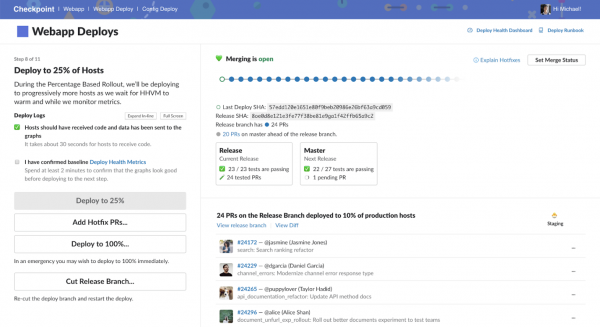
The Checkpoint system interface used at Slack for project deployment
The process of deploying a new release in production can be represented as consisting of four steps.
▍1. Creating a release branch
Every release begins with a new release branch from a point in our Git history. This allows us to assign tags to the release and provides a place to make immediate fixes for errors found during the release preparation for deployment to production.
▍2. Deployment in the staging environment
The next step is to deploy the build on staging servers and run automated tests for the overall functionality of the project (smoke test). The staging environment is a production-like environment that does not receive external traffic. In this environment, we conduct additional manual testing. This provides us with further confidence that the modified project works correctly. Automated tests alone are not sufficient to gain such confidence.
▍3. Deployment in dogfood and canary environments
Deployment in production starts with the dogfood environment, which consists of a set of hosts that serve our internal Slack workspaces. Since we are very active users of Slack, applying this approach has helped uncover many errors at early stages of deployment. After we confirm that the basic functionality of the system is intact, we proceed with the deployment to the canary environment. This represents systems that receive about 2% of production traffic.
▍4. Gradual rollout in production
If the monitoring metrics of the new release remain stable, and if we do not receive complaints after deploying the project in the canary environment, we continue the gradual transition of production servers to the new release. The deployment process is broken down into the following stages: 10%, 25%, 50%, 75%, and 100%. As a result, we can slowly shift production traffic to the new system release. This gives us time to investigate the situation in case any anomalies are detected.
▍What to do if something goes wrong during deployment?
Modifying the code always carries risks. However, we manage this thanks to the presence of well-prepared 'deployment leads' who oversee the process of releasing new versions into production, monitor metrics, and coordinate the work of programmers delivering the code.
If something does indeed go wrong, we strive to identify the issue as early as possible. We investigate the problem, find the PR causing the errors, revert it, analyze thoroughly, and create a new build. However, sometimes the issue goes unnoticed until the project is deployed to production. In such situations, the most important thing is to restore the service's functionality. Therefore, before beginning the investigation, we immediately roll back to the last working build.
Building Blocks of the Deployment System
Let’s consider the technologies that underlie our project deployment system.
▍Rapid Deployments
The workflow described above may seem, in hindsight, completely obvious. But our deployment system did not become this way overnight.
When the company was significantly smaller, our entire application could run on 10 Amazon EC2 instances. Deploying a project in that situation meant using rsync for quick synchronization of all servers. In the past, there was only one step separating new code from production, represented by an intermediary environment. Builds were created and tested in this environment, and then went straight to production. Understanding such a system was very simple; it allowed any programmer to deploy their code at any time.
But as our client base grew, so did the scale of the infrastructure required to support the project. Soon, given the constant system growth, our deployment model based on sending new code to servers could no longer meet its objectives. Specifically, adding each new server meant increasing the time required for deployment. Even strategies based on parallel application of rsync have certain limitations.
As a result, we resolved this issue by transitioning to a fully parallel deployment system, structured differently than the old system. Specifically, we no longer sent code to servers using a synchronization script. Now, each server autonomously fetched the new build, learning about the need to do so by monitoring changes to the Consul key. The servers loaded the code in parallel. This allowed us to maintain a high deployment speed even in an environment of constant system growth.
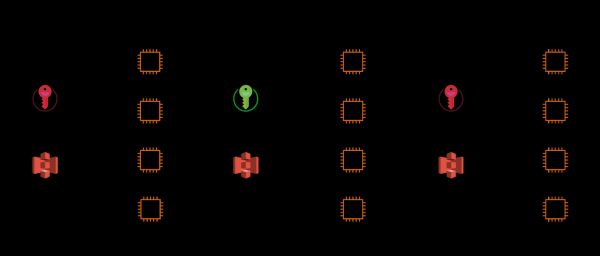
1. Production servers monitor the Consul key. 2. The key changes, notifying the servers to start loading the new code. 3. The servers download tarball files containing the application code.
▍Atomic Deployments
Another solution that helped us move to a multi-tier deployment system was atomic deployment.
Prior to using atomic deployments, each deployment could result in numerous error messages. This was due to the non-atomic process of copying new files to the production servers. It resulted in a short time window where code calling new functions became accessible before the functions themselves were available. When such code was invoked, it led to internal errors being returned. This manifested as failed API requests and 'broken' web pages.
The team addressing this issue resolved it by introducing the concepts of 'hot' and 'cold' directories. Code in the 'hot' directory handles production traffic. In the 'cold' directories, code is prepared for use during system operation. During deployment, the new code is copied into an unused 'cold' directory. Then, when there are no active processes on the server, an instant switch occurs between directories.
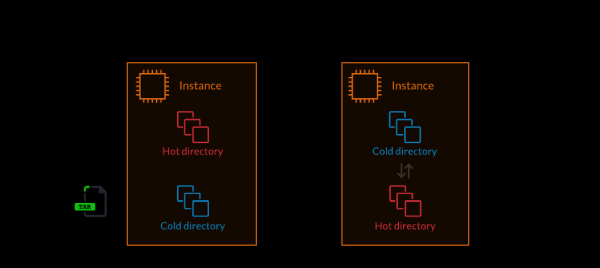
1. Unpacking application code into the 'cold' directory. 2. Switching the system to the 'cold' directory, which becomes 'hot' (an atomic operation).
Summary: shifting focus to reliability.
By 2018, the project had grown to such a scale that rapid deployment began to compromise the product's stability. We had a quite advanced deployment system, into which we invested a lot of effort and time. We needed to reorganize and improve the deployment organization processes. We transformed into a fairly large company whose developments were used worldwide for ensuring uninterrupted communication and solving critical tasks. Therefore, reliability became our main focus.
We needed to make the process of deploying new Slack releases more secure. This necessity led us to improve our deployment system. As mentioned earlier, we discussed this enhanced system. Deep within the system, we continue to utilize rapid and atomic deployment technologies. What changed was how the deployment is actually executed. Our new system is designed for gradual deployment of new code across different levels and environments. We now use more advanced auxiliary tools and monitoring solutions than before. This allows us to capture and fix bugs long before they have a chance to reach the end user.
But we do not intend to stop at this. We are continually enhancing this system by applying more sophisticated auxiliary tools and automation solutions.
Dear readers! How is the process of deploying new project releases structured where you work?
Source: habr.com
