

Simon Peter, creator of the self-contained AppImage package format, has released helloSystem 0.7, a FreeBSD 13-based distribution positioned as a system for ordinary users that hobbyists can switch to. macOS, dissatisfied with Apple's policies. The system is free of the complications inherent in modern Linux-distributions, is under the complete control of the user and allows former users to feel comfortable macOSA bootable image of 791 MB (torrent) has been created for familiarization with the distribution.
The interface is reminiscent of macOS It includes two panels: the top one with a global menu and the bottom one with an application bar. The global menu and status bar are generated using the panda-statusbar package, developed by the CyberOS distribution (formerly PandaOS). The Dock application bar is based on the work of the cyber-dock project, also developed by the CyberOS developers. For file management and desktop shortcuts, the Filer file manager is being developed, based on pcmanfm-qt from the LXQt project. The Falkon browser is offered by default, but Firefox and Chromium are optional. Applications are provided in self-contained packages. The launch utility is used to launch applications; it finds the program and analyzes runtime errors.
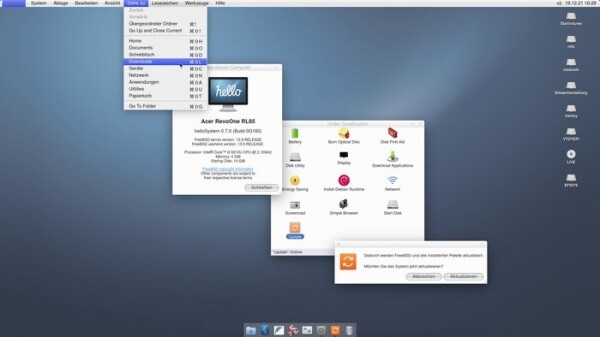
The project develops a series of its own applications, such as a configurator, an installer, a mountarchive utility for mounting archives into a file system tree, a utility for recovering data from ZFS, an interface for partitioning disks, a network configuration indicator, a screenshot utility, a Zeroconf server browser, an indicator for configuration volume, a utility for setting up a boot environment. For development, the Python language and the Qt library are used. Supported application development components include PyQt, QML, Qt, KDE Frameworks, and GTK, in descending order of preference. ZFS is used as the main file system, and UFS, exFAT, NTFS, EXT4, HFS+, XFS, and MTP are supported for mounting.
Main innovations of helloSystem 0.7:
- Changed to the FreeBSD 13.0 codebase (the last release was based on FreeBSD 12.2).
- A new architecture for working in Live mode has been implemented, which works without a RAM disk, without changing the root partition and without copying the system image to RAM. In the live image, instead of the ZFS file system, the UFS file system is used, compressed using uzip. The beginning of the launch of the graphical environment has been moved to an earlier stage of loading. As a result, the size of the live image decreased from 1.4 GB to 791 MB, and the download time was reduced by a factor of three.
- Compatibility with the Ventoy toolkit is provided, which allows loading several different iso images from one media.
- Added support for the exFAT file system.
- Separately downloadable set of files for application developers, including compilers, header files and documentation.
- Improved compatibility with older NVIDIA graphics cards (added several different versions of NVIDIA drivers).
- Changed the design of the download process. By default, no text console is provided.
- Added translations for many applications, configurator dialogs and utilities.
- In addition to the default Falkon browser, the ability to quickly install Chromium, Firefox and Thunderbird packages with global menu support and native window decoration is provided.
- The menu provides a display of hot keys that lead to the call of the corresponding menu items. Provided visual highlighting of selected menu items. By default, icons are disabled in context menus.
- Implemented the ability to change the volume and brightness of the screen through the corresponding multimedia buttons on laptop keyboards
- In the terminal emulator, Command-C and Command-V commands work in line with the processing of these commands in other applications (Ctrl-C requires pressing Command-Shift-C or Ctrl-Command-C).
- Added support for system sounds in the file manager and sound warnings in the message dialog.
- If it is impossible to start a graphical session for a certain time, an error message with useful information about the hardware is displayed.
- The file manager provides support for renaming disk partitions (by running the diskutil rename command), displaying their text labels, and linking icons to the partition. Added the ability to open a disk image by double clicking.
- Added makeimg utility for creating disk images.
- An element has been added to the context menu to call the disk formatting interface.
- Removed the program for keeping sticky notes from autorun.
- For audio devices, the ability to call the equalizer is provided.
- Experimental features that are not yet fully developed are collected in the "Under Construction" section. Utilities for installing package updates and applying FreeBSD patches, burning to optical discs, downloading additional application packages, and installing them are available for testing. Debian Runtime with launch environment Linux-applications.
Source: opennet.ru

